|

-
Apr 25th, 2021, 04:28 PM
#1
Thread Starter
Fanatic Member

 [RESOLVED] How do I create a many-to-many Relation? [RESOLVED] How do I create a many-to-many Relation?
I need to bind a DataGridView to a many-to-many Relation.
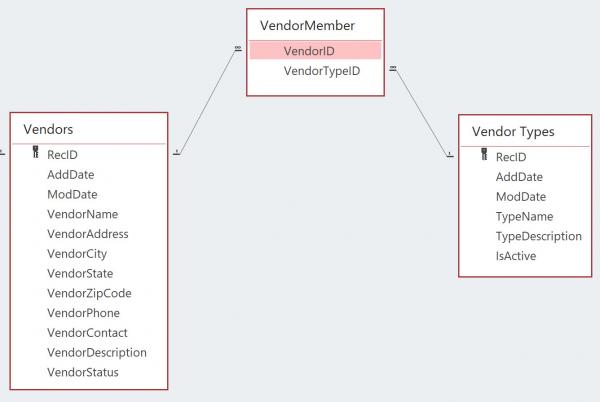
I know how to create both of the one-to-many Relations:
Code:
'VendorTypes and VendorMembers
dsMain.Relations.Add("VendorTypes_VendorMembers", dsMain.Tables("VendorTypes").Columns("RecID"), dsMain.Tables("VendorMembers").Columns("VendorTypeID"))
fkc = dsMain.Relations("VendorTypes_VendorMembers").ChildKeyConstraint
fkc.DeleteRule = Rule.Cascade
fkc.UpdateRule = Rule.Cascade
fkc.AcceptRejectRule = AcceptRejectRule.None

'Vendors and VendorMembers
dsMain.Relations.Add("Vendors_VendorMembers", dsMain.Tables("Vendors").Columns("RecID"), dsMain.Tables("VendorMembers").Columns("VendorID"))
fkc = dsMain.Relations("Vendors_VendorMembers").ChildKeyConstraint
fkc.DeleteRule = Rule.Cascade
fkc.UpdateRule = Rule.Cascade
fkc.AcceptRejectRule = AcceptRejectRule.None
I know how to bind a DataGrid view to a Relation, for example:
Code:
With bsFuel
    .DataSource = Nothing
    .DataMember = "Vehicle_Fuel"    '...bind to relationship (before setting the DataSource property, which fires the PositionChanged() event of the BindingSource)
    .DataSource = bsVehicles    '...fires the BindingSource's PositionChanged() event
    .Sort = "VehicleID, Odometer"
End With
If flgDebug Then Debug.WriteLine("bsFuel datasource has " & bsFuel.Count & " items.")

dgvFuel.DataSource = bsFuel
How do I create a many-to-many Relation and use it for binding a DataGridView?
For example, I have a form that is bound to the VendorTypes DataTable via a BindingSource (bsVendorTypes). When the bsVendorTypes.PositionChanged method is called, I want the Vendors DataGridView (dgvVendors) to automatically show the Vendors that are related to the current VendorType.
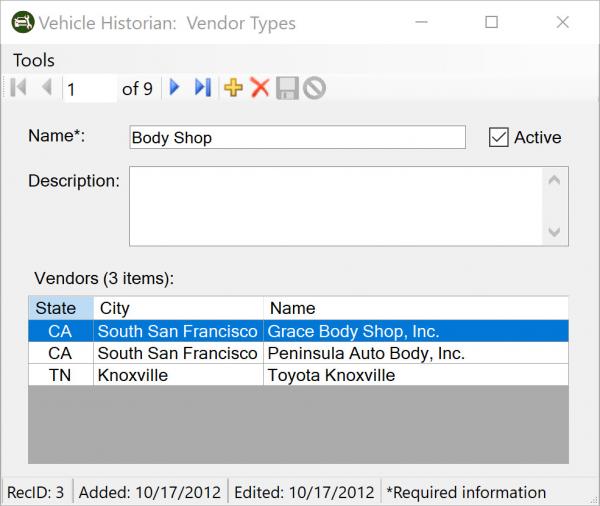
In the above example, I am populating a temporary DataTable (dtTemp) via a temporary DataAdapter (dad) and then binding Vendors DataGridView (dgvVendors) to dtTemp DataTable.
Code:
strSQL = "SELECT Vendors.* " &
    "FROM Vendors INNER JOIN VendorMember ON Vendors.RecID = VendorMember.VendorID " &
    "WHERE (VendorMember.VendorTypeID = " & lngVendorID & ") " &
    "ORDER BY Vendors.VendorName, Vendors.VendorCity, Vendors.VendorState"

If con.State <> ConnectionState.Open Then con.Open()
Using dad As New OleDb.OleDbDataAdapter(strSQL, con)
    dad.Fill(dtTemp)
End Using
con.Close()

dgvVendors.DataSource = dtTemp

lblGridInfo.Text = "Vendors (" & dgvVendors.Rows.Count & CStr(IIf(dgvVendors.Rows.Count = 1, " item", " items")) & "):"
I want to use the many-to-many Relation instead of reading the data from the underlying MS Access database via a DataAdapter.
Last edited by Mark@SF; Apr 25th, 2021 at 06:05 PM.
-
Apr 25th, 2021, 08:10 PM
#2
Re: How do I create a many-to-many Relation?
You can't automatically bind a many:many relation. A 1:many works because you're using a single parent to filter multiple related children. In this case, you're using a single child to get a single parent and then filtering multiple children. Here is what I'd do.
Start by binding the two child DataTables to BindingSources and then bind those directly to your controls. Handle the CurrentChanged event of the BindingSource on the side where the user is going to select a record. In that event handler, get the Current property value as a DataRowView and then get the corresponding DataRow. Call the GetParent method of that DataRow to get the parent DataRow in the join table. You can then use the appropriate field value from that to filter the second BindingSource, e.g.
vb.net Code:
Private Sub BindingSource1_CurrentChanged(sender As Object, e As EventArgs) Handles BindingSource1.CurrentChanged
    Dim row1 = DirectCast(BindingSource1.Current, DataRowView)?.Row
     If row1 IsNot Nothing Then
        Dim parentRow = row1.GetParentRow("Parent_Child1")
        Dim parentId = parentRow.Field(Of Integer)("ParentId")
         BindingSource2.Filter = $"ParentId = {parentId}"
    End If
End Sub
-
Apr 26th, 2021, 06:12 AM
#3
Thread Starter
Fanatic Member
Re: How do I create a many-to-many Relation?
jmc -
Thanks for looking at this for me. I cannot get your code to work.
As you suggested, I have bound the dgvVendors.DataSource to the Vendors DataTable (via the bsVendors BindingSource) and I have bound the dgvVendorTypes.DataSource to the VendorTypes DataTable (via the bsVendorTypes BindingSource).
In your example, I have set BindingSource1 to be bsVendorTypes and BindingSource2 to be bsVendors.
Here are the two Relations that are used by the junction table (VendorMember):
Code:
'VendorTypes and VendorMember
dsMain.Relations.Add("VendorTypes_VendorMember", dsMain.Tables("VendorTypes").Columns("RecID"), dsMain.Tables("VendorMember").Columns("VendorTypeID"))
fkc = dsMain.Relations("VendorTypes_VendorMember").ChildKeyConstraint
fkc.DeleteRule = Rule.Cascade
fkc.UpdateRule = Rule.Cascade
fkc.AcceptRejectRule = AcceptRejectRule.None

'Vendors and VendorMember
dsMain.Relations.Add("Vendors_VendorMember", dsMain.Tables("Vendors").Columns("RecID"), dsMain.Tables("VendorMember").Columns("VendorID"))
fkc = dsMain.Relations("Vendors_VendorMember").ChildKeyConstraint
fkc.DeleteRule = Rule.Cascade
fkc.UpdateRule = Rule.Cascade
fkc.AcceptRejectRule = AcceptRejectRule.None
When I call the GetParentRow method it returns Nothing (I've tried passing both of the above Relations). The returned parentRow is always Nothing. I'm not sure why you've suggested calling the GetParentRow method on the VendorTypes table because VendorTYpes is the "parent" table and VendorMembers is the "child" table (i.e., one VendorType can have many Vendors).
Also, the Vendors DataTable does not have the "ParentID" field (which as per the "VendorTypes_VendorMember" Relation will be the "VendorTypeID" field in the VendorMember junction table) your line #8 won't work.
Code:
BindingSource2.Filter = $"ParentId = {parentId}"
I would like to figure out how to get your example to work - what am I missing?
As an alternate way to populate the dgvVendors from the Vendors table in my dataset (instead of populating it from the underlying table in the MS Access database), I've added the following to the bsVendorTypes.CurrentChanged method.
Code:
dtVendors = dsMain.Tables("Vendors").Clone

For Each rowParent As DataRow In dsMain.Tables("VendorMember").Select("VendorTypeID = " & lngVendorID)
    strFilter = "RecID = " & CLng(rowParent("VendorID"))
    For Each rowChild As DataRow In dsMain.Tables("Vendors").Select(filterExpression:=strFilter)
        row = dtVendors.NewRow
        With row
            For Each col As DataColumn In dsMain.Tables("Vendors").Columns
                .Item(col.ColumnName) = rowChild(col.ColumnName)
            Next col
        End With
        dtVendors.Rows.Add(row)
    Next rowChild
Next rowParent

If dtVendors.Rows.Count <> 0 Then
    dgvVendors.DataSource = dtVendors.Select(filterExpression:="", sort:=strSort).CopyToDataTable
Else
    dgvVendors.DataSource = Nothing
End If

lblGridInfo.Text = "Vendors (" & dgvVendors.Rows.Count & CStr(IIf(dgvVendors.Rows.Count = 1, " item", " items")) & "):"
So I've got a couple of work-arounds that are working, but I would like to figure out how to make your suggested code work.
Thanks for your help with this question.
Last edited by Mark@SF; Apr 26th, 2021 at 06:34 AM.
-
Apr 26th, 2021, 08:39 AM
#4
Re: How do I create a many-to-many Relation?
Sorry, got my relations a bit mixed up. Did all that off the top of my head and my head was apparently not all there at the time. Here's an example that I just tested and confirmed is working:
vb.net Code:
Public Class Form1
     Private Sub Form1_Load(sender As Object, e As EventArgs) Handles MyBase.Load
        Dim data As New DataSet
         Dim parent1Table = data.Tables.Add("Parent1")
        Dim parent2Table = data.Tables.Add("Parent2")
        Dim joinTable = data.Tables.Add("Join")
         With parent1Table.Columns
            parent1Table.PrimaryKey = { .Add("Parent1Id", GetType(Integer))}
            .Add("Parent1Name", GetType(String))
        End With
         With parent1Table.Rows
            .Add(1, "A1")
            .Add(2, "A2")
            .Add(3, "A3")
        End With
         With parent2Table.Columns
            parent2Table.PrimaryKey = { .Add("Parent2Id", GetType(Integer))}
            .Add("Parent2Name", GetType(String))
        End With
         With parent2Table.Rows
            .Add(1, "B1")
            .Add(2, "B2")
            .Add(3, "B3")
            .Add(4, "B4")
            .Add(5, "B5")
            .Add(6, "B6")
        End With
         With joinTable.Columns
            joinTable.PrimaryKey = { .Add("Parent1Id", GetType(Integer)),
                                     .Add("Parent2Id", GetType(Integer))}
        End With
         With joinTable.Rows
            .Add(1, 1)
            .Add(2, 4)
            .Add(3, 2)
            .Add(1, 5)
            .Add(2, 3)
            .Add(3, 6)
        End With
         With data.Relations
            .Add("Parent1_Join", parent1Table.Columns("Parent1Id"), joinTable.Columns("Parent1Id"))
            .Add("Parent2_Join", parent2Table.Columns("Parent2Id"), joinTable.Columns("Parent2Id"))
        End With
         BindingSource1.DataSource = parent1Table
        BindingSource2.DataSource = parent2Table
         DataGridView1.DataSource = BindingSource1
        DataGridView2.DataSource = BindingSource2
    End Sub
     Private Sub BindingSource1_CurrentChanged(sender As Object, e As EventArgs) Handles BindingSource1.CurrentChanged
        Dim parent1Row = DirectCast(BindingSource1.Current, DataRowView).Row
        Dim joinRows = parent1Row.GetChildRows("Parent1_Join")
        Dim parent2ids = joinRows.Select(Function(dr) dr.Field(Of Integer)("Parent2Id"))
         BindingSource2.Filter = $"Parent2Id IN ({String.Join(",", parent2ids)})"
    End Sub
 End Class
-
Apr 26th, 2021, 09:50 AM
#5
Thread Starter
Fanatic Member
Re: How do I create a many-to-many Relation?
jmc -
That's it, thanks!
I added one other piece to your code to check that the parent2id.Count <> 0 (to prevent an error if the junction table has no rows for the parent1id):
Code:
If parent2ids.Count <> 0 Then
    bsVendors.Filter = $"RecID IN ({String.Join(",", parent2ids)})"
Else
    bsVendors.Filter = "RecID Is Null"
End If
Thanks again for your help. I learned something new -- always a good thing!
Tags for this Thread
 Posting Permissions
- You may not post new threads
- You may not post replies
- You may not post attachments
- You may not edit your posts
-
Forum Rules
|
Click Here to Expand Forum to Full Width
|



 Reply With Quote

