|

-
Feb 1st, 2021, 10:19 AM
#1
Thread Starter
Addicted Member

Problem with reference to Excel library - different office versions?
Hi
I'm working on some code in conjunction with a colleague that requires a reference adding to the Excel library in order to open an Excel file and run a macro.
I've added a COM reference to Microsoft Excel 15.0 Object Library via the usual References/Add References screen.
Here's the code:
Code:
Imports Excel = Microsoft.Office.Interop.Excel

Public Class Form1
    Private Sub Button1_Click(sender As Object, e As EventArgs) Handles Button1.Click

        RunExcelMacros("c:\test\test.xlsm", "thisworkbook.testme")

    End Sub


    Private Sub RunExcelMacros(ByVal Path As String, ByVal MacroName As String)

        Dim oXL As Excel.Application
        Dim oWB As Excel.Workbook

        oXL = New Excel.Application
        oXL.Visible = True
        oWB = oXL.Workbooks.Open(Path)

        oXL.Run(MacroName)

        oWB.Close(SaveChanges:=False)

        oXL.Quit()

        oXL = Nothing
        oWB = Nothing

    End Sub
End Class
This works absolutely fine for me. For my colleague however, he's getting the error:
System.IO.FileNotFoundException: 'Could not load file or assembly 'office, Version=15.0.0.0, Culture=neutral, PublicKeyToken=71e9bce111e9429c'. The system cannot find the file specified.'
This pops right at the start of the sub function.
The issue seems to be that he's running a different version of office - the v16 I believe. He's tried removing the reference and adding it afresh from his own copy of VS, but gets the same error message - referring to the v15 file. We've also tried copying/pasting in the code to a new windows form app to make sure nothing is being 'left behind' from when I added the reference - still has the error.
He tells me that from googling it seems there might be an issue with the v16 version of the library, so this may be a factor.
Could anyone suggest a solution for us please?
Thanks for reading!
-
Feb 1st, 2021, 10:34 AM
#2
Re: Problem with reference to Excel library - different office versions?
try and use CreateObject rather than a specific Excel Version
look here
https://docs.microsoft.com/en-us/off...bject-function
to hunt a species to extinction is not logical !
since 2010 the number of Tigers are rising again in 2016 - 3900 were counted. with Baby Callas it's 3901, my wife and I had 2-3 months the privilege of raising a Baby Tiger.
-
Feb 1st, 2021, 10:56 AM
#3
Thread Starter
Addicted Member
Re: Problem with reference to Excel library - different office versions?
 Originally Posted by ChrisE

Thanks - I'll give that a try and see how it goes.
-
Feb 1st, 2021, 11:27 AM
#4
Re: Problem with reference to Excel library - different office versions?
Ultimately, you probably want to go to late binding on this. To use late binding, create and test the program with a reference to some version of Excel. Once you switch to late binding, debugging becomes much more difficult, so you want to get all that done before you make the switch.
When you have it well put together, remove the reference to Excel. This will result in a whole lot of "<some type> is undefined" errors. Go to each of those errors and change the type to Object. You will also need to put Option Strict OFF at the top of every code page where you do that. You want Option Strict ON for projects, as a rule, but you can turn it off for individual pages when you need to, and you need to, here.
What this does is tell the program, "I'm not telling you WHAT object will be here, but trust me, once you run, there WILL be an object that has the properties and methods I make use of." When you do that, the program will use whatever version of the Excel interop happens to be there. As long as you have SOME version installed, you'll be fine...except for these caveats:
1) There have been some slight differences between versions. These are rare, and getting rarer, but if you use something that did change between versions, then the program won't work on computers that have the wrong version. I've only seen this with part of pivot tables, and expect that changes are in seldom traveled areas, so you can usually ignore this.
2) A person might not have ANY interop installed, despite having Excel. I don't know how it works, these days, but at one time, the interops could be held back unless the user took a (minor) step to install them.
3) Debugging late binding kind of sucks, because intellisense will tell you the wrong thing. It will try to help, but it won't know what the object actually is, so it will only show you suggestions for type Object...which is almost always going to be unhelpful.
My usual boring signature: Nothing
 
-
Feb 1st, 2021, 11:49 AM
#5
Thread Starter
Addicted Member
Re: Problem with reference to Excel library - different office versions?
Thanks for the posts guys. I've just sent a quick bit of code to my colleague using late binding to confirm it works for him, so hopefully I'll get a positive reply.
Late binding is definitely a PITA to debug though - is there no workaround to use early binding at all in these circumstances?
If not we'll just get the basic bits we want working and then stay away from Excel as much as possible!
Thanks!
-
Feb 1st, 2021, 12:16 PM
#6
Re: Problem with reference to Excel library - different office versions?
Well, that's MY solution, too.
My usual boring signature: Nothing
-
Feb 1st, 2021, 12:21 PM
#7
Thread Starter
Addicted Member
Re: Problem with reference to Excel library - different office versions?
OK, my colleague is still having problems and has sent me this screenshot:
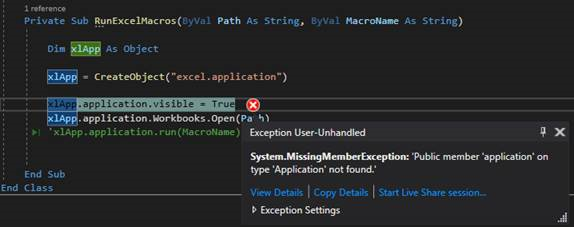
Could anyone suggest why he's getting this error? - it works fine for me, so I'm finding it really difficult to help him.
Thanks!
Tags for this Thread
 Posting Permissions
- You may not post new threads
- You may not post replies
- You may not post attachments
- You may not edit your posts
-
Forum Rules
|
Click Here to Expand Forum to Full Width
|



 Reply With Quote


