|

-
Mar 5th, 2020, 02:05 AM
#81
Re: [VB6] ucShellBrowse: A modern replacement for Drive/FileList w/ extensive feature
Project Updated - 07 March 2020
7.2 R2: A second revision of v7.2 was released on March 7th, since the original 7.2 release zip was missing the main demo. The only change is a minor update to sorting which only effects special folders with default columns in non-default positions, and an option to always use IShellFolder-based sorting for non-default columns, which keeps folders separated but in most (but not all) cases carries a significant performance cost; default is off.
Original update on March 5th:
Due to the extreme magnitude of the performance gain from the following issue, I went ahead and updated the project:
(Fixed in 7.2: Major performance issue) It turns out basically the entire reason ucShellBrowse is slow for large folders is querying for the overlay icons. It was being done with IShellIconOverlay as that's the only way to get custom overlays for Github, TortoiseSVN, Dropbox, etc. but that single call causes a performance hit by a factor of between 10x and 100x. Loading a 3,000 item folder literally goes from 100s to 1s just by removing that call. It's now a default-off option. The new way will still display overlays for Shortcuts and Shared folders without enabling the ExtendedOverlays option or suffering any performance degradation, as the index for these is a system constant and presence is determined simply by normal attributes.
Also fixed the remaining combined-folders bug.
Code:
'New in v7.2 R2 (Released 07 March 2020)
'
'-Rereleased because I forgot to include the main demo.
'
'-Sorting system has an optional upgrade: AlwaysSortWithISF uses the IShellFolder
' CompareIDs sorting method for all columns that are supported. This keeps folders
' separated and sorts non-standard data types better, but *sometimes* carries a
' significant performance hit, so it's off by default.
'
'-(Bug fix) For the CompareIDs sort for the standard types (always enabled), some
'           special folders contained the standard types, but in a non-standard
'           order. Since the order was hard-coded, this led to incorret sorting.
'           Now columns are mapped with each folder load to the correct column id.
'
'New in v7.2 (Released 05 March 2020)
'
'-Extended Icon Overlays (e.g. for Tortoise SVN, Dropbox, Github, etc) are now
' an option, ExtendedOverlays, that default to false after finding that querying
' for them causes a *massive* performance hit. I thought things were just slow
' because of complexity and this being VB, but just eliminating the query speeds
' up loading folders ***by a factor of 10-100**. 3000 items used to take over 100s
' on a 7200rpm spinning drive, it now only takes 1.4s.
' The Shortcut overlay, and Share overlay, can be determined by attributes, so these
' are the basic overlays that will still appear when the extended ones are turned off.
'
'-Numerous other internal performance improvements have been made.
'
'-(Bug fix) The folders combining if one was selected while the previous was still
'           loading hadn't been fixed for manual calls to CreateCustomFolder or one
'           of the file search calls.
Also note that ucShellTree has been updated with this same fix, if you also use that in your project.
Last edited by fafalone; Mar 7th, 2020 at 11:33 PM.
-
Mar 5th, 2020, 08:26 AM
#82
Re: [VB6] ucShellBrowse: A modern replacement for Drive/FileList w/ extensive feature
This is an impressive piece of work. I could really do with the same filelistbox control in VB.NET.
-
Mar 7th, 2020, 07:40 PM
#83
Re: [VB6] ucShellBrowse: A modern replacement for Drive/FileList w/ extensive feature
Thanks 
Always found shell programming interesting, so creating a full-blown Explorer-type control was always inevitable 
-
Mar 15th, 2020, 02:28 AM
#84
Re: [VB6] ucShellBrowse: A modern replacement for Drive/FileList w/ extensive feature
Current Version Updated - 16 March 2020
v7.2 R5: My absent-mindedness curse continues. The R4 fix for Search only fixed searches made through the UI, but searches can also be made through code, so that needed an urgent fix too:
(Bug fix) The 7.2 R5 release fixed this issue for searches made via code by calling the Public methods ExecFileSearch and ExecFileSearchEx.
To apply this fix manually, in the ExecFileSearchEx function (which is called by ExecFileSearch so only this function needs to be modified), replace the following block:
Code:
Dim pLibTmp As IShellLibrary
Set pLibTmp = New ShellLibrary
pLibTmp.LoadLibraryFromItem pLocation, STGM_READ
pLibTmp.GetFolders LFF_ALLITEMS, IID_IShellItemArray, ppia
If (ppia Is Nothing) Then
    If CreateSearchLibrary(pObjects) = S_OK Then
        pObjects.AddObject ByVal ObjPtr(pLocation)
        Set ppia = pObjects
    End If
End If
with this one:
Code:
Dim lp As Long, sPath As String

siCurPath.GetDisplayName SIGDN_DESKTOPABSOLUTEPARSING, lp
sPath = LPWSTRtoStr(lp)

If Left$(sPath, Len(sLibRoot)) = sLibRoot Then
    Dim pLibTmp As IShellLibrary
    Set pLibTmp = New ShellLibrary
    pLibTmp.LoadLibraryFromItem siCurPath, STGM_READ 'Check if it's a a real library-- if it is, we need to get the folder array directly or search fails
    pLibTmp.GetFolders LFF_ALLITEMS, IID_IShellItemArray, ppia
    If (ppia Is Nothing) = False Then 'Valid Library, proceed here.
        GoTo defcsl
    End If
End If
defcsl:
If (ppia Is Nothing) Then
    If CreateSearchLibrary(pObjects) = S_OK Then
        pObjects.AddObject ByVal ObjPtr(pLocation)
        Set ppia = pObjects
    End If
End If
Also fixed in R5, two timers were enabled from design time/startup, sometimes causing issues where the IDE flashed [running] a few times a second when a Form was loaded in design view, causing problems with pop-up code completion in the IDE. To fix this manually, open ucShellBrowse in Design View and for tmrChangeQueue and tmrResize, set the Enabled property to False. Then also delete tmrFilter; it's also enabled but not actually used for anything anymore.
v7.2 R4: I swear I'm cursed. Search has been completely broken besides in a Library since v6.7.
(Bug fix) In v6.7 a patch was applied because Search wasn't working in a Library, in a way that should have produced a failure and fallback if we weren't in one. It turns out it has been returning a valid but corrupted object the whole time since then, so Search has been broken everywhere except in a Library since then.
Projected updated to v7.2-R4 with a fix. If you want to apply a quick manual fix, replace the function CreateSearchScope with this version:
Code:
Private Function CreateSearchScope(ppia As IShellItemArray) As Long
Set ppia = Nothing
Dim pObjects As IObjectCollection
Dim hr As Long

Dim lp As Long, sPath As String
siCurPath.GetDisplayName SIGDN_DESKTOPABSOLUTEPARSING, lp
sPath = LPWSTRtoStr(lp)

If Left$(sPath, Len(sLibRoot)) = sLibRoot Then

    Dim pLibTmp As IShellLibrary
    Set pLibTmp = New ShellLibrary
    pLibTmp.LoadLibraryFromItem siCurPath, STGM_READ 'Check if it's a a real library-- if it is, we need to get the folder array directly or search fails
    pLibTmp.GetFolders LFF_ALLITEMS, IID_IShellItemArray, ppia
    If (ppia Is Nothing) = False Then 'Valid Library, proceed here.
        Exit Function
    End If
End If

If CreateSearchLibrary(pObjects) = S_OK Then
    pObjects.AddObject ByVal ObjPtr(siCurPath)

    Set ppia = pObjects
    Set pObjects = Nothing

    CreateSearchScope = hr
End If

End Function
v7.2 R3: Very minor update for the following:
(Bug fix) When setting up the always-on overlays for Shortcuts, my system had a bug at the time which led to me putting down the wrong overlay index. It was set to 4, it should be 2. The project was updated to v7.2 R3 with a fix for this. If you just want to apply a quick manual fix, in LVLoadFolder and in LVAddEntry, there's the following block:
Code:
            If (lAtr And SFGAO_LINK) = SFGAO_LINK Then
                lpIconOvr = 4
            End If
Change the 4 to a 2.
Also note that if your last DL of this project was missing the main demo in \Demo, there was a silent update on March 7th when R2 was put out including the demo and a sorting fix for some rare scenarios where it sorts wrong; see Post #81 just above.
Last edited by fafalone; Apr 3rd, 2020 at 07:45 PM.
Reason: Many new versions :(
-
Mar 30th, 2020, 09:58 AM
#85
Re: [VB6] ucShellBrowse: A modern replacement for Drive/FileList w/ extensive feature
ucShellBrowse v7.4 Released! (30 March 2020)
Sorry for the frequent updates, but I found 2 serious bugs present in the 7.x series. Compiled exes could not load portable devices, and some situations with overlays enabled led to crashes.
BUT: There's some great new features. The Large Icons are now the size of Explorer's, and there's support for Medium Icons (the old large) and Extra Large Icons. All view modes can now be the startup mode from Properties in Design Mode. There's also a couple smaller features and fixes.
Code:
'New in v7.4 (Released 30 March 2020)
'
'-Large icons are now actually large.
'
'-Also added support for 'Medium' icons, which are the old large, and Extra
' Large icons, which are 256x256 (*scale). These aren't 'true' modes; to make
' the 'Large' icons like Windows 7 and 10 sized, the same general approach for
' thumbnails had to be used; we load a copy of the 'Jumbo' 256x256 image list,
' then scale down from that by copying the needed icons to a local ImageList.
' So once that's done, we can add any other size by simply changing the scale
' factor. You could easily look at SwitchView to see how it's done for XL and
' Medium, and add more.
' Note: By default, icons in Medium/Large/XL aren't loaded until the item first
'       comes into view; like with thumbnails, there's a new IconPreload option
'       if you want to load them all during the initial folder load.
' Sizes: Medium is 48x48, Large is 96x96, and XLarge is 128x128, and you can
'        change these in the User Options section below this changelog if so
'        desired. It's not recommended to exceed 512x512.
' Links: There's this weird glitch where the presence of some shortcuts to a
'        folder, in certain other folders, causes not only itself, but some
'        other links, to return the default document icon instead of the real
'        icon. This bizarrely goes away if you Refresh, but reappears if you
'        navigate away and come back (even though Refresh is just calling
'        LVLoadFolder again the exact same way).
'        I can't isolate the exact circumstance, and refreshing every time is
'        a huge performance hit, so a workaround was developed where links
'        have their icons loaded manually.
'        There's a User Option, nManualLinkIconLoadingMode, with 3 options
'        for this; 0=disable it and always just use the same automatic method
'        (IShellItemImageFactory), 1=Use it only for links to folders (which
'        trigger the bug, so this avoids it), and 2=Use it for all links.
' Watch: This whole system seems to trigger a number of bugs where blank or
'        default or incorrect icons are loaded. I've added a bunch of work
'        arounds, but if you encounter any situation where the wrong icons,
'        or no icons, are being loaded, please let me know!
'
'-All View Modes are supported on startup via the ViewMode setting in the
' Properties list, there's a minor tradeoff in that no change is reflected
' in Design View.
'
'-Now the Bookmarks submenu is only added to the folder background right-click
' menu if it's not already present in the control box.
'
'-Support for items marked as SFGAO_GHOSTED but not SFGAO_HIDDEN added.
'
'-(Bug fix) When Extended Overlays are enabled, the wrong method was called,
'           sometimes leading to incorrect overlays or crashing.
'
'-(Bug fix) Switching into Tile View lost the sorting order, so folders no
'           longer appeared first. Switching to Tile View now sorts by name.
'
'-(Bug fix) Some bizarre memory issue related to the order of things in the
'           LVLoadFolder routine broke loading more than 1 dir into Portable
'           Devices in compiled exes only.
Last edited by fafalone; Mar 30th, 2020 at 10:31 AM.
-
Mar 30th, 2020, 11:08 AM
#86
Fanatic Member

Re: [VB6] ucShellBrowse: A modern replacement for Drive/FileList w/ extensive feature
you could create a file explorer.
for example I really like "q-dir".
with tabs, preview.
with your wit, surely you could create a good one.
Alternate to Windows Explorer and vb6.
greetings great job
-
Mar 30th, 2020, 01:45 PM
#87
Re: [VB6] ucShellBrowse: A modern replacement for Drive/FileList w/ extensive feature
That's basically what this control is... have you seen the ShellTree control this is often combined with? It lets you have a navigation tree for a complete file explorer experience, and of course there's a lot of points to control the UCs from code to build programs around them. There's even a bunch of extra functionality available through code that's not part of the UI. There's very, very little that an Explorer window can do that a form with ShellBrowse+ShellTree can't*, and quite a number of things these can do that Explorer can't.

Thanks for all the compliments btw (yereverluvinuncleber as well)... always good to know other people think this stuff is cool too 
* - The only real thing I can think of that still needs to be replicated... in the 'Details' bar at the bottom, Explorer can handle combining multiple files like showing two different years for two different MP3s, or noting if a property is the same for all selected files or 'Multiple values'... mine can only show details of a single file. It's gonna be a nightmare replicating that but it's on the list. Can't really think of anything else
Last edited by fafalone; Mar 30th, 2020 at 02:07 PM.
-
Mar 31st, 2020, 10:31 AM
#88
Fanatic Member
Re: [VB6] ucShellBrowse: A modern replacement for Drive/FileList w/ extensive feature
if I have been following many of your projects.
When I have time I will try it more thoroughly.
I have found a bug.
when you activate preview panel and select an image everything closes, in ide too.
oleexp 4.62
how many controls could be put without overloading the project.
keep it up very good great job
-
Mar 31st, 2020, 12:58 PM
#89
Re: [VB6] ucShellBrowse: A modern replacement for Drive/FileList w/ extensive feature
It really might be worth making into a standalone program that emulates the old explorer in XP. I still miss that tool daily. None of the alternatives have it quite right.
I did make my own drive/folder/file list in .javascript and so I know how hard it is to get right.
I will use your creation in one of my future projects if that's OK?
-
Apr 2nd, 2020, 04:25 PM
#90
Re: [VB6] ucShellBrowse: A modern replacement for Drive/FileList w/ extensive feature
God damn Windows 10 
It works perfect on Win7.
I just can't win lately. Every time I try to update, something somewhere else breaks in some unanticipated way.
Edit: Posted a fix, see below.
---
@yereverluvinuncleber- Of course you're welcome to use it in your projects, that's what it's here for
It wouldn't be too hard to make what looks like an old-style Explorer window; there's a few things that would need to be publicly accessible on the control that aren't right now; like Select All/Invert Sel, sorting and grouping commands-- which would require access to the current columns, which might be a little tricky. I'll work on making more commands available through code for the next big update.
Edit;
Just playing around a bit, to replicate the sort menu for a container window menu, you'd need a column list... you could get the column PROPERTYKEYs and display names like this:
Code:
Public Function GetCurrentColumnCount() As Long
GetCurrentColumnCount = Header_GetItemCount(hLVSHdr)
End Function

Public Function GetCurrentColumns(ptr_pk_ar As Long, sDispNames() As String) As Long
Dim pk() As oleexp.PROPERTYKEY
Dim lColCnt As Long
lColCnt = Header_GetItemCount(hLVSHdr)
ReDim pk(lColCnt - 1)
Dim i As Long
Dim lp As Long
For i = 0 To (lColCnt - 1)
    lp = GetHDItemlParam(hLVSHdr, i)
    pk(i) = uColData(lp).pKey
    sDispNames(i) = uColData(lp).szDisplayName
Next i
CopyMemory ByVal ptr_pk_ar, pk(0), LenB(pk(0)) * lColCnt
End Function
Called like
Code:
Dim pk() As oleexp.PROPERTYKEY
Dim sNm() As String

lCt = ucShellBrowse1.GetCurrentColumnCount
ReDim pk(lCt - 1)
ReDim sNm(lCt - 1)
ucShellBrowse1.GetCurrentColumns VarPtr(pk(0)), sNm
Yeah I can definitely make everything you'd need accessible.
Edit2: As for the rest that's not available... I haven't tested any of this for functionality, just syntax, but it's my bedtime... so if you want to pick it up, here's roughly how the rest would work for the sorting/grouping stuff not already accessible through code. (Note: the history list is already available through code, as well as back/fwd/up; and the selected shell item(s) so you can get context menu interfaces for File)
Code:
Public Function GetGroupColumn() As Long
GetGroupColumn = lGrpCol
End Function
Public Sub InvokeGroupByColumn(lCol As Long)
'Pass -1 for 'None'
If lCol = -1 Then
    SetGroupMode SBGB_None
    lGrpCol = -1
    bCatGrpActive = False
    Exit Sub
End If
Dim lp As Long
lp = GetHDItemlParam(hLVSHdr, lCol)
If lp <> lGrpCol Then
    lGrpCol = lp
    Select Case lp
        Case lDefColIdx(0): SetGroupMode SBGB_Name
        Case lDefColIdx(1): SetGroupMode SBGB_Size
        Case lDefColIdx(2): SetGroupMode SBGB_Type
        Case lDefColIdx(3): SetGroupMode SBGB_DateModified
        Case lDefColIdx(4): SetGroupMode SBGB_DateCreated
        Case lDefColIdx(5): SetGroupMode SBGB_DateAccessed

        Case Else: SetGroupMode SBGB_Extended
    End Select
    bCatGrpActive = False
End If
End Sub
Public Sub InvokeGroupByPKEY(ptr_pkey As Long)
Dim pk As oleexp.PROPERTYKEY

If ptr_pkey Then
    CopyMemory ByVal VarPtr(pk), ByVal ptr_pkey, Len(pk)
Else
    DebugAppend "InvokeSortByPKEY::No pointer to PKEY"
    Exit Sub
End If

Dim lColCnt As Long
lColCnt = Header_GetItemCount(hLVSHdr)

Dim i As Long
Dim lp As Long
For i = 0 To (lColCnt - 1)
    lp = GetHDItemlParam(hLVSHdr, i)
    If IsEqualPKEY(pk, uColData(lp).pKey) Then
        lGrpCol = lp
        Select Case lp
            Case lDefColIdx(0): SetGroupMode SBGB_Name
            Case lDefColIdx(1): SetGroupMode SBGB_Size
            Case lDefColIdx(2): SetGroupMode SBGB_Type
            Case lDefColIdx(3): SetGroupMode SBGB_DateModified
            Case lDefColIdx(4): SetGroupMode SBGB_DateCreated
            Case lDefColIdx(5): SetGroupMode SBGB_DateAccessed

            Case Else: SetGroupMode SBGB_Extended
        End Select
        bCatGrpActive = False
        Exit Sub
     End If
Next i
End Sub

Public Sub InvokeSortByColumn(iCol As Long)
LVColumnClick iCol
End Sub


Public Sub InvokeSortAscending()
If lSortD = 0 Then
    LVColumnClick lSortK
    lSortD = 1
End If
End Sub
Public Sub InvokeSortDescending()
If lSortD = 1 Then
    LVColumnClick lSortK
    lSortD = 0
End If
End Sub

Public Function GetSortDirection() As Integer
'0=Descending, 1=Ascending
If lSortD <> 0 Then
    GetSortDirection = 1
End If
End Function
Public Function GetSortColumn() As Long
GetSortColumn = lSortK
End Function

Public Sub InvokeSortByPKEY(ptr_pkey As Long)
Dim pk As oleexp.PROPERTYKEY

If ptr_pkey Then
    CopyMemory ByVal VarPtr(pk), ByVal ptr_pkey, Len(pk)
Else
    DebugAppend "InvokeSortByPKEY::No pointer to PKEY"
    Exit Sub
End If

Dim lColCnt As Long
lColCnt = Header_GetItemCount(hLVSHdr)
Dim i As Long
Dim lp As Long
For i = 0 To (lColCnt - 1)
    lp = GetHDItemlParam(hLVSHdr, i)
    If IsEqualPKEY(pk, uColData(lp).pKey) Then
        LVColumnClick i
        Exit Sub
    End If
Next i
End Sub
Public Sub InvokeColumnSelector()
LoadColumnSelect
End Sub
Last edited by fafalone; Apr 3rd, 2020 at 03:36 AM.
-
Apr 2nd, 2020, 05:54 PM
#91
Re: [VB6] ucShellBrowse: A modern replacement for Drive/FileList w/ extensive feature
CRITICAL UPDATE :: Version 7.4 R3, 02 April 2020
(R2) In Version 7.4, previewing images with Windows 10 causes an appcrash as noted in the posts above. This version fixes the new method.
What happened, the new method I started using reads files with gdipLoadImageFromStream. I got the IStream from taking the IShellItem and using BindToHandler/BHID_Stream/IStream. This works on Windows 7, but for some reason on Windows 10, this causes an appcrash when gdipLoadImageFromStream is called. As a workaround, the file is opened with CreateFileW, read into a byte array, then an IStream created using CreateStreamOnHGlobal. The IStream resulting from that can be passed to gdipLoadImageFromStream without an issue.
(R3) - If you don't have have this current version, 7.4 R3, icon scaling for Medium/Large/X-Large will be either too large or too small in most circumstances. Total chaos broke lose with the scaling for M/L/XL icons being either too large or too small, after it was previously perfect. Then I thought I pushed a fix with just 1 DL of the old one, but that's not what wound up on the board here. Then 4 people had DL'd it, so I triple-checked everything in a whole new version folder so nothing could get mixed up this time. I'm so sorry for all these dumb errors 
This may have applied to the original 7.4 release as well; the zip I have they're too small on a zoomed monitors IDE, but correct in the exe. I'm not going to check on my other computer right now, but given the critical R2 fix, it's important to update anyway, so bottom line: If the ucShellBrowse icons are bigger or smaller than Explorer in either in the IDE or EXE, v7.4 R3 will fix it.
Also fixed a bug where selecting 'Desktop' from the dropdown wasn't doing anything.
---------------
Original notice: geez... I'm losing it or something. I spent hours getting things just right with the new icon sizes so they're correctly sized whether dpiAware is true or not, and in IDE or not since it's all different. Somehow they just became wrong. I got everything readjusted for Win7/Win10/Zoomed/Not/Ide/Exe while there was just 1 DL (if that was you and you notice icons are too big, sorry, re-dl). I added an 'actual zoom' because if dpiAware was false, it didn't apply to the APIs that read the images and sized them, but now for some reason it started just not being right and the original scaling system was now right when it was wrong... ugh.
Update: Ok I'm definitely losing my mind. I swear I updated that icon thing, but when I checked, nope. If your icon size is messed up download R3.
(R4, Minor, Non-critical update)
The current version is R4. If you already have at least R3, you don't need to rush to get R4, it's just only 3 people had it so far, I discovered a minor bug, and wanted to nip it in the bud so it's not around for a while until the next major upgrade.
The Column Select box got bigger and bigger each time it was opened when dpiAware was on and DPI scaling was above 100%. Also made the column width text box update when keyboard scrolling. Again, very minor, not critical to update again.
Last edited by fafalone; Apr 3rd, 2020 at 02:49 AM.
-
Apr 2nd, 2020, 08:07 PM
#92
Fanatic Member
Re: [VB6] ucShellBrowse: A modern replacement for Drive/FileList w/ extensive feature
thanks for solving the problem.
I found two bugs but could not reproduce it again.
one was with the up button everything was closed.
and another was browsing the files and folders and zip files.
but I could not reproduce them again.
windows 10 home 1803.
Greetings
-
Apr 2nd, 2020, 08:15 PM
#93
Re: [VB6] ucShellBrowse: A modern replacement for Drive/FileList w/ extensive feature
Ok, if they pop up again let me know. Haven't ever had trouble with the Up button, but haven't thorough checked zip files recently.
-
Apr 3rd, 2020, 10:23 AM
#94
Re: [VB6] ucShellBrowse: A modern replacement for Drive/FileList w/ extensive feature
I have plenty of ideas for a replacement explorer and would love to build one. Perhaps when I have finished my current VB6 project. I have two in mind, one is a straight XP explorer type replacement as above but the other is more exotic and I doubt it can be achieved in VB6. The other was a steampunk/medieval version that I coded successfully for .javascript a long time ago.

-
Apr 3rd, 2020, 04:16 PM
#95
Re: [VB6] ucShellBrowse: A modern replacement for Drive/FileList w/ extensive feature
What kind of file browser couldn't be achieved in VB6?
-
Apr 3rd, 2020, 04:26 PM
#96
Re: [VB6] ucShellBrowse: A modern replacement for Drive/FileList w/ extensive feature
That graphical one above... I'm sure it could but my experience in trying to skin VB6 apps has been off-putting.
-
Apr 3rd, 2020, 04:28 PM
#97
Re: [VB6] ucShellBrowse: A modern replacement for Drive/FileList w/ extensive feature
PS can you restructure post #82?
it is screwing up the formatting of this whole page, causing it be so wide as to be painful to navigate.
-
Apr 3rd, 2020, 07:48 PM
#98
Re: [VB6] ucShellBrowse: A modern replacement for Drive/FileList w/ extensive feature
Of course you could make that in VB, it's just all graphics. You'd just set up the graphics any number of ways, including accelerated with D3D or DD, and then grab file lists and icons to draw where needed. Even in this project, all the icons are extracted and drawn with graphics functions for some parts (thumbnails and icon view).
Fixed that wide post.
-
Apr 4th, 2020, 02:50 AM
#99
Re: [VB6] ucShellBrowse: A modern replacement for Drive/FileList w/ extensive feature
 Originally Posted by yereverluvinuncleber

I have plenty of ideas for a replacement explorer and would love to build one.
Perhaps when I have finished my current VB6 project.
I have two in mind, one is a straight XP explorer type replacement as above but the other is more exotic and I doubt it can be achieved in VB6.
There'd be no problem with VB6 and graphics-heavy GUIs, when you'd use appropriate helper-libs,
to build these without any API-calls in your UserCode (and thus without having to care about handles, or proper handle-freeing).
Here's, what I've thrown together in an hour, using RC5 and two Widgets from vbWidgets.dll:
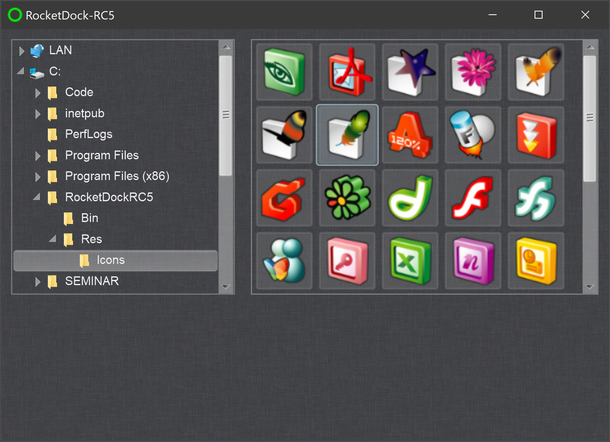
The Widget to the left is cwDirList - and the one to the right is a cwVList in "TileMode" - filtering for only "image-files" in the left-selected Folder.
(on both of them I've disabled the BackGround, and made them a bit more transparent).
Always wondered, why you ventured into .NET-land (to re-implement your VB6-RocketDock-Editor) -
and never once tried to re-implement it using the RC5-Widgets (using much less code than the other two variants you currently have).
Manipulating all that graphical-stuff you so like, would be a breeze with that tool (Controls which respect Alpha, even when nested in each other) -
and of course you'd feel like "a total newbie" the first week - but you should be able to "get the hang of it" after that.
Olaf
-
Apr 4th, 2020, 08:41 AM
#100
Re: [VB6] ucShellBrowse: A modern replacement for Drive/FileList w/ extensive feature
Originally Posted by Schmidt
Always wondered, why you ventured into .NET-land (to re-implement your VB6-RocketDock-Editor) -
Well, it is all about teaching myself the technologies, old and new, those that are generally "out there". So, this VB6 re-learning is really just a refresher for me, GDI+ fits into that and then I'm dipping my toes into the VB.NET world to see how it feels, I've started but I must complete it.
When I feel half-competent (and I don't feel anywhere near that yet but I'm getting there) then I will dip my toes into the RC5 stuff that you suggest but first I have a VB6 project to complete, then a VB.NET migration to complete, then I will complete my re-skinning project for the same codebase and then finally onto my old Mil.Sim. code with a new approach, possibly a VB.NET front end and a C++ back end, I'm not sure... Then there are little delectations like the above explorer that I'd 'like' to do but probably won't get round to for a while.
I like the explorer that you just knocked up. I'd be happy to send you my image sources, both PSD and PNG if you wanted to do so before me?
Just as the bear with little brain, for me it is just small steps at a time - but with not a lot of time to do it in - so progress is slow and what technologies I can experiment with are limited. It has to be real-word usage or the what I am doing won't help me if I have to apply these technologies in a real-life work situation. That is my aim Olaf so I frankly can only do so much...
-
Apr 4th, 2020, 11:12 AM
#101
Re: [VB6] ucShellBrowse: A modern replacement for Drive/FileList w/ extensive feature
Originally Posted by yereverluvinuncleber
I like the explorer that you just knocked up. I'd be happy to send you my image sources, both PSD and PNG if you wanted to do so before me?
Well, I've always liked your graphics-stuff - and would start with such a "porting" on my own (whenever I find time) -
posting the results into the CodeBank, when the whole thing accumulated to something "presentable".
As for your image-offerings...
Somewhere in the CodeBank there's a PSD-file-parser I've adapted (which is able to extract the different layers to PNGs) -
but if you have the layers as separated PNGs already available, then I'd prefer that (to save some time).
Also your current VB6-sources would be of help (time-saving-wise), to better see, what functionality you were aiming for...
Perhaps zipped and uploaded to some WebHost, posting the URL via private forum-PM?
Olaf
-
Apr 22nd, 2020, 11:27 PM
#102
Re: [VB6] ucShellBrowse: A modern replacement for Drive/FileList w/ extensive feature
Project Updated - Version 8.0 Released on 23 April 2020
-There's a number of new features here, as the major version change might indicate. The biggest is portability: The images are now built into the control. You no longer need to worry about keeping those images with the control, and the only thing you need the .res file for is the manifest. The Demo contains 3 images in the resource file that are just for the Demo, you do not need to move those to another .res, they're not part of the control.
-Next up, a large number of subs/functions were added to allow all functionality to be controlled through code, to make it easier to embed the control as part of a larger file browser or similar. See the changelog for a full list.
-All the panel toggles are now on their own submenu ('Layout'), which contains a new option to switch between the two most common modes, Files Only and Directories+Files. This option won't appear in other modes and you can disable its appearance all together if desired. There's also an option to add a 'Navigation Tree' item-- this is for projects that use ucShellTree, it can signal a toggle so you know when the user wants the tree shown.
-If you've got editing turned on in the directory box, you can now enable Autocomplete on it.
-Then we've got a number of smaller feature updates and a fix for the handful of minor bugs.
Full changelog:
Code:
'Version 8.0 R1 (24 April 2020): Fixed out of place parenthesis triggering compile error.
'New in v8.0 (Released 23 April 2020)
'
'NOTE: As of this version, the images for the buttons and menus are no longer loaded
'      from the resource file. Thanks to an idea by LaVolpe and code by The_trick, now
'      they have been encoded into bitmaps are stored as Picturebox pictures, and are
'      decoded by the control.
'      The control is pbIconData, and if you need to look up the images for whatever
'      reason, the control index is mapped to their old names; e.g. ICO_MNREFRESH is
'      now pbidx_ICO_MNREFRESH, and its value, 6, means its data is in pbIconData(6).
'      From now on, the resource file is only for the manifest, or application data.
'      The demo in \Demo shows a feature for the footer where the control will load
'      icons from the resource file, and these are still included in the demo res
'      file, but they are *not* required to be included in your project, they're
'      exclusively for the demo project's custom footer.
'
'-There's now an Autocomplete option for when the ComboType is Simple or Dropdown,
' and ComboCanEdit is True, that by default will complete paths. The default flags
' are ACO_AUTOAPPEND and ACLO_FILESYSDIRS. To change these flags, use the new Public
' Sub AutoCompleteFlagAdjust. This is *not* enabled by default.
'
'-The DropFiles event now supplies a lot more information. Previous, it only included
' a list of full paths and the drop effect. The following have been added:
'  :An IShellItemArray of the dropped files,
'  :The raw IDataObject received from IDropTarget_Drop,
'  :The full path of the folder it was dropped on (which would not be the current path
'    because of dynamic drag drop, it could be a folder or item within,
'  :An IShellItem of the item it was dropped on,
'  :The grfKeyState value (MK_LBUTTON, MK_RBUTTON, MK_SHIFT, etc),
'  :The x,y coordinate of the drop.
' NOTE: This will require updating the event in any form that is using it, as this is
'       an update to the DropFiles event, and not a new event.
'       Private Sub ucShellBrowse1_DropFiles(sFiles() As String, siaFiles As oleexp.IShellItemArray, doDropped As oleexp.IDataObject, sDropParent As String, siDropParent As oleexp.IShellItem, iEffect As oleexp.DROPEFFECTS, dwKeyState As Long, ptPoint As oleexp.POINT)
'
'-Also now include the IShellItemArray and IDataObject for dragged files in the
' DragStart event. This also requires updating the event args in any form using it.
'
'-The OneClickActivate style now does what it should have been doing; acts like the
' similar option in Explorer and opens the clicked folder or executes the default
' action on a file.
'
'-Moved the Status Bar/Details Pane/Preview Pane/Search Box toggles on the View Menu
' to their own 'Layout' submenu; used the default Windows icons where available.
'
'-For the two most common modes, Files Only and DirAndFiles, there's now a menu option
' to switch between them in the new Layout submenu. You can set whether this menu item
' appears with the EnableUserModeSwitching property; it's enabled by default.
'
'-You can now drop files in attached USB locations. This had been deliberately excluded
' because the code blocked drops on ::{ paths, which are usually non-droppable.
'
'-After noticing the above was sometimes slow and in at least some circumstances doesn't
' display an external progress box, I added a wait cursor and status message indicating
' that files are being dropped (applies to all drops everywhere).
'
'-Added EnableStatusBar property to set whether the toggle for the Status Bar appears
' on the View Menu. Note that with this and the new Layout submenu, the submenu will
' not appear at all if none of its subitems are present.
'
'-Added ShellTreeInLayout property. This is for projects that also use ucShellTree for
' navigation: it adds 'Navigation tree' to the Layout submenu, and raises the new event
' ShowShellTree with true/false when the user clicks it. To set the initial status, or
' when the status is changed externally, of whether the tree is visible, use the added
' ShellTreeStatus property (note: this does not appear in the Property Browser).
'
'-Added DisableOverlays option to entirely disable overlays. If Extended Overlays is set
' to False, the Link and Share overlays are still shown; this disables those as well.
' Extended overlays will not be shown either if this option is enabled.
'
'-Moved thumbnails closer together.
'
'-The ListKeyDown event now also reports the status of the Shift, Control, and Alt keys.
'
'-Added a ListKeyUp event, which responds to WM_KEYUP coming from the ListView.
'
'-New BackgroundKeyDown and BackgroundKeyUp events, for keypresses while the UserControl
' has focus, but not on any of the controls.
'
'-New ComboEditChange event, which passes the new text when the combo text changes. If
' you change the text received, the combo text will be set to the new value.
'
'-New ComboDropdown and ComboCloseUp events.
'
'-Added additional subs/functions to control the browser through code:
'  GetHistoryData(sEntries(), CurrentIndex, MaxDisplayed) : Retrieves the contents of
'    the history record. The return value is the count of entries.
'  GetPidlStoreEntry(path) : For history entries, and some other path scenarios, the
'    parsing path returned may not work for certain locations (virtual locations like
'    non-filesystem locations and devices like phones/cameras); so the control keeps
'    a record of the fully qualified pidl of these locations. IMPORTANT: This shares
'    a reference to the pidl, so it's critical the caller not free it. Copy it if you
'    need to, but don't free it.
'  GetCurrentColumnCount() : Get a count of the number of details columns loaded, for:
'  GetCurrentColumns(ptr_pk_ar, sDispNames()) : To get a list of the current columns,
'    first call GetCurrentColumnCount to get the count, then create an array of
'    oleexp.PROPERTYKEY and String to receive the data. Pass VarPtr(pkey(0)) and
'    Names() to this function to receive the data. This is used for:
'  GetSortColumn() : The index of the column set that the files are currently sorted by.
'  GetSortDirection() : 0 = Descending, 1 = Ascending
'  GetGroupColumn() : The index of the column set that the files are grouped by. If this
'                     returns -1, Group Mode is disabled.
'  InvokeSortByColumn(Index) : Sort by column index.
'  InvokeSortByPKEY(VarPtr(pkey)) : Sort by PROPERTYKEY. The column must be loaded.
'  InvokeSortAscending() : Sort ascending.
'  InvokeSortDescending() : Sort descending.
'  InvokeGroupByColumn(Index) : Group items by the given index of the column set.
'  InvokeGroupByPKEY(VarPtr(pkey)) : Group items by the given PKEY. Must be loaded.
'  InvokeColumnSelection() : Brings up the full list of available columns.
'  InvokeNewFolder() : Creates a new folder and begins the label edit for rename.
'  InvokeSelectAll() : Select all.
'  InvokeInvertSelection() : Invert selection.
'  DetailsPaneHeightLocked PropGet/Set : Note- not shown in Properties
'  PreviewPaneWidthLocked PropGet/Set : Note- not shown in Properties
'
'-(Bug fix) Toggling the .PreviewPane property during runtime resized the ListView over
'           the pane, but was accidentally showing it when set to False, so it became
'           visible when resizing.
'
'-(Bug fix) If the navigation buttons were enabled and set to Theme Buttons, and you
'           switched the Control Type during runtime to a mode where they were hidden,
'           and then switched back, they would not reappear.
'
'-(Bug fix) Switching from Dir+Files to Files Only during runtime caused an app crash
'           in some circumstances. Completely bizarre, just changing the order fixed it.
'
'-(Bug fix) If the DetailsPane/PreviewPane had their height/width set to Locked, then
'           were hidden, then turned back on, the sizer would become visible again, with
'           the popup menu incorrectly showing it to still be locked.
Last edited by fafalone; Apr 25th, 2020 at 05:44 AM.
-
Apr 25th, 2020, 05:48 AM
#103
Re: [VB6] ucShellBrowse: A modern replacement for Drive/FileList w/ extensive feature
Project Update: Version 8.1 Released 25 April 2020
Updated to Version 8.1 on 4/25 after initial 8.0 release on 4/23: A compile-stopping error was found in the 8.0 release: A parenthesis was in the wrong spot and preventing compiling; it's trivial to fix when you go to compile. How the test compile worked before the upload remains a mystery. It's trivial to fix, but since I needed to update the download anyway, there were a few significant features that were ready to go so I went ahead and updated the version instead of just posting a revision.
In addition to the critical bug fix, this version also adds the ability to configure the InfoTips- you can disable them entirely, limit them to the simple LabelTip the ListView provides, continue with the Explorer-style ones (the default), or supply a custom one. Then options were added for a few ListView style flags that should really have been available, and another very minor bugfix.
Code:
'New in v8.1 (Released 25 April 2020)
'
'-It's now possible to configure InfoTips with the InfoTipMode property. You can
' disable them entirely, only use the ListView's default Label Tip, use the Explorer
' style extended ones with several items properties, or supply a custom one via the
' new QueryCustomInfoTip event (only raised if InfoTipMode is set to custom).
'
'-Added SimpleSelect option to toggle the LVS_EX_SIMPLESELECT style. Sets whether, in
' Med/Lg/XL Icon views, when Checkboxes are enabled, pressing the space bar checks and
' unchecks all selected items (True-Default) or only the focused item (False. Other view
' modes are not effected by this style and do the former.
'
'-Can now also toggle the basic ListView styles NoLabelWrap, ShowSelAlways, AutoArrange,
' and AlignTop. For AlignTop, if you set it to False, AlignLeft is used instead.
'
'-(Bug fix) Changing AllowRename during runtime was inverted. False allowed renames, and
'           True did not.
'
'-(Bug fix) Fixed out of place parenthesis triggering compile error.
'
Sorry for another immediate update, no matter how much I test for bugs and sit around thinking of what to add, it seems I *always* manage to miss a bug and immediately think of a bunch of "oh damn I should have added _____" things immediately after posting a new version    
-
Apr 30th, 2020, 01:15 AM
#104
Re: [VB6] ucShellBrowse: A modern replacement for Drive/FileList w/ extensive feature
Project Updated with Major Bug Fixes for History Buttons and more
Updated to Version 8.1 Revision 1
To better support Unicode and some virtual locations, the method folders were loaded on double-click was changed. Somehow I failed to notice this broke the history function; no entries were added, and the back/forward buttons stayed disabled. This change also caused the 'Up' button to get stuck on disabled after getting to the root. It's always something. Further bug fixes include renaming files when extensions are hidden (wasn't working), a bug where the themed Back/Forward buttons (on the left or in the box) didn't show up if you started in Files Only mode then switched to Dir+Files, and a bug where dropping on libraries from the 'Libraries' main folder wasn't working. Added a few small features.
Side note, in the DemoEx demo, I added code to demonstrate usage of the new ShellTreeInLayout feature from the recent new version (to show/hide a ShellTree control as a normal layout option within the ShellBrowse control).
Code:
'New in v8.1 R1 (Released 30 April 2020)
'
'-DragOver in the Library home now has e.g. "Move to Documents" instead of just
' the default "Move here" tip.
'
'-Cleaned up dropping so that if the target can't be dropped on, it fails with a
' skip of the drop handler and status message, instead of just erroring (silently).
'
'-Switched to using IShellItem.GetDisplayName SIGDN_NORMALDISPLAY instead of using
' PKEY_ItemNameDisplay for the displayed name; the latter was including the '.lnk'
' for links, which is normally hidden.
'
'-The sizer bar for the Preview Pane now covers the whole control height, so that
' the user doesn't see the top and bottom, which could be confusing. The Details
' Pane sizer already had this behavior.
'
'-(Bug fix) If you started in Files Only mode, then switched to Dir+Files, if your
'           Navigation Buttons were in ThemeButton mode, they would not be shown.
'           If the mode was ThemeButtonInBox, the spacing would be created, but the
'           actual buttons weren't drawn.
'
'-(Bug fix) If the current folder is the Libraries home folder, dropping items on the
'           library items wasn't working.
'
'-(Bug fix) Double-clicking on a folder to navigate was changed to a different method,
'           in order to better support Unicode and some virtual locations, and this
'           broke history; no items were added.
'
'-(Bug fix) Also due to the above change, once the Desktop was reached and 'Up' was
'           disabled, it would not become re-enabled when navigating elsewhere.
'
'-(Bug fix) Ensured 'Up' is disabled when reaching the root of a custom root.
'
'-(Bug fix) Renaming files when extensions were hidden broke at some point.
I'm honestly just disgusted with me missing the appearance of completely unexpected bugs whenever anything is changed; once again sorry for the buggy release.
Last edited by fafalone; Apr 30th, 2020 at 04:57 AM.
-
May 3rd, 2020, 06:33 PM
#105
Hyperactive Member
Re: [VB6] ucShellBrowse: A modern replacement for Drive/FileList w/ extensive feature
Some dumb questions...
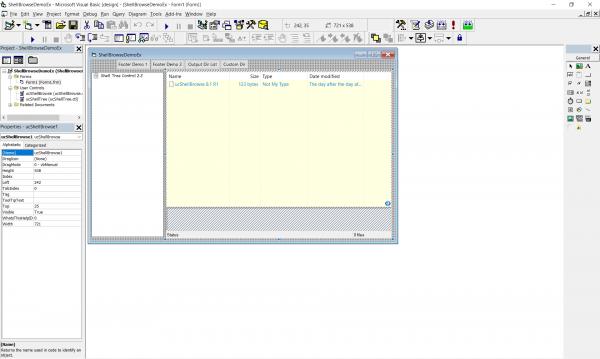
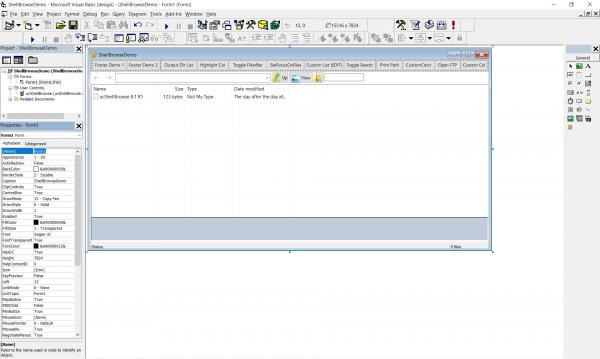
In the first 2 demo projects you have, when I highlight the ShellBrowse control in the form in the IDE I get 50 or more properties I can set. When I have the DemoEx project in the IDE and I look at the user control properties, there are only 10 for ucShellBrowse and for ucShellTree. The same is true for the ShellBrowse controls in the DemoVB project. Why did you do this and how?
Second, is there any documentation for the events, properties, methods, etc. in the ShellBrowse and ShellTree controls? I see where you document everything in your changelog but it is tedious to have to work through all of the changes over time just to figure out how to use it now. To an extent, I don't care about the sequence and timing of bug fixes and feature additions, I want to use it as it exists now (or whatever time I use it).
I know you have put many years of work into these controls and I am grateful that y are sharing them with everyone. I would just like to be more efficient in my use of them. Thanks.
-
May 3rd, 2020, 07:06 PM
#106
Hyperactive Member
Re: [VB6] ucShellBrowse: A modern replacement for Drive/FileList w/ extensive feature
Drop Question - In your 1st demo, you have an event handler for ucShellBrowse1_DropFiles. If I drag some files off the form and then come back and drop them on the same form, this event is triggered. However, when I highlight some files in Explorer and drop them on your form, the event doesn't fire. Is this how it is supposed to work?
-
May 3rd, 2020, 07:22 PM
#107
Re: [VB6] ucShellBrowse: A modern replacement for Drive/FileList w/ extensive feature
Are the controls striped when you can't see their properties? If so close and reopen the form. That's usually caused by changing the control code while the designer is open, or the impossibly complex bug related to adding additional controls on a multi-control form with a Sub Main also containing public variables or APIs defined in both a UC and a TLB (see Known Issues in Post #2).
If it's not one of the above, it's not a condition that exists on the windows 7 pc I develop it on or the Win10 laptop I test it on (I checked both again just now). I see the full set of properties for all demos on my systems; so need to know more about the circumstances here to try to recreate the issue.
Documentation is limited to the list and descriptions right now. All the properties have descriptions in the IDE, and all events and public methods are documented in post #4 of this thread.
-
May 3rd, 2020, 07:37 PM
#108
Re: [VB6] ucShellBrowse: A modern replacement for Drive/FileList w/ extensive feature
Originally Posted by MountainMan
Drop Question - In your 1st demo, you have an event handler for ucShellBrowse1_DropFiles. If I drag some files off the form and then come back and drop them on the same form, this event is triggered. However, when I highlight some files in Explorer and drop them on your form, the event doesn't fire. Is this how it is supposed to work?
No... but that's also not an issue present on my machines, can you turn on debug logging?
Although I can't seem to test this on Win10 right now as dragging and dropping seems to be entirely disabled in the IDE for all programs (permissions issue, can't get VB to not run as admin, and can't get explorer to run as admin). But it was working fine when I was testing the new events and other recent changes to drops. It works in the compiled exe, give me a minute to turn on file debug logging to see if the event fires (update: it does).
Honestly it sounds like Microsoft has once again pushed a 'minor update' that broke a ton of stuff =/
Last edited by fafalone; May 3rd, 2020 at 07:48 PM.
-
May 3rd, 2020, 10:38 PM
#109
Hyperactive Member
Re: [VB6] ucShellBrowse: A modern replacement for Drive/FileList w/ extensive feature
Could the drop issue be one of differing permissions? I know Explorer runs unelevated and I was just running your demo in the IDE so it was elevated. I re-ran my little test with the compiled version and it works so the problem is transfer between elevated and unelevated processes. I don't know if there is an easy fix for that or not.
BTW, when I did the test, I dropped a file from Explorer onto your control and although the event fired, before it did, the Shell popped up with a warning that I dropped a file into a folder where the file was the same. I can deal with that myself so I was wondering if there is a way to turn that off. The full path was passed through to the event handler regardless of whether I responded with Skip or Cancel to the shell prompt.
-
May 3rd, 2020, 10:54 PM
#110
Hyperactive Member
Re: [VB6] ucShellBrowse: A modern replacement for Drive/FileList w/ extensive feature
Originally Posted by fafalone
Are the controls striped when you can't see their properties? If so close and reopen the form. That's usually caused by changing the control code while the designer is open, or the impossibly complex bug related to adding additional controls on a multi-control form with a Sub Main also containing public variables or APIs defined in both a UC and a TLB (see Known Issues in Post #2).
If it's not one of the above, it's not a condition that exists on the windows 7 pc I develop it on or the Win10 laptop I test it on (I checked both again just now). I see the full set of properties for all demos on my systems; so need to know more about the circumstances here to try to recreate the issue.
I am running Windows 10 version 1909. I haven't modified your code. I just ran the demos as your wrote them and I get the huge difference in visible properties. if I don't screw this up, below are screenshots of the 2 demos in the IDE.
-
May 3rd, 2020, 11:10 PM
#111
Hyperactive Member
Re: [VB6] ucShellBrowse: A modern replacement for Drive/FileList w/ extensive feature
Originally Posted by fafalone
Documentation is limited to the list and descriptions right now. All the properties have descriptions in the IDE, and all events and public methods are documented in post #4 of this thread.
Thanks. I totally overlooked that. When I get a notice of an update I go to the bottom of your original post #1 and I get the zip file. For some reason it never dawned on me that perhaps you had been updatnig subsequent posts including #4....
-
May 3rd, 2020, 11:19 PM
#112
Re: [VB6] ucShellBrowse: A modern replacement for Drive/FileList w/ extensive feature
Originally Posted by MountainMan
Could the drop issue be one of differing permissions? I know Explorer runs unelevated and I was just running your demo in the IDE so it was elevated. I re-ran my little test with the compiled version and it works so the problem is transfer between elevated and unelevated processes. I don't know if there is an easy fix for that or not.
BTW, when I did the test, I dropped a file from Explorer onto your control and although the event fired, before it did, the Shell popped up with a warning that I dropped a file into a folder where the file was the same. I can deal with that myself so I was wondering if there is a way to turn that off. The full path was passed through to the event handler regardless of whether I responded with Skip or Cancel to the shell prompt.
You can't drag and drop between elevated and non-elevated processes no; this effects all apps. There's a way around it, but it has to be done at the whole-app level (uiAccess = True in the manifest and digitally sign the code), or an intermediate app (see here)
There's no way to turn off that warning, no, unless there's some registry setting somewhere that turns it off in Explorer (as that's what's handling the drop, so it's as if you dropped it in the same location in Explorer, which also displays that message).
Note that the drop message is also going to notify you of drops that are on subfolders, or programs, so aren't copied to your current folder in any case, so you should be performing logic on the drop data or just watching the ItemAdded event instead.
As for properties, I'm going to have to start updating Windows, because I definitely can't reproduce it on any machine or VM I have right now.
-
May 17th, 2020, 06:23 AM
#113
Re: [VB6] ucShellBrowse: A modern replacement for Drive/FileList w/ extensive feature
Project Update: Version 8.2 Beta Released
There's a major issue with Custom Roots where you want them enforced, it's basically broken beyond repair besides opening the root once and then children. So I needed to release the next version sooner than I planned so a fix for that is available. But: Was in the process of completely overhauling the column selection and search functions. So I'm leaving V8.1-R1 up and releasing 8.2 as a Beta until I can test it more thoroughly, through I have done basic testing on both Win7 and Win10.
Hopefully everything is working good as it seemed to be in my initial tests, but after the last few fiascos I figured I ought to leave a known-stable version up until some more testing is done.
Last edited by fafalone; May 23rd, 2020 at 09:22 PM.
-
May 19th, 2020, 02:07 AM
#114
Addicted Member
Re: [VB6] ucShellBrowse: A modern replacement for Drive/FileList w/ extensive feature
Ref: http://www.vbforums.com/showthread.p...=1#post5477911
Hi fafalone,
Your ucShellBrowse control is super-fascinating. Really. Its absolutely awesome. And, as pointed out by you (please see reference thread above), I was able to get all different font styles for 'BahnSchrift' (as well as for the other fonts which have multiple styles too) quite easily. Thanks a TON. So, as of now, for me, this seems to be the only way by which I can get the desired information (in the same precise manner, as reported in the 'Fonts' folder by Windows). But, if you/anybody can get this particular desired information by API, etc. itself, without any dependency on your control, that would be great too.
My best wishes for all your noble endeavours.
Prayers and Kind Regards.
-
May 19th, 2020, 05:32 PM
#115
Re: [VB6] ucShellBrowse: A modern replacement for Drive/FileList w/ extensive feature
The way the control works is just to enumerate the items and use the system Property Store.
The properties in the fonts folder are:
System.ItemNameDisplay
System.Fonts.ActiveStatus
System.Fonts.Category
System.Fonts.DesignedFor
System.Fonts.FontEmbeddability
System.Fonts.Styles
System.Fonts.Vendors
System.Fonts.CollectionName
System.Fonts.FamilyName
System.Fonts.FileNames
System.Fonts.Type
System.Fonts.Version
If you just wanted to do it for the fonts folder, here's a way to list all those properties:
(Requires just oleexp.tlb, and either the add-on mIID.bas in the oleexp download or the IIDs/FOLDERIDs/BHID GUIDs copied from there or the control)
Code:
Private Declare Function PSGetPropertyKeyFromName Lib "propsys.dll" (ByVal pszName As Long, ppropkey As oleexp.PROPERTYKEY) As Long
Private Declare Function PSGetPropertyDescription Lib "propsys.dll" (PropKey As oleexp.PROPERTYKEY, riid As UUID, ppv As Any) As Long
Private Declare Function PSFormatPropertyValue Lib "propsys.dll" (ByVal pps As Long, ByVal ppd As Long, ByVal pdff As PROPDESC_FORMAT_FLAGS, ppszDisplay As Long) As Long
Private Declare Function SysReAllocString Lib "oleaut32.dll" (ByVal pBSTR As Long, Optional ByVal pszStrPtr As Long) As Long


Private Sub ListFonts()
Dim siFontFolder As IShellItem
Dim pEnum As IEnumShellItems
Dim siFont As IShellItem
Dim si2Font As IShellItem2
Dim pcl As Long
Dim pStore As IPropertyStore
Dim ppd As IPropertyDescription
Dim sList As String

oleexp.SHGetKnownFolderItem FOLDERID_Fonts, KF_FLAG_DEFAULT, 0&, IID_IShellItem, siFontFolder
siFontFolder.BindToHandler 0&, BHID_EnumItems, IID_IEnumShellItems, pEnum
Do While pEnum.Next(1&, siFont, pcl) = S_OK
    Set si2Font = siFont
    si2Font.GetPropertyStore GPS_BESTEFFORT Or GPS_OPENSLOWITEM, IID_IPropertyStore, pStore
    sList = "Font: " & GetPropertyDisplayStringByName(pStore, "System.ItemNameDisplay")
    sList = sList & ",ActiveStatus=" & GetPropertyDisplayStringByName(pStore, "System.Fonts.ActiveStatus")
    sList = sList & ",Category=" & GetPropertyDisplayStringByName(pStore, "System.Fonts.Category")
    sList = sList & ",DesignedFor=" & GetPropertyDisplayStringByName(pStore, "System.Fonts.DesignedFor")
    sList = sList & ",FontEmbeddability=" & GetPropertyDisplayStringByName(pStore, "System.Fonts.FontEmbeddability")
    sList = sList & ",Styles=" & GetPropertyDisplayStringByName(pStore, "System.Fonts.Styles")
    sList = sList & ",Vendors=" & GetPropertyDisplayStringByName(pStore, "System.Fonts.Vendors")
    sList = sList & ",CollectionName=" & GetPropertyDisplayStringByName(pStore, "System.Fonts.CollectionName")
    sList = sList & ",FamilyName=" & GetPropertyDisplayStringByName(pStore, "System.Fonts.FamilyName")
    sList = sList & ",FileNames=" & GetPropertyDisplayStringByName(pStore, "System.Fonts.FileNames")
    sList = sList & ",Type=" & GetPropertyDisplayStringByName(pStore, "System.Fonts.Type")
    sList = sList & ",Version=" & GetPropertyDisplayStringByName(pStore, "System.Fonts.Version")
    Debug.Print sList
    Set pStore = Nothing
    Set si2Font = Nothing
    Set siFont = Nothing
Loop
End Sub
Private Function GetPropertyDisplayStringByName(pps As oleexp.IPropertyStore, szProp As String, Optional bFixChars As Boolean = True) As String
'Gets the string value of the given canonical property; e.g. System.Company, System.Rating, etc
'This would be the value displayed in Explorer if you added the column in details view
On Error GoTo e0
Dim lpsz As Long
Dim ppd As oleexp.IPropertyDescription
Dim pkProp As PROPERTYKEY
If (pps Is Nothing) = False Then
    PSGetPropertyKeyFromName StrPtr(szProp), pkProp
    PSGetPropertyDescription pkProp, IID_IPropertyDescription, ppd
    If (ppd Is Nothing) = False Then
        Dim hr As Long
        hr = PSFormatPropertyValue(ObjPtr(pps), ObjPtr(ppd), PDFF_DEFAULT, lpsz)
        SysReAllocString VarPtr(GetPropertyDisplayStringByName), lpsz
        CoTaskMemFree lpsz
    End If
    If bFixChars Then
        GetPropertyDisplayStringByName = Replace$(GetPropertyDisplayStringByName, ChrW$(&H200E), "")
        GetPropertyDisplayStringByName = Replace$(GetPropertyDisplayStringByName, ChrW$(&H200F), "")
        GetPropertyDisplayStringByName = Replace$(GetPropertyDisplayStringByName, ChrW$(&H202A), "")
        GetPropertyDisplayStringByName = Replace$(GetPropertyDisplayStringByName, ChrW$(&H202C), "")
    End If
    Set ppd = Nothing
Else
    Debug.Print "GetPropertyDisplayStringByName.Error->PropertyStore is not set."
End If
Exit Function
e0:
    Debug.Print "GetPropertyDisplayStringByName->Error: " & Err.Description & ", 0x" & Hex$(Err.Number)
End Function
Now if you needed the additional information on the individual multi-style fonts (where you'd double click one in the control and then an entry would show up for each), the quickest shortcut would be to check the Folder attribute (siFont.GetAttributes SFGAO_FOLDER, dwAttribs: If (dwAttribs And SFGAO_FOLDER) = SFGAO_FOLDER Then), and then just take siFont and enumerate that in the same way that was done for the font folder...
siFont.BindToHandler 0&, BHID_EnumItems, IID_IEnumShellItems, pEnum2
Do While pEnum2.Next(1&, siSubFont, pcl) = S_OK
etc.
--
It's possible to use APIs to make direct calls on the VTable as well to eliminate the need for the TLB (which only needs to be present for the IDE, doesn't need to be included with the exe), but it's quite a bit more work.
Side note:
It's possible to show previews for fonts in the control, but the usual methods of reporting the full parsing name don't actually return the font file name, so the preview doesn't get loaded. I haven't updated the download yet, but anyone who wants to fix that,
In ShowPreviewForFile, replace everything between On Error Goto e0 and If (ipv Is Nothing) = False Then with
Code:
objpic.Cls
If (isi Is Nothing) Then
    DebugAppend "no isi"
    If sFileIn <> "" Then
        sFile = sFileIn
    End If
Else
    sFile = GetShellItemFileName(isi, SIGDN_DESKTOPABSOLUTEPARSING)
End If

sExt = tSelectedFile.sExt
If sExt = "" Then
    sFile = GetShellItemFileName(isi, SIGDN_DESKTOPABSOLUTEPARSING)
    If (Len(sFile) > InStr(sFile, "\")) And (InStr(sFile, "\") > 0) Then
        sExt = Right$(sFile, Len(sFile) - InStrRev(sFile, "\"))
        If InStr(sExt, ".") Then
            sExt = Right$(sExt, (Len(sExt) - InStrRev(sExt, ".")) + 1)
        Else
            Exit Sub
        End If
    End If
    If sExt = "" Then Exit Sub
    DebugAppend "ShowPreviewForFile::Used alt file name method to get " & sFile
End If

Last edited by fafalone; May 19th, 2020 at 08:50 PM.
-
May 20th, 2020, 04:07 AM
#116
Hyperactive Member
Re: [VB6] ucShellBrowse: A modern replacement for Drive/FileList w/ extensive feature
I have a request for your next update. Throughout your .ctl file you define SYSTEMTIME and FILETIME UDT's as oleexp.SYSTEMTIME and oleexp.FILETIME respectively except once in line 20468 and twice in line 20470. It would be helpful to make those changes so we avoid a mismatch when we have our own definitions of these two types. Thanks.
-
May 20th, 2020, 08:19 AM
#117
Addicted Member
Re: [VB6] ucShellBrowse: A modern replacement for Drive/FileList w/ extensive feature
Originally Posted by fafalone
The way the control works is just to enumerate the items and use the system Property Store.
... .. .
Now if you needed the additional information on the individual multi-style fonts ... .. .
It's possible to use APIs to make direct calls on the VTable as well to eliminate the need for the TLB (which only needs to be present for the IDE, doesn't need to be included with the exe), but it's quite a bit more work. ... .. .
Side note:
It's possible to show previews for fonts in the control, ... .. .
Fabulous. Works like a charm. Goes to show how your tremendous work - diving deep into the "property system" - has made things ever so simple for requirements like mine (and very many others' as well). Feeling very grateful and happy, sitting here and marvelling at the work done by you.
And, thank you so... much for explaining further - on how to get the 'additional information on the individual multistyle fonts' and 'previews for fonts'. Much appreciated. Will try them out very soon.
-
May 23rd, 2020, 09:22 PM
#118
Re: [VB6] ucShellBrowse: A modern replacement for Drive/FileList w/ extensive feature
Released v8.2 Final since no major issues popped up. Included a couple small fixes, including the previewer, and the change requested by MountainMan.
Code:
'New in v8.2 Final (Released 23 May 2020)
'
'-The file previewer now checks an alternate way to get file parsing names (a
'  *very* unusual one) that allows certain actual files represented virtually
'  to have their previews shown. So far, this is only known to apply to fonts
'  in the Fonts folder, but may be more widely applicable if there's similar
'  folders elsewhere.
'
'-(Bug fix) In the column right-click menu, in some circumstances some properties
'           would appear more than once.
'
'-(Bug fix) Small icons, sometimes, would load blank file type icons in Med/L/XL
'           icon modes. Switched to using the thumbnail routine since there's
'           no practical difference. There's sometimes a similar problem with
'           exe's so I did the same thing, but that appears unresolved and I
'           haven't been able to determine what makes a particle exe fail, since
'           all the Demo exe's of this control have the same icon, but some fail
'           and some do not.
Original info:
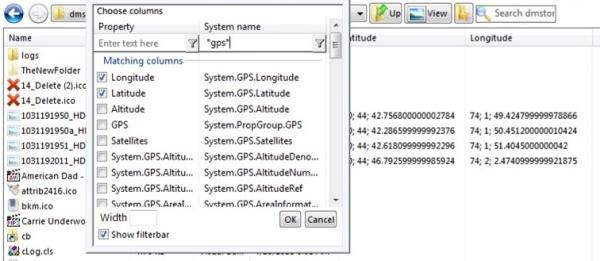
Here's a shot of the new Advanced options for the column manager; showing the super-expanded property list that includes GPS properties, then using the filter bars to search for them (be sure to read changelog for full details!):
Full Changelog:
Code:
'New in v8.2 (Released 17 May 2020)
'
'-The Column Select popup now has a dropdown menu on the Property column header
' which allows a new 'Advanced mode'. In this mode, *all* properties are loaded.
' Many of these properties are not meant for columns, but some are, for instance
' this mode has Longitude and Latitude columns for photos with GPS data. Since
' many have duplicate labels, an additional column with the System Name will be
' added to the list. Some don't have friendly names, so the canonical name appears
' in both columns. Sorting is also enabled for both columns.
' You can disable this with User Option bEnableColumnAdvancedMode.
'
'-Added a toggle for a FilterBar in the Column Select popup, allowing you to
' search for specific columns. Like the filters for the file list, you can start
' with the first letter(s) or use wildcards (*) to match partials inside.
' The filterbar will be present and working for the System Name column if the
' Advanced mode described above is enabled.
'
'-It's now possible to conduct a search of all Libraries from the library root
' folder. Even Explorer on Windows 7 didn't support this because of the way the
' libraries are structured.
'
'-When a search is completed, there's now an option to add a footer bar, which has
' options to repeat the search in several places. Option ShowFooterAfterSearch.
' The 'Custom' option loads a dialog, with its own GUID so it doesn't effect your
' app. If you do want it to effect your app, or you want to ensure the last place
' isn't automatically brought up in other ucShellBrowse controls, you can get/set
' the Client GUID with the DialogGUID property (not shown in Properties window).
' Note: The host form is *not* notified of a click to these buttons.
'
'-There's now a FileSearchStart event that notifies the host that a file search
' has started, along with the details of the search. Changing the details will not
' have any effect.
'
'-This control now implements IObjectSafety to mark it safe for untrusted calls
' and data, as controls such as Krools Common Controls replacements do. This was
' not done previously because it was not compatible with the self-sub code (it
' would completely prevent subclassing and callbacks while throwing many errors),
' but LaVolpe was able to figure out a fix for the issue (number of VTable entries
' in zProbe).
'
'-The Custom Folder, if already created (this is *not* search results, it's the
' single custom folder created with CreateCustomFolder), can now be opened with
' DisplayCustomFolder. This is primarily for being able to add a custom item to a
' accompanying ShellTree control to be able to navigate back to it from there.
' This can also be done (also new) by passing "*CUSTOM" as the path for navigating
' with the BrowserPath property.
'
'-Icons in the Preview Pane seemed to be a little small, so I switched to another
' preview method for them that should load the largest applicable size.
'
'-(Bug fix) Custom root paths weren't being processed correctly, leading to being
'           unable to load the root folder from the dropdown, and the parent being
'           incorrectly added as a child even when navigating out of root was blocked.
'
'-(Bug fix) If the footer was enabled, and it was created in a folder with few
'           enough items to be on screen, it would stay on screen when changing
'           folders and new items would just be drawn on top of it.
'           In a mostly related bug, if it was off screen, it wouldn't reappear
'           in a new folder sometimes.
'           It's now re-created each time, including being re-created when you
'           navigate away from search results, replacing the custom search one.
'
'-(Bug fix) There was a needless redraw of the Details Pane on startup.
'
'-(Internal issue) The group header/footer text for item count was defined in the
'                  procedure instead of with the module-level string group.
Last edited by fafalone; Aug 19th, 2020 at 05:37 PM.
Reason: This post originally had the wrong image
-
Aug 25th, 2020, 05:01 PM
#119
Re: [VB6] ucShellBrowse: A modern replacement for Drive/FileList w/ extensive feature
Version 8.3 Finalized
Found no major issues, so posted the new version in the main post. Only changes were a small issue where in Windows 10, the '3D Objects' item in This PC for some reason reports the properties of the main hard drive, and text positioning in the Details Pane when multiple items are selected (this seems to date back several versions).
Version 8.3 Beta
Need to do a lot of testing, but since the list of known issues has grown quite long, I wanted to release the next version as a beta. Everything seems good to go on my development system, but I haven't tested several other systems like normal yet. If any issues pop up, be sure to let me know.
Code:
'New in v8.3 Final (Released 27 Aug 2020)
'
'-(Bug fix) On Windows 10, the 3D Objects item in This PC for some reason has a
'           property store that returns free space, percent full, and space used
'           values for the main hard drive. The progress bar showing % full is
'           now hidden for items like that which don't return a 'Decorated Free
'           Space' value ("x bytes free of y").
'
'-(Bug fix) Spacing and sizing in the Details Pane when multiple items were
'           selected was bad; some text was cut off or on top of other text.
'
'New in v8.3 (Released 25 Aug 2020)
'
'-Added colored title bar to the Column Select popup and Search Options popup
' to provide a visual cue indicating it can be moved around.
'
'-There's a new option called RestrictViewModes. You can specify that certain
' view modes be hidden from the View Menu and unavailable to switch into via
' the ViewMode property. At least one option must be available, if none are,
' Large Icon view is enabled.
' It is your responsibility to ensure the startup view is not restricted, as
' that will not be blocked, and that if you make Tile and Contents the only
' possible views, that ComCtl6 is present, since those are unsupported without
' it. You can specify a list formatted like 0,1,2,... or 0123..., as follows:
'   0=XLIcon, 1=LgIcon, 2=MedIcon, 3=SmIcon, 4=List, 5=Details, 6=Tiles,
'   7=Contents, 8=Thumbnails
'
'-Added EnableLayout option, to toggle whether the Layout submenu appears in
' the View Menu, without needing to disable each item individually (which is
' still possible and would have the same effect).
'
'-In the Details Pane, you can now highlight and copy the values of properties
' that are read-only. The box is still locked, so it won't appear enabled or
' allow typing. This can be disabled with the bAllowCopyFromReadOnlyProps
' user option in the section below this changelog.
'
'-Changed the Bookmarks menu to only show the add or remove menu item for the
' current folder, instead of showing both and having one disabled.
'
'-There's now an option, AutoHideControlBox, for whether or not to automatically
' hide the Control Box (Up, View, Bookmarks, Search, and Back/Fwd in certain
' modes) when the UserControl width becomes too small, to allow a smaller size
' without the directory dropdown disappearing. Default is True. A new User
' Option, cyMinCombo, will apply when set to False.
'
'-Improved spacing/alignment of Details Pane properties. The biggest change here
' is no longer truncating long property names in the first column, like with an
' mp3's "Contributing Artists" that would get cut off.
'
'-Added event FileSearchPopup. This fires when the Search Popup is about to be
' shown either from double-clicking the control box or through the menu. It
' gives the current text for the control box search box, and the fCancel option
' which will prevent the popup from being shown if fCancel is set to non-zero.
' This is intended to allow you to replace the built-in Search Options screen
' with your own. You'd hide the default with this event, show your own, then
' use it to execute a custom search, using ExecFileSearch, ExecFileSearchEx,
' or ExecFileSearchExB (advanced options require manually building your own
' ICondition object. See GetCondition to see how to begin that path).
'
'-(Bug fix) If the Navigation Buttons (Back/Forward) were set to regular
'           command buttons (SBNB_Normal), the Forward button did not work; at
'           some point the click code was inadvertently deleted.
'
'-(Bug fix) For the option to include a toggle for a ShellTree control in the
'           layout menu, an icon was created and added to the control, but was
'           not assigned to the menu item.
'
'-(Bug fix) Without ComCtl6, the dropdown button on column headers is not
'           available, so Advanced Mode in the Column Select popup was not
'           accessible. It's now available by right-clicking the header.
'           -Related, since Group Mode is not available without CC6, the filter
'            bar is now hidden, pending a re-write to not rely on grouping.
'           -Neither of these change anything if Comctl6 is present.
'
'-(Bug fix) During runtime, if you switch NavigationButtons to Theme Buttons,
'           regular (not in box), from any of the other styles (or disabled),
'           the Back button would not be drawn.
'
'-(Bug fix) If you go to Computer/This PC, set the Group Mode to None, then
'           switch back to Category, then navigate to another folder, an error
'           occured and the folder didn't load.

'-(Bug fix) FullRowSelect couldn't be changed during runtime. There may have
'           been similar bugs where an extended style couldn't be disabled
'           during runtime; I adjusted all of them just in case.

'-(Bug fix) When switching control modes during runtime, when the Back/Fwd
'           buttons were drawn in theme mode (in box or on the left), they'd
'           initially be drawn as disabled when they should be enabled, until
'           a mouseover caused it to update to the correct status. They're now
'           drawn in the correct state from the start.
Last edited by fafalone; Aug 27th, 2020 at 09:08 PM.
-
Sep 9th, 2020, 09:51 PM
#120
Re: [VB6] ucShellBrowse: A modern replacement for Drive/FileList w/ extensive feature
Project Updated to Version 8.3 R2
Fixed bug in sort order:
Not sure how this was overlooked for so long, but there was a bug in the sorting algorithm for extended columns. If an item didn't have any value for the current column, it would trigger a break in the sorting. Everything above it would be sorted correct, and everything below it sorted correct--- but like it was two different lists, e.g. CEG __ ABDF.
Also, Type/DateCreated/DateAccessed/DateModified should be sorted using the IShellFolder sort, so that it's a little faster and folders are listed separately from files, but instead were sorted as extended columns.
Finally, now all columns have folders kept separate when sorted. Previously only the default columns (Name, Size, Type, Date Created/Accessed/Modified), or supported columns where AlwaysSortWithISF was enabled, were shown this way, but now all columns are without any significant performance impact.
Code:
'New in v8.3 R2 (Released 09 Sep 2020)
'
'-Implemented folder separation for extended columns. Previously, besides the
' default columns (Name,Size,Type,DateC-A-M), folders would be mixed in with
' all the items instead of appearing before or after. Now, like the defaults,
' all columns will show folders separately.
' This was tested in folders of several thousand items and did not add any
' significant performance hit; under a second for 3,000 items. But if this was
' causing problems, the block that checks folder status in LVSortProc->stdsort
' is easily removed.
'
'-(Bug fix) Sorting for Type and the three default Dates was not being done with
'           IShellFolder.CompareIDs.
'
'-(Bug fix) Sorting order for extended columns could be incorrect if any items
'           in the folder had no value for the given column.
Last edited by fafalone; Sep 10th, 2020 at 05:10 AM.
Tags for this Thread
 Posting Permissions
- You may not post new threads
- You may not post replies
- You may not post attachments
- You may not edit your posts
-
Forum Rules
|
Click Here to Expand Forum to Full Width
|



 Reply With Quote
