What I know:
* Using with speeds up developement
* Using with makes code a lot easier to manage.
* Using with can make code prettier
I think "With ... End With" speeds up execution time, which is something I've seen posted before. But I've also seen in other posts that it's a pure syntactic sugar and does nothing to compiled code. I've also heard:
With speeds up execution because objects need to be "opened" before they are accessed, and "closed" afterwards to allow other processes to access them.
Looking through the COM Api's the only thing I could see which might relate to this is CoLockObjectExternal.
So my question is, for the following code:
Code:
With A.B.C
   With .D
      Debug.Print .E
   end with
   Debug.Print .F & .G
End With
What does VB6 do internally? E.G. is it like this:
Code:
set temp1 = A.B.C
set temp2 = temp1.D
Debug.Print temp2.E
Debug.print temp1.F & temp1.G
No, CoLockObjectExternal and CoDisconnectObject are 100% not involved in With construction. Calling methods on an interface does not need wrapping the call in AddRef/Release too so nothing to skip/remove from normal code per se.
The only optimization is that With uses a hidden local variable for the expression which is used for calls inside its scope. For instance if there is a member variable m_oData in a class, using With m_oData declares and initializes a hidden local variable (on the stack) which is used instead when making calls to "instanceless" methods inside the With scope. This optimizes having to retrieve m_oData from object data (the so called Me in VB parlance) on each call.
There you have it -- a small victory. The more complex the expression is, the more CPU cycles are saved on calls inside the With scope.
The only optimization is that With uses a hidden local variable for the expression which is used for calls inside its scope. For instance if there is a member variable m_oData in a class, using With m_oData declares and initializes a hidden local variable (on the stack) which is used instead when making calls to "instanceless" methods inside the With scope. This optimizes having to retrieve m_oData from object data (the so called Me in VB parlance) on each call.
If A is a member variable there *are* performance benefits. With statement is transformed to this
Code:
Dim __hidden_A As __TypeOfA
Set __hidden_A = A
__hidden_A.B = 1
__hidden_A.C = 2
__hidden_A.D = 3
Because __hidden_A is on the stack while A is actually this->A (a member variable) there are several instructions (or more) saved.
cheers,
</wqw>
it took me a while to understand what you meant by member lol, but i see now yes that would make a lot of sense. I more so meant in the case where A is a local variable I.E.
Code:
Sub test
  Dim A as Whatever
  set A = new Whatever
  With A
    .B = 1
    .C = 2
    .D=3
  end with
end sub
in this instance I would expect a small performance decrease because A has to be moved from it's local variable location to the special hidden variable location. But the performance decrease will likely be negligible...
But the performance decrease will likely be negligible...
Yes and it might even be worth it if this removes visual clutter in the source code. I'm willing to use With on local UDTs as well if it reduces source code lines length and/or prevents code lines from splitting.
I also like to use "With New" when something is just needed for a quick time and thus want to save a variable declaration. (kind of lazy style, but reduces source code length)
It's certainly also faster in theory. (IUnknown::AddRef and IUnknown::Release just called one time)
I need to read all the responses, but I suspect the With statement does very little internally. My guess would be that it declares a temporary object variable of the Type of the With object, sets that object variable (i.e., creates a new reference), and then uses it within the "With" block. I suspect that 99% of that (if not 100%) is actually done by the compiler, and has nothing to do with anything runtime.
In fact, regarding actual code, I suspect the following two blocks of code are identical:
Code:
    Dim c As Collection
    Set c = New Collection

    With c
        .Add "asdf"
        .Add "qwer"
        .Add "zxcv"
    End With
Code:
    Dim c As Collection
    Set c = New Collection

    c.Add "asdf"
    c.Add "qwer"
    c.Add "zxcv"
In this case, the "With" block buys us very little. However, if we're digging deep into some object hierarchy (like I often am when doing Word or Excel automation), the "With" approach is quite convenient for not having to dig through that hierarchy. And, according to MS, it's faster when we've got such a hierarchy, as each piece of the hierarchy doesn't have to be resolved each time.
But, we could still accomplish the same thing by explicitly declaring an object variable that represented the end-point of our object hierarchy, and explicitly setting that reference and using it. So, in the end, the "With" block is just a nice convenience.
Best Regards,
Elroy
p.s. I look forward to anyone spotting anything wrong with what I've said.
EDIT: For grins, here's an example where it's actually useful. But again, I could have created a new object variable and set it to "doc.ActiveWindow.ActivePane.Selection" and accomplished the same thing:
Code:
Public Sub InWordTurnLineColor(doc As Object, TextColor As Long, Optional iSkipWordsAtBeg As Long)
    With doc.ActiveWindow.ActivePane.Selection
        .HomeKey wdLine, wdMove                                              ' Move to beginning of line.
        If iSkipWordsAtBeg Then .MoveRight wdWord, iSkipWordsAtBeg, wdMove   ' Skip over notation of joint (or just tabs).
        .EndKey wdLine, wdExtend                                             ' Select text to end of line.
        .Font.Color = TextColor                                              ' Turn the selection a color.
    End With
End Sub
Last edited by Elroy; Aug 14th, 2020 at 11:18 AM.
Any software I post in these forums written by me is provided "AS IS" without warranty of any kind, expressed or implied, and permission is hereby granted, free of charge and without restriction, to any person obtaining a copy. To all, peace and happiness.
Compile both ways and disassemble the binary. In some simple cases the object reference stays cached in a register. Most of the time that isn't practical though (calculations, function calls, etc.) so it doesn't happen.
Ahhh, I actually read all the posts, and they're interesting.
For one, I'd never considered using "With New" before. Krool, that's a neat trick, and I can see how it could come in handy on occasion.
So, just to be clear, y'all are thinking that ...
Code:
Public Sub InWordTurnLineColor(doc As Object, TextColor As Long, Optional iSkipWordsAtBeg As Long)
    With doc.ActiveWindow.ActivePane.Selection
        .HomeKey wdLine, wdMove                                              ' Move to beginning of line.
        If iSkipWordsAtBeg Then .MoveRight wdWord, iSkipWordsAtBeg, wdMove   ' Skip over notation of joint (or just tabs).
        .EndKey wdLine, wdExtend                                             ' Select text to end of line.
        .Font.Color = TextColor                                              ' Turn the selection a color.
    End With
End Sub
... is faster than ...
Code:
Public Sub InWordTurnLineColor(doc As Object, TextColor As Long, Optional iSkipWordsAtBeg As Long)
    Dim DocText As Object
    Set DocText = doc.ActiveWindow.ActivePane.Selection
    '
    DocText.HomeKey wdLine, wdMove                                              ' Move to beginning of line.
    If iSkipWordsAtBeg Then DocText.MoveRight wdWord, iSkipWordsAtBeg, wdMove   ' Skip over notation of joint (or just tabs).
    DocText.EndKey wdLine, wdExtend                                             ' Select text to end of line.
    DocText.Font.Color = TextColor                                              ' Turn the selection a color.
End Sub
... ?
p.s. I know I get into some late vs early binding issues, but I suspect my example is ALL late binding, even if "With" is used.
Any software I post in these forums written by me is provided "AS IS" without warranty of any kind, expressed or implied, and permission is hereby granted, free of charge and without restriction, to any person obtaining a copy. To all, peace and happiness.
Note: Once a With block is entered, object can't be changed. As a result, you can't use a single With statement to affect a number of different objects.
You can nest With statements by placing one With block within another. However, because members of outer With blocks are masked within the inner With blocks, you must provide a fully qualified object reference in an inner With block to any member of an object in an outer With block
In general, it's recommended that you don't jump into or out of With blocks. If statements in a With block are executed, but either the With or End With statement is not executed, a temporary variable containing a reference to the object remains in memory until you exit the procedure.
Edited. One of my biggest "abuses" of WITH is for loading properties on some controls and recordsets, especially listviews
Code:
With ListView1.ListIems.Add(, , , "Main Item Text")
    .SubItems(1) = ...
    .SubItems(2) = ...
    ... etc
End With
Last edited by LaVolpe; Aug 14th, 2020 at 11:49 AM.
Insomnia is just a byproduct of, "It can't be done"
So I made a post on StackOverflow regarding what I learnt from here and ultimately got criticised from mods who, rightly, thought it was all speculation.
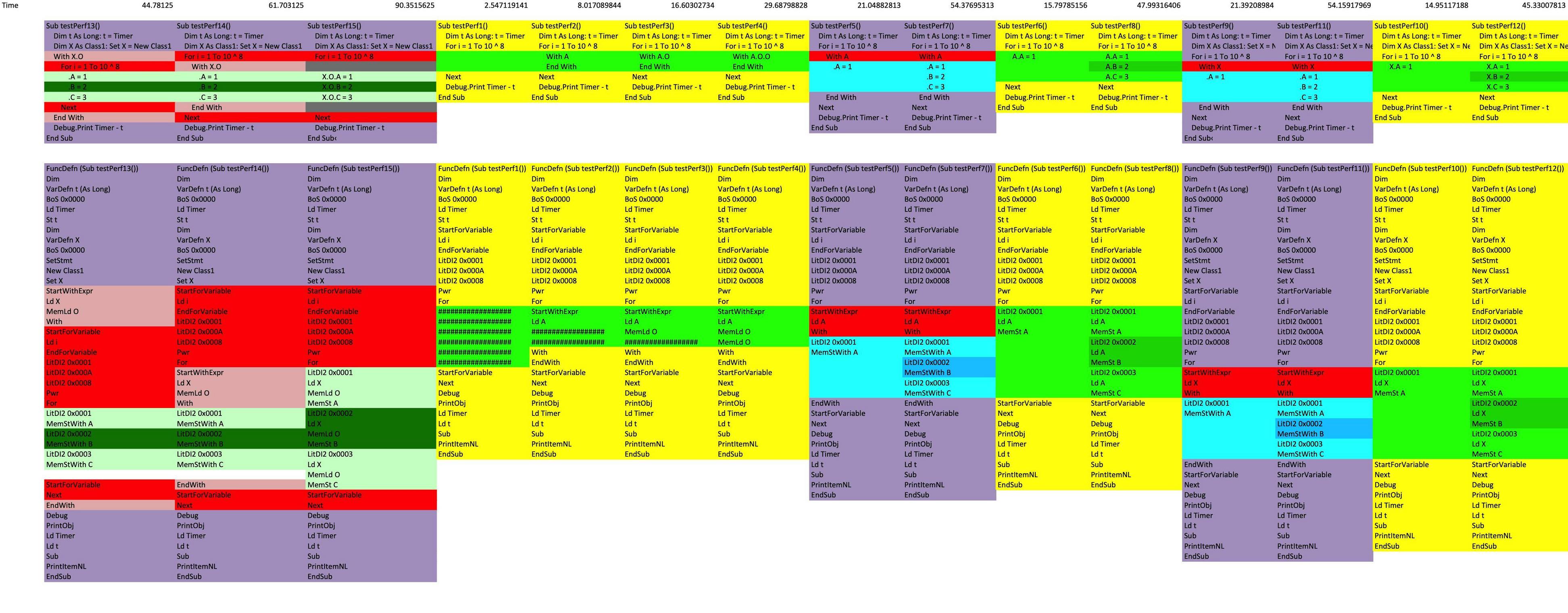
So I actually started to do some analysis of the P-Code generated and actual performance analysis.
Notes
My performance tests were in VBA. VBA does have 2 compiling steps - Code to P-Code, and P-Code to Executable codes, however I'm unsure there is any optimisation step in the VBA compiler, where as the VB6 compiler might have one.
[C]With A[/C] uses a member variable.
The real surprising thing to me here is that optimisation was only really seen with
Code:
With X.O
   .A=1
   .B=2
   .C=3
End With
Member variables are faster to access directly, without with. Similarly local variables are faster to access directly, without with.
Set of tests used for reference:
Module1 Code:
Public A As New Class1
 Sub testPerf1() 'Mac: 2.547119140625   Win:  1.7734375
    Dim t As Long: t = Timer
    For i = 1 To 10 ^ 8
        'With A
        'End With
    Next
    Debug.Print Timer - t

End Sub
Sub testPerf2() 'Mac: 8.01708984375    Win:  4.48828125
    Dim t As Long: t = Timer
    For i = 1 To 10 ^ 8
        With A
        End With
    Next
    Debug.Print Timer - t
End Sub
Sub testPerf3() 'Mac: 16.60302734375   Win:  7.0546875
    Dim t As Long: t = Timer
    For i = 1 To 10 ^ 8
        With A.O
        End With
    Next
    Debug.Print Timer - t
End Sub
Sub testPerf4()  'Mac: 29.68798828125   Win:  10.61328125
    Dim t As Long: t = Timer
    For i = 1 To 10 ^ 8
        With A.O.O
        End With
    Next
    Debug.Print Timer - t
End Sub
   Sub testPerf5()  'Mac: 21.048828125   Win:  9.21875
    Dim t As Long: t = Timer
    For i = 1 To 10 ^ 8
        With A
            .A = 1
        End With
    Next
    Debug.Print Timer - t
End Sub
Sub testPerf6()  'Mac: 15.7978515625   Win: 6.8203125
    Dim t As Long: t = Timer
    For i = 1 To 10 ^ 8
        A.A = 1
    Next
    Debug.Print Timer - t
End Sub
  Sub testPerf7()  'Mac: 54.376953125   Win:  23.40625
    Dim t As Long: t = Timer
    For i = 1 To 10 ^ 8
        With A
            .A = 1
            .B = 2
            .C = 3
        End With
    Next
    Debug.Print Timer - t
End Sub
Sub testPerf8()  'Mac: 47.9931640625   Win:  21.046875
    Dim t As Long: t = Timer
    For i = 1 To 10 ^ 8
        A.A = 1
        A.B = 2
        A.C = 3
    Next
    Debug.Print Timer - t
End Sub
     Sub testPerf9()  'Mac: 21.39208984375   Win:  8.8046875
    Dim t As Long: t = Timer
    Dim X As Class1: Set X = New Class1
    For i = 1 To 10 ^ 8
        With X
            .A = 1
        End With
    Next
    Debug.Print Timer - t
End Sub
Sub testPerf10()  'Mac: 14.951171875   Win:  6.203125
    Dim t As Long: t = Timer
    Dim X As Class1: Set X = New Class1
    For i = 1 To 10 ^ 8
        X.A = 1
    Next
    Debug.Print Timer - t
End Sub
  Sub testPerf11()  'Mac: 54.1591796875   Win:  22.8828125
    Dim t As Long: t = Timer
    Dim X As Class1: Set X = New Class1
    For i = 1 To 10 ^ 8
        With X
            .A = 1
            .B = 2
            .C = 3
        End With
    Next
    Debug.Print Timer - t
End Sub
Sub testPerf12()  'Mac: 45.330078125   Win:  19.203125
    Dim t As Long: t = Timer
    Dim X As Class1: Set X = New Class1
    For i = 1 To 10 ^ 8
        X.A = 1
        X.B = 2
        X.C = 3
    Next
    Debug.Print Timer - t
End Sub
    Sub testPerf13()  'Mac: 44.78125   Win:  19.8828125
    Dim t As Long: t = Timer
    Dim X As Class1: Set X = New Class1
    With X.O
        For i = 1 To 10 ^ 8
            .A = 1
            .B = 2
            .C = 3
        Next
    End With
    Debug.Print Timer - t
End Sub
Sub testPerf14()  'Mac: 61.703125   Win:  25.3046875
    Dim t As Long: t = Timer
    Dim X As Class1: Set X = New Class1
    For i = 1 To 10 ^ 8
        With X.O
            .A = 1
            .B = 2
            .C = 3
        End With
    Next
    Debug.Print Timer - t
End Sub
Sub testPerf15()  'Mac: 90.3515625   Win:  31.109375
    Dim t As Long: t = Timer
    Dim X As Class1: Set X = New Class1
    For i = 1 To 10 ^ 8
        X.O.A = 1
        X.O.B = 2
        X.O.C = 3
    Next
    Debug.Print Timer - t
End Sub
    Sub testPerf16()  'Mac: 57.28125   Win: 23.05078125
    Dim t As Long: t = Timer
    For i = 1 To 10 ^ 8
        With A
            .A = 1
            .B = 2
            .C = 3
        End With
    Next
    Debug.Print Timer - t
End Sub
Sub testPerf17()  'Mac: 49.9375   Win:  20.140625
    Dim t As Long: t = Timer
    For i = 1 To 10 ^ 8
        A.A = 1
        A.B = 2
        A.C = 3
    Next
    Debug.Print Timer - t
End Sub
Sub testPerf18()  'Mac: 57.4453125    Win:  22.421875
    Dim t As Long: t = Timer
    Dim X As Class1: Set X = New Class1
    For i = 1 To 10 ^ 8
        With X
            .A = 1
            .B = 2
            .C = 3
        End With
    Next
    Debug.Print Timer - t
End Sub
Sub testPerf19()  'Mac: 47.28125   Win:  19.234375
    Dim t As Long: t = Timer
    Dim X As Class1: Set X = New Class1
    For i = 1 To 10 ^ 8
        X.A = 1
        X.B = 2
        X.C = 3
    Next
    Debug.Print Timer - t
End Sub
Sub testPerf20()  'Mac:  56.64453125   Win:  22.96875
    Dim t As Long: t = Timer
    Dim X As Class1: Set X = A
    For i = 1 To 10 ^ 8
        With X
            .A = 1
            .B = 2
            .C = 3
        End With
    Next
    Debug.Print Timer - t
End Sub
Sub testPerf21()  'Mac: 46.79296875   Win: 19.8046875
    Dim t As Long: t = Timer
    Dim X As Class1: Set X = A
    For i = 1 To 10 ^ 8
        X.A = 1
        X.B = 2
        X.C = 3
    Next
    Debug.Print Timer - t
End Sub
Sub testPerf22()  'Mac: 100.15625   Win:  42.296875
    Dim t As Long: t = Timer
    Dim X As Class1: Set X = A
    For i = 1 To 10 ^ 8
        With X
            .A = 1
            .B = 2
            .C = 3
            .A = 1
            .B = 2
            .C = 3
        End With
    Next
    Debug.Print Timer - t
End Sub
Sub testPerf23()  'Mac: 90.1015625   Win: ???
    Dim t As Long: t = Timer
    Dim X As Class1: Set X = A
    For i = 1 To 510 ^ 8
        X.A = 1
        X.B = 2
        X.C = 3
        X.A = 1
        X.B = 2
        X.C = 3
    Next
    Debug.Print Timer - t
End Sub
Sub testPerf24()  'Mac: ???   Win: ???
    Dim t As Long: t = Timer
    Dim X As Class1: Set X = A
    For i = 1 To 10 ^ 8
        With X
            .A = 1
            .B = 2
            .C = 3
            .A = 1
            .B = 2
            .C = 3
            .A = 1
            .B = 2
            .C = 3
        End With
    Next
    Debug.Print Timer - t
End Sub
Sub testPerf25()  'Mac: ???   Win: ???
    Dim t As Long: t = Timer
    Dim X As Class1: Set X = A
    For i = 1 To 510 ^ 8
        X.A = 1
        X.B = 2
        X.C = 3
        X.A = 1
        X.B = 2
        X.C = 3
        X.A = 1
        X.B = 2
        X.C = 3
    Next
    Debug.Print Timer - t
End Sub
Class1 Code:
Public A
Public B
Public C
Public O As Class1
  Private Sub Class_Initialize()
    Set O = Me
End Sub
Edit: One last thing - A really neat use of the with statement is for sentries. So if you ever have options that need to turn on and off in code this is quite useful:
Optimiser.cls Code:
Private bEnableEvents as boolean
Private bScreenUpdating as boolean
sub class_initialise()
  'Apply change and save state:
  bEnableEvents = Application.EnableEvents
  bScreenUpdating = Application.ScreenUpdating
  Application.EnableEvents = false
  Application.ScreenUpdating = false
end sub
Private Sub Class_Terminate()
  'Revert change
  Application.EnableEvents = bEnableEvents
  Application.ScreenUpdating = bScreenUpdating
Module1 Code:
With new Optimiser
  '...
End With
Last edited by sancarn; Aug 16th, 2020 at 04:17 AM.
Reason: An additional nice to have that I learnt while going through this ordeal
Performance measurement is hard. Most of your tests have to be re-run for the VBA crowd on Windows and all of the VB6 forums members that compile to native x86 code.
Some of the conclusions will probably not hold water as a result e.g. member variables vs with.
Performance measurement is hard. Most of your tests have to be re-run for the VBA crowd on Windows and all of the VB6 forums members that compile to native x86 code.
Some of the conclusions will probably not hold water as a result e.g. member variables vs with.
Yes. All these tests have been done in the VBA environment on both Mac and Windows. If someone could run these over VB6 P-Code and VB6 compiled native code this would be really useful! I will be quite interested.
My understanding, from bontchev, is that VBA doesn't have an optimisation step. VBA appears to compile to P-Code on save, and then compile again to "Execodes" known as the "performance cache" which is system specific. All of this is stored on in the VBA Project file on windows. If this is the same process which VB6 code is compiled under I wouldn't be surprised... But the performance tests might show us otherwise...
To get an understanding of how With statements affect all platforms/compilation environments would be most interesting .
Another thing that I hadn't tried yet is my member variable was while testing the member of a Module rather than a class. Realistically I should compare it to the performance from within a class also.
I just tested in VB6, both as p-code and compiled.
In my test, I used all early-binding. I just made five classes, all nested. I'll list them backwards:
Here's Class5.cls:
Code:
Option Explicit

Friend Function Test() As String
    Test = "asdfasdf"
End Function
Class4.cls:
Code:
Option Explicit

Dim cls5 As New Class5

Friend Function Class5() As Class5
    Set Class5 = cls5
End Function
Class3.cls:
Code:
Option Explicit

Dim cls4 As New Class4

Friend Function Class4() As Class4
    Set Class4 = cls4
End Function
Class2.cls:
Code:
Option Explicit

Dim cls3 As New Class3

Friend Function Class3() As Class3
    Set Class3 = cls3
End Function
And Class1.cls:
Code:
Option Explicit

Dim cls2 As New Class2

Friend Function Class2() As Class2
    Set Class2 = cls2
End Function
And here's the test code I put together in Form1. I also included my TimerEx.cls (not listed). It's all included in the little attached project:
Code:
Option Explicit
Dim cls1 As New Class1


Private Sub Form_Load()
    Me.AutoRedraw = True
    Me.Font.Size = 14
    Me.Font.Name = "Segoe UI"
    Me.Font.Bold = True
    '
    ' Get everything instantiated.
    Call cls1.Class2.Class3.Class4.Class5.Test
    Call TimerEx.Value


    Me.Print "Click me"
End Sub


Private Sub Form_Click()

    Me.Print "Working..."
    Me.Refresh
    DoTesting

End Sub

Private Sub DoTesting()
    Dim dStart  As Double
    Dim dStop   As Double

    Dim i       As Long
    Const cnt   As Long = 10000000


    dStart = TimerEx.Value
    For i = 1 To cnt
        Call cls1.Class2.Class3.Class4.Class5.Test
    Next
    dStop = TimerEx.Value
    Me.Print "Full reference each time: "; Format$(dStop - dStart, "#0.000000")
    Me.Refresh


    Dim cls5    As Class5
    Set cls5 = cls1.Class2.Class3.Class4.Class5
    '
    dStart = TimerEx.Value
    For i = 1 To cnt
        Call cls5.Test
    Next
    dStop = TimerEx.Value
    Me.Print "Using explicit shortcut reference: "; Format$(dStop - dStart, "#0.000000")
    Me.Refresh


    With cls1.Class2.Class3.Class4.Class5
        dStart = TimerEx.Value
        For i = 1 To cnt
            Call .Test
        Next
        dStop = TimerEx.Value
    End With
    Me.Print "Using ""With"" reference: "; Format$(dStop - dStart, "#0.000000")
    Me.Refresh


End Sub
------------------
I tested both as IDE p-code and compiled.
Here's the p-code test:
And here's compiled:
I ran both several times.
Clearly, creating a short-cut reference speeds things up. However, creating an "explicit" shortcut versus the "implicit" shortcut you get with the With block seems to make no difference. I ran it several times, and the differences between implicit and explicit bounced back and forth, always being almost identical.
EDIT: Crud!!! I just noticed I didn't do the With block correctly. I'll redo it.
EDIT2: Ok, I fixed the With block and still got basically the same results. It was just the one line inside the loop. I changed it to:
Code:
Call .Test
(I fixed it in the above too. And in the attachment.)
Last edited by Elroy; Aug 16th, 2020 at 08:23 PM.
Any software I post in these forums written by me is provided "AS IS" without warranty of any kind, expressed or implied, and permission is hereby granted, free of charge and without restriction, to any person obtaining a copy. To all, peace and happiness.



 Reply With Quote

 Originally Posted by wqweto


 .
.
