|

-
Aug 3rd, 2020, 03:30 PM
#1
Thread Starter
Lively Member

Exit Validating if button clicked
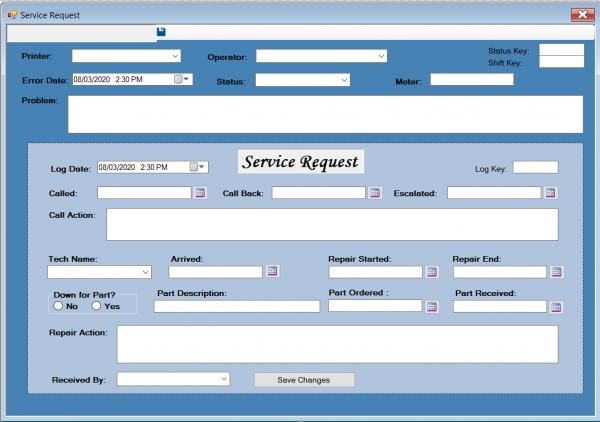
Maybe I am not doing this correctly or its just not possible. I am hoping someone has a solution. I have a text box that has date time data. It is the first field accessible control on the screen. I validate this field in a validating event. I also have a button for a calendar pop up that allows the user to select a date. I want to validate unless the user Clicks on the calendar button. The issue is I don't know how to tell if the user clicked the calendar button so I can skip the validate until they have selected a date. I am thinking somewhere the program has to know where I clicked on the screen in case there is no errors it will move the cursor to that control. Just don't know how to access where it is stored.
Code:
    Private Sub tbCalled_Validating(sender As Object, e As System.ComponentModel.CancelEventArgs) Handles tbCalled.Validating

        If tbStatus_Key.Text <> Save_StatusKey Then Exit Sub

        If sender.name = "btnCalled" Then  <--- This what I am trying to do
            Exit Sub                                     <---
        ElseIf String.IsNullOrEmpty(tbCalled.Text) Then
            MsgBox("Called date must be a valid date") 'Is required
            tbCalled.Text = Save_Called
            tbCalled.Focus()
            Exit Sub
        ElseIf tbCalled.Text = Save_Called Then
            Exit Sub 'No Change exit
        ElseIf Not IsDate(tbCalled.Text) Then
            MsgBox("Called date must be a valid date")
            tbCalled.Text = Save_Called
            tbCalled.Focus()
        End If

        Dim MyDate As DateTime = DateTime.Parse(tbCalled.Text)
        Dim MyDate2 As DateTime = dtpLogDate.Value
        If MyDate < MyDate2 Then
            MsgBox("Call must be after Error Date")
            tbCallBack.Text = tbCalled.Text
            tbCallBack.Focus()
            Exit Sub
        End If

        MyDate = DateTime.Parse(tbCalled.Text)
        tbCalled.Text = MyDate.ToString("M/d/yyyy h:mm tt")

    End Sub
-
Aug 3rd, 2020, 08:06 PM
#2
Re: Exit Validating if button clicked
My first question would be, if you have DateTimePicker controls elsewhere, why aren't you using DateTimePicker controls where you have those TextBox/Button pairs? That would render this a non-issue because the control would not lose focus when you click the drop-down button. Maybe there's a good reason. Maybe you just think there's a good reason but there actually isn't. I want to confirm that first because, while it would be possible to jerry-rig what you want, there's no simple way, i.e. you can't just set a property or the like. The code you have is obviously not going to work because the sender parameter is the object that raised the event so, if you're handling the Validating event of a TextBox, the sender can't be a Button.
Last edited by jmcilhinney; Aug 3rd, 2020 at 10:29 PM.
-
Aug 3rd, 2020, 10:15 PM
#3
Thread Starter
Lively Member
Re: Exit Validating if button clicked
Again you are correct and have a valid point JM. I do not use Date Time pickers on most fields on this form because most are not required at the time the service request is created. If I call a service tech I do not know when he will arrive or when he will start or end the service. Date Time pickers always default to the current date and I need them to be blank if not entered. I had it defaulting to the Error date, then the user asked me to not default the date so I used the common logic of a text box that would allow blank values. But I think I can sell the user based on the fact that this field is required to open a service request. I think a date time picker will be the best option here. Thanks again for your input.
-
Aug 3rd, 2020, 10:33 PM
#4
Re: Exit Validating if button clicked
Note that the DateTimePicker control has a ShowCheckBox property that, when set to True, will display a check box in the control and grey the text if it is not checked. For those fields that don't need to be populated, you could set Checked to False by default and then ignore the Value property unless Checked is True. You can default the date to something sensible or leave it as today but being greyed out will indicate that it is being ignored.
Tags for this Thread
 Posting Permissions
- You may not post new threads
- You may not post replies
- You may not post attachments
- You may not edit your posts
-
Forum Rules
|
Click Here to Expand Forum to Full Width
|



 Reply With Quote

