|

-
Jun 16th, 2020, 04:43 AM
#1
Thread Starter
Fanatic Member


 help about create this theme help about create this theme
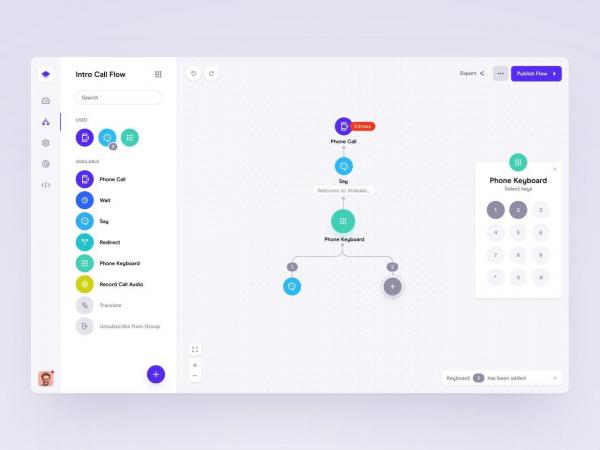
hi,i am looking for any sample to can create theme like this.
i can design with activeskin but i want more samle,imprtants to me is material colors and soft radius form corners and objects.
-
Jun 18th, 2020, 06:53 AM
#2
Fanatic Member
Re: help about create this theme
LeandroA, has the following project, in case you are helpful or have ideas.
their menus look very nice.
http://www.vbforums.com/showthread.p...lus&highlight=
Greetings
-
Jun 29th, 2020, 10:58 PM
#3
Thread Starter
Fanatic Member
Re: help about create this theme
when i downloaded source and want open projects i can see just this error : experssion too complex,how can fix this error? i cant open projects
-
Jun 29th, 2020, 11:37 PM
#4
Re: help about create this theme
You posted the question on my alpha image control also. I'll give you this hint (and I don't' think it is related to my control).
Look for "Not Not" in your source code. Do a complete project search for those two words together like that. It is a common approach to test an array if it is dimensioned or not. And that method can cause that error. If you see "Not Not" used with arrays, add this line shortly after that statement: Debug.Assert App.hInstance
Now run the project again and see if error goes away. For more information on Not Not with arrays, see this FAQ page
If the error isn't related to Not Not, then at least post the line that is causing the error.
-
Jul 1st, 2020, 06:00 AM
#5
Re: help about create this theme
 Originally Posted by LaVolpe

You posted the question on my alpha image control also. I'll give you this hint (and I don't' think it is related to my control).
Look for "Not Not" in your source code. Do a complete project search for those two words together like that. It is a common approach to test an array if it is dimensioned or not. And that method can cause that error. If you see "Not Not" used with arrays, add this line shortly after that statement: Debug.Assert App.hInstance
Now run the project again and see if error goes away. For more information on Not Not with arrays, see this FAQ page
If the error isn't related to Not Not, then at least post the line that is causing the error.
Interesting, I have never heard that one before... Should try it some time. Another method to check whether an array has been dimensioned is:
Code:
Private Declare Function SafeArrayGetDim Lib "Oleaut32.dll" (ByRef saArray() As Any) As Long
-
Jul 1st, 2020, 08:14 PM
#6
Thread Starter
Fanatic Member
Re: help about create this theme
Originally Posted by Peter Swinkels
Interesting, I have never heard that one before... Should try it some time. Another method to check whether an array has been dimensioned is:
Code:
Private Declare Function SafeArrayGetDim Lib "Oleaut32.dll" (ByRef saArray() As Any) As Long
whats this and how work?
i find solution,problem is about vb6 ide editor.i disabaled ax-smart code 2013 in add in manager but i think problems is about processed added on vb6 ide like as add in managers
-
Jul 2nd, 2020, 12:50 AM
#7
Re: help about create this theme
Originally Posted by Black_Storm
whats this and how work?
i find solution,problem is about vb6 ide editor.i disabaled ax-smart code 2013 in add in manager but i think problems is about processed added on vb6 ide like as add in managers
It’s an external function in a dll. Just call it as you would any other function. It returns a value indicating whether an array has been dimensioned.
-
Jul 2nd, 2020, 02:31 AM
#8
Re: help about create this theme
If you are having problems in the IDE then I would first stop all intrusive ADDINS like CodeSmart
They modify the IDE to heavily.
I tried it once, their addin uses the CodeJock visual components to enhance the IDE experience, which conflicts heavily with my version of the CodeJock controls I use in my project.
-
Jul 4th, 2020, 04:10 PM
#9
Re: help about create this theme
Originally Posted by Peter Swinkels
Interesting, I have never heard that one before... Should try it some time. Another method to check whether an array has been dimensioned is:
Code:
Private Declare Function SafeArrayGetDim Lib "Oleaut32.dll" (ByRef saArray() As Any) As Long
Okay, so I tried the "not not" method in vb6:
Code:
Public Sub Main()
Dim tmp() As Long

MsgBox (Not Not tmp())

ReDim tmp(0 To 100)
MsgBox (Not Not tmp())
End Sub
And it works! As to my question: why does it work and what do the numbers returned actually mean? It may be pointer, but definitely not the arrays size, the numbers are too big and don't relate to array's size.
Code:
Public Sub Main()
Dim tmp(0 To 100) As Long
Dim tmp1(0 To 100) As Long
Dim tmp2(0 To 100) As Long

Debug.Print Not Not tmp()
Debug.Print Not Not tmp1()
Debug.Print Not Not tmp2()
End Sub
Outputs:
1702628
1702600
1702572
Those do look like pointers with 28 byte descriptiors. Anyone here know?
ps:
I tried this trick in GWbasic, Q(uick) Basic, and vb.net as well. It didn't work.
-
Aug 1st, 2020, 08:01 PM
#10
Thread Starter
Fanatic Member
Re: help about create this theme
-
Aug 2nd, 2020, 05:04 AM
#11
Re: help about create this theme
Originally Posted by Peter Swinkels
ps:
I tried this trick in GWbasic, Q(uick) Basic, and vb.net as well. It didn't work.
It's a bug in the compiler and it makes the IDE (interpreter) runtime unstable so should never be used is production (or any other) code.
Just use ArrPtr alias to VarPtr to get pointer to the SAFEARRAY. If this is not nullptr then the cDim As Integer member is in the first 2 bytes.
Code:
Private Declare Function ArrPtr Lib "msvbvm60" Alias "VarPtr" (Ptr() As Any) As Long
cheers,
</wqw>
Tags for this Thread
 Posting Permissions
- You may not post new threads
- You may not post replies
- You may not post attachments
- You may not edit your posts
-
Forum Rules
|
Click Here to Expand Forum to Full Width
|



 Reply With Quote


