|

-
May 30th, 2020, 01:30 PM
#1
Redesign of Resource Editor - Suggestions
For a challenge, I want to create a resource editor for VB. Looking for a wish-list from those that routinely use resources. Elroy, you listening?  Here is what I have in mind & a lot of it is already done. Here is what I have in mind & a lot of it is already done.
Wish List - Done
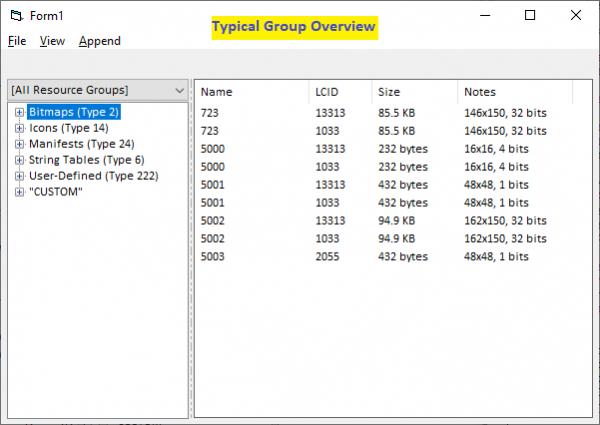
Bitmaps: see all bitmaps in a tile-view and large preview of selected item
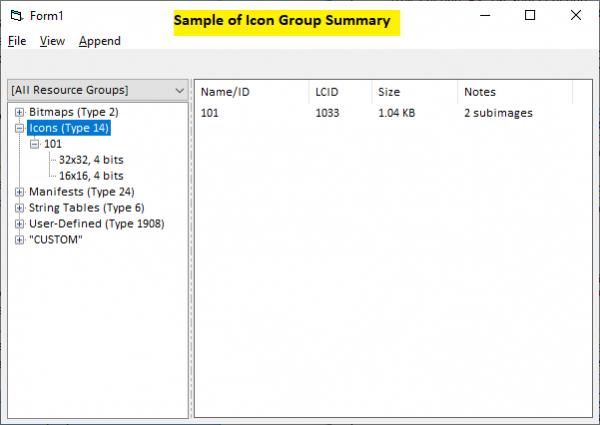
Icons/Cursors: see all in a tile-view, show subimages, allow rearranging subimages
-- warn if using a PNG-encoded icon/cursor (XP and lower cannot support them)
-- allow deleting of individual subimages
Manifests: allow editing, ensure DWord padding, warn if non-standard IDs are used
-- possibly include a generic application manifest that can be added from the tool & tweaked
HTML: allow editing, ensure DWord padding
String Tables
-- allow carriage returns
-- edit entries with multiline textbox, unicode compatible
"Custom" resource types
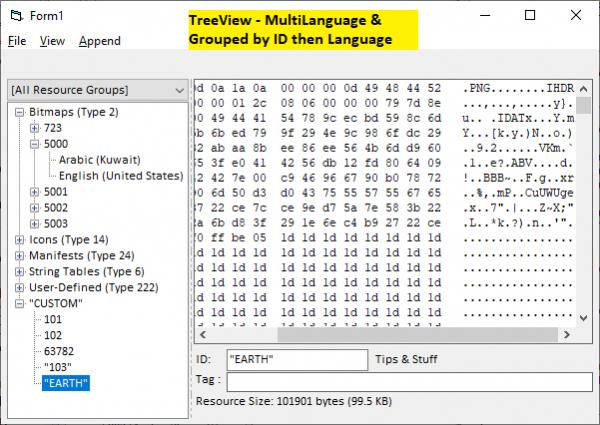
-- show content as read-only hex dump if content is unknown
-- show content graphically if PNG, TIF, GIF, BMP
-- show content as RTF if RTF formatted & allow editing
-- show content as text and allow editing
enable full 65k range for resource/type names, string table entries etc
-- VB limits are due to TextBox & Grid control limitations used for input
Wish List - VB Bugs to Fix
Automatically fix incorrect icon/cursor directory entries (height is always wrong)
Enable full range of numeric resource types: 1 to 65535 vs using hacks like "#24"
Wish List - To Do
Restore Points: similar to undo actions
-- each restore point is a complete res file in proper format
-- at any point during editing can move between restore points
Importing: allow bulk importing
-- enable importing data from existing resources (other res files, exes, dlls, etc)
-- enable importing from restore points (see above); may use registered clipboard messages
-- enable importing from rc scripts? likely not, may require user to compile to res file first
Exporting: allow exporting & bulk exporting of resource types and individual items
-- export as own resource file
-- export in preferred format, i.e., .bmp, ico, cur, .html, .manifest, etc
-- export/import string tables with a user-friendly format (suggestions?)
-- :: remember that carriage returns are allowed & multiple languages can exist (i.e., unicode)
Renumbering: not just for string table entries
Updating: enable updating compiled executables (UpdateResource APIs)
Satellites: allow creation of resource-only DLLs (aka satellite DLLs)
Tagging
-- as implies, allow tags to be assigned to individual resource items (with limitations)
-- allow tags to be stored externally, i.e., INI file or internally as a custom resource
-- internally stored tags can be accessed at design-time & run-time
-- tagging can be used to cache CRC values, file sizes, versions, and more
Access: enable as an Add-In and stand-alone executable
-- idea is for the Add-in to simply shell out to the editor and they talk with each other
-- stand-alone can be associated to .res files if you choose
Provide ready-made class/module for extracting resource file entries that VB cannot support
-- these classes would either be copied to clipboard or extracted to file, on demand
-- :: for example: extracting a specific icon subimage and string table entries of other locales & more
-- possibly include ready-made class for runtime accessing of satellite DLLs
Wish List- Others
jpbro: shell resource to default editor option. See posts #3 & #4 below
Elroy: have some way to say which resources to overwrite when uploading/importing. Post #10
LeandroA: import PNG as an icon group. Post #16
Wish List - Will not Do
icon editing
generate rc scripts
include optional creation of RT_VERSION resource. VB creates this when app is compiled
include editing of many resource types that VB doesn't natively support, but not all
-- i.e., RT_FONT/FONTDIR, RT_DIALOG, and more
-- however, may offer creating/editing of RT_MESSAGETABLE
-- any types not supported by the new tool can always be imported from elsewhere
-- in other cases, still may provide a read-only visual other than hex dump
CONS with any replacement of VB's resource editor. There really aren't any major ones except: VB's resource editor may not be able to display the resource file. This would mean you cannot use VB's resource editor to make changes to the resource file later. However, the file itself is valid and can be compiled into any VB application and used with any tool that can read/edit resources. Stuff that may make it incompatible with VB's resource editor are PNG-encoded & 32bpp icons and strings greater than 32k. But odds are that if this editor is well behaved, you may never go back to VB's editor again.
Commonsense and reality. Enabling the editor to allow 65k character strings in the string table and resource names up to 65k characters in length is valid. That doesn't mean VB will compile resource files where someone abuses those limits to stuff binary data and other things into them. More testing is needed to see if there is a true lower-limit that cannot be exceeded. Any true limitation will not be with VB since its resource editor isn't the deciding factor. Limits would be with the CVTRES utiilty that converts res files to COFF objects during project compilation.
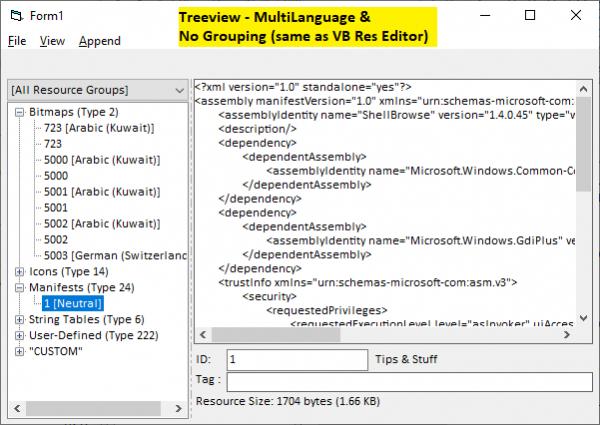
Some screenshots of work in progress. Notice the various ways we can choose to display the resources in the treeview

Last edited by LaVolpe; Jun 1st, 2020 at 12:44 PM.
-
May 30th, 2020, 02:16 PM
#2
Fanatic Member

Re: Redesign of Resource Editor - Suggestions
I use a third-party resource editor called Resource Builder from SiComponents.
https://www.resource-builder.com/
If you want function/feature ideas to include in your own.
-
May 30th, 2020, 02:34 PM
#3
Re: Redesign of Resource Editor - Suggestions
I understand not wanting to roll your own icon/bitmap editing feature, but how about allowing users to shell out to an external editor for each file type and automatically replacing the resource when changes are saved?
-
May 30th, 2020, 03:04 PM
#4
Re: Redesign of Resource Editor - Suggestions
 Originally Posted by jpbro

I understand not wanting to roll your own icon/bitmap editing feature, but how about allowing users to shell out to an external editor for each file type and automatically replacing the resource when changes are saved?
Shelling out is a good idea, I'll add that to the list. Replacing would be just a simple exercise to re-import the modified file. Maybe an idea there would be to allow an option when importing a single file to identify which existing resource it would replace. That way you don't get the "import new > resource created > delete old one > rename new one" scenario
-
May 30th, 2020, 04:00 PM
#5
Fanatic Member
Re: Redesign of Resource Editor - Suggestions
very good project.
I like your ideas.
-
May 30th, 2020, 06:11 PM
#6
Fanatic Member
Re: Redesign of Resource Editor - Suggestions
how about having a library of icons/images/files that you can choose to add to a resource file
maybe have a folder location where lots of icons/images/files are stored, then have a part of the resource builder that can have tabs
ie 32x32 16x16 etc ( or something like that ) then be able to select 1 or more icons/images/files etc that you added to the resource file easily
just an idea
-
May 30th, 2020, 06:49 PM
#7
Re: Redesign of Resource Editor - Suggestions
Originally Posted by k_zeon
how about having a library of icons/images/files that you can choose to add to a resource file ... maybe have a folder location where lots of icons/images/files are stored
Well, folders like that do exist, i.e., system folder where shell32.dll, moricons.dll and other dlls exist. This tool will allow you to import from those dlls. The tool won't have a 'tabs' but will allow you browse each icon group and any subimages that group may have. Included with that browsing are the icon metrics: size, color depth & PNG-formatting.
But to the overall question... maintaining some image library isn't within the scope of what I want this project to do.
-
May 31st, 2020, 07:59 AM
#8
Re: Redesign of Resource Editor - Suggestions
Originally Posted by k_zeon
how about having a library of icons/images/files that you can choose to add to a resource file
maybe have a folder location where lots of icons/images/files are stored, then have a part of the resource builder that can have tabs
ie 32x32 16x16 etc ( or something like that ) then be able to select 1 or more icons/images/files etc that you added to the resource file easily
You can manage such "complete resource-folders" quite easily yourself (in just a few lines of code),
when you use an archiver-class (e.g. wqwetos Zip-Class, or cWebArchive or cMemDB from RC5),
by "Transforming such a folder into a single, compressed File beforehand".
And that single (binary) File is basically equivalent to "a single ByteArray" in the end ...
(which you can put easily into a resource, and also retrieve it from there via VBs LoadResData).
There's a recent example about that here:
http://www.vbforums.com/showthread.p...=1#post5477113
So, instead of these "bytes of a text-string" I've used in the example,
you simply put "the complete, zipped Folder-ByteArray" into the resource.
That way, you only have to manage one single resource for your Exes (which always contains everything in a proper Tree-structure).
As said, the only thing you need to make this comfortable coding-wise
(e.g. when you want to later access, single "SubFiles" from the compressed Archive-ByteBlob via their "relative PathNames"),
is an archiver-Class which supports InMemory-Decompression.
Olaf
Last edited by Schmidt; May 31st, 2020 at 08:08 AM.
-
May 31st, 2020, 08:19 AM
#9
Re: Redesign of Resource Editor - Suggestions
Regarding the above: here a suggestion for LaVolpe (which adds not much to his task-list):
Take wqwetos InMemory-ZipArchiver-Class and use it to offer an "Integrate-Folder-As-Custom-Resource" feature:
- simply popping up a "Select Folder-Dialogue"
- zipping that Folder in-memory into a ByteArray
- manage that byte-array internally as a "custom-binary-resource" (with a CustomString and a CustomNumber)
A useful extra-option in this regard would be, when that resource-helper:
- has a mode to "always run" (hidden as an Icon in the TaskArea)
- then occasionally polling for certain "Executable-FileNames"
- and when any of these Files changes (simply checking for the File-Date)
- then wait a bit... (just to make sure the compiler is really done with it)
- and then "spool off a List of resource-re-adding actions"
- (which could include the above "add-folder-as-binary-resource" step)
This would then be a decent tool, where one can define "typical post-compile-steps"
(wihtout the need to "trigger these things manually").
Olaf
-
May 31st, 2020, 02:03 PM
#10
Re: Redesign of Resource Editor - Suggestions
Hey, just checking in and seeing this. I haven't looked at everything in detail, but here are a few things I'd love:
* When you drag a file into the resource editor, it (maybe optionally) uses the file's name for the ID.
* Allow the dragging of multiple files at once into the resource editor (and optionally using the files' name for each of them).
* Allow the dragging of files into specific folder/type areas of the resource editor (and ultimately the .RES file).
* If a Type/ID already exists when dragging in, delete the old (possibly prompting about exactly how to proceed).
Those alone would save me a great deal of time and double-checking when I'm making changes to files in my .RES files.
Any software I post in these forums written by me is provided "AS IS" without warranty of any kind, expressed or implied, and permission is hereby granted, free of charge and without restriction, to any person obtaining a copy. To all, peace and happiness.
-
May 31st, 2020, 03:55 PM
#11
Re: Redesign of Resource Editor - Suggestions
Elroy, already ahead of you for most of that. Here's some of the issues:
- FileNames are not truly ideal: resources within VB can't have spaces, so they are removed
:: resource names also can't contain the @ or accent characters within VB
:: resource names technically can contain unicode, but from previous tests & problems associated with them, the new tool will only allow ASCII characters (inclusive range: 33 to 127).
- More on this. And I know initially, you will not like it on the surface. Don't use file names for IDs. The optional tagging options are more what you are after I think.
:: tags can include file names, CRC values, original file length and more
:: though you can only have 1 tag per resource item, you can always custom delimit it for your use
:: I'm already designing auto-tagging during import based on user-defined settings, i.e., like a Format() command, where you can choose the tagging format. For example: FILENAME, SIZE, FILEPATHNAME, FILEDATE, DATE and a few more. The idea is that you can add tool-defined placeholders (as just listed), along with user-defined values. And if auto-tagging isn't something that is needed, each uploaded resource can be tagged individually when importing just one resource, or tagging can be done later at any time for any resource.
As for automatically replacing an imported resource... When one file is uploaded, that's easy to code, regardless of the resource's ID. But when multiple are uploaded that isn't so simple. Obviously, in your case, you are using filenames for resource names, so a one-to-one match can be done. But in most cases, people are not going to use string resource names for everything. I need to consider this more and any other input you have on this topic is more than welcomed. Maybe offering an option to assign resource IDs for each imported file used for replacing, after files are selected, but before being imported?
In any case, worth more discussion. And honestly, this is sort of what I was hoping for when I posted this thread.
Last edited by LaVolpe; May 31st, 2020 at 05:20 PM.
-
May 31st, 2020, 09:49 PM
#12
Re: Redesign of Resource Editor - Suggestions
very good initiative, something that I think could be useful is to import a png and make it an icon group, this is usually useful for our executable icon.
-
May 31st, 2020, 10:17 PM
#13
Re: Redesign of Resource Editor - Suggestions
Originally Posted by LaVolpe
Elroy, already ahead of you for most of that. Here's some of the issues:
- FileNames are not truly ideal: resources within VB can't have spaces, so they are removed
:: resource names also can't contain the @ or accent characters within VB
:: resource names technically can contain unicode, but from previous tests & problems associated with them, the new tool will only allow ASCII characters (inclusive range: 33 to 127).
- More on this. And I know initially, you will not like it on the surface. Don't use file names for IDs. The optional tagging options are more what you are after I think.
:: tags can include file names, CRC values, original file length and more
:: though you can only have 1 tag per resource item, you can always custom delimit it for your use
:: I'm already designing auto-tagging during import based on user-defined settings, i.e., like a Format() command, where you can choose the tagging format. For example: FILENAME, SIZE, FILEPATHNAME, FILEDATE, DATE and a few more. The idea is that you can add tool-defined placeholders (as just listed), along with user-defined values. And if auto-tagging isn't something that is needed, each uploaded resource can be tagged individually when importing just one resource, or tagging can be done later at any time for any resource.
As for automatically replacing an imported resource... When one file is uploaded, that's easy to code, regardless of the resource's ID. But when multiple are uploaded that isn't so simple. Obviously, in your case, you are using filenames for resource names, so a one-to-one match can be done. But in most cases, people are not going to use string resource names for everything. I need to consider this more and any other input you have on this topic is more than welcomed. Maybe offering an option to assign resource IDs for each imported file used for replacing, after files are selected, but before being imported?
In any case, worth more discussion. And honestly, this is sort of what I was hoping for when I posted this thread.
Hey, no problem at all.  I look forward to what you put together. I look forward to what you put together.
Regarding the more strict criteria for the resource ID field, versus a filename, you're correct of course. Spaces are the only thing that give me any problems. Here's the line of code I use to fetch resources:
Code:
LoadResourceFileFromName = LoadResData(Replace$(sFileName, " ", vbNullString), sResourceType)
And yeah, I know that everyone will do this a bit differently, and it's highly doubtful that I'll change my method. Maybe I'll take your work (when it's completed), and fork it for my specific needs. You'll clearly do all the work to read-and-write the .RES file. And slogging through all of that is the only reason I haven't done it myself ... and the fact that the VB6's resource editor comes close enough for my needs.
Any software I post in these forums written by me is provided "AS IS" without warranty of any kind, expressed or implied, and permission is hereby granted, free of charge and without restriction, to any person obtaining a copy. To all, peace and happiness.
-
Jun 1st, 2020, 09:18 AM
#14
Re: Redesign of Resource Editor - Suggestions
LaVolpe, I finally thoroughly read your OP. I suppose the only (very soft) CON I would list is that it certainly won't work "in conjunction with" the existing resource editor. However, you probably just need to add a clearly visible warning to yours that says something like, "If you use this resource editor, it is strongly advisable to not simultaneously use the VB6 resource editor."
I assume you're not going to make it an Add-In, which is absolutely fine with me. There's really not much of a reason that the VB6 resource editor is an Add-In, other than giving it the ability to locate the .RES file associated with the open project.
Ahh, that makes me think of another feature ... please be sure and allow a Command$ feeding/opening of a .RES file. This will allow the creating of .BAT files for editing these .RES files. Also, if we wanted, we could set a file association to your new program.
----------
I never really had thought about it before, but I've always assumed that, when running p-code from the IDE, the IDE goes to the .RES file on disk to read the resources. I suppose that brings up another point ... you may want to make sure people understand that they must click some "save" button in your program before they can execute p-code from the VB6 IDE and "see" any resource changes. Just some thoughts on how people might get confused about things.
Take Care,
Elroy
EDIT: Just thinking more about it, I think there are some very good reasons to not make it an Add-In. For one, I'm pretty sure that Add-Ins run in the same thread as the VB6 IDE and any associated p-code (if executing). Therefore, this limits us to 2gB (or 4gB if using LAA). And, I assume that any resource editor will almost certainly read all the resources into memory to get its work done. Therefore, the entire .RES file chips away at our 2gB while in the IDE and editing resources. My .RES file is currently 149mB. That's only a fraction of 2gB, but it's a noticeable fraction. Keeping that out of the main IDE thread would be a nice feature for me.
EDIT2: Just thinking more ... I'm wondering if you can "lock" a .RES file when you're editing it and some "dirty" flag is set in your program. Hopefully, this would cause the VB6 IDE to report this when trying to execute p-code from the IDE. Hopefully it wouldn't crash the IDE (probably just a runtime error on LoadResData, etc). This would take a bit of testing, but it'd be a nice feature if everything worked correctly.
Last edited by Elroy; Jun 1st, 2020 at 09:42 AM.
Any software I post in these forums written by me is provided "AS IS" without warranty of any kind, expressed or implied, and permission is hereby granted, free of charge and without restriction, to any person obtaining a copy. To all, peace and happiness.
-
Jun 1st, 2020, 11:31 AM
#15
Re: Redesign of Resource Editor - Suggestions
Elroy, I know my 1st post was long and you missed some key points
I suppose the only (very soft) CON I would list is that it certainly won't work "in conjunction with" the existing resource editor. However, you probably just need to add a clearly visible warning to yours that says something like, "If you use this resource editor, it is strongly advisable to not simultaneously use the VB6 resource editor."
^^ already noted in post #1. BTW, 99% of the resource files can still be edited by VB's Resource Editor. May want to re-read that part -- the major reason why VB res editor may not be able to edit the res file would be if you add 32bpp icons/cursors to the res file via the new tool. But that's true whether you use any method to add those, including rc scripts.
I assume you're not going to make it an Add-In...
Actually, I didn't say that. I plan on making it an add-in, but not a DLL. It will be a stand-alone exe called by the Add-In DLL.
Now to your edited questions. Already considered that.
The editor will run in its own process. It will attempt to lock the res file to prevent writing, while it is editing one. The editor will use streams via IStorage. So not only is the edited data not in the same process as the IDE, it has its own 2GB storage.
Edited. Expanding on the above a bit...
- If called by an add-in I create, then the tool can ensure changes are saved before running the application or allowing one to ignore the changes for now. Same as VB
- If opening the tool on its own and pointing to an external res file, the tool will first ensure it has access. If so, it will warn the user to save any changes they may have made in case the res file is currently loaded into an IDE instance. Write access is denied to other apps while editing. My Manifest Creator II project does that also since it writes to res files. But it may be possible to actually scan for open IDE instances and look for resource files in those open projects to see if a conflict can occur. That can take a bit of playing.
Oh & I touched on file association also in post #1. That will not be something the tool will automatically do.
Now regarding batch files? I'm not getting your vision. If you are talking about simply shelling the tool with the target res file, planned on that.
The ideas for this tool go beyond just res files. As also mentioned in post #1, we would be able to extract and update existing resources within a compiled exe without needing to point to an external resource file. Additionally, that allows us to recover a resource file from an existing exe if we should have lost it or deleted it accidentally. I fully intend to support creation of satellite (resource-only) DLLs via this tool.
FYI: Yes, when uncompiled, VB parses the on-disk res file. This can be proven. I created a custom resource & named it "#2" (which is RT_BITMAP). I then manually added a valid bitmap in format expected by RT_BITMAP. Within the project, I called LoadResPicture(101, vbResBitmap). That failed during IDE because VB didn't find a resource identifier with an integer value of 2, it found an identifier with "#2" instead. However, after compiling that test project without any code changes, no errors. Oddly enough, the compilation doesn't scream at you if you have two resource groups named 2 and "#2". No crashes either when compiled. This is something that won't be allowed in the new tool. Any imported identifiers with # prefixes will be treated as Integer values. So, #2 becomes vbResBitmap and not some custom resource.
Last edited by LaVolpe; Jun 1st, 2020 at 01:07 PM.
-
Jun 1st, 2020, 12:26 PM
#16
Re: Redesign of Resource Editor - Suggestions
Originally Posted by LeandroA
very good initiative, something that I think could be useful is to import a png and make it an icon group, this is usually useful for our executable icon.
I can see that. Need to think it over. Rhetorically... Why stop at PNG, what about a bitmap, GIF, or other format? Have user dictate a size to scale to or use actual size? When I think about this more, pretty sure other questions/options will come up
-
Jun 28th, 2020, 05:15 PM
#17
Lively Member
Re: Redesign of Resource Editor - Suggestions
sounds like an interesting project, are you planning to share it?
-
Jun 28th, 2020, 05:27 PM
#18
Re: Redesign of Resource Editor - Suggestions
Originally Posted by Semke
sounds like an interesting project, are you planning to share it?
Yes. It's coming along nicely. I'd say barely over 50% done. The long pole in the tent was unicode support, design considerations, and of course handling the dozen or so custom resource type peculiarities.
In the screenshots below, you may notice that I've used external dll/exe. The project is designed for VB resource files, but those external files give me the chance to stress test the code so far and bring in lots of other resources that we VBers typically don't use but theoretically could use.
Here's a screenshot of a multi-language string table that happens to have 24 supported languages
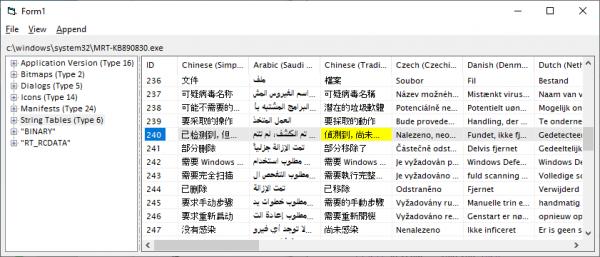
and another with lots of icons, over 2K individual ones

Last edited by LaVolpe; Jun 28th, 2020 at 05:35 PM.
 Posting Permissions
- You may not post new threads
- You may not post replies
- You may not post attachments
- You may not edit your posts
-
Forum Rules
|
Click Here to Expand Forum to Full Width
|



 Reply With Quote
