|

-
Jun 24th, 2020, 12:59 PM
#1
Thread Starter
Lively Member

Classes & Class Libraries: Best practices and other imponderables.
This thread has for goal to gather the POV and experience of fellow VB.NET programmers regarding the creation of Classes and Class Libraries.
Any questions on the subject or links to documentation are welcome as long as it follows the forum's rules of course.
I'll start with a question that may seem simple to many but I still haven't found an answer to.
Assuming I am to create a Class Library for geometrical shapes and I want to store Pi as a constant which of the following would be best:
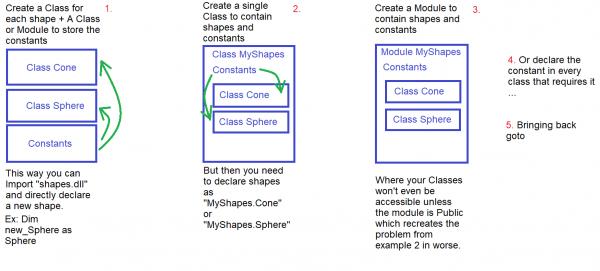
Jokes aside I highly prefer the first option to avoid calling unrequired classes everytime but I'm not sure my approach would be well viewed.
Last edited by KBConsole; Jun 24th, 2020 at 01:04 PM.
-
Jun 24th, 2020, 01:43 PM
#2
Re: Classes & Class Libraries: Best practices and other imponderables.
Given that there's already a Math.Pi constant defined in the .NET Framework, defining your own would be fairly pointless. If you really wanted to though, you could use that that existing one as an example of how to do it. As the .NET Framework is mostly written in C#, so is that constant. Math is a static class and Pi is a constant declared in that class. That Math class contains members relating specifically to mathematical operations. The VB equivalent of a static class is a module.
On another note, don't declare one type inside another as a general rule. That applies to classes, structures, enumerations and delegates. Each type should be declared independently unless it will only be used within another type, in which case the inner type should be private anyway. You can declare a nested type and Microsoft used to nest closely associated types, e.g. ListViewItem.ListViewSubItem but they haven't done that for a long time and you shouldn't either. Generally speaking, I would suggest that classes, modules and structures all get there own code file. I tend to use a single code file for all enumerations and all delegates but I wouldn't fault anyone for having separate files for enumerations too. You generally don't need to declare your own delegates so that's rarely an issue (just use Action or Func in most cases) but they are one line each, so a single code file makes sense for all of them.
-
Jun 24th, 2020, 02:07 PM
#3
Thread Starter
Lively Member
Re: Classes & Class Libraries: Best practices and other imponderables.
Given that there's already a Math.Pi constant defined in the .NET Framework, defining your own would be fairly pointless. If you really wanted to though, you could use that that existing one as an example of how to do it. As the .NET Framework is mostly written in C#, so is that constant. Math is a static class and Pi is a constant declared in that class. That Math class contains members relating specifically to mathematical operations. The VB equivalent of a static class is a module.
So the Math Class (assuming it was made in VB and not C#) is basically a Module that contains the constants PI and E as well as some functions to do operations on numeric data types ?
On another note, don't declare one type inside another as a general rule. That applies to classes, structures, enumerations and delegates. Each type should be declared independently unless it will only be used within another type, in which case the inner type should be private anyway.
Neat so going for the first approach is indeed the best choice then, except my example of creating a Module for the PI constant isn't very useful since that's already a Module in .NET 
-
Jun 24th, 2020, 02:19 PM
#4
Thread Starter
Lively Member
Re: Classes & Class Libraries: Best practices and other imponderables.
Here's another question while at it; What are the differences/advantages between these two examples:
vb.net Code:
Public Class SystemUser
        Dim su_Username As String
        Public Property Username As String
            Get
                Return su_Username
            End Get
            Set(ByVal new_Username As String)
                su_Username = new_Username
            End Set
        End Property
    End Class
vb.net Code:
Public Class SystemUser
        Dim su_Username As String
        Public Property Username As String
            Get
                Dim x as String = su_Username
                Return x
            End Get
            Set(ByVal new_Username As String)
                su_Username = new_Username
            End Set
        End Property
    End Class
-
Jun 24th, 2020, 06:18 PM
#5
Re: Classes & Class Libraries: Best practices and other imponderables.
There is NO advantage to the second version. There may be no disadvantage, either. All it does is creates a local variable, then throw it away. That's insignificant, but there's no benefit to it, so why bother?
I don't like any of the three alternatives to start with. Also, I've done almost exactly that for a project. What I started out with was that there was a common dll that held a base Shape class. This was a pure virtual class (MustInherit) as there were methods like Volume that returned a value, but for which there is no definition for the base class. The derived classes were in different dlls. They referenced that common dll, and inherited from the base Shape class, adding actual definitions for methods like Volume. This was done for extensibility. New shapes could be defined in new dlls, but ultimately, I abandoned this approach.
What I ended up doing was creating an IShape interface in the common dll. The base class went away. Every specific shape in any other dll (there could be more than one in each dll) implemented the IShape interface, which meant that they had those common methods, such as Volume. The implementation of the methods for each class was different, but anybody could use the IShape interface and call the Volume method knowing that they'd get whatever implementation of that method was right for that class.
The reason I did this was primarily due to the fact that they had to be able to draw themselves on the screen. The base class tied them to one technology (XNA), which was a limitation. By going with the interface, I could just have a Draw method. If the underlying class used XNA, that was fine. If they use WPF, that will be fine, too. This means that I can switch technology more easily.
However, once you go to interfaces, you start to find more and more advantages to them. For example, I can create a dummy IShape very quickly, which is convenient for unit testing. I can also make radically different things that implement the IShape. Using the base class, I could only flex as much as the base class allowed. If the base class implemented some method, and didn't leave it up to the derived classes, then any derived class was stuck with the base class implementation (though it could override it). By switching to IShape, the implementation behind anything is as versatile as I can think of.
My usual boring signature: Nothing
 
Tags for this Thread
 Posting Permissions
- You may not post new threads
- You may not post replies
- You may not post attachments
- You may not edit your posts
-
Forum Rules
|
Click Here to Expand Forum to Full Width
|



 Reply With Quote


