|

-
Jan 10th, 2020, 02:26 PM
#1
Thread Starter
Lively Member

What is the best way create a report
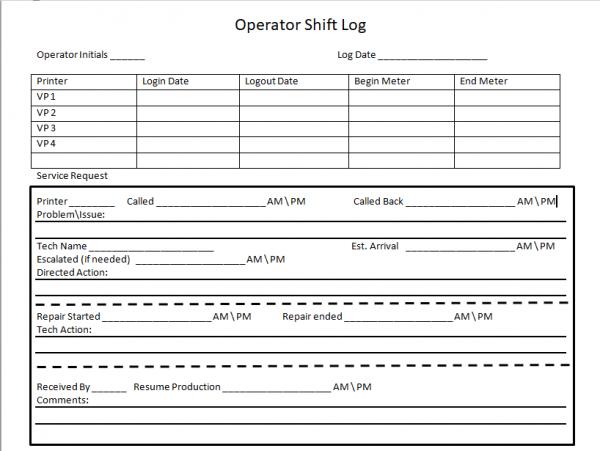
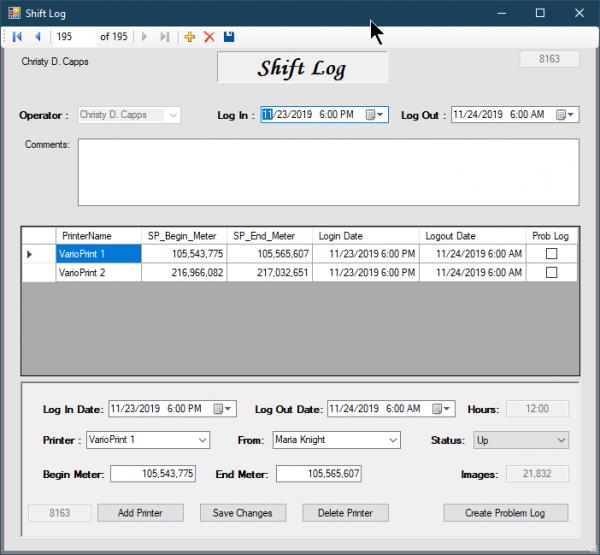
Basically I need to give the user the option to print a hard copy of what's on a windows form. I designed a form below. Looking for the best way to get that done.
Last edited by wjburke2; Jan 10th, 2020 at 02:34 PM.
-
Jan 10th, 2020, 08:24 PM
#2
Re: What is the best way create a report
Create a PrintDocument, call its Print method and handle its PrintPage event. That's how you do any printing in WinForms. In the event handler, you draw whatever you want printed using GDI+. There are plenty of examples around but I would suggest that you start by visiting the VB.NET CodeBank forum on this site and checking out the beginners' printing tutorial by Merrion.
-
Jan 10th, 2020, 08:26 PM
#3
Re: What is the best way create a report
Note that you aren't going to want to do loads of printing during testing so you will likely also want to incorporate a PrintPreviewDialog, in the testing phase at least. You can associate it with your PrintDocument and then call its ShowDialog method and your printing code will be invoked but the drawing will be done on the dialogue rather than sent to the physical printer. You can then do an actual print run from the dialogue or cancel, so you won't be wasting loads of paper and ink/toner.
Tags for this Thread
 Posting Permissions
- You may not post new threads
- You may not post replies
- You may not post attachments
- You may not edit your posts
-
Forum Rules
|
Click Here to Expand Forum to Full Width
|



 Reply With Quote

