|

-
Dec 29th, 2019, 05:53 PM
#1
Thread Starter
Lively Member

How can I Get Sum Total Size of Directories Which Listed in ListBox?
Hi everyone.
I try to get size of directories (with all subdirectories) which I added into the Listbox by FolderBrowser
If I select one Folder
C:\Users\Yaman\Desktop\Folder1
I can get the size it but when I select 2 or more Folders into listbox
C:\Users\Yaman\Desktop\Folder1
C:\Users\Yaman\Desktop\Folder2
C:\Users\Yaman\Desktop\Folder3
programe gives me only last added Folder3 size
Code:
Private Sub getSizeBtn_Click(sender As Object, e As EventArgs) Handles getSizeBtn.Click
        Dim sayi
        Dim bicim3
        Dim lngDirectorySize2 As Long

        For i As Integer = 0 To ListBox1.Items.Count - 1
            If IO.Directory.Exists(Me.ListBox1.Items.Item(i).ToString) Then
                lngDirectorySize2 = lngDirectorySize2 + (From strFile In My.Computer.FileSystem.GetFiles(Me.ListBox1.Items.Item(i).ToString, FileIO.SearchOption.SearchAllSubDirectories) Select New System.IO.FileInfo(strFile).Length).Sum()
            End If
        Next i
        MsgBox(lngDirectorySize2)

        sayi = (CDec(Fix((lngDirectorySize2 / 1 / 1) * 100) / 100))

        bicim3 = Format(sayi, "#,#.##")

        MsgBox(bicim3)

    End Sub
What I am doing Wrong ?
-
Dec 29th, 2019, 06:48 PM
#2
Re: How can I Get Sum Total Size of Directories Which Listed in ListBox?
Try this...
Code:
MsgBox(ListBox1.Items.Cast(Of String).Sum(Function(s) (From strFile In My.Computer.FileSystem.GetFiles(s, FileIO.SearchOption.SearchAllSubDirectories) Select New System.IO.FileInfo(strFile).Length).Sum()))
- Coding Examples:
- Features:
- Online Games:
- Compiled Games:
-
Dec 29th, 2019, 06:56 PM
#3
Re: How can I Get Sum Total Size of Directories Which Listed in ListBox?
If you want the size of selected items, use ListBox1.SelectedItems instead of ListBox1.Items
- Coding Examples:
- Features:
- Online Games:
- Compiled Games:
-
Dec 29th, 2019, 07:15 PM
#4
Thread Starter
Lively Member
Re: How can I Get Sum Total Size of Directories Which Listed in ListBox?
 Originally Posted by .paul.

Try this...
Code:
MsgBox(ListBox1.Items.Cast(Of String).Sum(Function(s) (From strFile In My.Computer.FileSystem.GetFiles(s, FileIO.SearchOption.SearchAllSubDirectories) Select New System.IO.FileInfo(strFile).Length).Sum()))
Just give an only one folder size. (listed 2 folders directory String and gives only last one size)
-
Dec 29th, 2019, 07:15 PM
#5
Thread Starter
Lively Member
Re: How can I Get Sum Total Size of Directories Which Listed in ListBox?
Originally Posted by .paul.
Try this...
Code:
MsgBox(ListBox1.Items.Cast(Of String).Sum(Function(s) (From strFile In My.Computer.FileSystem.GetFiles(s, FileIO.SearchOption.SearchAllSubDirectories) Select New System.IO.FileInfo(strFile).Length).Sum()))
Just give an only one folder size. (listed 2 folders directory String and gives only last one size)
-
Dec 29th, 2019, 08:00 PM
#6
Re: How can I Get Sum Total Size of Directories Which Listed in ListBox?
Works fine for me...
Code:
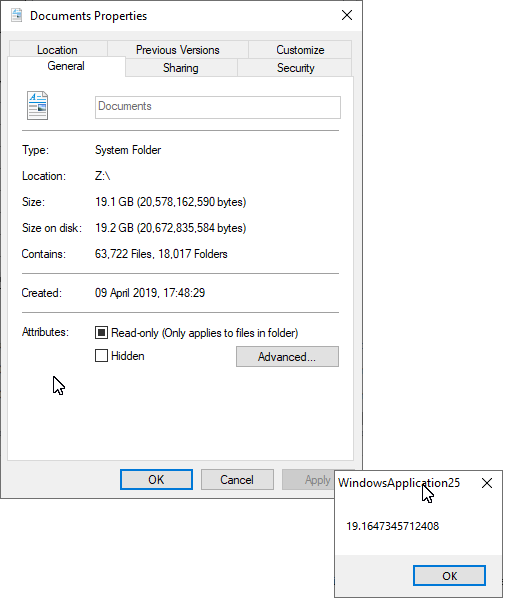
ListBox1.Items.AddRange(IO.Directory.GetDirectories("Z:\Documents"))
Dim dirSize As Long = ListBox1.Items.Cast(Of String).Sum(Function(s) (From strFile In My.Computer.FileSystem.GetFiles(s, FileIO.SearchOption.SearchAllSubDirectories) Select New IO.FileInfo(strFile).Length).Sum())
MsgBox(((dirSize / 1024) / 1024) / 1024)
- Coding Examples:
- Features:
- Online Games:
- Compiled Games:
-
Dec 30th, 2019, 06:14 AM
#7
Thread Starter
Lively Member
Re: How can I Get Sum Total Size of Directories Which Listed in ListBox?
Originally Posted by .paul.
Works fine for me...
Code:
ListBox1.Items.AddRange(IO.Directory.GetDirectories("Z:\Documents"))
Dim dirSize As Long = ListBox1.Items.Cast(Of String).Sum(Function(s) (From strFile In My.Computer.FileSystem.GetFiles(s, FileIO.SearchOption.SearchAllSubDirectories) Select New IO.FileInfo(strFile).Length).Sum())
MsgBox(((dirSize / 1024) / 1024) / 1024)
i didnt say it's not working. your code working if you get only one directory size. but I try to get multiple directory size. like this.
in listbox there are multiple directory sitrings...
C:\Users\Yaman\Desktop\Samples (7 Subfolder 25 Files) (13.378.512 )
C:\Users\Yaman\Desktop\Projects (12 Subfolders 107 Files) ( 59.863.129)
C:\Users\Yaman\Desktop\Contacts (21 Folders 58 Files) (36.079.427)
all these are Samples, Projects, Contacts are difrent Folder on Desktop.
I try to get all this Folders size (13.378.512+59.863.129+36.079.427) equal 109.321.068
anyway...
last night after I post question. run project again and I get result that what I want. I didnt do anything but its working
-
Dec 30th, 2019, 06:21 AM
#8
Re: How can I Get Sum Total Size of Directories Which Listed in ListBox?
I didn’t just get one directory size. I put all of the directory names from my documents folder in my listbox, then run the exact same code I gave you...
- Coding Examples:
- Features:
- Online Games:
- Compiled Games:
-
Dec 30th, 2019, 06:50 AM
#9
Thread Starter
Lively Member
Re: How can I Get Sum Total Size of Directories Which Listed in ListBox?
Originally Posted by .paul.
I didn’t just get one directory size. I put all of the directory names from my documents folder in my listbox, then run the exact same code I gave you...
I mean to say same. You put only Documents Folder. please put difrent folders (D:\XXX, or C:\Pictures and try again.)
Not try only with one folder inside listbox. Try your code with multiple folders...
-
Dec 30th, 2019, 10:15 AM
#10
Re: How can I Get Sum Total Size of Directories Which Listed in ListBox?
Code:
ListBox1.Items.AddRange(IO.Directory.GetDirectories("Z:\Documents"))
He did have multiple directories in the list.
The above line adds all the directories that are in Z:\Documents to the Listbox (note "AddRange" and "GetDirectories". GetDirectories returns an array of directory paths and AddRange adds all the elements of the array to the list.
The code then gets the size of each of the directories (and the subdirectories below those directories) and gives the sum.
That is what you said you wanted.
A test more similar to your posts.
Code:
 Public Class Form1

  Private Sub Button1_Click(sender As System.Object, e As System.EventArgs) Handles Button1.Click
    ListBox1.Items.Add("C:\users\passel\Desktop\Tools")  '7.5 MB
    ListBox1.Items.Add("C:\users\passel\Desktop\DeskTop Collection 2")  '691 MB
    ListBox1.Items.Add("C:\users\passel\Desktop\DeskTopCollection")  ' 121 MB

    Dim dirSize As Long = ListBox1.Items.Cast(Of String).Sum(Function(s) (From strFile In My.Computer.FileSystem.GetFiles(s, FileIO.SearchOption.SearchAllSubDirectories) Select New IO.FileInfo(strFile).Length).Sum())
    MsgBox((dirSize / 1024) / 1024) 'MB
  End Sub
End Class
The message box shows the total 820.675497..... so matches the expected size of the three directories sizes (as noted in the comments).
I just removed one of the "/ 1024" so it is in MB rather than GB.
You said it is working, so I assume it is good for you. I guess you just assumed he was adding only one directory to the Listbox, rather than all the directories from the Z:\Documents folder.
"Anyone can do any amount of work, provided it isn't the work he is supposed to be doing at that moment" Robert Benchley, 1930
-
Dec 31st, 2019, 01:55 AM
#11
Thread Starter
Lively Member
Re: How can I Get Sum Total Size of Directories Which Listed in ListBox?
Originally Posted by passel
Code:
ListBox1.Items.AddRange(IO.Directory.GetDirectories("Z:\Documents"))
He did have multiple directories in the list.
The above line adds all the directories that are in Z:\Documents to the Listbox (note "AddRange" and "GetDirectories". GetDirectories returns an array of directory paths and AddRange adds all the elements of the array to the list.
The code then gets the size of each of the directories (and the subdirectories below those directories) and gives the sum.
That is what you said you wanted.
A test more similar to your posts.
Code:
 Public Class Form1

  Private Sub Button1_Click(sender As System.Object, e As System.EventArgs) Handles Button1.Click
    ListBox1.Items.Add("C:\users\passel\Desktop\Tools")  '7.5 MB
    ListBox1.Items.Add("C:\users\passel\Desktop\DeskTop Collection 2")  '691 MB
    ListBox1.Items.Add("C:\users\passel\Desktop\DeskTopCollection")  ' 121 MB

    Dim dirSize As Long = ListBox1.Items.Cast(Of String).Sum(Function(s) (From strFile In My.Computer.FileSystem.GetFiles(s, FileIO.SearchOption.SearchAllSubDirectories) Select New IO.FileInfo(strFile).Length).Sum())
    MsgBox((dirSize / 1024) / 1024) 'MB
  End Sub
End Class
The message box shows the total 820.675497..... so matches the expected size of the three directories sizes (as noted in the comments).
I just removed one of the "/ 1024" so it is in MB rather than GB.
You said it is working, so I assume it is good for you. I guess you just assumed he was adding only one directory to the Listbox, rather than all the directories from the Z:\Documents folder.
Yes. its working. thanks a lot.
Tags for this Thread
 Posting Permissions
- You may not post new threads
- You may not post replies
- You may not post attachments
- You may not edit your posts
-
Forum Rules
|
Click Here to Expand Forum to Full Width
|



 Reply With Quote

