|

-
Dec 4th, 2019, 03:51 PM
#1
Thread Starter
Lively Member

Update data from code
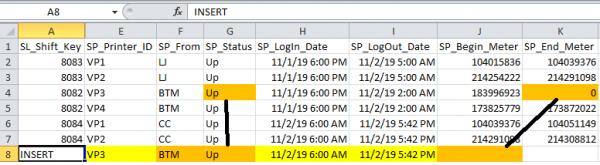
My application allows the user to add printers to their shift log. They do this clicking on the add printer button and selecting a printer from a drop down. The application then goes out and gets information from the previous record for this printer to auto fill certain fields. On the off chance the previous user did not properly fill out the ending meter reading. As with the record in the illustration below Ending Meter = 0. The current user is asked to provide the current meter reading. Everything works well as far a adding the new record but I would like to use the input begin meter to update the ending meter on the previous record.
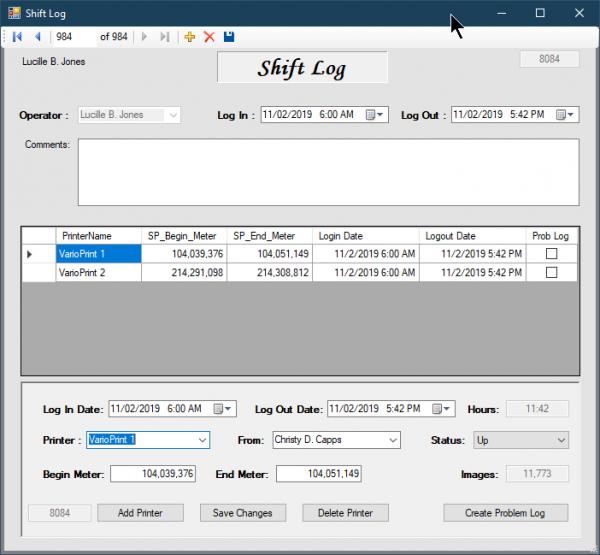
I fell I am real close to getting it but having problems figuring the actual update part. What would be nice would be to actually update through the project dataset Shift_Printers dataset. That way it wouldn’t update anything until they hit the save button but have not seen a example of that anywhere. Most example show. Creating a dataset and updating through that but I haven't been able to get that to work. My code is below. It doesn't work that's why its commented out.
Code:
Private Sub cmbSP_Printer_SelectionChangeCommitted(sender As Object, e As EventArgs) Handles cmbPrinter.SelectionChangeCommitted

        If cmbPrinter.SelectedValue = "FLR" Then
            cmbFrom.SelectedIndex = -1
            cmbStatus.SelectedIndex = -1
            tbBegin_Meter.Text = 0
            tbEnd_Meter.Text = 0
            Exit Sub
        End If

        If PrinterBusy() Then
            MessageBox.Show("That printer Is busy please select another ")
            cmbPrinter.Focus()
            If Not AddPntr Then
                cmbPrinter.SelectedValue = Save_SP_Printer_Id
            Else
                cmbPrinter.SelectedValue = -1
            End If
            Exit Sub
        End If

        If Not AddPntr Then
            If MessageBox.Show("Are you sure you want to change the Printer, This will reset all the current fields ",
                           "Warning", MessageBoxButtons.YesNo,
                           MessageBoxIcon.Question) = DialogResult.No Then
                cmbPrinter.Focus()
                cmbPrinter.SelectedValue = Save_SP_Printer_Id
                Exit Sub
            End If
        End If

        ' This gets the last known record for the selected printer
        Using conn As SqlConnection = New SqlConnection(My.Settings.LaserMaintLogConnectionString)
            Try
                Dim query As String =
                    "Select TOP 1 *  " &
                    "FROM Shift_Printers INNER JOIN Shift_Log ON SL_Shift_key = SP_Shift_Key " &
                    "WHERE SP_Printer_Id = '" & cmbPrinter.SelectedValue & "' " &
                    "  AND SP_LogOut_Date < '" & dtpSL_LogIn_Date.Value & "' " &
                    "ORDER BY SP_LogOut_Date DESC "

                Dim da As SqlDataAdapter = New SqlDataAdapter(query, conn)
                Dim dt As DataTable = New DataTable
                Dim ds As DataSet = New DataSet

                da.Fill(ds, "ShiftPrinter")

                If (ds.Tables("ShiftPrinter").Rows.Count > 0) Then
                    dt = ds.Tables("ShiftPrinter")
                    Dim BeginMeter As String = dt.Rows(0)("SP_End_Meter").ToString

                    If String.IsNullOrEmpty(BeginMeter) _
                    Or BeginMeter = 0 Then
                        Dim frmGetMeter As New PopGetMeter()
                        Dim LastBegMeter As String = dt.Rows(0)("SP_Begin_Meter").ToString
                        Dim LastLogDate As DateTime = dt.Rows(0)("SP_Login_Date").ToString

                        frmGetMeter.PrinterId = cmbPrinter.SelectedValue
                        frmGetMeter.PrinterName = GetPrinterName(cmbPrinter.SelectedValue)
                        frmGetMeter.LoginDate = LastLogDate
                        frmGetMeter.BeginMeter = LastBegMeter

                        If DialogResult.OK = frmGetMeter.ShowDialog() Then
                            If frmGetMeter.tbEndMeter.Text > 0 Then
                                BeginMeter = frmGetMeter.tbEndMeter.Text

                       ' Code to update the previous log with the entered meter reading
                                dt.Rows(0)("SP_End_Meter") = BeginMeter

                                'Dim Command As String = "Update Shift_Printers SET SP_End_Meter = '" & BeginMeter & "'" &
                                '                        "WHERE SP_Printer_ID = '" & cmbPrinter.SelectedValue & "' AND SP_SHIFT_Key = '" & dt.Rows(0)("SP_Shift_Key") & "'"
                                'da.UpdateCommand = Command
                                'da.Update(ds, "ShiftPrinter")
                       ' Code to update the previous log with the entered meter reading

                            Else
                                cmbPrinter.SelectedIndex = 0
                                MessageBox.Show("Invalid begin Meter reenter Or Select another Printer ")
                                cmbPrinter.Focus()
                                Exit Sub
                            End If
                        Else
                            cmbPrinter.SelectedIndex = 0
                            MessageBox.Show("That printer Is busy please Select another ")
                            cmbPrinter.Focus()
                            Exit Sub
                        End If
                    End If

                    tbBegin_Meter.Text = BeginMeter

                    Dim lastLogout = dt.Rows(0)("SP_LogOut_Date")
                    dtpSP_LogIn_Date.Value = IIf(dtpSL_LogIn_Date.Value > lastLogout, dtpSL_LogIn_Date.Value, lastLogout)

                    dtpSP_LogOut_Date.Value = Me.dtpSL_LogOut_Date.Value

                    cmbFrom.SelectedValue = dt.Rows(0)("SL_Operator")
                    cmbStatus.SelectedIndex = cmbStatus.FindStringExact(dt.Rows(0)("SP_Status"))

                    SaveCurrPrinter()

                End If
            Catch ex As Exception
                MessageBox.Show("Error occured! : " & ex.Message)
            End Try
        End Using

    End Sub
Last edited by wjburke2; Dec 4th, 2019 at 05:52 PM.
-
Dec 4th, 2019, 05:32 PM
#2
Re: Update data from code
Don't post code in QUOTE tags. Not surprisingly, QUOTE tags are for quotes and CODE tags are for code. The buttons are about a centimetre apart on the toolbar so there's no reason to use the wrong one. Please edit your post so the code is more readable.
-
Dec 4th, 2019, 05:53 PM
#3
Thread Starter
Lively Member
Re: Update data from code
-
Dec 4th, 2019, 07:44 PM
#4
Re: Update data from code
If you have a populated DataTable then you simply get the appropriate DataRow from that and set the appropriate filed. That's it. When you call Update on your data adapter, that will then save ALL the changes from the DataTable to the database, including inserts, updates and deletes. You would generally call Update on the same data adapter that you called Fill on. For examples of using a data adapter with or without a command builder, follow the CodeBank link in my signature below and check out my thread on Retrieving & Saving Data.
Tags for this Thread
 Posting Permissions
- You may not post new threads
- You may not post replies
- You may not post attachments
- You may not edit your posts
-
Forum Rules
|
Click Here to Expand Forum to Full Width
|



 Reply With Quote

