


A common practice for company or paid for applications is to register a user with a first and last name and password or user name and password some will have a confirm password. With the information a system will validate if the user exists or not along with self-validation of a password.
The process in this example is dependent on using data annotations so that a validate method can be called against a class instance populated by values (in this case) entered in TextBox controls.
Source code on GitHub
For a simple register/login
In the above class a custom rule is used to check if a password has letters, numbers and symbolsCode:Imports System.ComponentModel.DataAnnotations Imports ValidatorLibrary.Rules Namespace Classes Public Class CustomerLogin <Required(ErrorMessage:="{0} is required"), DataType(DataType.Text)> <StringLength(20, MinimumLength:=6)> Public Property Name() As String <Required(ErrorMessage:="{0} is required"), DataType(DataType.Text)> <StringLength(20, MinimumLength:=6)> <PasswordCheck(ErrorMessage:="{0} must include a number and symbol in {0}")> Public Property Password() As String <Compare("Password", ErrorMessage:="Passwords do not match, please try again")> <StringLength(20, MinimumLength:=6)> Public Property PasswordConfirmation() As String End Class End Namespace
Implementation in a form to capture user name, password and confirm passwordCode:Imports System.ComponentModel.DataAnnotations Imports System.Text.RegularExpressions Namespace Rules Public Class PasswordCheck Inherits ValidationAttribute Public Overrides Function IsValid(value As Object) As Boolean Dim validPassword = False Dim reason = String.Empty Dim password As String = If(value Is Nothing, String.Empty, value.ToString()) If String.IsNullOrWhiteSpace(password) OrElse password.Length < 6 Then reason = "new password must be at least 6 characters long. " Else Dim reSymbol As New Regex("((?=.*\d)(?=.*[a-z])(?=.*[A-Z])(?=.*[@#$%]).{6,20})") If Not reSymbol.IsMatch(password) Then reason &= "Your new password must contain at least 1 symbol character and number." Else validPassword = True End If End If If validPassword Then Return True Else Return False End If End Function End Class End Namespace
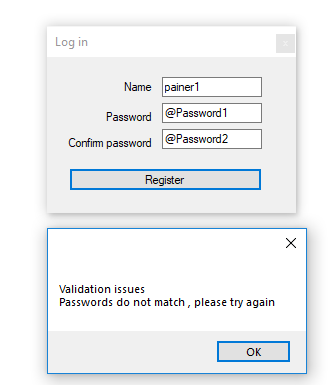
Screenshot depicting a invalid registration against rules in the customer login classCode:Imports ValidatorLibrary.Classes Imports ValidatorLibrary.LanguageExtensions Imports ValidatorLibrary.Validators Public Class LoginForm Private _retryCount As Integer = 0 Private Sub LoginButton_Click(sender As Object, e As EventArgs) _ Handles LoginButton.Click Dim login As New CustomerLogin With { .Name = UserNameTextBox.Text, .Password = PasswordTextBox.Text, .PasswordConfirmation = PasswordConfirmTextBox.Text } Dim validationResult As EntityValidationResult = ValidationHelper.ValidateEntity(login) If validationResult.HasError Then If _retryCount >= 3 Then MessageBox.Show("Guards toss them out!") Close() End If MessageBox.Show(validationResult.ErrorMessageList()) _retryCount += 1 Else Dim f As New MainForm(login.Name) f.Show() Hide() End If End Sub End Class
Passwords do not match


 Reply With Quote
 Originally Posted by coolcurrent4u

