|

-
Aug 1st, 2019, 01:06 PM
#1
Thread Starter
Junior Member

 Excel Macro VB Mismatch error Excel Macro VB Mismatch error
Hi everybody,
I hope this is the right place to post this. I was looking to get some feedback on a mismatch error I'm getting in Visual Basic. I have inherited a custom macro created to run in an Excel spreadsheet. The business that I am working with, would like this updated to work with the newer version of the software. I'm not super proficient in Visual Basic's, more of a newbe.
Anyway, I'm getting a mismatch error I was hoping somebody could look at the picture below and perhaps give me some input on what I should correct?
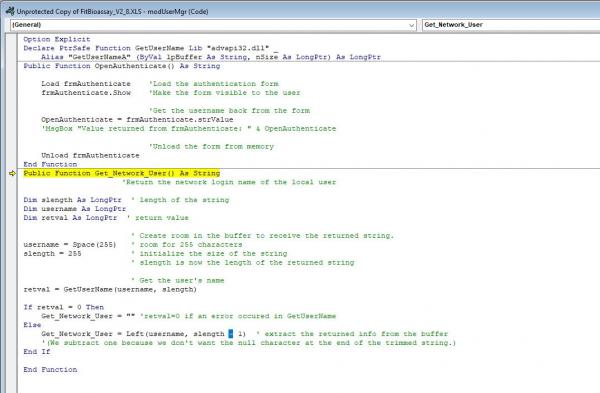
here is the code too
Code:
Option Explicit
Declare PtrSafe Function GetUserName Lib "advapi32.dll" _
    Alias "GetUserNameA" (ByVal lpBuffer As String, nSize As LongPtr) As LongPtr
Public Function OpenAuthenticate() As String

    Load frmAuthenticate    'Load the authentication form
    frmAuthenticate.Show    'Make the form visible to the user

                            'Get the username back from the form
    OpenAuthenticate = frmAuthenticate.strValue
    'MsgBox "Value returned from frmAuthenticate: " & OpenAuthenticate

                            'Unload the form from memory
    Unload frmAuthenticate
End Function

Public Function Get_Network_User() As String
                      'Return the network login name of the local user

Dim slength As LongPtr  ' length of the string
Dim username As LongPtr
Dim retval As LongPtr  ' return value

                        ' Create room in the buffer to receive the returned string.
username = Space(255)   ' room for 255 characters
slength = 255           ' initialize the size of the string
                        ' slength is now the length of the returned string

                        ' Get the user's name
retval = GetUserName(username, slength)

If retval = 0 Then
    Get_Network_User = "" 'retval=0 if an error occured in GetUserName
Else
    Get_Network_User = Left(username, slength - 1)  ' extract the returned info from the buffer
    '(We subtract one because we don't want the null character at the end of the trimmed string.)
End If

End Function
Last edited by Siddharth Rout; Aug 2nd, 2019 at 06:55 AM.
Reason: Inserted Code Tags
-
Aug 1st, 2019, 04:23 PM
#2
Re: Excel Macro VB Mismatch error
as you do not show the code to call the function, hard to guess
going by the highlighted line, should be something like
Code:
somevar = get_network_user
your variable must be of type string
but also username should be a string
but on testing the first did not appear to cause a problem, so the problem was username
i do my best to test code works before i post it, but sometimes am unable to do so for some reason, and usually say so if this is the case.
Note code snippets posted are just that and do not include error handling that is required in real world applications, but avoid On Error Resume Next
dim all variables as required as often i have done so elsewhere in my code but only posted the relevant part
come back and mark your original post as resolved if your problem is fixed 
pete
-
Aug 1st, 2019, 04:29 PM
#3
Re: Excel Macro VB Mismatch error
You may be getting this error if the user name is blank (0 length). Add a breakpoint or Stop to check the username contents.
-
Aug 2nd, 2019, 06:53 AM
#4
Re: Excel Macro VB Mismatch error
Change
Code:
Dim username As LongPtr
to
Code:
Dim username As String
A good exercise for the Heart is to bend down and help another up...
Please Mark your Thread " Resolved", if the query is solved
MyGear: Resolved", if the query is solved
MyGear:
★ CPU ★ Ryzen 5 5800X
★ GPU ★ NVIDIA GeForce RTX 3080 TI Founder Edition
★ RAM ★ G. Skill Trident Z RGB 32GB 3600MHz
★ MB ★ ASUS TUF GAMING X570 (WI-FI) ATX Gaming
★ Storage ★ SSD SB-ROCKET-1TB + SEAGATE 2TB Barracuda IHD
★ Cooling ★ NOCTUA NH-D15 CHROMAX BLACK 140mm + 10 of Noctua NF-F12 PWM
★ PSU ★ ANTEC HCG-1000-EXTREME 1000 Watt 80 Plus Gold Fully Modular PSU
★ Case ★ LIAN LI PC-O11 DYNAMIC XL ROG (BLACK) (G99.O11DXL-X)
★ Monitor ★ LG Ultragear 27" 240Hz Gaming Monitor
★ Keyboard ★ TVS Electronics Gold Keyboard
★ Mouse ★ Logitech G502 Hero
-
Aug 2nd, 2019, 07:35 AM
#5
Thread Starter
Junior Member
Re: Excel Macro VB Mismatch error
 Originally Posted by westconn1

as you do not show the code to call the function, hard to guess
going by the highlighted line, should be something like
Code:
somevar = get_network_user
your variable must be of type string
but also username should be a string
but on testing the first did not appear to cause a problem, so the problem was username
sorry, here is the whole thing...
Code:
Option Explicit
Declare PtrSafe Function GetUserName Lib "advapi32.dll" _
    Alias "GetUserNameA" (ByVal lpBuffer As String, nSize As LongPtr) As LongPtr
Public Function OpenAuthenticate() As String

    Load frmAuthenticate    'Load the authentication form
    frmAuthenticate.Show    'Make the form visible to the user

                            'Get the username back from the form
    OpenAuthenticate = frmAuthenticate.strValue
    'MsgBox "Value returned from frmAuthenticate: " & OpenAuthenticate

                            'Unload the form from memory
    Unload frmAuthenticate
End Function
Public Function Get_Network_User() As String
                      'Return the network login name of the local user

Dim slength As LongPtr  ' length of the string
Dim username As String
Dim retval As LongPtr  ' return value

                        ' Create room in the buffer to receive the returned string.
username = Space(255)   ' room for 255 characters
slength = 255           ' initialize the size of the string
                        ' slength is now the length of the returned string

                        ' Get the user's name
retval = GetUserName(username, slength)

If retval = 0 Then
    Get_Network_User = "" 'retval=0 if an error occured in GetUserName
Else
    Get_Network_User = Left(username, slength - 1)  ' extract the returned info from the buffer
    '(We subtract one because we don't want the null character at the end of the trimmed string.)
End If

End Function
Tags for this Thread
 Posting Permissions
- You may not post new threads
- You may not post replies
- You may not post attachments
- You may not edit your posts
-
Forum Rules
|
Click Here to Expand Forum to Full Width
|



 Reply With Quote


