|

-
Jun 12th, 2019, 08:39 PM
#1
Thread Starter
Lively Member


 [RESOLVED] Change Color / Format Text [RESOLVED] Change Color / Format Text
I am trying to highlight all text that is between all elements between < >, ( ), { }, [], " ". However, the only thing I really know how to do is to find and highlight text within a richtextbox to the exact string. What I am trying to accomplish is to highlight certain strings of a html file or xaml file that are between those symbols. I have looked around on forums and such, and I cannot find anything relating to this. If you guys can help refer me to a place this has been discussed or help throw together some code, I'd really appreciate it. This is what I have for finding specific text and highlighting it (not what I tho...)
Code:
Dim loc As Int16
	  If txtbox1.Text.Contains("<html>") Then
	            loc = txtbox1.Find("<html>")
	            txtbox1.Select(loc, 6)
	            txtbox1.SelectionColor = Color.Red
	            'ForeColor = Color.Red
	        End If
But for an example for a string "asdfg(neededtexthere) 1234"
the "neededtexthere" would need to be changed to a different fore color
-
Jun 12th, 2019, 09:11 PM
#2
Re: Change Color / Format Text
Your question isn't really clear to me. Are you saying that you are displaying HTML or XML markup in a RichTextBox and you want any text between chevrons, parentheses, braces or brackets to be displayed using a different fore colour? For instance, for a tag like <html>, you would colour the "html" but leave the chevrons the default colour, which is what your last example suggests, or would you colour the chevrons as well, which is what your code suggests?
Basically, what you need to do is to use Find in a loop. Find lets' you specify the index from which to start searching so you can start with an index of 0 and then, for each subsequent search, specify the index after the last result. You would need to make two calls for each substring. Find lets you specify multiple characters to search for so you would specify an opening chevron, parenthesis, brace or bracket. When you find one, you determine which it is and then look specifically for the matching closing chevron, parenthesis, brace or bracket after that. You then use those two results to determine what to select, change the colour and then repeat from the new starting index. Keep looping until the first of the two Find calls returns -1.
-
Jun 12th, 2019, 09:31 PM
#3
Thread Starter
Lively Member
Re: Change Color / Format Text
Yes, your first thought was correct. I would like to color everything inside of chevrons, parentheses, etc. I will be doing this for both xaml and html.
Hmm, Your suggestion to build a loop is very challenging, and I appreciate it. I will give it a shot and let you know what I come up with
-
Jun 12th, 2019, 09:35 PM
#4
Thread Starter
Lively Member
Re: Change Color / Format Text
So, I am trying to puzzle together that loop you had mentioned... I don't know how to check character by character with the loop. This is what I want to type for the for loop, but i know it isn't right...
Code:
for each char as char in txtbox1.text
-
Jun 12th, 2019, 10:53 PM
#5
Re: Change Color / Format Text
E.g.
vb.net Code:
Dim findStartIndex = 0
Dim openingChars = {"<"c, "("c, "{"c, "["c}
Dim closingChars = {">"c, ")"c, "}"c, "]"c}
 Do
    'Find the start of the next substring.
    Dim substringStartIndex = RichTextBox1.Find(openingChars, findStartIndex)
     If substringStartIndex = -1 Then
        'No more substrings to find.
        Exit Do
    End If
     Dim openingChar = RichTextBox1.Text(substringStartIndex)
    Dim closingChar = closingChars(Array.IndexOf(openingChars, openingChar))
     'Find the end of the current substring.
    Dim substringEndIndex = RichTextBox1.Find({closingChar}, substringStartIndex + 1)
     'Use substringStartIndex and substringEndIndex here.
     'The next search starts after the current substring.
    findStartIndex = substringEndIndex + 1
Loop
-
Jun 13th, 2019, 08:18 AM
#6
Thread Starter
Lively Member
 Re: Change Color / Format Text Re: Change Color / Format Text
 Originally Posted by jmcilhinney

E.g.
vb.net Code:
Dim findStartIndex = 0
Dim openingChars = {"<"c, "("c, "{"c, "["c}
Dim closingChars = {">"c, ")"c, "}"c, "]"c}
Do
'Find the start of the next substring.
Dim substringStartIndex = RichTextBox1.Find(openingChars, findStartIndex)
If substringStartIndex = -1 Then
'No more substrings to find.
Exit Do
End If
Dim openingChar = RichTextBox1.Text(substringStartIndex)
Dim closingChar = closingChars(Array.IndexOf(openingChars, openingChar))
'Find the end of the current substring.
Dim substringEndIndex = RichTextBox1.Find({closingChar}, substringStartIndex + 1)
'Use substringStartIndex and substringEndIndex here.
'The next search starts after the current substring.
findStartIndex = substringEndIndex + 1
Loop
Based off your example, this is what I have written:
Code:
  Dim findStartIndex = 0
            Dim openingChars = {"<"c}
            Dim closingChars = {">"c}

            Do
                'Find the start of the next substring.
                Dim substringStartIndex = RichTextbox1.Find(openingChars, findStartIndex)

                If substringStartIndex = -1 Then
                    'No more substrings to find.
                    Exit Do
                End If

                Dim openingChar = RichTextbox1.Text(substringStartIndex)
                Dim closingChar = closingChars(Array.IndexOf(openingChars, openingChar))

                'Find the end of the current substring.
                Dim substringEndIndex = RichTextbox1.Find({closingChar}, findStartIndex + 1)

                'Use substringStartIndex and substringEndIndex here.
                RichTextbox1.Select(substringStartIndex + 1, substringEndIndex - 1)
                RichTextbox1.SelectionColor = Color.Red

                MsgBox(substringStartIndex & ", " & substringEndIndex)
                'The next search starts after the current substring.
                findStartIndex = substringEndIndex + 1
            Loop
Now, I added a message box to display the indexes which are being highlighted. However, the very first instance is highlighted correctly. Everything following the first instance is jumbled and a mess. Here are some screen shots which I have.
 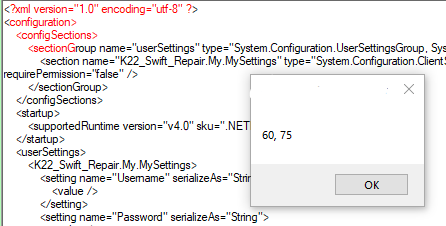
I did try messing with your loop and tried changing and moving a few of the values, but I really can't figure it out. Thank you for your help and patience.
Here is some example xaml code if you wanted to see exactly what I am sort of working with.
HTML Code:
<?xml version="1.0" encoding="utf-8" ?>
<configuration>
    <configSections>
        <sectionGroup name="userSettings" type="System.Configuration.UserSettingsGroup, System, Version=4.0.0.0, Culture=neutral, PublicKeyToken=b77a5c561934e089" >
            <section name="K22_Swift_Repair.My.MySettings" type="System.Configuration.ClientSettingsSection, System, Version=4.0.0.0, Culture=neutral, PublicKeyToken=b77a5c561934e089" allowExeDefinition="MachineToLocalUser" requirePermission="false" />
        </sectionGroup>
    </configSections>
    <startup>
        <supportedRuntime version="v4.0" sku=".NETFramework,Version=v4.6.1" />
    </startup>
    <userSettings>
-
Jun 13th, 2019, 09:40 AM
#7
Re: Change Color / Format Text
Maybe you should read the documentation for that Select method and learn what the parameters represent. Do you really want to select a substring that starts at index 61 and is 74 characters long?
-
Jun 13th, 2019, 11:58 AM
#8
Thread Starter
Lively Member
 Re: Change Color / Format Text Re: Change Color / Format Text
Originally Posted by jmcilhinney
Maybe you should read the documentation for that Select method and learn what the parameters represent. Do you really want to select a substring that starts at index 61 and is 74 characters long?
haha  , I guess I should had looked at my own code!! This is what I have now, I won't be checking it out until later, but I do believe it will work. , I guess I should had looked at my own code!! This is what I have now, I won't be checking it out until later, but I do believe it will work.
vb.net Code:
RichTextbox1.Select((substringStartIndex + 1), (substringEndIndex - substringStartIndex -1)) RichTextbox1.SelectionColor = Color.Red
-
Jun 13th, 2019, 06:14 PM
#9
Re: Change Color / Format Text
Tags for this Thread
 Posting Permissions
- You may not post new threads
- You may not post replies
- You may not post attachments
- You may not edit your posts
-
Forum Rules
|
Click Here to Expand Forum to Full Width
|



 Reply With Quote

