|

-
Mar 12th, 2019, 11:13 AM
#1
Thread Starter
Junior Member

 Preloading lookup data using strongly typed dataset and tableadapters Preloading lookup data using strongly typed dataset and tableadapters
I have a winforms application with a strongly typed dataset that uses tableadapters and bindingsources to connect forms and data. I have a lot of lookup tables in my database. I want to load the lookup data in in a background worker on application start. I thought I found a way, but when a form within the application loads, it calls initializecomponent, which wipes out the data that is in that table. What is the best way to load the data into the dataset tables that can then be used across multiple forms, without having to fill the datatable on every form.
This is what I tried:
Code:
Public Class dsglobal

    Public Shared EML_StaffingDataSet As EML_StaffingDataSet

    Public Shared Sub populateDS()
        EML_StaffingDataSet = New EML_StaffingDataSet
    End Sub

    Public Shared Sub loadskills()
        Dim ta As New EML_StaffingDataSetTableAdapters.TSTAFFSKILLTableAdapter
        ta.Fill(EML_StaffingDataSet.TSTAFFSKILL)
    End Sub

End Class
So when I open another form, EML_StaffingDataSet.TSTAFFSKILL would already be filled and I wouldnt have to fill it again.
Any help would be greatly appreciated.
-
Mar 12th, 2019, 02:24 PM
#2
Thread Starter
Junior Member
Re: Preloading lookup data using strongly typed dataset and tableadapters
I think what I am trying to ask for is the best way to have my dataset as a global dataset
-
Mar 12th, 2019, 05:30 PM
#3
Re: Preloading lookup data using strongly typed dataset and tableadapters
 Originally Posted by dk96m

I think what I am trying to ask for is the best way to have my dataset as a global dataset
Why would it be any different to any other global data? A variable is a variable and an object is an object. Could you declare a global variable of type Integer and then populate it from an external source? Why should this be any different? Obviously you can't just drag and drop in forms because that makes things specific to that form so the alternative is to treat it like you treat everything else.
-
Mar 13th, 2019, 07:29 AM
#4
Thread Starter
Junior Member
Re: Preloading lookup data using strongly typed dataset and tableadapters
Whatever I do, I want to be able to select it as the datasource for a control at design time.
-
Mar 13th, 2019, 08:01 AM
#5
Re: Preloading lookup data using strongly typed dataset and tableadapters
Originally Posted by dk96m
Whatever I do, I want to be able to select it as the datasource for a control at design time.
You can't do both. Whatever you do in the designer is part of the form. Would you expect to be able to use a single Button created elsewhere in the designer for multiple forms? Maybe you would, but you'd be disappointed, and using a DataSet in that way is no more possible.
-
Mar 13th, 2019, 11:35 AM
#6
Thread Starter
Junior Member
Re: Preloading lookup data using strongly typed dataset and tableadapters
I was looking at doing something like this:
Code:
Public Module lookupdata
    Private skillvalues As List(Of skillclass)

    Public ReadOnly Property skilllist As IEnumerable(Of skillclass)
        Get
            If skillvalues Is Nothing Then
                getskillvalues()
            End If
            Return skillvalues
        End Get
    End Property

    Private Sub getskillvalues()
        skillvalues = New List(Of skillclass)
        Dim dt As New DataTable
        Dim ta As New EML_StaffingDSTableAdapters.TSTAFFSKILLTableAdapter
        dt = ta.GetData()

        For Each row As DataRow In dt.Rows
            Dim skill As New skillclass
            skill.skill_id = row("skill_id")
            skill.skill_desc = row("skill_desc")
            skill.skill_open_ind = row("skill_open_ind")
            skillvalues.Add(skill)
        Next
    End Sub

End Module
I am trying to add create a datasource from an object. But for some reason, the above isnt working. How do I create an object that can be used as a datasource?
-
Mar 13th, 2019, 11:51 AM
#7
Re: Preloading lookup data using strongly typed dataset and tableadapters
When you say "isn't working" what is actually happening? Is it throwing an error or just not displaying any data?
How are you using this object, could you post the code where you assign it to a data grid or similar?
-
Mar 13th, 2019, 12:17 PM
#8
Thread Starter
Junior Member
Re: Preloading lookup data using strongly typed dataset and tableadapters
so it is not showing any data.
Code:
Code:
Imports System.Data

Public Class lookupdata
    Private skillvalues As List(Of skillclass)

    Public Sub New()
    End Sub

    Public ReadOnly Property skilllist As List(Of skillclass)
        Get
            If skillvalues Is Nothing Then
                getskillvalues()
            End If
            Return skillvalues
        End Get
    End Property

    Private Sub getskillvalues()
        skillvalues = New List(Of skillclass)
        Dim dt As New DataTable
        Dim ta As New EML_StaffingDSTableAdapters.TSTAFFSKILLTableAdapter
        dt = ta.GetData()

        For Each row As DataRow In dt.Rows
            Dim skill As New skillclass
            skill.skill_id = row("skill_id")
            skill.skill_desc = row("skill_desc")
            skill.skill_open_ind = row("skill_open_ind")
            skillvalues.Add(skill)
        Next
    End Sub

End Class

Public Class skillclass
    Public Property skill_id As Integer
    Public Property skill_desc As String
    Public Property skill_open_ind As Boolean
End Class
There is no code on the form, i am using the object datasource, but I guess I dont know how to load the data.
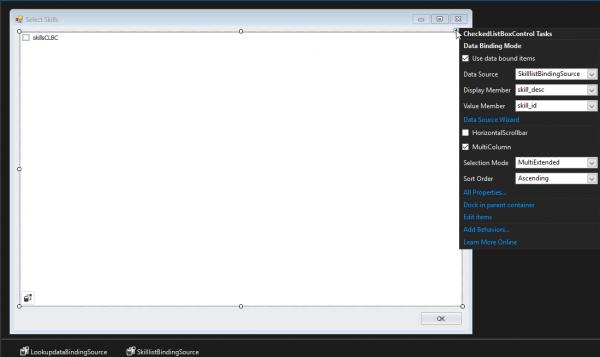
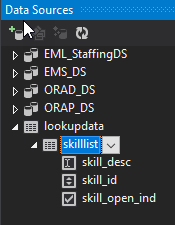
-
Mar 13th, 2019, 12:27 PM
#9
Thread Starter
Junior Member
Re: Preloading lookup data using strongly typed dataset and tableadapters
I am trying to create an object datasource with a structure like:
Lookupdata
skill(like a datatable) skill_id(like a field in a datatable) status and so on
Does that make sense?
-
Mar 13th, 2019, 02:58 PM
#10
Thread Starter
Junior Member
Re: Preloading lookup data using strongly typed dataset and tableadapters
I can do this on my form:
Code:
        Dim lu As New lookupdata
        SkilllistBindingSource.DataSource = lu.skilllist
        skillsCLBC.DataSource = SkilllistBindingSource.DataSource
but there has to be a way to not have to do it programmatically. setting the datasource to lookupedit.skilllist gives me an error. I guess i need to make lu global?
-
Mar 13th, 2019, 08:58 PM
#11
Re: Preloading lookup data using strongly typed dataset and tableadapters
If you want to have the look up data in scope for the whole project then you can create a global dataset. Here is a simple example of what I'm talking about.
Code:
Imports System.Data.OleDb

Module Module1
    Public luConnection As New OleDbConnection(My.Settings.waterConnectionString)
    Public lookUpDataSet As New LookUpDataSet

    Public Function cropsLookUp() As DataTable
        Dim ta As New LookUpDataSetTableAdapters.CropsTableAdapter
        ta.Fill(lookUpDataSet.Crops)
        Return lookUpDataSet.Crops
    End Function

    Public Function lotsLookUp() As DataTable
        Dim ta As New LookUpDataSetTableAdapters.LotsTableAdapter
        ta.Fill(lookUpDataSet.Lots)
        Return lookUpDataSet.Lots
    End Function
End Module
Code:
Public Class Form1
    Private Sub Form1_Load(sender As Object, e As EventArgs) Handles Me.Load
        Try
            Me.CropsComboBox.DisplayMember = "Crop"
            Me.CropsComboBox.ValueMember = "Crop"
            Me.CropsComboBox.DataSource = cropsLookUp()
            Me.CropsComboBox.SelectedIndex = -1

            Me.LotsComboBox.DisplayMember = "LotId"
            Me.LotsComboBox.ValueMember = "LotId"
            Me.LotsComboBox.DataSource = lotsLookUp()
            Me.LotsComboBox.SelectedIndex = -1

        Catch ex As Exception
            MessageBox.Show(ex.ToString)
        End Try
    End Sub
End Class
-
Mar 13th, 2019, 08:59 PM
#12
Re: Preloading lookup data using strongly typed dataset and tableadapters
If you want to have the look up data in scope for the whole project then you can create a global dataset. Here is a simple example of what I'm talking about.
Code:
Module Module1
    Public lookUpDataSet As New LookUpDataSet

    Public Function cropsLookUp() As DataTable
        Dim ta As New LookUpDataSetTableAdapters.CropsTableAdapter
        ta.Fill(lookUpDataSet.Crops)
        Return lookUpDataSet.Crops
    End Function

    Public Function lotsLookUp() As DataTable
        Dim ta As New LookUpDataSetTableAdapters.LotsTableAdapter
        ta.Fill(lookUpDataSet.Lots)
        Return lookUpDataSet.Lots
    End Function
End Module
Code:
Public Class Form1
    Private Sub Form1_Load(sender As Object, e As EventArgs) Handles Me.Load
        Try
            Me.CropsComboBox.DisplayMember = "Crop"
            Me.CropsComboBox.ValueMember = "Crop"
            Me.CropsComboBox.DataSource = cropsLookUp()
            Me.CropsComboBox.SelectedIndex = -1

            Me.LotsComboBox.DisplayMember = "LotId"
            Me.LotsComboBox.ValueMember = "LotId"
            Me.LotsComboBox.DataSource = lotsLookUp()
            Me.LotsComboBox.SelectedIndex = -1

        Catch ex As Exception
            MessageBox.Show(ex.ToString)
        End Try
    End Sub
End Class
Last edited by wes4dbt; Mar 13th, 2019 at 09:02 PM.
-
Mar 13th, 2019, 09:01 PM
#13
Re: Preloading lookup data using strongly typed dataset and tableadapters
-
Mar 13th, 2019, 09:30 PM
#14
Re: Preloading lookup data using strongly typed dataset and tableadapters
Now that I think about it, this may be what you want,
Code:
Module Module1
    Public gblLookUpDataSet As New LookUpDataSet
    Public gblCropTA As New LookUpDataSetTableAdapters.CropsTableAdapter
    Public gblLots As New LookUpDataSetTableAdapters.LotsTableAdapter

    Public Sub LoadLookUp()
       gblCropTA.Fill(gblLookUpDataSet.Crops)
        gblLots.Fill(gblLookUpDataSet.Lots)
    End Sub


End Module
Code:
Public Class Form1
    Private Sub Form1_Load(sender As Object, e As EventArgs) Handles Me.Load
        Try
            LoadLookUp()

            Me.CropsComboBox.DisplayMember = "Crop"
            Me.CropsComboBox.ValueMember = "Crop"
            Me.CropsComboBox.DataSource = gblLookUpDataSet.Crops
            Me.CropsComboBox.SelectedIndex = -1

            Me.LotsComboBox.DisplayMember = "LotId"
            Me.LotsComboBox.ValueMember = "LotId"
            Me.LotsComboBox.DataSource = gblLookUpDataSet.Lots
            Me.LotsComboBox.SelectedIndex = -1
        Catch ex As Exception
            MessageBox.Show(ex.ToString)
        End Try
    End Sub
End Class
Once you call LoadLookUp you can use that data anywhere in the program.
Last edited by wes4dbt; Mar 14th, 2019 at 01:31 PM.
-
Mar 14th, 2019, 07:39 AM
#15
Thread Starter
Junior Member
Re: Preloading lookup data using strongly typed dataset and tableadapters
That makes sense. What I was hoping for was to do it at design time, being able to select something as the datasource from properties rather than do it programmatically, but if that is my only option i guess I can do it that way. I was looking at how to create a class that i could add as a project data source. I am close, but that requires me to make a lot of changes programmatically as well.
Thanks for your suggestions.
-
Mar 14th, 2019, 10:05 AM
#16
Thread Starter
Junior Member
Re: Preloading lookup data using strongly typed dataset and tableadapters
This is where I am, changed it up a little.
Code:
Imports System.Data

Public Class lookupdata
    Private skillvals As DataTable
    Private hirestatvals As DataTable

    Public Sub New()
    End Sub

    Public ReadOnly Property skilldt As EML_StaffingDS.TSTAFFSKILLDataTable
        Get
            If skillvals Is Nothing Then
                skillvals = New EML_StaffingDS.TSTAFFSKILLDataTable
                Dim ta As New EML_StaffingDSTableAdapters.TSTAFFSKILLTableAdapter
                skillvals = ta.GetData()
                skillvals = skillvals.Select("skill_open_ind = 1", "skill_desc ASC").CopyToDataTable
            End If
            Return skillvals
        End Get
    End Property

    Public ReadOnly Property hirestatdt As EML_StaffingDS.TSTAFFHIRESTATDataTable
        Get
            If hirestatvals Is Nothing Then
                hirestatvals = New EML_StaffingDS.TSTAFFHIRESTATDataTable
                Dim ta As New EML_StaffingDSTableAdapters.TSTAFFHIRESTATTableAdapter
                hirestatvals = ta.GetData()
                hirestatvals = hirestatvals.Select("hirestat_open_ind = 1", "hirestat_name ASC").CopyToDataTable
            End If
            Return hirestatvals
        End Get
    End Property

End Class
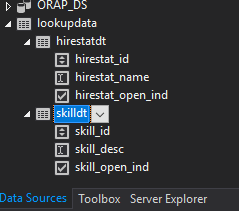
So i get it to show up in data sources, but i cant get it to show up correctly when selecting data source for a control. It shows the lookupdata, but not the items under it, like a regular dataset does. Any ideas?
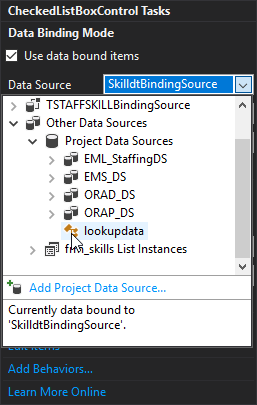
-
Mar 14th, 2019, 12:34 PM
#17
Re: Preloading lookup data using strongly typed dataset and tableadapters
Design time or runtime, the data doesn't gets loaded until you start the program.
-
Mar 14th, 2019, 01:31 PM
#18
Re: Preloading lookup data using strongly typed dataset and tableadapters
I don't know if you can get a Class to show up as a datasource as design time. At least I don't know how. But a Typed DataSet will show up as a datasource and you can bind it to things like a ComboBox at design time.
Last edited by wes4dbt; Mar 14th, 2019 at 02:58 PM.
Tags for this Thread
 Posting Permissions
- You may not post new threads
- You may not post replies
- You may not post attachments
- You may not edit your posts
-
Forum Rules
|
Click Here to Expand Forum to Full Width
|



 Reply With Quote


