|

-
Feb 5th, 2019, 11:25 PM
#1
Thread Starter
Fanatic Member

Handled Exception
Hi,
In a parent subroutine with a Try/Catch I want to check if a file is open.
If the file is open then it seems to create an exception in the ?parent? routine which means that it doesn't continue with the code.
Is there any way to handle the exception in the subroutine so that it doesn't interfere with the parent?
And is the a term for a parent subroutine?
Code:
    Function IsFileOpen(ByRef FileName As String) As Boolean
        Dim blnRetVal As Boolean = False
        Dim fs As FileStream = Nothing
        Try
            fs = File.Open(FileName, FileMode.Open, FileAccess.Read, FileShare.None)
        Catch ex As Exception
                blnRetVal = True
            Finally
                If Not IsNothing(fs) Then
                    fs.Close()
                End If
            End Try
        Return blnRetVal
    End Function
Last edited by sgrya1; Feb 5th, 2019 at 11:30 PM.
-
Feb 5th, 2019, 11:54 PM
#2
Re: Handled Exception
I found this...
Code:
Private Sub IsFileOpen(ByVal file As FileInfo)
    Dim stream As FileStream = Nothing
    Try
        stream = file.Open(FileMode.Open, FileAccess.ReadWrite, FileShare.None)
        stream.Close()
    Catch ex As Exception

        If TypeOf ex Is IOException AndAlso IsFileLocked(ex) Then
            ' do something here, either close the file if you have a handle, show a msgbox, retry  or as a last resort terminate the process - which could cause corruption and lose data
        End If
    End Try
End Sub

Private Shared Function IsFileLocked(exception As Exception) As Boolean
    Dim errorCode As Integer = Marshal.GetHRForException(exception) And ((1 << 16) - 1)
    Return errorCode = 32 OrElse errorCode = 33
End Function
- Coding Examples:
- Features:
- Online Games:
- Compiled Games:
-
Feb 5th, 2019, 11:58 PM
#3
Re: Handled Exception
How your code reacts to an open file depends on the code you run after checking if the file is open. We'd need to see that code...
- Coding Examples:
- Features:
- Online Games:
- Compiled Games:
-
Feb 6th, 2019, 12:20 AM
#4
Thread Starter
Fanatic Member
Re: Handled Exception
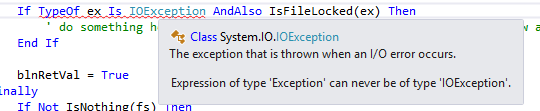
There's nothing in the parent routine that refers to the file.
The Exception occurs right at the point of checking if the file is open then instantly returns to the catch of the parent.
I have a problem with
-
Feb 6th, 2019, 12:21 AM
#5
Re: Handled Exception
Firstly, there's no justification for declaring that FileName parameter ByRef. For reference types, you only ever use ByRef if you want to assign a new object to the parameter inside the method and have that change affect the original reference. You're not assigning anything to the parameter in the method so there can't possibly be a reason to use ByRef. ByVal is the default for a reason.
As for your code, it has a number of shortcomings. Firstly, catching any and every exception and declaring that the file is open based on that is wrong. What if a FileNotFoundException is thrown? How does the fact that a file doesn't exist indicate that it is open? Even .paul.'s code is wrong in that it catches an Exception and then tests whether it is type IOException instead of just catching IOException in the first place. Even ignoring that, your code could be improved in a number of ways. This:
vb.net Code:
If Not IsNothing(fs) Then
should be this:
but there should be no reason to have to make that check at all. If you open the file with a Using statement then the FileStream will be implicitly closed if it is successfully created:
vb.net Code:
Private Function IsFileOpen(fileName As String) As Boolean Dim result = False Try Using fs = File.Open(fileName, FileMode.Open, FileAccess.Read, FileShare.None) End Using Catch ex As Exception result = True End Using Return result End Function
Last edited by jmcilhinney; Feb 6th, 2019 at 12:24 AM.
-
Feb 6th, 2019, 12:21 AM
#6
Thread Starter
Fanatic Member
Re: Handled Exception
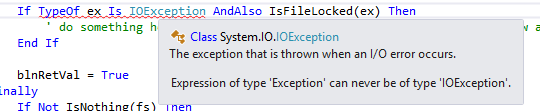
There's nothing in the parent routine that refers to the file.
The Exception occurs right at the point of checking if the file is open then instantly returns to the catch of the parent.
I have a problem with
-
Feb 6th, 2019, 12:27 AM
#7
Re: Handled Exception
 Originally Posted by sgrya1

There's nothing in the parent routine that refers to the file.
The Exception occurs right at the point of checking if the file is open then instantly returns to the catch of the parent.
I have a problem with
That seems to suggest that you have defined your own class named Exception. That would explain why you're not catching the exception in that method. It is an IOException that is being thrown, which does inherit System.Exception, but you are actually catching something other than System.Exception and so you don't catch the exception that is thrown. In your code, change Exception to System.Exception and I expect that it will work as you expect. In that case, find that class named Exception and get rid of it or, if it actually does serve a useful purpose, rename it to something sensible.
-
Feb 6th, 2019, 01:01 AM
#8
Thread Starter
Fanatic Member
Re: Handled Exception
jmcilhinney,
You've helped me many times before. Thank you!!
I can't check this right now but I'm sure it's the answer.
-
Feb 6th, 2019, 01:02 AM
#9
Thread Starter
Fanatic Member
Re: Handled Exception
jmcilhinney,
You've helped me many times before. Thank you!!
I can't check this right now but I'm sure it's the answer.
-
Feb 6th, 2019, 01:11 AM
#10
Thread Starter
Fanatic Member
Re: Handled Exception
Arr. Same thing.
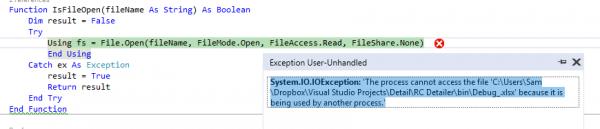
It says system.IO.IOException so I don't think I've defined my own class for an exception.
Last edited by sgrya1; Feb 6th, 2019 at 01:19 AM.
-
Feb 6th, 2019, 02:47 AM
#11
Re: Handled Exception
Originally Posted by sgrya1
Arr. Same thing.
It says system.IO.IOException so I don't think I've defined my own class for an exception.
That's a complete non-sequitur. What that is telling you is that a System.IO.IOException was thrown. That class inherits the System.Exception class so, if your code was actually catching System.Exception then it would catch an IOException. The fact that it's not means that you are not catching System.Exception. Nothing you have shown there is any indication that you haven't defined your own Exception class and, in fact, is evidence that you have. As far as I can tell, it's either that or something on your system is broken.
The way to find out what that class actually is to right-click on it and select Go To Declaration or the like. If you have declared that type in your own code then doing that will show you where. That said, as I already mentioned, you shouldn't be catching System.Exception in the first place. The point of your code is to determine whether a file is already open and it will only be an IOException that gets thrown in that situation so it should be only IOException that you are catching. As I stated quite clearly, catching System.Exception would result in your telling the user that a file that didn't exist was already open, which doesn't seem like any good application should be doing.
-
Feb 6th, 2019, 09:19 AM
#12
Re: Handled Exception
It's possible that the OP has Imported a namespace that has its own Exception class that maybe interfering... so it may not necessarily be that he's defined a custom class Exception. I've been bit by that before.
-tg
-
Feb 6th, 2019, 05:43 PM
#13
Re: Handled Exception
Originally Posted by sgrya1
You will also get an warning with that code, telling you that a return statement is missing.
vb.net Code:
Private Function IsFileOpen(fileName As String) As Boolean Try Using fs = IO.File.Open(fileName, IO.FileMode.Open, IO.FileAccess.Read, IO.FileShare.None) End Using Catch ex As Exception Return True End Try Return False <----- End Function
-
Feb 8th, 2019, 09:53 PM
#14
Thread Starter
Fanatic Member
Re: Handled Exception
Apologies all.
As jmcilhinney and techgnome has suggested I my project has a reference .dll file that overrules the exception.
Thank you all for pointing that out.
 Posting Permissions
- You may not post new threads
- You may not post replies
- You may not post attachments
- You may not edit your posts
-
Forum Rules
|
Click Here to Expand Forum to Full Width
|



 Reply With Quote


