|

-
Dec 19th, 2018, 11:08 AM
#1
Thread Starter
Lively Member

Process with empty name for VB6 ActiveX and flashing of MS Access
My customers are using an ActiveX control developed by me in VB6 in their Microsoft Access apps. Recently I have received a report about the following issue. If my control is placed on an Access form, a strange process with empty name appears in the Task Manager. In addition to that, later Access loses focus and starts flashing for about 10-15 seconds. This happens several times a day and it looks like a scheduled task or something similar. The more ActiveX controls are added to forms, the worse the situation. This problem occurs on both terminal servers and local clients with Windows 7 and 10:
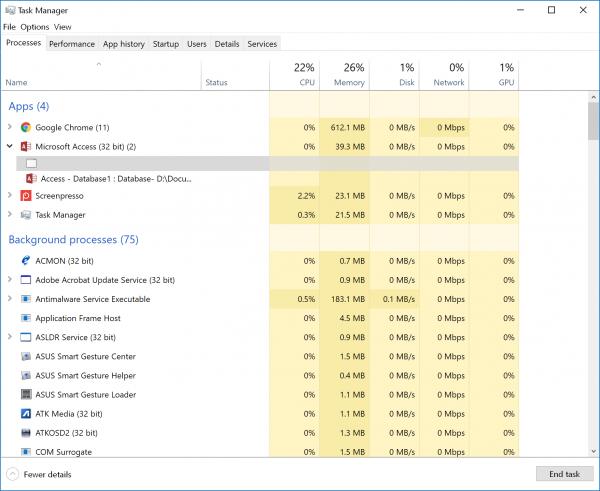
I started to investigate this issue. It turned out that this problem occurs in the other Office VBA environments like Word or Excel VBA. During my investigation I also detected that this 'noname' process appears even if I launch VB6 IDE with a brand new project created by default - even without my ActiveX control on the form:
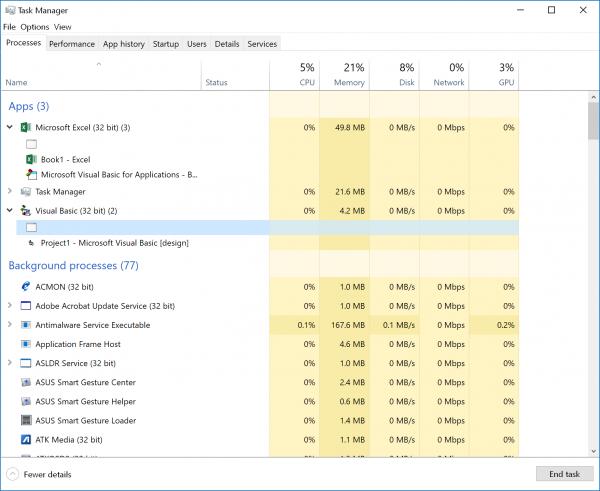
This caused me to think that this noname process is a thing related to the VB6 runtime. One more fact I found is the following: if I open VB6 and kill that noname window process, I can no longer drop my ActiveX control onto VB forms. I always get the 'Out of memory' error after killing this noname process. It seems, it's definitely a VB6 runtime thing.
I also tried to find the difference in window lists when VB6 is launched and not. I made spanshots with the Microsoft Spy++ utility, saved them to text files and compared in Total Commander to see the diff and find what windows are removed fromthe system when I kill the noname process. Look at the following picture:
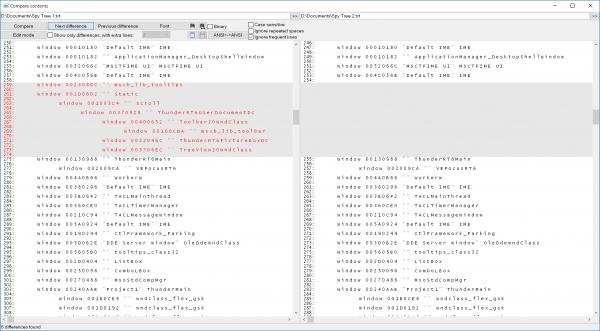
The helper windows marked with red in the left pane disappears when I kill the noname window-process in the Task Manager. As I can see from their class names, they are specific hidden windows created by the VB6 runtime to process system messages.
In my experiments I also issued the 'Switch to' command in the Task Manager to move the input focus to that noname window and make it the foreground process. When I do this, all other top-level windows including VB6 IDE loses the input focus and are moved to the background, but I do not see any window at the foreground. Perhaps, this explains why MS Access loses focus and starts flashing for 10-15 seconds.
My customers tell me that my ActiveX control still works properly even if they kill the noname process, so an API hack in my ActiveX to do this programmatically could solve the problem. But I would not do that - who knows how this will affect the functionality of the VB6 runtime.
Did anybody face a similar issue in their apps? If so, do you know how to solve the problem with flashing of apps using VB6 ActiveXs?
Last edited by wisekat; Dec 20th, 2018 at 03:20 AM.
Reason: minor corrections
-
Dec 20th, 2018, 03:12 AM
#2
Re: Process with empty name for VB6 ActiveX and flashing of MS Access
 Originally Posted by wisekat

Did anybody face a similar issue in their apps? If so, do you know how to solve the problem with flashing of apps using VB6 ActiveXs?
This is *not* a process. The line Visual Basic (32 bit) (2) is the process, and the nodes below it are top-level *windows* (hwnd) belonging to this process.
So this is listing an invisible hwnd (probably VBBubble) erroneously marked as top-level. Is this really such is problem?
cheers,
</wqw>
-
Dec 20th, 2018, 03:18 AM
#3
Thread Starter
Lively Member
Re: Process with empty name for VB6 ActiveX and flashing of MS Access
Mod, please, delete this post.
Last edited by wisekat; Dec 20th, 2018 at 07:35 AM.
-
Dec 20th, 2018, 03:19 AM
#4
Thread Starter
Lively Member
Re: Process with empty name for VB6 ActiveX and flashing of MS Access
Not all records nested into top-level nodes in this view in Task Manager are top-level windows. See, for example, what Google Chrome does. It launches a dozen of true processes that are also displayed as leaves in this tree.
This noname window is not a problem itself. The problem is that MS Access starts flashing. I think this may be related to this noname window.
-
Dec 20th, 2018, 03:27 AM
#5
Re: Process with empty name for VB6 ActiveX and flashing of MS Access
Originally Posted by wisekat
Not all records nested into top-level nodes in this view in Task Manager are top-level windows. See, for example, what Google Chrome does. It launches a dozen of true processes that are also displayed as leaves in this tree.
True. These sub-processes are grouped in common job object, most probably with a limit like JOB_OBJECT_LIMIT_KILL_ON_JOB_CLOSE so that all worker-processes are closed on main process termination/crash.
I'm using Process Hacker as a Task Manager replacement and the process tree there is obvious, don't have to deal with Task Manager idiosyncrasies.
Originally Posted by wisekat
This noname window is not a problem itself. The problem is that MS Access starts flashing. I think this may be related to this noname window.
Could be but most probably not. Flashing happens on cross-process window activation -- when SetFocus is attempted w/o AllowSetForegroundWindow setup beforehand.
cheers,
</wqw>
Tags for this Thread
 Posting Permissions
- You may not post new threads
- You may not post replies
- You may not post attachments
- You may not edit your posts
-
Forum Rules
|
Click Here to Expand Forum to Full Width
|



 Reply With Quote

