|

-
Dec 10th, 2018, 10:21 PM
#1
 [RESOLVED] Uninstall Visual Basic 6.0 (Not Shown in Control Panel) [RESOLVED] Uninstall Visual Basic 6.0 (Not Shown in Control Panel)
Okay....back to the same old stuff. I just installed VB6 (from Visual Studio 6.0 Enterprise CDs) on another Win10 computer. I want to remove VB6 (or VS6.0, if ya will) from one of the other Win10 computers in my office. However, on THAT computer, it never installed correctly (the old 'hanging when installing' issue). And was hence never able to get SP6 installed on that computer either because of the 'failure' of a proper VB6 install (although VB6 'worked fine' for what I needed). VB6 was never shown in the Control Panel listing of installed programs, so I was unable to select it and uninstall.
So, I attempted (3x) to reinstall VB6 from 'scratch' from my original CD set. Each time it failed. So, what I would like to do is UNINSTALL VB6 from that computer, but haven't a clue on how to do it (running the 'Install' program again to deselect (which I never get to) Visual Basic 6.0, ends with a message saying it was not installed.) However, the current 'bad' install I have been using for a couple of years still 'works'.
I found this on the internet, and have NOT tried it, because it seems like it is what I am doing with the Setup.exe wizard:
In order to uninstall VB6, run this command: "C:\Program Files\Microsoft Visual Studio\VB98\Setup\1033\Setup.exe"
1-does that make sense?
2-How else might I get VB6 off that computer?
Ultimate goal is to reinstall VS6 (only the VB6 component) on that computer (along with MSDN and SP6), but can't do it with that older install on the system.
Any other information ya might need to advise?
Sammi
-
Dec 11th, 2018, 05:33 AM
#2
Re: Uninstall Visual Basic 6.0 (Not Shown in Control Panel)
looks like you will have to do it manually
i do my best to test code works before i post it, but sometimes am unable to do so for some reason, and usually say so if this is the case.
Note code snippets posted are just that and do not include error handling that is required in real world applications, but avoid On Error Resume Next
dim all variables as required as often i have done so elsewhere in my code but only posted the relevant part
come back and mark your original post as resolved if your problem is fixed 
pete
-
Dec 11th, 2018, 05:41 AM
#3
Re: Uninstall Visual Basic 6.0 (Not Shown in Control Panel)
To Mods---sorry, I believe I posted this in the wrong section of the Forum...please move as appropriate (BUT, I think I'd get better responses here). Your choice.
-
Dec 11th, 2018, 06:08 AM
#4
Re: Uninstall Visual Basic 6.0 (Not Shown in Control Panel)
 Originally Posted by SamOscarBrown

Okay....back to the same old stuff. I just installed VB6 (from Visual Studio 6.0 Enterprise CDs) on another Win10 computer. I want to remove VB6 (or VS6.0, if ya will) from one of the other Win10 computers in my office. However, on THAT computer, it never installed correctly (the old 'hanging when installing' issue). And was hence never able to get SP6 installed on that computer either because of the 'failure' of a proper VB6 install (although VB6 'worked fine' for what I needed). VB6 was never shown in the Control Panel listing of installed programs, so I was unable to select it and uninstall.
So, I attempted (3x) to reinstall VB6 from 'scratch' from my original CD set. Each time it failed. So, what I would like to do is UNINSTALL VB6 from that computer, but haven't a clue on how to do it (running the 'Install' program again to deselect (which I never get to) Visual Basic 6.0, ends with a message saying it was not installed.) However, the current 'bad' install I have been using for a couple of years still 'works'.
I found this on the internet, and have NOT tried it, because it seems like it is what I am doing with the Setup.exe wizard:
In order to uninstall VB6, run this command: "C:\Program Files\Microsoft Visual Studio\VB98\Setup\1033\Setup.exe"
1-does that make sense?
2-How else might I get VB6 off that computer?
Ultimate goal is to reinstall VS6 (only the VB6 component) on that computer (along with MSDN and SP6), but can't do it with that older install on the system.
Any other information ya might need to advise?
Sammi
When you do get it uninstalled Review the document in this link:
https://www.raymond.cc/blog/install-...hine-for-java/
There are two critical items that must be taken or the installation will hang up at the end. That is what happened to you.
Please remember next time...elections matter!
-
Dec 11th, 2018, 07:16 AM
#5
Re: Uninstall Visual Basic 6.0 (Not Shown in Control Panel)
Yes sir, Tyson. Well aware of HOW to do it properly. However, when I did that install originally, I failed to do something (either didn't run elevated, or didn't uncheck the data option, or something else). On my other (several) computers, I have been successful using the guidance from that (and other) Google links. But, my problem is now to get it uninstalled. When I attempt to reinstall, I get the prompt that the Wizard had been run on this computer previously, and when trying to continue, the Wizard ends after a few checks, and then prompts that the installation was NOT successful. It does not, however, alter the 'bad' installation currently on that machine. Just trying to clean it up. ONE of the things on that computer that will not work because of the wrong installation, is the Deployment Wizard...errors out with an Active X notification.
So, still looking for some guidance...but also will keep trying other things myself in the meantime. Thx for responding, though.
Sam
-
Dec 11th, 2018, 10:22 AM
#6
Re: Uninstall Visual Basic 6.0 (Not Shown in Control Panel)
I've seen CCleaner recommended for cleaning up a botched VB6 install. Don't know about it personally.
-
Dec 11th, 2018, 12:11 PM
#7
Re: Uninstall Visual Basic 6.0 (Not Shown in Control Panel)
Originally Posted by SamOscarBrown
So, still looking for some guidance...
If you're comfortable with editing the Registry, you might want to try deleting (or to be safe, renaming) these Registry keys:
Code:
HKEY_CURRENT_USER\Software\Microsoft\MS Setup (ACME)
HKEY_CURRENT_USER\Software\Microsoft\VBA\Microsoft Visual Basic
HKEY_CURRENT_USER\Software\Microsoft\Visual Basic\6.0

#If 64-bit OS Then
HKEY_LOCAL_MACHINE\SOFTWARE\Wow6432Node\Microsoft\MS Setup (ACME)
HKEY_LOCAL_MACHINE\SOFTWARE\Wow6432Node\Microsoft\VisualStudio\6.0\Setup
#Else '32-bit OS
HKEY_LOCAL_MACHINE\SOFTWARE\Microsoft\MS Setup (ACME)
HKEY_LOCAL_MACHINE\SOFTWARE\Microsoft\VisualStudio\6.0\Setup
#End If
Afterwards, you can try reinstalling VB6 and just simply overwrite the previous botched installation.
Originally Posted by TysonLPrice
I would like to mention that there is another way of skipping the MS JVM installation that doesn't involve creating a dummy file.
-
Dec 11th, 2018, 04:13 PM
#8
Re: Uninstall Visual Basic 6.0 (Not Shown in Control Panel)
When my install failed I just ran the install again with the correct options and it installed correctly.
If the installer is complaining about the install having already been in progress or something of the sort I think my first move would be to look into the registry and see if there is a key there that is causing problems.
-
Dec 11th, 2018, 04:45 PM
#9
Re: Uninstall Visual Basic 6.0 (Not Shown in Control Panel)
@DataMiser....aye...NORMALLY that works for me as well, but in this one instance, no such luck. (been out all day so haven't retried anything).
@Tyson...I have no problem with Registry Keys...may just try that. Thx (I let the Java thing go ahead and do its thing...just makes me reboot an extra time, that's all...doesn't mess up my installs.
-
Dec 11th, 2018, 05:20 PM
#10
Re: Uninstall Visual Basic 6.0 (Not Shown in Control Panel)
Hi Sam,
I'm a bit confused as to why you wish to un-install that VB6 IDE installation. You want to get it installed correctly, right? I don't seem to have much trouble with VB6 IDE installations these days, but I have seen things go sideways a few times. There are really only four hiccups I've seen that can foul up an installation:
- The MSJAVA.DLL file in the c:\Windows folder, and you seem to know about this one.
- The msdatsrc.tlb (found in c:\Windows\System32 or c:\Windows\SysWOW64) not being correctly registered. And the solution here is just to register it with the RegTlib program.
- Failing to un-check the "ADO and RDS" option during installation. That's important.
- Some (or all) of the developer licenses for OCX files not getting registered correctly.
Regarding uninstalling, I'd just delete the ...Microsoft Visual Studio folder and be done with it. You'll leave a few traces around in the registry, but they won't hurt anything.
Regarding getting a good install, on the MSJAVA.DLL, I still use the approach of placing a zero-byte file in my c:\Windows folder. The msdatsrc.tlb and "ADO and RDS" issues are self-explanatory. Regarding getting OCX files registered (for development), I use a copy of the VBC6.exe program (zipped as VB6CLI.exe). Beyond that, I'm not sure you need to worry about un-installing before you attempt to re-install. When installing, I just typically keep kicking it until it installs, and then make sure everything is working.
I'm also sure you know about SP6, as that's a must.
The VB6 IDE does put a few things in the registry (primarily all the things you set/change under Tools/Options). However, beyond that, the VB6 IDE is quite portable. The only other thing I know of that goes into the registry are the developer licenses for any OCX controls you may use.
Good Luck,
Elroy
Any software I post in these forums written by me is provided "AS IS" without warranty of any kind, expressed or implied, and permission is hereby granted, free of charge and without restriction, to any person obtaining a copy. To all, peace and happiness.
-
Dec 11th, 2018, 11:01 PM
#11
Re: Uninstall Visual Basic 6.0 (Not Shown in Control Panel)
So...when I try to Install from one of my backup Install disks (I have several backups), I get this picture below.
Attachment 163817
When I continue with the first option, the system 'Checks for Installed Components', and then fails. What I mean by 'fails' is it simply hangs there 'forever' (Not Responding). I have to kill the process with Task Manager.
If I use another install disk (both exact copies of Disk #1 Original), I do not get that screen prompting about the Wizard having been run before!!!! I get to the point of selecting what components I want to install (just VB6---and of course Active X and those other components related --- unchecked ADO and RDO selection, already created the zero-length MSJAVA.DLL file and registered that library Elroy mentioned (successfully). What I get after continuing, is this picture:
Attachment 163819
So, back to square one. I have NOT deleted any directories at this point, nor messed with the Registry. Probably will do the former next unless someone else has a better suggestion.
Sam
-
Dec 12th, 2018, 07:26 AM
#12
Re: Uninstall Visual Basic 6.0 (Not Shown in Control Panel)
UPDATE...it seems the installation (see last post) 'took' (almost). When I look at Help-About, I see my 'new' Name and Organization (which I used for this last attempt). So, even though the setup was done, it wasn't completely finished...and I don't know why. I still don't have access to the Package and Deployment Wizard (get an Active X error when starting to go through the process), and I still cannot successfully install SP6 (on this one computer, that is).
So, it doesn't hang. It has the zero-length MSJava.dll file in C:\windows. I get to choose options (where I unselect ADO and RDS). I run everything as Administrator. But, it still 'fails' for a complete install.
Gonna try one more thing this morning...installing FoxPro (an application on the disks that I REALLY liked when I was using it many, many years ago). Will advise.
Thanks Mods for keeping this thread in the 'wrong' place...getting some good advice, just not quite there yet.
Sam Brown
-
Dec 12th, 2018, 08:02 AM
#13
Re: Uninstall Visual Basic 6.0 (Not Shown in Control Panel)
Dumb question but just to be sure. You are running setup as admin right?
-
Dec 12th, 2018, 08:22 AM
#14
Re: Uninstall Visual Basic 6.0 (Not Shown in Control Panel)
Yes sir. All things suggested in previous posts were done with :Run as Administrator:
Well, FoxPro 6.0 loaded just fine...so probably next step IS to delete VB6 directories. Would think I wouldn't have to (as I've done this before on many other computers over the years and never had this particular issue).
-
Dec 12th, 2018, 08:50 AM
#15
Re: Uninstall Visual Basic 6.0 (Not Shown in Control Panel)
Hi Sam,
Personally, I think this thread is in the precisely correct place. It's about VB6 and it's a problem.
If you don't mind, please outline why you can't get the SP6 installed.
Also, I didn't realize you needed the Package & Deploy Wizard. It's been forever since I've used that thing. However, you say it's getting an ActiveX error. This suggests to me that you may not have all the core OCX files correctly registered (especially for development purposes which RegSvr32 can't do).
I Googled a bit and did find a copy of the vb6cli.exe package. It is an exe, so I won't post a direct link. However, Google for: "drive.google.com" "vb6cli.exe" (with quotes). It's the first one that comes up. And just FYI, that's not my google drive. You should probably do your own virus scan as well. However, I did download it and check it with the one I've had for quite some time:
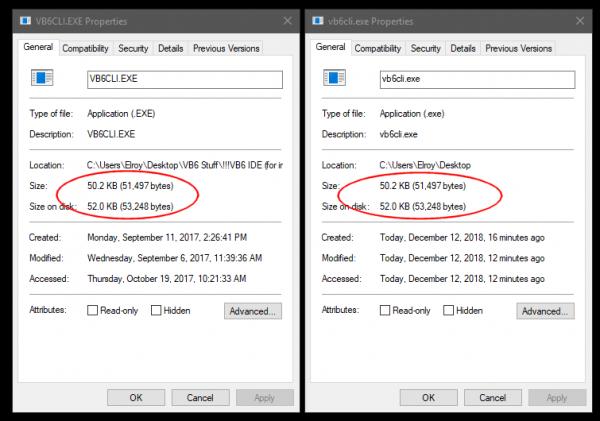
I also ran a checksum on it with Microsoft's checksum utility, and the checksum for both files was: dbf92608e47ed7ea54f86b765b772385 (That is another exe file, but it's from Microsoft so I'm hoping the mods think that link is fine.)
Also, don't forget to make sure the msdatsrc.tlb is registered. That's a problem I've encountered several times.
Good Luck,
Elroy
Any software I post in these forums written by me is provided "AS IS" without warranty of any kind, expressed or implied, and permission is hereby granted, free of charge and without restriction, to any person obtaining a copy. To all, peace and happiness.
-
Dec 12th, 2018, 09:13 AM
#16
Re: Uninstall Visual Basic 6.0 (Not Shown in Control Panel)
Thx Elroy...will check that other .exe in a bit....
But, here's one for the books. After I successfully installed Visual FoxPro 6.0 (From my Visual Studio 6.0 Enterprise Edition CD), I again tried to install Service Pack 6 (I just did it so I could capture the actual error notification at the end to answer you Elroy.) But this time, it installed correctly!!!!!....shows up in Help About. (But I don't see it in the Control Panel...not sure if I should anyway.)
ALSO, Microsoft Visual Studio 6.0 Enterprise Edition now shows up in Control Panel (probably from the FoxPro install)!
So, getting closer....now to get the Package and Deployment Addin working properly...
-
Dec 12th, 2018, 09:17 AM
#17
Re: Uninstall Visual Basic 6.0 (Not Shown in Control Panel)
Originally Posted by Elroy
http://code.kliu.org/hashcheck/
Just show Properties in explorer to see all kind of checksums. And supports SFV standard checksum files (not the custom XML from MS)
cheers,
</wqw>
-
Dec 12th, 2018, 09:22 AM
#18
Re: Uninstall Visual Basic 6.0 (Not Shown in Control Panel)
Error when attempting to Use Package (and Deploy) wizard...
Attachment 163829
-
Dec 12th, 2018, 09:27 AM
#19
Re: Uninstall Visual Basic 6.0 (Not Shown in Control Panel)
I successfully ran VB6cli.exe. (As administrator, as well).
msdatsrc.tlb was successfully registered earlier as well.
-
Dec 12th, 2018, 09:32 AM
#20
Re: Uninstall Visual Basic 6.0 (Not Shown in Control Panel)
Originally Posted by wqweto
Just show Properties in explorer to see all kind of checksums. And supports SFV standard checksum files (not the custom XML from MS)
I don't have that "Checksums" tab on my Properties Window. However, I'm only running Windows 10 Home on this laptop. I suspect you need Pro to get that tab, so I'm reduced to doing it the "manual" way.
Take Care,
Elroy
EDIT1: Ahhh, I now see. You're recommending a shell extension. 
Last edited by Elroy; Dec 12th, 2018 at 09:38 AM.
Any software I post in these forums written by me is provided "AS IS" without warranty of any kind, expressed or implied, and permission is hereby granted, free of charge and without restriction, to any person obtaining a copy. To all, peace and happiness.
-
Dec 12th, 2018, 09:35 AM
#21
Re: Uninstall Visual Basic 6.0 (Not Shown in Control Panel)
And Sam, I'm stumped. I assume you're running as a local administrator when doing all of this. No need to even answer, unless you weren't.
I suppose I'll let others jump in with some ideas, as I can't recall having had problems with the SP6 package.
EDIT1: Ahh, I see you had the Admistrator based covered (your post #19).
Any software I post in these forums written by me is provided "AS IS" without warranty of any kind, expressed or implied, and permission is hereby granted, free of charge and without restriction, to any person obtaining a copy. To all, peace and happiness.
-
Dec 12th, 2018, 09:40 AM
#22
Re: [RESOLVED] Uninstall Visual Basic 6.0 (Not Shown in Control Panel)
FOUND IT!!!!!
Had to register (re-register, I guess) hostwiz.dll (probably wasn't done in last VB6 install).
Located in .....\common\wizards98\, used regsvr32 to register...
All is good.
Found it by Google Search...and guess what...look who started THIS link where I RE-found the solution!! see post #2:
http://www.vbforums.com/showthread.p...-create-object
Thanks everyone.
-
Dec 12th, 2018, 09:53 AM
#23
Re: [RESOLVED] Uninstall Visual Basic 6.0 (Not Shown in Control Panel)
Sam, if you don't mind, can you provide a few more details? What did registering hostwiz.dll fix?
Can you now install SP6 without a problem?
Does the Package & Deploy Wizard now work?
If you give me those details, I'll make a note over in this thread.
Thanks,
Elroy
EDIT1: Also, please tell me where you found hostwiz.dll (which folder).
Any software I post in these forums written by me is provided "AS IS" without warranty of any kind, expressed or implied, and permission is hereby granted, free of charge and without restriction, to any person obtaining a copy. To all, peace and happiness.
-
Dec 12th, 2018, 10:13 AM
#24
Re: [RESOLVED] Uninstall Visual Basic 6.0 (Not Shown in Control Panel)
sorry, yes...here goes
Registering hostwiz.dll fixed the error I was getting (429) when trying to Package a project...would not let me continue.
I can (and did) install SP6 with no problem (but not before I ran the VS6.0 install program installing Visual FoxPro!)
The Package and Deploy Wizard now works.
hostwiz.dll (on my 64 bit system) is in C:\Windows\Program Files (x86)\Microsoft Visual Studio\common\Wizards98\ (152 KB)
FYI- I have NOT attempted to run the install program again to re-install VB6 (recall last few times I did so resulted in what appeared to be a good install except for two things: The prompt at the end said it was NOT installed properly, and MS Vis Studio did not show up in Installed Programs.) After installing FoxPro (from VS6.0 disk), Microsoft Visual Studio DOES show up in the control panel 'Programs'. I believe I now have a 'good'/complete install of VB6.0 simply because it now shows up in CP, and SP6 appears in the Help-About and P&D Wizard now works....I MAY experience some other issues in the future, but then, I always DO!!! :-)
-
Dec 12th, 2018, 10:17 AM
#25
Re: [RESOLVED] Uninstall Visual Basic 6.0 (Not Shown in Control Panel)
PS...I have created a MS Word Document that captures all the 'necessary' steps to install Visual Basic 6.0 (From a Microsoft Visual Studio Enterprise Edition CD set) on Windows 7 through 10. NEXT TIME I need to load a computer, I'll have a good guide to follow without Googling again. At my age, I can hardly be expected to REMEMBER all those unique steps, let alone know the best places to search for them!
-
Dec 12th, 2018, 10:26 AM
#26
Re: [RESOLVED] Uninstall Visual Basic 6.0 (Not Shown in Control Panel)
Hmmm, I think maybe I'll wait for some other information before changing my thread. I'm thinking that installing FoxPro is what got SP6 un-jammed. And I'm thinking that all registering the hostwiz.dll did was fix the P&D wizard.
I'm sure glad you got it going though.
This is all just more evidence why a quasi-portable version would be very nice. Say Microsoft, if you're listening, how about releasing the licensing requirements to the VB6 IDE! With just a notice from you (Microsoft), I suspect we could work out all the rest.
Any software I post in these forums written by me is provided "AS IS" without warranty of any kind, expressed or implied, and permission is hereby granted, free of charge and without restriction, to any person obtaining a copy. To all, peace and happiness.
-
Dec 12th, 2018, 12:20 PM
#27
Re: [RESOLVED] Uninstall Visual Basic 6.0 (Not Shown in Control Panel)
Sam,
You might consider attaching your Word document to this thread. It might help someone else.
-
Dec 13th, 2018, 06:26 AM
#28
Re: [RESOLVED] Uninstall Visual Basic 6.0 (Not Shown in Control Panel)
@jdc2000----no real need to post my Word doc. Elroy has posted that link (see post #23) on the same subject. One can copy-paste that into their own document (he has no patent (or royalty) on its contents!!!).
Cudos to him for creating it and keeping that thing updated. (One might just consider putting that link on one's own desktop!)
My local document essentially says the same thing (with notes about hostwiz and msdatsrc.tlb).
Sam
 Posting Permissions
- You may not post new threads
- You may not post replies
- You may not post attachments
- You may not edit your posts
-
Forum Rules
|
Click Here to Expand Forum to Full Width
|



 Reply With Quote


