|

-
Nov 21st, 2018, 02:19 PM
#1
Thread Starter
Fanatic Member


any way to load and view doc or docx or ppt or pptx just 2 o 3 pages in a form?
hi,i want load or view word or powerpoint(doc or docx nad ppt or pptx ) in a form and just i need page 1..3 or page1..2 in from word document loaded or slide1 ..3 or slide 1..2 from powerpoint documents.
i tested with office viewer activex or ole object but all pages loaded.how can fix this possible?
maybe i need load all pages and save page from 1 to 3 in another path and load? (if yes how?)
-
Nov 25th, 2018, 05:18 AM
#2
Re: any way to load and view doc or docx or ppt or pptx just 2 o 3 pages in a form?
for a word document if you open in background, you can move goto the end of the 2nd (or whatever) page then copy up to the selection into a temporary document and save, i presume similar could be done in powerpoint, but as i do not have powerpoint i can not give an example
Code:
Dim doc As object, rng As object, newdoc As object
Set app = createobject("word.application")
Set doc = app.Documents.Open("somepath\filename")
Set rng = doc.Content
doc.GoTo wdGoToPage, wdGoToAbsolute, 3  ' start of 3rd page
rng.End = Selection.Start - 2    ' - 2 characters to remove previous page break, may only need to be 1
rng.Copy
Set newdoc = Documents.Add
newdoc.Range.PasteSpecial
newdoc.SaveAs "somepath\tmpfilename"
doc.close false
newdoc.close false
app.quit
this is partially tested, to save only the first 2 pages, change filenames to suit, do houskeeping on objects as required
i do my best to test code works before i post it, but sometimes am unable to do so for some reason, and usually say so if this is the case.
Note code snippets posted are just that and do not include error handling that is required in real world applications, but avoid On Error Resume Next
dim all variables as required as often i have done so elsewhere in my code but only posted the relevant part
come back and mark your original post as resolved if your problem is fixed 
pete
-
Nov 25th, 2018, 11:08 AM
#3
Thread Starter
Fanatic Member
Re: any way to load and view doc or docx or ppt or pptx just 2 o 3 pages in a form?
 Originally Posted by westconn1

for a word document if you open in background, you can move goto the end of the 2nd (or whatever) page then copy up to the selection into a temporary document and save, i presume similar could be done in powerpoint, but as i do not have powerpoint i can not give an example
Code:
Dim doc As object, rng As object, newdoc As object
Set app = createobject("word.application")
Set doc = app.Documents.Open("somepath\filename")
Set rng = doc.Content
doc.GoTo wdGoToPage, wdGoToAbsolute, 3  ' start of 3rd page
rng.End = Selection.Start - 2    ' - 2 characters to remove previous page break, may only need to be 1
rng.Copy
Set newdoc = Documents.Add
newdoc.Range.PasteSpecial
newdoc.SaveAs "somepath\tmpfilename"
doc.close false
newdoc.close false
app.quit
this is partially tested, to save only the first 2 pages, change filenames to suit, do houskeeping on objects as required
i run your source but have some problem
1. i wanted show 2 page or 3 page from word ore powerpoint in a form like this :
this is my ocx created by myself but i have problem with load just 3 page(in this image i loaded all pages from powerpoint or word 2003 or 2007) :

2. i runed your source code but have been error (image attached) :
app error because was been vb command (app.path and like this) so i renamed to app1 and next error is :
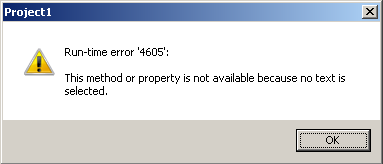
this command have error :
my question is about load and show on form without open office application.
Last edited by Black_Storm; Nov 25th, 2018 at 11:11 AM.
-
Nov 26th, 2018, 02:15 AM
#4
Re: any way to load and view doc or docx or ppt or pptx just 2 o 3 pages in a form?
You might want to look at using the Preview Handler. I'm not sure exactly how many pages it shows for documents (my docx previewer is broken), IIRC it's somewhere between 1 and 5, but for Excel it's showing the first few pages and powerpoint the 1st, 2nd, and last slide. This does require that Office be installed, but doesn't launch the program.
[VB6] IPreviewHandler: Show non-image file previews from any reg'd preview handler (uses oleexp.tlb + the mIID.bas file in the zip, find that here)
(Sample will run on XP if you replace the file selection method, but does that screen shot come from an even older version? This method only works on XP and newer)
Last edited by fafalone; Nov 26th, 2018 at 02:24 AM.
-
Nov 26th, 2018, 03:17 PM
#5
Re: any way to load and view doc or docx or ppt or pptx just 2 o 3 pages in a form?
try changing this line to fix the error
Code:
rng.End = app.Selection.Start - 2 ' - 2 characters to remove previous page break, may only need to be 1
it was a bad example to use app as a variable, wrdapp would have much been better
without open office application.
while it does open the office application, it does not need to be seen by the user
i do my best to test code works before i post it, but sometimes am unable to do so for some reason, and usually say so if this is the case.
Note code snippets posted are just that and do not include error handling that is required in real world applications, but avoid On Error Resume Next
dim all variables as required as often i have done so elsewhere in my code but only posted the relevant part
come back and mark your original post as resolved if your problem is fixed
pete
-
Nov 26th, 2018, 05:16 PM
#6
Thread Starter
Fanatic Member
Re: any way to load and view doc or docx or ppt or pptx just 2 o 3 pages in a form?
Originally Posted by westconn1
try changing this line to fix the error
Code:
rng.End = app.Selection.Start - 2 ' - 2 characters to remove previous page break, may only need to be 1
it was a bad example to use app as a variable, wrdapp would have much been better
while it does open the office application, it does not need to be seen by the user
again same error and rng.copy error too.
and i writed these codes :
Code:
Private Sub Command1_Click()
'    Dim doc As Object
    Dim doc As New Word.Document
'    Dim rng As Object
    Dim rng As Word.Range
'    Dim newdoc As Object
    Dim newdoc As New Document
    Dim app1 As New Word.Application
'    Set app1 = CreateObject("word.application")
    Set doc = app1.Documents.Open(App.Path & "\demo.docx")
    Set rng = doc.Content
    doc.GoTo(wdGoToPage, wdGoToAbsolute, 3).Select   ' start of 3rd page
    rng.End = Selection.Start - 2    ' - 2 characters to remove previous page break, may only need to be 1
'    rng.CopyAsPicture
    rng.Copy
    Set newdoc = Documents.Add
    newdoc.Range.PasteSpecial
    newdoc.SaveAs App.Path & "\demosave.docx"
    doc.Close False
    newdoc.Close False
    app1.Quit
End Sub

Private Sub Command2_Click()
    Dim doc As New Word.Document
    Dim rng As Word.Range
    Dim newdoc As New Document
    Dim app1 As New Word.Application
    Set doc = app1.Documents.Open(App.Path & "\demo.docx")
Selection.GoTo What:=wdGoToPage, Which:=wdGoToAbsolute, Count:=1
Set rng = Selection.Range
Selection.GoTo What:=wdGoToPage, Which:=wdGoToAbsolute, Count:=3
rng.End = Selection.Bookmarks("\Page").Range.End - 1
rng.Select
rng.Copy

Set newdoc = Documents.Add
newdoc.Range.PasteSpecial
newdoc.SaveAs App.Path & "\demosave.docx"
doc.Close False
newdoc.Close False
app1.Quit
MsgBox "done"
End Sub
why sometimes worked good and simetime show error like this :
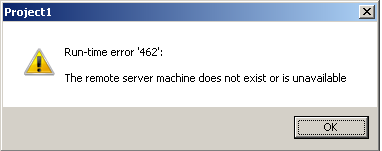
i want just click on command1 or command2 and save 3 pages of my word to another word file without open office word application and if i click again on command 1 or command2 work again!!!!
Last edited by Black_Storm; Nov 26th, 2018 at 05:20 PM.
Tags for this Thread
 Posting Permissions
- You may not post new threads
- You may not post replies
- You may not post attachments
- You may not edit your posts
-
Forum Rules
|
Click Here to Expand Forum to Full Width
|



 Reply With Quote
