|

-
Nov 9th, 2018, 10:13 AM
#1
Thread Starter
New Member


bangin my head: so close..format an excel workbooks column as number & save it
The goal: to take an existing Excel .csv file, and format column D as number, with 2 decimal places.
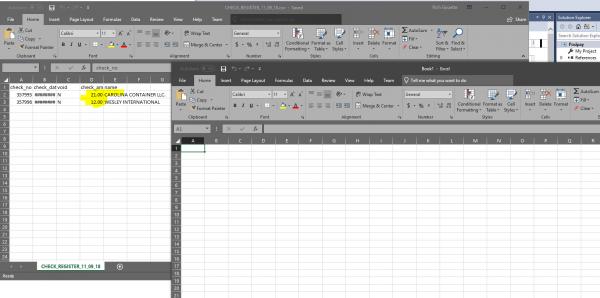
What's currently happening: I click my button to fire off the code(below), and up pops two excel workbooks:
1) the workbook I'm trying to modify(includes the changes I want)
2) a blank workbook (Book1)
If I close Book1(no prompt to save), then close my workbook, it asks me to save my workbook, but I want it to simply
make the change, and save, not displaying the workbook.
Here's my code:
Code:
    Private Sub ModifyExcel()
        Try
            Dim xlApp As New Microsoft.Office.Interop.Excel.Application()
            Dim xlWb As Microsoft.Office.Interop.Excel.Workbook = xlApp.Workbooks.Add
            xlWb = xlApp.Workbooks.Open("\\bb-rdsmngr\P21SHARE\POSIPAY\CHECK_REGISTER_" + PosipayFileDate + ".csv")
            Dim xlSt As Microsoft.Office.Interop.Excel.Worksheet = xlWb.ActiveSheet
            xlSt.Range("D1:D10000").EntireColumn.NumberFormat = "#,##0.00"
            xlWb.Save()
            xlApp.Visible = True
        Catch g As Exception
            MsgBox(g.ToString)
        End Try
and here's what's on the screen after it runs:
Thoughts?
Rich
-
Nov 9th, 2018, 10:29 AM
#2
Re: bangin my head: so close..format an excel workbooks column as number & save it
Take a look at this line:
 Originally Posted by rgouette

Code:
Dim xlWb As Microsoft.Office.Interop.Excel.Workbook = xlApp.Workbooks.Add
It is declaring the variable, and explicitly creating a new workbook. If you don't want the extra workbook (Book1), then remove the part of the code that creates it.
The line xlApp.Visible = True is probably something you don't want either (and instead replace it with closing the workbook and application objects), but it is probably wise to keep it for now.
I suspect the reason for the extra Save dialog is that the file is a CSV, which can only contain data (no formatting). I would assume that the dialog is not only prompting you to save, but also to change the file type to one that supports formatting (but it may only tell you that when you press save).
-
Nov 9th, 2018, 11:11 AM
#3
Re: bangin my head: so close..format an excel workbooks column as number & save it
Hi,
try this for NumberFormat
Code:
Imports Microsoft.Office.Interop.Excel

Public Class Form1

    Private Sub Button1_Click(ByVal sender As System.Object, ByVal e As System.EventArgs) Handles Button1.Click
        Dim oExcel As Object = CreateObject("Excel.Application")

        Dim oBook As Object = oExcel.Workbooks.Open("E:\Book1.xls")
        Dim oSheet As Object = oBook.Worksheets(1)

        oSheet.Range("A2").Value = 123.12
        oSheet.Range("A2", "A12").NumberFormatLocal = "#.##0,00"

        'Save this Excel document
        oBook.SaveAs("E:\Book1.xls", True)
        oExcel.Quit()
    End Sub


End Class
Last edited by ChrisE; Nov 9th, 2018 at 11:21 AM.
to hunt a species to extinction is not logical !
since 2010 the number of Tigers are rising again in 2016 - 3900 were counted. with Baby Callas it's 3901, my wife and I had 2-3 months the privilege of raising a Baby Tiger.
-
Nov 9th, 2018, 11:31 AM
#4
Thread Starter
New Member
Re: bangin my head: so close..format an excel workbooks column as number & save it
Originally Posted by ChrisE
Hi,
try this for NumberFormat
Code:
Imports Microsoft.Office.Interop.Excel

End Class
....
I think I'm definitely closer...
Do you know how I would create column names?
I tried:
Code:
oSheet.Columns.add("colName")
but that's not it...
Thanks much for your guidance,
R
-
Nov 9th, 2018, 11:48 AM
#5
Re: bangin my head: so close..format an excel workbooks column as number & save it
Hi
here a sample, this is not code from me, and I can't remember where I got it from
Code:
 Private Sub Button3_Click(ByVal sender As System.Object, ByVal e As System.EventArgs) Handles Button3.Click
        Dim appXL As New Microsoft.Office.Interop.Excel.Application()
        Dim wbXl As Microsoft.Office.Interop.Excel.Workbook
        Dim shXL As Microsoft.Office.Interop.Excel.Worksheet
        Dim raXL As Microsoft.Office.Interop.Excel.Range

        ' Start Excel and get Application object.
        appXL = CreateObject("Excel.Application")
        appXL.Visible = True

        ' Add a new workbook.
        wbXl = appXL.Workbooks.Add
        shXL = wbXl.ActiveSheet

        ' Add table headers going cell by cell.
        shXL.Cells(1, 1).Value = "First Name"
        shXL.Cells(1, 2).Value = "Last Name"
        shXL.Cells(1, 3).Value = "Full Name"
        shXL.Cells(1, 4).Value = "Specialization"

        ' Format A1:D1 as bold, vertical alignment = center.
        With shXL.Range("A1", "D1")
            .Font.Bold = True
            .VerticalAlignment = XlVAlign.xlVAlignCenter
            '.VerticalAlignment = appXL.Range.XlVAlign.xlVAlignCenter
        End With

        ' Create an array to set multiple values at once.
        Dim students(5, 2) As String
        students(0, 0) = "Zara"
        students(0, 1) = "Ali"
        students(1, 0) = "Nuha"
        students(1, 1) = "Ali"
        students(2, 0) = "Arilia"
        students(2, 1) = "RamKumar"
        students(3, 0) = "Rita"
        students(3, 1) = "Jones"
        students(4, 0) = "Umme"
        students(4, 1) = "Ayman"

        ' Fill A2:B6 with an array of values (First and Last Names).
        shXL.Range("A2", "B6").Value = students

        ' Fill C2:C6 with a relative formula (=A2 & " " & B2).
        raXL = shXL.Range("C2", "C6")
        raXL.Formula = "=A2 & "" "" & B2"

        ' Fill D2:D6 values.
        With shXL
            .Cells(2, 4).Value = "Biology"
            .Cells(3, 4).Value = "Mathmematics"
            .Cells(4, 4).Value = "Physics"
            .Cells(5, 4).Value = "Mathmematics"
            .Cells(6, 4).Value = "Arabic"
        End With

        ' AutoFit columns A:D.
        raXL = shXL.Range("A1", "D1")
        raXL.EntireColumn.AutoFit()

        ' Make sure Excel is visible and give the user control
        ' of Excel's lifetime.
        appXL.Visible = True
        appXL.UserControl = True

        ' Release object references.
        raXL = Nothing
        shXL = Nothing
        wbXl = Nothing
        appXL.Quit()
        appXL = Nothing
        Exit Sub
Err_Handler:
        MsgBox(Err.Description, vbCritical, "Error: " & Err.Number)
    End Sub
to hunt a species to extinction is not logical !
since 2010 the number of Tigers are rising again in 2016 - 3900 were counted. with Baby Callas it's 3901, my wife and I had 2-3 months the privilege of raising a Baby Tiger.
-
Nov 9th, 2018, 12:17 PM
#6
Thread Starter
New Member
Re: bangin my head: so close..format an excel workbooks column as number & save it
ok thanks much, I'll see how I get on with that..
R
Tags for this Thread
 Posting Permissions
- You may not post new threads
- You may not post replies
- You may not post attachments
- You may not edit your posts
-
Forum Rules
|
Click Here to Expand Forum to Full Width
|



 Reply With Quote


