|

-
Jul 13th, 2018, 11:19 AM
#2001
Re: CommonControls (Replacement of the MS common controls)
 Originally Posted by Karl77

FONTCOMBO
Small problem
This occurs only if the control is set to RecentMax > 0.
Let's say, the last selected font name was "Zürich".
Then it appears at the top of the list.
If we now press 'End' on the keyboard, the list doesn't scroll down to "Zürich".
It stops at the top, the place where "Zürich" ist found in the recents list.
I would expect that 'End' would go down to the list.
It's not a problem with the control. It's a event problem in connection with the RichTextBox.
The same problem occurs in the Demo.
The reason is that FontCombo1_Click sets the SelFontName of the RichTextBox which on the other hand fires it's own SelChange event and then again sets the Text of the FontCombo.
In order to avoid this circular thing I added in the Demo (RichTextBoxForm.frm) a Freeze boolean flag: (red marked)
Code:
Private Sub FontCombo1_Click()
If FontComboFreezeClick = True Then Exit Sub
RichTextBoxFreezeSelChange = True
If FontCombo1.ListIndex > -1 Then RichTextBox1.SelFontName = FontCombo1.Text
RichTextBoxFreezeSelChange = False
End Sub

Private Sub FontCombo1_CloseUp()
RichTextBox1.SetFocus
End Sub

Private Sub RichTextBox1_SelChange(ByVal SelType As Integer, ByVal SelStart As Long, ByVal SelEnd As Long)
If RichTextBoxFreezeSelChange = True Then Exit Sub
If (SelType And RtfSelTypeText) <> 0 Or SelType = RtfSelTypeEmpty Then
    FontComboFreezeClick = True
    If IsNull(RichTextBox1.SelFontName) Then
        FontCombo1.ListIndex = -1
    Else
        FontCombo1.Text = RichTextBox1.SelFontName
    End If
    FontComboFreezeClick = False
End If
End Sub
Last edited by Krool; Jul 13th, 2018 at 11:22 AM.
-
Jul 16th, 2018, 05:42 AM
#2002
Fanatic Member

Re: CommonControls (Replacement of the MS common controls)
Originally Posted by Krool
It's not a problem with the control. It's a event problem in connection with the RichTextBox.
I see.
Now with your 2 variables it works as expected.
Thank you.
-
Aug 13th, 2018, 03:20 PM
#2003
Re: CommonControls (Replacement of the MS common controls)
Feature update for the FontCombo control.
The FontCombo control now has a BuddyControl property which can be set to another FontCombo only.
Example:
a Form has FontCombo1 and FontCombo2.
FontCombo1.BuddyControl is set to FontCombo2.
Thus FontCombo1 will display the font names and FontCombo2 will display the font sizes of the selected font of FontCombo1.
If FontCombo1 changes FontCombo2 will be updated. It's all managed within the control so there is no code effort in the app.
FontCombo2 is then internally marked as "buddied" and thus the RecentMax feature is off and also in case the Style is not List only number input is allowed.
The RichTextBoxForm has been extended to demonstrate this new feature.
-
Aug 21st, 2018, 04:50 PM
#2004
Fanatic Member
Re: CommonControls (Replacement of the MS common controls)
Last edited by Mustaphi; Aug 21st, 2018 at 06:05 PM.
-
Aug 25th, 2018, 05:24 PM
#2005
Addicted Member
Re: CommonControls (Replacement of the MS common controls)
hi all , does anyone know what is the property ListItemIndices for listview group is used for ?
I was looking for something to act as a summary panel for the listview control and I started playing with methods and properties and I passed by the previous property and I did not know what it is for
-
Aug 29th, 2018, 06:29 AM
#2006
Lively Member
Re: CommonControls (Replacement of the MS common controls)
yesterday I compiled a program using the ocx, (I didn't use a manifest), the buttons (on the toolbar, the only control on the form) were not flat.
am I missing anything?
-
Aug 29th, 2018, 06:50 AM
#2007
Addicted Member
Re: CommonControls (Replacement of the MS common controls)
Originally Posted by Semke
yesterday I compiled a program using the ocx, (I didn't use a manifest), the buttons (on the toolbar, the only control on the form) were not flat.
am I missing anything?
External manifests or embedded resource file is essential for visual styles to be applied . OCX only will not give you the visual effect of Windows.
-
Aug 29th, 2018, 08:47 AM
#2008
Lively Member
Re: CommonControls (Replacement of the MS common controls)
Originally Posted by Hosam AL Dein
External manifests or embedded resource file is essential for visual styles to be applied . OCX only will not give you the visual effect of Windows.
that's what I thought, I just wanted to confirm.
thank you
-
Sep 2nd, 2018, 10:34 PM
#2009
Lively Member

Re: CommonControls (Replacement of the MS common controls)
Hi Krool,
I mention some time ago I would like to use your VBCCR with a OCX as a forms object that is interfaced via a COM/OLE automation and callbacks to the host for event processing.
I'm happy to say it's working out great using Script BASIC as the host. Here is a thread I have going on the All BASIC Forum
I remember there being two side-by-side files besides the VBCCR15.OCX. Are these still needed and if so how are they added to the project? Everything seems fine without them so far.
John
Originally Posted by Hosam AL Dein
OCX only will not give you the visual effect of Windows.
Seems to work for me.
Last edited by ScriptBASIC; Sep 4th, 2018 at 12:52 AM.
-
Sep 4th, 2018, 12:39 PM
#2010
Re: CommonControls (Replacement of the MS common controls)
Originally Posted by Hosam AL Dein
hi all , does anyone know what is the property ListItemIndices for listview group is used for ?
I was looking for something to act as a summary panel for the listview control and I started playing with methods and properties and I passed by the previous property and I did not know what it is for
The description for ListItemIndices property of a Group object says:
"Returns a reference to a collection containing the indexes to the list items referring to this group. Requires comctl32.dll version 6.0 or higher."
-
Sep 8th, 2018, 03:46 PM
#2011
Addicted Member
Re: CommonControls (Replacement of the MS common controls)
Originally Posted by Krool
The description for ListItemIndices property of a Group object says:
"Returns a reference to a collection containing the indexes to the list items referring to this group. Requires comctl32.dll version 6.0 or higher."
thanks a lot
-
Sep 13th, 2018, 12:41 PM
#2012
Addicted Member
Re: CommonControls (Replacement of the MS common controls)
Originally Posted by ScriptBASIC
Seems to work for me.
I am not sure of the platform you are on . But , for visual studio 6 , it is necessary to manifest the IDE itself to see visual effects during design time . Also for the EXE it is necessary to include an external manifest or an embedded resource file with manifest contents .
I think this is the general case except if you are having these settings already done or maybe you are judging the case only within design time (assuming you have a manifested IDE) . Is it the case also for EXEs ?
-
Sep 13th, 2018, 03:02 PM
#2013
Addicted Member
Re: CommonControls (Replacement of the MS common controls)
Is there a way to detect the column index in listview when clicking and item or subitem ? I came up to hit test . Is there any other way implemented in the current listview and I am missing it ? If not , Can it be added ? if I may suggest .
-
Sep 13th, 2018, 03:42 PM
#2014
Re: CommonControls (Replacement of the MS common controls)
Originally Posted by Hosam AL Dein
Is there a way to detect the column index in listview when clicking and item or subitem ? I came up to hit test . Is there any other way implemented in the current listview and I am missing it ? If not , Can it be added ? if I may suggest .
A ColumnHeader has a SubItemIndex function. So even when the ColumnHeader orders are changed it will advise you the correct index for accessing the sub items.
Code:
ListView1.ColumnHeaders(Index).SubItemIndex
So you can use this to check/compare with subitem index to the corresponding column index.
-
Sep 13th, 2018, 05:43 PM
#2015
Addicted Member
Re: CommonControls (Replacement of the MS common controls)
Originally Posted by Krool
A ColumnHeader has a SubItemIndex function. So even when the ColumnHeader orders are changed it will advise you the correct index for accessing the sub items.
Code:
ListView1.ColumnHeaders(Index).SubItemIndex
So you can use this to check/compare with subitem index to the corresponding column index.
It seems I could not form my question clearly .
how can I implement this in the event (item_click) . It has no arguments to deal with column headers . I am mainly asking for how to get the index of the column through the click position on a listview item . The code you provided krool requires the index of the column as input while I want it to be retrieved .
To make it more clear , my main goal is :
when the user right-clicks the listview or accurately an item , I need to extract what column this click was over , to get to the text under the mouse whether it was the first item or another subitem .
I am limited to click event , mouse-up and mouse-down events to detect the mouse button since I want "right click" .
Thanks in advance krool .
-
Sep 20th, 2018, 02:56 AM
#2016
Re: CommonControls (Replacement of the MS common controls)
Originally Posted by Hosam AL Dein
Is there a way to detect the column index in listview when clicking and item or subitem ? I came up to hit test . Is there any other way implemented in the current listview and I am missing it ? If not , Can it be added ? if I may suggest .
Add this code to the MainForm:
Code:
''''''''''''''''''''''''''''''''''''''''''''''''''''''''''''''''
' Copyright ©1996-2011 VBnet/Randy Birch, All Rights Reserved.
' Some pages may also contain other copyrights by the author.
''''''''''''''''''''''''''''''''''''''''''''''''''''''''''''''''
' Distribution: You can freely use this code in your own
'               applications, but you may not reproduce
'               or publish this code on any web site,
'               online service, or distribute as source
'               on any media without express permission.
''''''''''''''''''''''''''''''''''''''''''''''''''''''''''''''''
I've adapted the original code from http://vbnet.mvps.org/index.html?cod.../lvhittest.htm
Last edited by gilman; Sep 21st, 2018 at 01:19 AM.
-
Sep 20th, 2018, 03:10 AM
#2017
Re: CommonControls (Replacement of the MS common controls)
Originally Posted by Hosam AL Dein
Is there a way to detect the column index in listview when clicking and item or subitem ? I came up to hit test . Is there any other way implemented in the current listview and I am missing it ? If not , Can it be added ? if I may suggest .
Add this code to the MainForm:
Code:
''''''''''''''''''''''''''''''''''''''''''''''''''''''''''''''''
' Copyright ©1996-2011 VBnet/Randy Birch, All Rights Reserved.
' Some pages may also contain other copyrights by the author.
''''''''''''''''''''''''''''''''''''''''''''''''''''''''''''''''
' Distribution: You can freely use this code in your own
'               applications, but you may not reproduce
'               or publish this code on any web site,
'               online service, or distribute as source
'               on any media without express permission.
''''''''''''''''''''''''''''''''''''''''''''''''''''''''''''''''
I've adapted the original code from http://vbnet.mvps.org/index.html?cod.../lvhittest.htm
Edit:
I deleted the original code due to the copyright notice, but you can adapt the code from the link
-
Sep 20th, 2018, 04:18 AM
#2018
Re: CommonControls (Replacement of the MS common controls)
In the ListView is an in-built FindSubItem function. There you can pass byRef a SubItem index variable.
-
Sep 22nd, 2018, 01:26 AM
#2019
Fanatic Member
Re: CommonControls (Replacement of the MS common controls)
Thank you for the 21-Sep-2018 enhancement.
The toolbar performance boost is very important for my app.
-
Sep 22nd, 2018, 02:26 AM
#2020
Lively Member
Re: CommonControls (Replacement of the MS common controls)
I think this is the general case except if you are having these settings already done or maybe you are judging the case only within design time (assuming you have a manifested IDE) . Is it the case also for EXEs ?
Script BASIC is an interpreter. The Windows (non-console) version has a resource manifest. If I run the same program using the console version of Script BASIC it looks like Win2K.
-
Sep 27th, 2018, 06:49 AM
#2021
Addicted Member
Re: CommonControls (Replacement of the MS common controls)
I would like to start using VBCCR in a large existing project. Let's start with the VBCCR ListView for example. The project currently uses both "Microsoft Windows Common Controls 6.0 (SP6)" and "Microsoft Windows Common Controls-2 6.0 (SP6)".
Steps:
1. Download the ComCtlsDemo.zip attachment from the first post.
2. Copy ComCtlsDemo\OLEGuids\OLEGuids.tlb to C:\Windows\system32
3. In the VB6 IDE, open the project, go to Project -> References... -> Browse, select C:\Windows\system32\OLEGuids.tlb , tick "OLE Guid and interface definitions".
What now?
-
Sep 27th, 2018, 03:23 PM
#2022
Re: CommonControls (Replacement of the MS common controls)
Update released.
Included 'VirtualListItems' that returns a collection of virtual list items.
This is actually a limited/stripped down and mostly read-only version of the normal 'ListItems'. ('ListItems' feature is disabled when VirtualMode is turned on.)
So when migrating a project from non-virtual to virtual this addition will for sure make things easier as you don't need to reference everywhere to the virtual data source. So you can then go here the re-direction of retrieving for example a text in 'VirtualListItems' which then fires the normal GetVirtualItem event.
But most important you can control there some item states. For example the Selected state of an arbitrary index.
Due to 'ListItems' not available for virtual mode list views you had to use some API. Now that's not necessary anymore.
The Item property only accepts an Index As Long. No AddItem because everything remains controlled by the VirtualItemCount property. The Count property here is just for completeness and returns the same as VirtualItemCount.
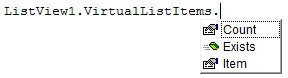
Again: Nothing was changed in the general virtual mode processing. This is just an addition for comfort and ease of migration. And to avoid some extra API work when going the virtual way. Also events like ItemClick will work in virtual mode. For there 'LvwListItem' will work as before even in virtual mode within these events.
Originally Posted by OldClock
I would like to start using VBCCR in a large existing project.
For large existing projects I would recommend to use the ActiveX version of VBCCR in a reg-free way.
Doing this way you don't have to load so much components into your large project. Also it is IDE-safe to use ActiveX version.
After that you open each .frm file and replace all occurrences of 'ComctlLib' to 'VBCCR15' for example.
You may also need to replace other stuff, like enum constants or class objects. For example 'ComctlLib.ListItem' will be 'VBCCR15.LvwListItem'.
Last edited by Krool; Sep 27th, 2018 at 03:32 PM.
-
Sep 28th, 2018, 03:48 PM
#2023
Re: CommonControls (Replacement of the MS common controls)
-
Sep 30th, 2018, 05:24 PM
#2024
Addicted Member
Re: CommonControls (Replacement of the MS common controls)
Hi krool ,
This issue is under version 1.6 only .
for ComboBoxW , If the style is dropdown list and the control got focus , it does not show the focus rectangle over the combobox . This was not the behavior for the previous versions . Is it right or I am missing something ?
-
Sep 30th, 2018, 11:31 PM
#2025
Re: CommonControls (Replacement of the MS common controls)
Originally Posted by Hosam AL Dein
Hi krool ,
This issue is under version 1.6 only .
for ComboBoxW , If the style is dropdown list and the control got focus , it does not show the focus rectangle over the combobox . This was not the behavior for the previous versions . Is it right or I am missing something ?
You have a visual styles manifest, right?
Did you call SetupVisualStyles on the Form during Form_Load ? (And InitVisualStyles during Sub Main)
-
Oct 1st, 2018, 04:02 AM
#2026
Addicted Member
Re: CommonControls (Replacement of the MS common controls)
Originally Posted by Krool
You have a visual styles manifest, right?
yes , I am using a manifest and it is applying the visual styles properly on all other controls .
Originally Posted by Krool
Did you call SetupVisualStyles on the Form during Form_Load ? (And InitVisualStyles during Sub Main)
I am using the OCX version
-
Oct 1st, 2018, 04:31 AM
#2027
Re: CommonControls (Replacement of the MS common controls)
Originally Posted by Hosam AL Dein
yes , I am using a manifest and it is applying the visual styles properly on all other controls .
I am using the OCX version
Doesnt' matter. InitVisualStyles and SetupVisualStyles also need to be applied when using OCX.
For me it's not possible to integrate into OCX.
Its responsibility of the application who use the OCX.
-
Oct 1st, 2018, 04:45 AM
#2028
Addicted Member
Re: CommonControls (Replacement of the MS common controls)
Originally Posted by Krool
Doesnt' matter. InitVisualStyles and SetupVisualStyles also need to be applied when using OCX.
For me it's not possible to integrate into OCX.
Its responsibility of the application who use the OCX.
this is the first time to know this point . I was using all the previous versions without these functions and it worked a bit fine except some casual crashes in IDE . This maybe the reason for these crashes , I will give it a try and report here .
Before this reply , I was suspicious about the way I upgraded the ocx from 15 to 16 and I was intending to ask about it also .
I have opened all the forms and modules and replaced VBCCR15 with VBCCR16 . Is this the proper way for upgrading from one version to another ?
-
Oct 1st, 2018, 05:17 AM
#2029
Addicted Member
Re: CommonControls (Replacement of the MS common controls)
I am developing a usercontrol which has a textboxw . Should I call setupvisualstyles in the Initialize event as well as the form holding the usercontrol ? If yes , how ? while setupvisualstyles requires a form as a parameter . If no , How are visualstyles properly applied in a usercontrol ?
I am asking this question because I have casual IDE crashes when dealing with the user control which contains a VBCCR textbox . I am suspecting the hwnd and hwndusercontrol and also visual styles functions calling you provided in the previous post .
For focus rectangle , the problem is solved by adding visualstyles and common modules and calling the functions in main and in each form load event . Thanks a lot
-
Oct 1st, 2018, 06:12 AM
#2030
Fanatic Member
Re: CommonControls (Replacement of the MS common controls)
COMPILER QUESTION
I have my 'own' VBCCR OCX, made from the original Exe sources + some extensions.
Same structure as with the original OCX version.
The OCX is quite large - no problem so far.
Now I'm tuning my app for performance.
Out of curiosity, I compiled the OCX as P-code.
It is a lot smaller.
And the P-code version has no performance advantage.
I didn't really expect it, but wanted to try.
Also it is not slower.
Can it harm somehow to have the OCX as P-code?
Thank you.
-
Oct 1st, 2018, 06:19 AM
#2031
Fanatic Member
Re: CommonControls (Replacement of the MS common controls)
Originally Posted by Hosam AL Dein
Should I call setupvisualstyles in the Initialize event as well as the form holding the usercontrol ? If yes , how ? while setupvisualstyles requires a form as a parameter . If no , How are visualstyles properly applied in a usercontrol ?
No.
If you use the OCX version no need to call SetupVisualStyles at all.
All you need is a manifest for the app.
Rem.:
You won't see any VisualStyles in the IDE.
Unless you have a patched VB6.EXE.
-
Oct 1st, 2018, 06:31 AM
#2032
Re: CommonControls (Replacement of the MS common controls)
Originally Posted by Karl77
No.
If you use the OCX version no need to call SetupVisualStyles at all.
All you need is a manifest for the app.
Rem.:
You won't see any VisualStyles in the IDE.
Unless you have a patched VB6.EXE.
Even in OCX you shall call SetupVisualStyles during Form_Load event. It fixes several stuff for visualstyles in general, e.g. focus rects etc.
-
Oct 1st, 2018, 06:41 AM
#2033
Addicted Member
Re: CommonControls (Replacement of the MS common controls)
Originally Posted by Karl77
No.
If you use the OCX version no need to call SetupVisualStyles at all.
All you need is a manifest for the app.
Rem.:
You won't see any VisualStyles in the IDE.
Unless you have a patched VB6.EXE.
I already have the IDE manifested and all works fine . I am asking based on krool note about calling visualsyles functions in the forms and main method . I am asking about usercontrols themselves
-
Oct 1st, 2018, 06:46 AM
#2034
Addicted Member
Re: CommonControls (Replacement of the MS common controls)
Originally Posted by Krool
Even in OCX you shall call SetupVisualStyles during Form_Load event. It fixes several stuff for visualstyles in general, e.g. focus rects etc.
I followed the info you provided krool , and the problem is solved . But I encounter casual crashes in IDE in the forms that contain a usercontrol which has a VBCCR textbox . I am wondering if this point could be a reason of theses crashes ?
and what about the proper way for upgrading ?
-
Oct 1st, 2018, 08:58 AM
#2035
Re: CommonControls (Replacement of the MS common controls)
Originally Posted by Hosam AL Dein
I followed the info you provided krool , and the problem is solved . But I encounter casual crashes in IDE in the forms that contain a usercontrol which has a VBCCR textbox . I am wondering if this point could be a reason of theses crashes ?
and what about the proper way for upgrading ?
Do you have a Sub Main which calls InitVisualStyles prior to first form load?
Yes, your upgrading is ok. Just replace in notepad from VBCCR15 to VBCCR16.
-
Oct 1st, 2018, 01:22 PM
#2036
Fanatic Member
Re: CommonControls (Replacement of the MS common controls)
Originally Posted by Krool
Even in OCX you shall call SetupVisualStyles during Form_Load event. It fixes several stuff for visualstyles in general, e.g. focus rects etc.
Thanks for the correction.
I couldn't see any difference in behavior with or without the call.
EDIT:
Now I see the difference.
Last edited by Karl77; Oct 2nd, 2018 at 12:48 AM.
-
Oct 1st, 2018, 02:19 PM
#2037
Hyperactive Member
Re: CommonControls (Replacement of the MS common controls)
Krool,
I am looking at VBCCR16 in the Object Browser and I do not see SetupVisualStyles or InitVisualStyles as procedures I can call. Also, neither of these show up anywhere in the source code provided with the OCX. I don't mind calling them but I can't find them. Where are they?
-
Oct 1st, 2018, 02:20 PM
#2038
Hyperactive Member
Re: CommonControls (Replacement of the MS common controls)
Last edited by MountainMan; Oct 1st, 2018 at 04:15 PM.
Reason: double post
-
Oct 1st, 2018, 02:26 PM
#2039
Re: CommonControls (Replacement of the MS common controls)
......
Look in ComCtlsDemo in first post for VisualStyles.bas
-
Oct 1st, 2018, 04:43 PM
#2040
Hyperactive Member
Re: CommonControls (Replacement of the MS common controls)
Krool,
You are saying we need to use InitVisualStyles in Procedure Main before showing a form. Okay. How about SetupVisualStyles? It is in VisualStyles.bas in the demo program (no OCX) and it looks like you put it as the first line of code in each of the forms. However, it is not present in the OCX version so do we assume that it got called internally in your OCX for each form or that is isn't needed or something else. if we should call it in the Form_Load procedure, do we nneed to put SetupVisualStyles into a different module or use VisualStyles.bas?
 Posting Permissions
- You may not post new threads
- You may not post replies
- You may not post attachments
- You may not edit your posts
-
Forum Rules
|
Click Here to Expand Forum to Full Width
|



 Reply With Quote