|

-
Sep 18th, 2018, 09:08 AM
#1
Thread Starter
Addicted Member


 [RESOLVED] MSComm Serial Receive issue [RESOLVED] MSComm Serial Receive issue
Hi there,
I trying to receive/collect data and parse from my microcontroller, but for some reason I got data received with random breaks and I can't parse them while receiving.
Code:
Private Sub comRS232_OnComm()

 Dim vrBuffer As String

 Dim lgFwV As Long
 Dim lgFwDate As Long
 Dim lgFwTime As Long

 comRS232.InputLen = 0

 vrBuffer = ""

 vrBuffer = comRS232.Input

 lgFwV = InStr(vrBuffer, "FWVER=")

 lgFwDate = InStr(vrBuffer, "DATE=")
 lgFwTime = InStr(vrBuffer, "TIME=")

 If lgFwV > 0 Then
  lblFwVer.Caption = Mid$(vrBuffer, lgFwV + 6, 3)
 End If

 If lgFwDate > 0 Then
  lblFwDate.Caption = Mid$(vrBuffer, lgFwDate + 5, 11)
 End If

 If lgFwTime > 0 Then
  lblFwTime.Caption = Mid$(vrBuffer, lgFwTime + 5, 8)
 End If

 Debug.Print vrBuffer

 txtSerial.Text = txtSerial.Text + vrBuffer
 txtSerial.SelStart = Len(txtSerial.Text)

 Exit Sub
End Sub
I got these differend Debug output receiving from two idetical microcontroller board, but with different serial chip:
Board 1:
Code:
RDW Rem
ote Cont
rol


FWV
ER=1.2

DATE
=Sep
 18
2018

T
IME=
13:3
4:23
Board 2:
Code:
RDW Remote Control
FWVER=1.2
D
ATE=Sep 18 2018
TIME=13:34:23
The board sketch is very simple one:
Code:
void setup()
{
  Serial.begin(9600);
  while (!Serial)
  {
    delay(10);
  }

  delay(500);

  Serial.print(F("RDW Remote Control"));
  Serial.println(F(""));
  Serial.println(F("FWVER=1.2"));
  Serial.println(F("DATE=Sep 18 2018"));
  Serial.println(F("TIME=13:34:23"));
  Serial.println(F(""));
}
They are using all the same serial connection settings:
I already posted my issue on the official board forum, but they say it's not board relevant and it's must be in my VB6 code.
Can someone tell me what I'm doing wrong?
Thank you!
-
Sep 18th, 2018, 11:09 AM
#2
Re: MSComm Serial Receive issue
If your setup is always the same, why not just replace all linebreaks, blanks (and whatnot) with vbnullstring, and then search your fields you're looking for?
btw: What do you have for RThreshold?
Last edited by Zvoni; Tomorrow at 31:69 PM.
----------------------------------------------------------------------------------------
One System to rule them all, One Code to find them,
One IDE to bring them all, and to the Framework bind them,
in the Land of Redmond, where the Windows lie
---------------------------------------------------------------------------------
People call me crazy because i'm jumping out of perfectly fine airplanes.
---------------------------------------------------------------------------------
Code is like a joke: If you have to explain it, it's bad
-
Sep 18th, 2018, 12:17 PM
#3
Re: MSComm Serial Receive issue
Serial Data is a stream, and the serial port has no idea how long your data is so it just sends you an event when it has received some data. You can control how often it sends the event based on the RThreshold value.
Most likely, since it looks like you sent two (end of line) values in a row at the end of your data, you could just collect the Input into a string each time you get the event until you see the double end of line sequence.
You could then parse the data and clear the string, ready to accumulate the next stream of characters into the string for your next message.
-
Sep 18th, 2018, 12:27 PM
#4
Thread Starter
Addicted Member
Re: MSComm Serial Receive issue
 Originally Posted by Zvoni

If your setup is always the same, why not just replace all linebreaks, blanks (and whatnot) with vbnullstring, and then search your fields you're looking for?
btw: What do you have for RThreshold?
Okay, can you please show me some in-line example?
And sorry I forgot to post my full serial settings:
Code:
With frmMAIN.comRS232
  .CommPort = frmMAIN.txtPort.Text
  .Settings = frmMAIN.txtBaud.Text & "," & frmMAIN.txtParity.Text & "," & frmMAIN.txtData.Text & "," & frmMAIN.txtStop.Text
  .InputLen = 0
  .InputMode = comInputModeText
  .InBufferSize = 1024
  .OutBufferSize = 512
  .EOFEnable = False
  .Handshaking = comNone
  .RThreshold = 1
  .SThreshold = 1

  If blConnectOnStartup = True Then
   .PortOpen = True
  End If
 End With
Thank you for your support!
-
Sep 18th, 2018, 12:47 PM
#5
Thread Starter
Addicted Member
Re: MSComm Serial Receive issue
Originally Posted by passel
Most likely, since it looks like you sent two (end of line) values in a row at the end of your data, you could just collect the Input into a string each time you get the event until you see the double end of line sequence.
means that it will print/send out with new line.
I tried already like this:
Code:
If comRS232.CommEvent = comEvReceive Then
 vrBuffer = vrBuffer & comRS232.Input
End If
and I got in Debug.Print vrBuffer result:
Code:
RDW R
emot
e Co
ntro
l
F
WVER=1.
2
D
ATE=
Sep
18 2
018


TIM
E=13
:34:
23
But in my txtSerial.Text output it's showing the correct data?!
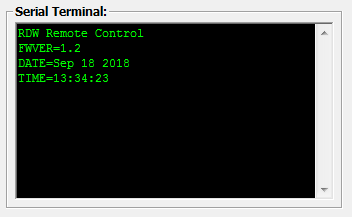
Last edited by beic; Sep 18th, 2018 at 12:48 PM.
Reason: typo
-
Sep 18th, 2018, 02:19 PM
#6
Re: MSComm Serial Receive issue
So, the debug print shows you're receiving some number of characters each event, so the full message comes across in 18 or more pieces.
You accumulate these pieces in the textbox, so see the fully assembled message. You need to accumulate these pieces in your string until you have the full message to parse, or you could accumulate lines, and parse as you go, but you may as well just accumulate the full message as your code is basically making the assumption you have the full message when you parse.
You do a println with the last data line followed by a println with an empty string, so there should be two line terminations in a row at the end of your data.
I don't have a serial setup to test, but given your original code, something along the lines of :
Code:
Private Sub comRS232_OnComm()

 Static vrBuffer As String

 Dim lgFwV As Long
 Dim lgFwDate As Long
 Dim lgFwTime As Long

 comRS232.InputLen = 0

'rem  vrBuffer = ""
  Dim EndOfMsgFlag As String
  EndOfMsgFlag = vbLf & vbLf  'or possibly vbCrLf & vbCrLf depending on what your line terminations are.
  vrBuffer = vrBuffer & comRS232.Input   'Add whatever characters have been received this event to the string

  If InStr(vrBuffer, EndOfMsgFlag) <> 0 Then  'vrBuffer has all the data, including the two line terminations at the end

    lgFwV = InStr(vrBuffer, "FWVER=")

    lgFwDate = InStr(vrBuffer, "DATE=")
    lgFwTime = InStr(vrBuffer, "TIME=")

    If lgFwV > 0 Then
      lblFwVer.Caption = Mid$(vrBuffer, lgFwV + 6, 3)
    End If

    If lgFwDate > 0 Then
      lblFwDate.Caption = Mid$(vrBuffer, lgFwDate + 5, 11)
    End If

    If lgFwTime > 0 Then
      lblFwTime.Caption = Mid$(vrBuffer, lgFwTime + 5, 8)
    End If

    Debug.Print vrBuffer

    txtSerial.Text = txtSerial.Text + vrBuffer
    txtSerial.SelStart = Len(txtSerial.Text)

   vrBuffer = ""   'we've parsed the complete message so empty the string to accumulate the next message
  End If
End Sub
Note that vrBuffer is declared to be static, so that it will hold its previous contents from one event to the next. If you "Dim" it, it goes away at the end of the sub and is created anew every time the sub is called.
Last edited by passel; Sep 18th, 2018 at 02:27 PM.
-
Sep 18th, 2018, 03:43 PM
#7
Thread Starter
Addicted Member
Re: MSComm Serial Receive issue
Originally Posted by passel
You do a println with the last data line followed by a println with an empty string, so there should be two line terminations in a row at the end of your data.
Your implementation just worked great, I got working it with vbCrLf & vbCrLf, did try to rework everithing (both source) just for vbCrLf, but that was not working for some reason, don't know why.
Originally Posted by passel
Note that vrBuffer is declared to be static, so that it will hold its previous contents from one event to the next. If you "Dim" it, it goes away at the end of the sub and is created anew every time the sub is called.
It's nice that you pointed me out for that!
Also noticed that, if there is a MsgBox shown while receiving data, after pressing OK button on it, the Buffer will output like this:
Code:
T
EMP=25.40
HUMI=58.50
Is it because of blocking?
Thank you for your great support! 
-
Sep 18th, 2018, 04:23 PM
#8
Re: MSComm Serial Receive issue
I'm not sure how often your data is sent, or how long the msgbox is displayed, but there could be a buffer overrun I suppose if the msgbox is up and the data is continuing to come in. I would have thought the I/O would be on another thread, so would buffer data even with the msgbox up. You would think there would be enough buffer (I'm thinking 1024 bytes), in the serial control, but I haven't played with VB6 serial in a long time, and not too much serial data connections even when I did.
I could see that depending on when you started, the first shot could be a partial message, but after you've found the first double newline instance, the reading would be synced up after that.
Anyway, I guess I'm done.
-
Sep 18th, 2018, 04:38 PM
#9
Thread Starter
Addicted Member
Re: MSComm Serial Receive issue
Originally Posted by passel
I'm not sure how often your data is sent
It is sent every 2 seconds.
Originally Posted by passel
but there could be a buffer overrun I suppose if the msgbox is up and the data is continuing to come in.
Yes, thats right, it's buffer overrun, because the msgbox is up.
Now I replaced the msgbox with beep for now, so we solved that too.
Originally Posted by passel
Anyway, I guess I'm done.
Yes, and thank you again, you really helped me alot! +1
Last edited by beic; Sep 18th, 2018 at 04:39 PM.
Reason: typo
-
Sep 18th, 2018, 07:28 PM
#10
Re: [RESOLVED] MSComm Serial Receive issue
It is never a bad idea to wrap your transmissions in start and/or end characters. I almost always do this so when receiving I can be 100% sure I am parsing the right bit of data even when it is variable length. Is a good habit to get into and can avoid a lot of headaches.
Tags for this Thread
 Posting Permissions
- You may not post new threads
- You may not post replies
- You may not post attachments
- You may not edit your posts
-
Forum Rules
|
Click Here to Expand Forum to Full Width
|



 Reply With Quote

