|

-
Aug 2nd, 2018, 02:12 AM
#1
Thread Starter
Lively Member

how to import excel data to data grid view vb 2010
hi All ,
I am creating a program that will import the data of excel files to my datagridview on my program.
here is the code i search.
Code:
 Private Sub Button1_Click(ByVal sender As System.Object, ByVal e As System.EventArgs) Handles Button1.Click
        Try

            Dim MyConnection As System.Data.OleDb.OleDbConnection
            Dim dataset As System.Data.DataSet
            Dim myCommand As System.Data.OleDb.OleDbDataAdapter
            Dim path As String = "C:\\Users\\lb770017\\Documents\\test.xlsx"

            MyConnection = New System.Data.OleDb.OleDbConnection("Provider=Microsoft.ACE.OLEDB.12.0;Data Source=" + path + ";Extended Properties 12.0;")
            myCommand = New System.Data.OleDb.OleDbDataAdapter("select * from [Sheet1$]", MyConnection)
            dataset = New System.Data.DataSet
            myCommand.Fill(dataset)
            DataGridView1.DataSource = dataset.Tables(0)
            MyConnection.Close()
        Catch ex As Exception
            MsgBox(ex.Message.ToString)

        End Try
    End Sub
it throws an exception message that
format of the initialization string does not conform to specification starting at index 88
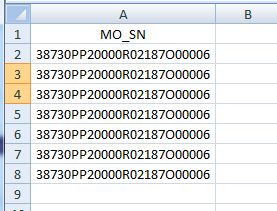
my excel file will only compose 1 column
-
Aug 2nd, 2018, 02:33 AM
#2
Re: how to import excel data to data grid view vb 2010
You don't ask questions in the CodeBank forum. I've asked the mods to move this thread. Please don't create a duplicate in the mean time.
As for the question, I believe that that error message indicates an invalid connection string. Why do you have double slashes in your file path?
-
Aug 2nd, 2018, 03:04 AM
#3
Thread Starter
Lively Member
Re: how to import excel data to data grid view vb 2010
aw sorry sir.
i am using backslash so it should be double , but if i used forward slash must be single, base on the research i made.
can you suggest what should be the correct connection string ?
-
Aug 2nd, 2018, 03:22 AM
#4
Re: how to import excel data to data grid view vb 2010
 Originally Posted by BONITO

i am using backslash so it should be double
No, it shouldn't. You only need to use a double backslash in languages where the backslash is an escape character. VB is not such a language.
Looking closer, I doubt that your Extended Properties attribute is valid either. I suggest that you visit www.connectionstrings.com to get the appropriate format.
-
Aug 2nd, 2018, 03:50 AM
#5
Thread Starter
Lively Member
Re: how to import excel data to data grid view vb 2010
really helpful link thanks for that,
but now i'm getting error ."COULD NOT FIND INSTALLABLE ISAM"
what does it means ?
-
Aug 2nd, 2018, 04:00 AM
#6
Re: how to import excel data to data grid view vb 2010
Thread moved from the 'CodeBank VB.Net' forum (which is for you to post working code examples, not questions) to the 'VB.Net' forum
Originally Posted by BONITO
but now i'm getting error ."COULD NOT FIND INSTALLABLE ISAM"
what does it means ?
It should mean either you spelt the provider name wrong, or the provider is not installed on the computer you are running it on.
However, as it is ACE, if your program is 32-bit and you installed the 64-bit version of the provider, it also won't be found (the same applies for 64-bit app and 32-bit provider).
Unfortunately the error can sometimes also mean there are errors in the other parts of the connection string.
-
Aug 2nd, 2018, 04:13 AM
#7
Re: how to import excel data to data grid view vb 2010
Based on what si said, please show us your connection string as it is now and also tell us:
1. Is your version of Office 32-bit or 64-bit?
2. What is the 'Target Platform' for your project?
3. If the Target Platform is 'Any CPU', is the 'Prefer 32-bit' box checked?
-
Aug 2nd, 2018, 09:58 PM
#8
Thread Starter
Lively Member
Re: how to import excel data to data grid view vb 2010
here is my new connection string.
Code:
MyConnection = New System.Data.OleDb.OleDbConnection("Provider=Microsoft.ACE.OLEDB.12.0;Data Source='C:\Users\lb770017\Documents\test.xlsx';Extended Properties =' Excel 12.0 Xml;HDR=YES;IMEX=1';")
1. my office is 2007 and im using 32bit os.
2. x86

-
Aug 2nd, 2018, 09:59 PM
#9
Thread Starter
Lively Member
Re: how to import excel data to data grid view vb 2010
here is my new connection string.
Code:
MyConnection = New System.Data.OleDb.OleDbConnection("Provider=Microsoft.ACE.OLEDB.12.0;Data Source='C:\Users\lb770017\Documents\test.xlsx';Extended Properties =' Excel 12.0 Xml;HDR=YES;IMEX=1';")
1. my office is 2007 and im using 32bit os.
2. x86
-
Aug 6th, 2018, 06:58 AM
#10
Re: how to import excel data to data grid view vb 2010
Hello,
Take a look at the following code sample.
-
Aug 6th, 2018, 06:58 AM
#11
Re: how to import excel data to data grid view vb 2010
Hello,
Take a look at the following code sample.
Tags for this Thread
 Posting Permissions
- You may not post new threads
- You may not post replies
- You may not post attachments
- You may not edit your posts
-
Forum Rules
|
Click Here to Expand Forum to Full Width
|



 Reply With Quote


