|

-
Jul 11th, 2018, 03:49 AM
#1
Thread Starter
Lively Member

 [RESOLVED] how to Divide value from 2 text box and show result to another text box [RESOLVED] how to Divide value from 2 text box and show result to another text box
hi All,
I am creating program to divide two numbers from different text box and show the result in another text box .
I don't know why i am getting 100.00 % as answer it should be 54.93% as per computed in excel.
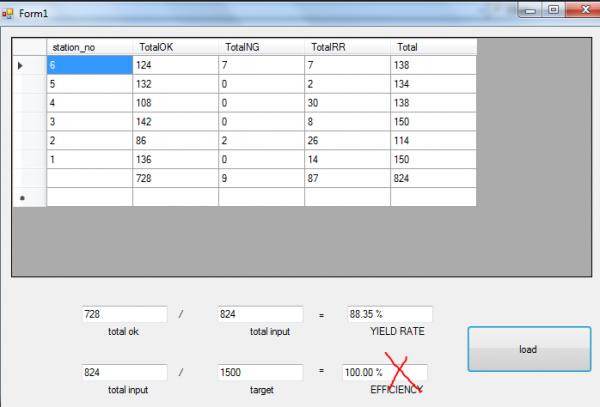
code
Code:
         If dr.HasRows Then
            Dim dtRecords As New DataTable
            dtRecords.Load(dr)
            DataGridView1.DataSource = dtRecords
            Dim rows = dtRecords.Rows
            Dim lastRow = rows(rows.Count - 1)
            Dim totalOk = CInt(lastRow("TotalOK"))
            Dim total_Input = CInt(lastRow("Total"))
            Dim yield = totalOk / total_Input
            txtTotalOk.Text = totalOk.ToString()
            txtTotalInput.Text = total_Input.ToString()
            txtYieldRate.Text = yield.ToString("p2")

            Dim noFixture As Integer = txtTarget.Text * 6 'multiply with no.of fixture.
            txtTarget.Text = noFixture      'target(user input) * no of fixture
            Dim Efficiency As Integer
            Efficiency = txtTotalInputEff.Text / txtTarget.Text
            txtTotalInputEff.Text = total_Input.ToString() ' last row
            txtEfficiency.Text = Efficiency.ToString("p2")


            '  txtEfficiency.Text = Efficiency.ToString("p2")

        End If
        dr.Close()
        connection.Close()

    End Sub
Last edited by BONITO; Jul 11th, 2018 at 04:01 AM.
-
Jul 11th, 2018, 04:15 AM
#2
Re: how to Divide value from 2 text box and show result to another text box
Firstly, how can you possibly not know how to divide two values and display the result when I've already showed you how to do it? You already have this:
vb.net Code:
Dim totalOk = CInt(lastRow("TotalOK")) Dim total_Input = CInt(lastRow("Total")) Dim yield = totalOk / total_Input '... txtYieldRate.Text = yield.ToString("p2")
That shows you how to get two values as Integers, divide one by the other and then display the result as a percentage. If the sources of the two values and the destination of the result are different then simply change them in the code, but the pattern is EXACTLY the same. One of your values is EXACTLY the same to begin with even.
You've already got 'total_input' so why do you need to get that value from a TextBox at all? As for the target value, why are you getting that from a Textbox when you must have got the value that is in the TextBox from somewhere else in the first place? That somewhere else is what you should be using in this calculation. It's simply the value you already have in 'total_input' divided by the target value retrieved from the original source and then display the result in exactly the same way as before.
-
Jul 11th, 2018, 04:18 AM
#3
Re: how to Divide value from 2 text box and show result to another text box
Also, debug your code. Don't just read it. Execute it and watch it in action, i.e. set a breakpoint and step through the code. That's an essential skill and makes lots of issues completely obvious because you can actually see what's happening instead of just guessing based on what you think should be happening. If you don't know how to debug, start learning now here:
https://msdn.microsoft.com/en-us/lib...or=-2147217396
-
Jul 11th, 2018, 04:31 AM
#4
Thread Starter
Lively Member
Re: how to Divide value from 2 text box and show result to another text box
hi sir,
Sorry I'm just newbie , thank you for advised i really want to learn coding.
i try what you said but it gives me answer 100.00% the real answer must be 54.93%.
Code:
Efficiency = total_Input / txtTarget.Text
-
Jul 11th, 2018, 04:44 AM
#5
Re: how to Divide value from 2 text box and show result to another text box
First of all, that's not what I suggested. Nowhere did I say that you include the Text of a TextBox in the division. I already said that you should be using the original source value and I have also demonstrated how to cast/convert something that is not an Integer to an Integer. I also suggested that you debug your code and there's no sign of that so far. Set a breakpoint, step through the code and see exactly what values are being used instead of guessing based on what you think they should be. VS includes a debugger for a reason so you should be using it. If you want to learn how to develop software then you MUST learn to debug, so you should do that right now.
-
Jul 11th, 2018, 08:33 AM
#6
Thread Starter
Lively Member
Re: how to Divide value from 2 text box and show result to another text box
Sir !
thank you , you are the best!
I got it by my self and it very easy! 
Code:
            Dim Target = txtTarget.Text * 6     'declare var Target assign value from txttarget * 6
            Dim Efficiency = total_Input / Target       'compute eff by dividing t_input /target
            txtEfficiency.Text = Efficiency.ToString("p2")  'p2 * 100 and percent sign
            txtTotalInputEff.Text = total_Input.ToString
-
Jul 15th, 2018, 11:49 PM
#7
Re: how to Divide value from 2 text box and show result to another text box
 Originally Posted by BONITO

Sir !
thank you , you are the best!
I got it by my self and it very easy!
Code:
            Dim Target = txtTarget.Text * 6     'declare var Target assign value from txttarget * 6
            Dim Efficiency = total_Input / Target       'compute eff by dividing t_input /target
            txtEfficiency.Text = Efficiency.ToString("p2")  'p2 * 100 and percent sign
            txtTotalInputEff.Text = total_Input.ToString
Try reading up on Datatypes, and turn Option Strict on in all of your projects...
If you're wondering what i mean try typing 'hello' in txtTarget, then try running your calculation.
- Coding Examples:
- Features:
- Online Games:
- Compiled Games:
Tags for this Thread
 Posting Permissions
- You may not post new threads
- You may not post replies
- You may not post attachments
- You may not edit your posts
-
Forum Rules
|
Click Here to Expand Forum to Full Width
|



 Reply With Quote


