|

-
Dec 10th, 2014, 10:16 AM
#1
Thread Starter
Member

Ethernet Sending & Receiving
Hello all,
Previously I've been a user of VB6 - All of our programs we create send and receive data on serial ports and on the ethernet port, in VB6 this was easy using the winsock control - However with VS2013 I think you need to use sockets for the ethernet port.
But I cannot for the life of me get my head around.
All I want is my program to connect to IP address 192.168.0.54 and port 10001 and send a "C".
I also want it to receive data and display it each time it does.
Surely that isn't difficult? I've been trawling around for ages now trying to find examples but just can't seem to get any to work, can anyone offer any help?
-
Dec 10th, 2014, 11:10 AM
#2
Re: Ethernet Sending & Receiving
I've personally never worked with ports, but a quick search led me to the TcpClient class. Here is a quick example that I worked up:
Code:
Module Module1

    Sub Main()
        'Get the IP address and port number
        Console.Write("Please enter an IP address: ")
        Dim address As String = Console.ReadLine
        Console.Write("Please enter a port number: ")
        Dim port As String = Console.ReadLine

        'Create and connect to the client
        Dim client As System.Net.Sockets.TcpClient = New System.Net.Sockets.TcpClient
        Dim ip As System.Net.IPAddress = System.Net.IPAddress.Parse(address)
        client.Connect(ip, CInt(port))

        'Get the desired message to send
        Console.WriteLine("What would you like to send?")
        Dim message As String = Console.ReadLine

        'Send the message
        Using stream As System.Net.Sockets.NetworkStream = client.GetStream
            Dim data() As Byte = System.Text.Encoding.ASCII.GetBytes(message)
            stream.Write(data, 0, data.Length - 1)
        End Using
    End Sub

End Module
Take it with a grain of salt though because like I said, I've never done this before nor have I tested it.
-
Dec 10th, 2014, 05:30 PM
#3
Re: Ethernet Sending & Receiving
dday9's is probably ok for TCP, but you're looking for UDP I'm sure.
There are a lot of ways to go about it in VB.Net.
And while there is a receive event you can use, I tend to use a background thread that just sits on a read, and when data comes in it processes it, then loops back to read more.
I do have a pair of examples written for someone else to demonstrate sending a couple of integers over UDP, and then later added sending a string as well.
Again, many ways to do it, the following is just my choice for how I like to pack the buffer and send, and how I unpack on the receiving side.
The first two programs are written to work in tandem. Originally sending data in one direction, it was changed to send data in both directions.
The demo simply takes mouse dragging positions on one form and sends it to the other, where the receiving side uses the data to draw lines on the form.
One was save as a transmitter project, and the other the receiver, but since they both do the same thing transmitting and receiving, you can name them udp1 and udp2 or whatever.
I'll post a third program, which is actually one that I use to just relay some serial data from a remote machine over Ethernet and sends it out to a device connected to a Serial port. That is just a one way connection. The computer generating the data for the serial device is not located near or connected to the serial device which was the reason for this simple program to get the data to a computer that was connected to the serial device.
-----
UDP Transmitter/Receiver side 1 (originally the transmitter)
Code:
Imports System.Threading
Imports System.Net
Imports System.Net.Sockets

Public Class Form1
  Dim udpSender As New UdpClient(32220)                               'Listen on UDP port 32220
  Dim destIPnt As New IPEndPoint(IPAddress.Parse("127.0.0.1"), 32221) 'Send to UDP port 32221

  Dim drawMap As New Bitmap(1200, 1000)
  Dim gMap As Graphics
  Dim receiveThread As New Thread(AddressOf Receiver)
  Dim leaving As Boolean

  Private Sub Form1_MouseMove(sender As Object, e As System.Windows.Forms.MouseEventArgs) Handles Me.MouseMove
    If e.Button = Windows.Forms.MouseButtons.Left Then
      Dim s As String = "ThisAtest"
      Dim sl As Integer = s.Length
      Dim b(11 + s.Length) As Byte '11 for X,Y and string size, + length of the string
      Buffer.BlockCopy(BitConverter.GetBytes(e.X), 0, b, 0, 4) 'convert X to 4 byte array and copy to b(0..3)
      Buffer.BlockCopy(BitConverter.GetBytes(e.Y), 0, b, 4, 4) 'convert Y to 4 byte array and copy to b(4..7)
      Buffer.BlockCopy(BitConverter.GetBytes(sl), 0, b, 8, 4) 'convert string length to 4 byte array and copy to b(8..11)
      Buffer.BlockCopy(System.Text.Encoding.ASCII.GetBytes(s), 0, b, 12, s.Length)
      udpSender.Send(b, b.Length, destIPnt)
    End If
  End Sub

  Private Sub Form1_Load(sender As System.Object, e As System.EventArgs) Handles MyBase.Load
    Dim b() As Byte = {0, 0, 0, 0, 0, 0, 0, 0}

    Me.Text = "Drag on this form to draw on the receiving form"
    Me.DoubleBuffered = True
    Me.BackgroundImage = drawMap
    gMap = Graphics.FromImage(drawMap)
    receiveThread.IsBackground = True
    receiveThread.Start()
  End Sub

  Private Sub Receiver()
    Dim remoteIP As New IPEndPoint(IPAddress.Any, 0)  'will hold who sent the data (not utilized)
    Dim b() As Byte 'buffer to receive data
    Dim s As String
    Dim sl As Integer

    Static LastPoint As Point

    Do Until leaving
      b = udpSender.Receive(remoteIP)
      If b.Count > 12 Then 'expect 12 bytes plus string data
        Dim newPoint As Point
        newPoint.X = BitConverter.ToInt32(b, 0)  'convert first 4 bytes (0..3) to Int32
        newPoint.Y = BitConverter.ToInt32(b, 4)  'convert second 4 bytes (4..7) to Int32
        sl = BitConverter.ToInt32(b, 8)  'get string length
        s = System.Text.ASCIIEncoding.ASCII.GetString(b, 12, sl) 'get ASCII bytes and convert to a string
        Me.Invoke(Sub() Me.Text = s)  'show the string received on the Form's title bar
        gMap.DrawLine(Pens.Black, LastPoint, newPoint)
        LastPoint = newPoint
        Me.BeginInvoke(Sub() Me.Invalidate()) 'Have to use Invoke to do stuff on the GUI thread
      End If
    Loop

  End Sub
End Class
----
UDP Transmitter/Receiver side 2 (originally the receiver). Very little difference between the two at this point.
Code:
Imports System.Threading
Imports System.Net
Imports System.Net.Sockets

Public Class Form1
  Dim socketIn As New UdpClient(32221)                                'Listen on UDP port 32221
  Dim destIPnt As New IPEndPoint(IPAddress.Parse("127.0.0.1"), 32220) 'Send to port 32220

  Dim drawMap As New Bitmap(1200, 1000)
  Dim gMap As Graphics
  Dim receiveThread As New Thread(AddressOf Receiver)
  Dim leaving As Boolean

  Private Sub Form1_FormClosing(sender As Object, e As System.Windows.Forms.FormClosingEventArgs) Handles Me.FormClosing
    leaving = True
  End Sub

  Private Sub Form1_MouseMove(sender As Object, e As System.Windows.Forms.MouseEventArgs) Handles Me.MouseMove
    If e.Button = Windows.Forms.MouseButtons.Left Then
      Dim s As String = "ThisAtest"
      Dim sl As Integer = s.Length
      Dim b(11 + s.Length) As Byte '11 for X,Y and string size, + length of the string
      Buffer.BlockCopy(BitConverter.GetBytes(e.X), 0, b, 0, 4) 'convert X to 4 byte array and copy to b(0..3)
      Buffer.BlockCopy(BitConverter.GetBytes(e.Y), 0, b, 4, 4) 'convert Y to 4 byte array and copy to b(4..7)
      Buffer.BlockCopy(BitConverter.GetBytes(sl), 0, b, 8, 4) 'convert string length to 4 byte array and copy to b(8..11)
      Buffer.BlockCopy(System.Text.Encoding.ASCII.GetBytes(s), 0, b, 12, s.Length)
      socketIn.Send(b, b.Length, destIPnt)
    End If
  End Sub

  Private Sub Form1_Load(sender As System.Object, e As System.EventArgs) Handles MyBase.Load
    Me.Text = "Receiving form"
    Me.DoubleBuffered = True
    Me.BackgroundImage = drawMap
    gMap = Graphics.FromImage(drawMap)
    receiveThread.IsBackground = True
    receiveThread.Start()
  End Sub

  Private Sub Receiver()
    Dim remoteIP As New IPEndPoint(IPAddress.Any, 0)  'will hold who sent the data (not utilized)
    Dim b() As Byte 'buffer to receive data
    Dim s As String
    Dim sl As Integer

    Static LastPoint As Point

    Do Until leaving
      b = socketIn.Receive(remoteIP)
      If b.Count > 12 Then 'expect 12 bytes plus string data
        'For i As Integer = 0 To b.Count - 1
        '  Debug.Write(String.Format("{0:x2} ", b(i)))
        'Next
        'Debug.WriteLine("")


        Dim newPoint As Point
        newPoint.X = BitConverter.ToInt32(b, 0)  'convert first 4 bytes (0..3) to Int32
        newPoint.Y = BitConverter.ToInt32(b, 4)  'convert second 4 bytes (4..7) to Int32
        sl = BitConverter.ToInt32(b, 8)  'get string length
        s = System.Text.ASCIIEncoding.ASCII.GetString(b, 12, sl) 'get ASCII bytes and convert to a string
        Me.Invoke(Sub() Me.Text = s)  'show the string received on the Form's title bar
        gMap.DrawLine(Pens.Black, LastPoint, newPoint)
        LastPoint = newPoint
        Me.BeginInvoke(Sub() Me.Invalidate()) 'Have to use Invoke to do stuff on the GUI thread
      End If
    Loop

  End Sub
End Class
And the code that acts as a simple relay, receiving data over UDP and retransmitting it on a serial port.
The first two code examples above should run just pasted into two new WinForm projects, they don't need any controls define.
The code below is an actual program being currently used, so is a coding example, not something you can run.
For instance, the COM port is hardcoded, and you probably won't have that COM port.
There also needs to be a timer, named GUITimer, added to the form, and a label named lblBeaconComm.
The label was Green as long as Ethernet messages came in at the expected rate, and turned Red if two "frames" passed without receiving Ethernet data.
The timer interval was set to 200ms, so I probably expected Ethernet input at 5 hz. If 400ms passed by without receiving Ethernet data then the label would show Red.
Code:
Imports System.IO.Ports
Imports System.Threading
Imports System.Net
Imports System.Net.Sockets

Public Class frmOseSerial
  Private _UdpReadThread As New Thread(AddressOf ReadThread)
  Private _SerialOut As New SerialPort("COM5", 38400, Parity.Odd, 8, StopBits.One)
  Dim Leaving As Boolean
  Dim recvIP As IPEndPoint = New IPEndPoint(IPAddress.Any, 3322)
  Dim b As Byte()
  Dim BeaconCommWatchDog As Integer

  Private Sub Form1_Load(ByVal sender As System.Object, ByVal e As System.EventArgs) Handles MyBase.Load
    _SerialOut.Open()

    GuiTimer.Start()
    _UdpReadThread.IsBackground = True
    _UdpReadThread.Start()
  End Sub

  Private Sub ReadThread()
    Dim UdpReceiver As New UdpClient(3322)
    Dim remoteIP As New IPEndPoint(IPAddress.Any, 0)

    Do Until Leaving
      b = UdpReceiver.Receive(remoteIP)
      If b.Length = 38 Then
        _SerialOut.Write(b, 0, 38)
        BeaconCommWatchDog = 2
      Else
        Debug.Print(String.Format("received {0}", b.Length))
      End If
    Loop
  End Sub

  Private Sub GuiTimer_Tick(ByVal sender As System.Object, ByVal e As System.EventArgs) Handles GuiTimer.Tick
    If BeaconCommWatchDog > 0 Then
      BeaconCommWatchDog -= 1
      lblBeaconComm.BackColor = Color.YellowGreen
      DisplayData()
    Else
      lblBeaconComm.BackColor = Color.OrangeRed
    End If
  End Sub

End Class
Last edited by passel; Dec 10th, 2014 at 05:36 PM.
-
Dec 11th, 2014, 05:09 AM
#4
Thread Starter
Member
Re: Ethernet Sending & Receiving
passel, thanks soo much for your help, I'm getting close now.
I will be sending and receiving from IP 192.168.0.54 and port 10001.
At the moment after copying and pasting code from side 1 into my project I get an error at this point:
b = udpSender.Receive(remoteIP)
With the description:
An unhandled exception of type 'System.Net.Sockets.SocketException' occurred in System.dll
Additional information: An existing connection was forcibly closed by the remote host
Any ideas?
-
Dec 11th, 2014, 09:35 AM
#5
Re: Ethernet Sending & Receiving
Sounds like you must of dragged the mouse on the form.
When you drag on the form with the mouse, it tries to send the message to the receiver.
Since the receiver isn't running, there is no one listening on that port.
The Operating system essentially sends an error response to let you know that no one is listening on that port.
Since I don't have a Try Catch in the receiver to trap the exception, it gets raised and you get the message box.
If you start both sides before dragging on either, you should be fine.
<edit>: I see you're were not talking about my program, but have added code to yours. So, you'll need to add exception handling in your receiver.
I've added an exception handler to the Receiver sub as an example.
Code:
  Private Sub Receiver()
    Dim remoteIP As New IPEndPoint(IPAddress.Any, 0)  'will hold who sent the data (not utilized)
    Dim b() As Byte 'buffer to receive data
    Dim s As String
    Dim sl As Integer

    Static LastPoint As Point

    Do Until leaving
      Try
        b = udpSender.Receive(remoteIP)
        If b.Count > 12 Then 'expect 12 bytes plus string data
          Dim newPoint As Point
          newPoint.X = BitConverter.ToInt32(b, 0)  'convert first 4 bytes (0..3) to Int32
          newPoint.Y = BitConverter.ToInt32(b, 4)  'convert second 4 bytes (4..7) to Int32
          sl = BitConverter.ToInt32(b, 8)  'get string length
          s = System.Text.ASCIIEncoding.ASCII.GetString(b, 12, sl) 'get ASCII bytes and convert to a string
          Me.Invoke(Sub() Me.Text = s)  'show the string received on the Form's title bar
          gMap.DrawLine(Pens.Black, LastPoint, newPoint)
          LastPoint = newPoint
          Me.BeginInvoke(Sub() Me.Invalidate()) 'Have to use Invoke to do stuff on the GUI thread
        End If
      Catch ex As System.Net.Sockets.SocketException
        Select Case ex.SocketErrorCode
          Case SocketError.ConnectionReset
            'Well just ignore it the remote port is not listening
          Case Else
            MsgBox(ex.Message) 'Display any other error type's message
        End Select
        Debug.Print(ex.Message)
      End Try

    Loop

  End Sub
Last edited by passel; Dec 11th, 2014 at 09:55 AM.
-
Dec 11th, 2014, 09:39 AM
#6
Thread Starter
Member
Re: Ethernet Sending & Receiving
Yes you're correct, I did drag the mouse on the form.
In this instance it is some hardware we have created which is set at IP: 192.168.0.54 and port 10001.
So there won't be a "receiver" program on the other end.
Does this change anything?
-
Dec 11th, 2014, 10:04 AM
#7
Re: Ethernet Sending & Receiving
Only if the hardware would send a port reset message, i.e. no one listening to that port at this IP. (when I say IP, I mean IP address)
Normally, when you are sending to another machine or hardware that isn't there, UDP is unaware whether the message was received or not.
If it can't find the IP, I think it is just lost.
But if it does find the IP, then it is up to the owner of the IP whether it will send an error response if no one is listening on the port.
In your code, sending to your hardware, I wouldn't think you would get an error message back.
In any case, I've updated my post with an example Try Catch to handle that particular error, or display a message box for other errors and allow you to continue.
Last edited by passel; Jan 25th, 2017 at 11:46 AM.
-
Dec 11th, 2014, 10:09 AM
#8
Re: Ethernet Sending & Receiving
To be clear, is the server (the receiver) expecting a TCP/IP connection or UDP?
"Ok, my response to that is pending a Google search" - Bucky Katt.
"There are two types of people in the world: Those who can extrapolate from incomplete data sets." - Unk.
"Before you can 'think outside the box' you need to understand where the box is."
-
Dec 11th, 2014, 10:35 AM
#9
Thread Starter
Member
Re: Ethernet Sending & Receiving
Previously when using the winsock control on all my programs it was set as TCP Protocol.
I'm basically trying to convert the code I've written in VB6 to VB 2013, but have come unstuck at the first hurdle - the ethernet communications.
The VB6 program simply connects on IP address 192.168.0.54, port 10001 and listens to the messages coming in (other programs of mine will send out ascii string messages, but not this one).
I just can't seem to quite get there yet.
-
Dec 11th, 2014, 10:37 AM
#10
Re: Ethernet Sending & Receiving
Did you attempt to use the code that I provided? As I stated, I never did any TCP/IP work before, but I believe that it'll work for you.
-
Dec 11th, 2014, 10:46 AM
#11
Thread Starter
Member
Re: Ethernet Sending & Receiving
 Originally Posted by dday9

Did you attempt to use the code that I provided? As I stated, I never did any TCP/IP work before, but I believe that it'll work for you.
I did, I couldn't get any of it to function though, I think that is because I am soo new to this Visual Basic 2013 version and it's soo different to VB6, I pasted the code into a project.... but couldn't get it to function.
Perhaps I need an idiots guide? - Which I truly feel like at the moment.
-
Dec 11th, 2014, 10:50 AM
#12
Re: Ethernet Sending & Receiving
The code I provided was for a Console Application. So if you create a new project, chose the Console Application Project, then delete any auto-generated code and paste mine.
-
Dec 11th, 2014, 10:56 AM
#13
Thread Starter
Member
Re: Ethernet Sending & Receiving
Originally Posted by dday9
The code I provided was for a Console Application. So if you create a new project, chose the Console Application Project, then delete any auto-generated code and paste mine.
Ahhh OK, Yes me being stupid then.
With your code it allows me to enter the IP, Port and then a message, after the message it quits.
I'm unable to test if it works successfully yet though as the program I'm creating to start with needs to be receiving data - Which I don't think yours does.
The hardware I am connected to sends me a "+" or a "-" each time a certain action is taken (basically it is a big penetration sensor, when the penetration increases I recieve many "+", when it decreases I receive many "-").
-
Dec 11th, 2014, 11:00 AM
#14
Re: Ethernet Sending & Receiving
I'm unable to test if it works successfully yet though as the program I'm creating to start with needs to be receiving data - Which I don't think yours does.
Ahh, ok. See if the program shuts down, then the message was successfully sent. At least we know now that the code works. I can try to work something up for the receiving end for you too.
-
Dec 11th, 2014, 11:03 AM
#15
Thread Starter
Member
Re: Ethernet Sending & Receiving
Originally Posted by dday9
Ahh, ok. See if the program shuts down, then the message was successfully sent. At least we know now that the code works. I can try to work something up for the receiving end for you too.
Brilliant! I wish I had come to you guys sooner - I spent a couple of sole sapping weeks struggling with this myself - being unable to find any decent examples online.
-
Dec 11th, 2014, 12:44 PM
#16
Re: Ethernet Sending & Receiving
As I stated earlier I have never done this before and I haven't tested this code, but try this out:
Code:
Option Strict On
Option Explicit On
Module Module1

    Sub Main()
        'Declare an IP Address
        Dim ip As System.Net.IPAddress = Nothing
        Console.Write("IP Address: ")

        'Continue to ask for the IP Address until the user enters in a valid address
        Do
            If Not System.Net.IPAddress.TryParse(Console.ReadLine, ip) Then
                Console.Write("Please enter in a valid IP address: ")
            End If
        Loop Until ip IsNot Nothing

        'Declare a Port
        Dim port As Integer = -1
        Console.Write("Port Number: ")

        'Continue to ask for the port until the user enters in a valid number
        Do
            If Not Integer.TryParse(Console.ReadLine, port) Then
                Console.Write("Please enter in a valid port: ")
            End If
        Loop Until port > -1

        'Create and connect to the client
        Dim client As System.Net.Sockets.TcpClient = New System.Net.Sockets.TcpClient
        client.Connect(ip, port)

        'Send a message
        Console.WriteLine("What message would you like to send? Hit enter to send.")
        Using stream As System.Net.Sockets.NetworkStream = client.GetStream
            Dim data() As Byte = System.Text.Encoding.ASCII.GetBytes(Console.ReadLine)
            stream.Write(data, 0, data.Length - 1)
        End Using

        'Inform the user on what's going on
        Console.WriteLine("Message sent. Now attempting to receive something back.")

        'Create and start to the listener
        Dim listener As System.Net.Sockets.TcpListener = New System.Net.Sockets.TcpListener(ip, port)
        listener.Start()

        'Wait for the client
        client = listener.AcceptTcpClient

        'Receive the message
        Using stream As System.Net.Sockets.NetworkStream = client.GetStream
            Dim buffer(1024) As Byte
            Dim builder As System.Text.StringBuilder = New System.Text.StringBuilder
            Dim bytesRead As Integer = 0

            Do
                bytesRead = stream.Read(buffer, 0, buffer.Length - 1)
                builder.AppendFormat("{0}", System.Text.Encoding.ASCII.GetString(buffer, 0, bytesRead))
            Loop While stream.DataAvailable

            Console.WriteLine("Message Received.")
            Console.WriteLine(builder.ToString)
        End Using

    End Sub


End Module
-
Dec 11th, 2014, 02:25 PM
#17
Re: Ethernet Sending & Receiving
I didn't realize you were using TCP, so my examples don't really apply.
I only have a couple of minutes, so probably won't be able to track down some convenient TCP examples, although I'm sure I and others have responded to some TCP based threads here before, so might be able to find some.
I don't think dday9's code is going to work for you, no fault of dday9 as he is an excellent poster, but as he says, he is not familiar with TCP and the code looks like it is mixing client side and server side code together.
A quick search and the following thread
http://www.vbforums.com/showthread.p...725&viewfull=1
is one I participated in that had TCP questions.
Another one http://www.vbforums.com/showthread.p...ent-and-Server
As I said, I can't stay. Just got a 15 min. break in a meeting. Hope the two links above give you useful input.
-
Dec 12th, 2014, 03:55 AM
#18
Thread Starter
Member
Re: Ethernet Sending & Receiving
Thankyou both for your replies!
With the new code above I get as far as attempting to receive something back and there appears to be a fault along this line:
listener.Start()
Description:
An unhandled exception of type 'System.Net.Sockets.SocketException' occurred in System.dll
Additional information: The requested address is not valid in its context.
I feel we are getting quite close.
-
Dec 12th, 2014, 10:52 AM
#19
Re: Ethernet Sending & Receiving
That was what I was referring to when I said dday9's code had a mix of client and server code in it.
You shouldn't be doing a listener.Start. That is for the Server side of a TCP connection.
In your case, the Server side would be the equipment you're connecting to.
Your side would be the Client.
The server listens for a connection.
The client connects.
The server accepts the connection.
The two sides can now transfer data back and forth.
The second link I had in post #17, http://www.vbforums.com/showthread.p...ent-and-Server
showed working versions of the MSDN examples of server side and client side TCP connections.
You should use the client side version and see if you can connect to your equipment.
p.s. I went back and tried that client code from the thread above, and it works fine with the server code in the same post.
It closes the connection after each send and receive, and reconnects each time you click the button.
That works OK, but if you were transferring large amounts of data, or fairly continuous data, you really wouldn't want to close and reconnect for every round of conversation.
Last edited by passel; Jan 25th, 2017 at 11:26 AM.
-
Dec 16th, 2014, 07:01 AM
#20
Thread Starter
Member
Re: Ethernet Sending & Receiving
Thanks for the reply.
Using that example I am nearly there.
I just need to alter the program in some way to check constantly for incoming messages and action them accordingly, with VB6 there was an oncomm event, with sockets it doesn't appear that easy, would I write a loop which would constantly check for messages? But surely that would generate an error? (A never ending loop)?
-
Dec 16th, 2014, 09:33 AM
#21
Re: Ethernet Sending & Receiving
A never ending loop wouldn't generate an error. In fact, I use a never ending loop in my video games and console applications that I want to continually repeat.
However, from what I understand... you're able to set a timeout where if there is no response by X milliseconds then it will stop trying to receive anything.
-
Dec 16th, 2014, 10:46 AM
#22
Re: Ethernet Sending & Receiving
I looked at one of my projects and I had a class to implement the client side interface for that particular project.
I used System.IO.BinaryWriter and BinaryReader to work with the TCP Network stream, but since we already have code in the existing example which is doing a stream read, I'll stick with the existing code to handle the read.
I've stripped the class down and used the existing read method inside the receiver loop.
I added a class module from the project menu and called it tcpClientInterface (it will create a file named tcpClientInterface.vb).
This was just done quick, so I didn't implement properties, and other standard class type interfaces. I made the background thread the class creates public so we can join with the thread when the form closes to allow it to clean up before the application exits.
You may want to copy the existing client example to a new directory since we're going to be modifying it, but using the same form controls so the program won't look any different to the user, but the connection will only be made once, and the read can read data continuously from the connection.
The modified Form code will be reduced to this:
The load event will make the connection to the server.
The Button will now just write the contents of the textbox (after converting to an ASCII string of bytes) to the TCP interface.
When the form closes, the TCP connection will be closed, and the form (GUI thread) will wait (join) for the background thread to exit before closing.
Code:
Imports System.Net
Imports System.Net.Sockets

Public Class Form1

  Dim client As New tcpClientInterface()  'class to handle the TCP interface

  Private Sub Form1_Load(sender As System.Object, e As System.EventArgs) Handles MyBase.Load
    client.Connect(IPAddress.Parse("127.0.0.1"), 13000, Me) 'ipaddress, port, reference to this Form for GUI updates
  End Sub

  Private Sub Button1_Click(sender As System.Object, e As System.EventArgs) Handles Button1.Click
    ' Translate the message into ASCII and store it as a Byte array.
    Dim data As [Byte]() = System.Text.Encoding.ASCII.GetBytes(TextBox1.Text)
    client.tcpWrite(data, data.Length)
  End Sub

  Private Sub Form1_FormClosing(sender As Object, e As System.Windows.Forms.FormClosingEventArgs) Handles Me.FormClosing
    client.Disconnect()
    client.tcpThread.Join()
  End Sub

End Class
The code in the tcpClientInterface class module:
I haven't tried to add recovery code to handle any exceptions. In the normal case, it will work fine, but to be robust, some error contingency code to gracefully handle exceptions should be added, but that would make the example more complex, and I don't have the time now to really consider the possible exceptions that need to be handled.
The code you need to replace to handle your TCP reads is inside the loop, between "Do Until exiting" and "Loop".
Code:
Imports System.Net.Sockets
Imports System.IO

Public Class tcpClientInterface
  Private _tcpClient As TcpClient
  Private tcpNetStream As NetworkStream
  Private exiting As Boolean                'flag when we're done using the interface

  Private serverIP As System.Net.IPAddress
  Private serverPort As Integer
  Private gui As Form1                      'Type is Class name of the form you want to interface with
  Public tcpThread As Threading.Thread

  Public Sub Connect(IP As System.Net.IPAddress, port As Integer, frm As Form1)  'frm as class name we want to interface with
    serverIP = IP
    serverPort = port
    gui = frm

    If _tcpClient IsNot Nothing Then                           'We've probably connected before
      Disconnect()                                             '  Cleanup previous connection
    End If
    exiting = False
    If tcpThread IsNot Nothing Then
      Debug.Print("We've been here before")
    End If
    tcpThread = New Threading.Thread(AddressOf tcpProcessor)
    tcpThread.IsBackground = True
    tcpThread.Start()
  End Sub

  Public Sub Disconnect()
    exiting = True
    If tcpNetStream IsNot Nothing Then
      tcpNetStream.Close()
      tcpNetStream.Dispose()
    End If
    _tcpClient.Close()
    _tcpClient = Nothing
  End Sub

  Private Sub tcpProcessor()
    Try
      Debug.Print("tcpProcessor thread launched")

      _tcpClient = New TcpClient
      _tcpClient.Connect(serverIP, serverPort)
      tcpNetStream = _tcpClient.GetStream()

      Dim data As [Byte]()

      Debug.Print("Got here")
      Do Until exiting

        data = New [Byte](256) {}

        ' String to store the response ASCII representation.
        Dim responseData As [String] = [String].Empty

        ' Read the first batch of the TcpServer response bytes.
        Dim bytes As Int32 = tcpNetStream.Read(data, 0, data.Length)
        responseData = System.Text.Encoding.ASCII.GetString(data, 0, bytes)
        gui.Invoke(Sub() gui.Label1.Text = responseData)

      Loop

    Catch ex As Exception
      'Should have some handling here, like flagging we need to attempt to reconnect, etc.
      Debug.Print("TcpProcessor exception")
    End Try
  End Sub

  Public Sub tcpWrite(ByVal ba As Byte(), ByVal cnt As Integer)
    Try
      If tcpNetStream IsNot Nothing Then
        If tcpNetStream.CanWrite Then
          tcpNetStream.Write(ba, 0, cnt)
        End If
      End If
    Catch ex As Exception
      'Should have some handling here, like flagging we need to attempt to reconnect, etc.
    End Try
  End Sub
End Class
I've tested the above code, just interfacing with the msdn example server already given in the link of post #19.
For fun, I also just copied the code from the button click event handler into the TextBox1 TextChanged event handler, and then you can see it transferring messages over the TCP connection with every modification of the textbox.
p.s. I should mention why the following line of code exists.
gui.Invoke(Sub() gui.Label1.Text = responseData)
You can't update controls created in one thread, from another thread.
The form controls were created in the main thread of the application, which is also referred to as the GUI thread, so can only be modified by code running in the GUI thread.
The above line is a shortcut method of creating a delegate sub that you can invoke, i.e. passing the delegate to a thread so it can run it.
We pass the form reference when we connect, so that we can later update the control on that form.
There are other ways to communicated data from background thread to GUI thread as well, such as concurrent queues, or globally shared data, but this suits the example code given.
Last edited by passel; Dec 16th, 2014 at 11:10 AM.
-
Dec 17th, 2014, 08:12 AM
#23
Thread Starter
Member
Re: Ethernet Sending & Receiving
Brilliant passel, it is working. I will now adapt it all to what I need and will post the final result when it's finished shortly.

Thanks again (and dday9)! I may be back for more advice shortly.
-
Apr 9th, 2017, 02:13 PM
#24
New Member
Re: Ethernet Sending & Receiving
Originally Posted by aaronbromley
Brilliant passel, it is working. I will now adapt it all to what I need and will post the final result when it's finished shortly.
Thanks again (and dday9)! I may be back for more advice shortly.
aaronbromley so did you manage to reach to any conclusion
-
Apr 10th, 2017, 12:20 PM
#25
Re: Ethernet Sending & Receiving
arronbromley hasn't had any activity on the forum in over two years. I would be surprise if he responded, but anything is possible.
Have you looked at aronbromley's follow-on thread, http://www.vbforums.com/showthread.p...-The-Variables
Perhaps you can decide from that thread whether he reached a "conclusion" or not. That was his last thread to date.
Last edited by passel; Apr 10th, 2017 at 12:32 PM.
-
Jul 10th, 2018, 09:32 AM
#26
New Member
Re: Ethernet Sending & Receiving
Good morning, that code can be used for vb 2015 and connect it to a PLC?
-
Jul 10th, 2018, 03:21 PM
#27
Re: Ethernet Sending & Receiving
Originally Posted by AVEG3011
Good morning, that code can be used for vb 2015 and connect it to a PLC?
Depends. Is the PLC using a TCP interface? I would have thought it might be UDP. I guess looking back I do show a UDP example as well, so... try to find out what your PLC expects, and start another thread after you've tried some code.
-
Jul 10th, 2018, 03:29 PM
#28
New Member
Re: Ethernet Sending & Receiving
Originally Posted by passel
Depends. Is the PLC using a TCP interface? I would have thought it might be UDP. I guess looking back I do show a UDP example as well, so... try to find out what your PLC expects, and start another thread after you've tried some code.
The plc has TCP interface
-
Jul 10th, 2018, 04:22 PM
#29
Re: Ethernet Sending & Receiving
Ok, then determine the IP address and port to connect to (assuming the PLC is the server), and what the defined interface is (what structure the messages to the PLC are to take and what responses you expect to receive). I haven't written any interfaces to PLCs and PLC may be to generic a term to have a single defined interface for them.
-
Jul 10th, 2018, 07:32 PM
#30
Member
Re: Ethernet Sending & Receiving
This is basically what I am trying to do.
I had created a thread the other day "Client Connect with Passcode"
I was getting an error every time I tried to connect using TCP after doing a bunch of reading I found out that I should be using UDP.
Going by passel sample code I should be the transmitter since my Ethernet module constantly is listening on port 7700.
My original program I would connect to my alarm panels using a serial modem then sending HEX to tell it what to do.
So using UDP it should be the same, correct?
Once connected to the Ethernet module just start sending the HEX data.
How I convert from this:
Code:
 buffer = {&H0, &H9, &H14, &H20, &H0, &H60, &H50, &H0, &H0, &H0, &H12}
            frmMain.SerialPort1.Write(buffer, 0, buffer.Length)
To sending it out by UDP?
-
Jul 10th, 2018, 08:40 PM
#31
Re: Ethernet Sending & Receiving
If you have a udpClient object that you created, you should be able to use that object (in the example case, udpSender) to send the data. An example line from post #3
udpSender.Send(b, b.Length, destIPnt)
b would be replaced by buffer, and you would set destIPnt to the IPaddress and port you are sending the data to. Refer to the code in post #3 to see where destIPnt is declared (for the type) and where it is set.
-
Jul 12th, 2018, 05:16 AM
#32
Member
Re: Ethernet Sending & Receiving
Originally Posted by passel
If you have a udpClient object that you created, you should be able to use that object (in the example case, udpSender) to send the data. An example line from post #3
udpSender.Send(b, b.Length, destIPnt)
b would be replaced by buffer, and you would set destIPnt to the IPaddress and port you are sending the data to. Refer to the code in post #3 to see where destIPnt is declared (for the type) and where it is set.
OK, I put something together real simple to test but I get nothing.
Code:
Imports System.Threading
Imports System.Net
Imports System.Net.Sockets

Public Class Form1

    Dim udpSender As New UdpClient(49730)
    Dim destIPnt As New IPEndPoint(IPAddress.Parse("172.16.221.2"), 7700)
    Dim b() As Byte

    Private Sub Button1_Click(sender As Object, e As EventArgs) Handles Button1.Click
        b = {&H0, &H9, &H14, &H20, &H0, &H60, &H50, &H0, &H0, &H0, &H12}
        udpSender.Send(b, b.Length, destIPnt)
        Delay(5)

        b = {&H0, &H9, &H14, &H1A, &H0, &H0, &H0, &H0, &H0, &H0, &HC8}
        udpSender.Send(b, b.Length, destIPnt)
        Delay(5)

        b = {&H0, &H4, &HF, &H0, &H0, &HEC}
        udpSender.Send(b, b.Length, destIPnt)
        Delay(5)

        b = {&H0, &H2, &H12, &HEB}
        udpSender.Send(b, b.Length, destIPnt)
        Delay(5)

        b = {&H0, &H2, &H12, &HEB}
        udpSender.Send(b, b.Length, destIPnt)
        Delay(5)

        b = {&H0, &H9, &H14, &H1E, &H1, &H0, &H0, &H0, &H0, &HC3}
        udpSender.Send(b, b.Length, destIPnt)
        Delay(5)

        b = {&H2B, &H2B, &H2B}
        udpSender.Send(b, b.Length, destIPnt)
        Delay(5)

        b = {&H41, &H54, &H48, &HD}
        udpSender.Send(b, b.Length, destIPnt)
        Delay(5)

        End
    End Sub
End Class
When this code has completed my panel should reboot.
Is there a way that I can see the commands being sent over UDP like a port sniffer?
-
Jul 12th, 2018, 07:26 AM
#33
Re: Ethernet Sending & Receiving
You should be able to download and install WireShark to capture network traffic that is occurring on your machine, so you could look for the UDP transmissions from your machine destined for port 7700.
If you have another machine you could also write a receiver to display the bytes received and change the IP address to send to that machine instead of the panel. You may have to turn your firewall off or add the port to allow the transfer in on the destination machine.
How is "Delay" implemented? Perhaps if it is hanging up the GUI thread, it is also affecting the udpSender.Send method, although I don't know if it would. Is a Delay of 5 suppose to be 5 seconds?
-
Jul 12th, 2018, 02:23 PM
#34
Member
Re: Ethernet Sending & Receiving
Originally Posted by passel
You should be able to download and install WireShark to capture network traffic that is occurring on your machine, so you could look for the UDP transmissions from your machine destined for port 7700.
If you have another machine you could also write a receiver to display the bytes received and change the IP address to send to that machine instead of the panel. You may have to turn your firewall off or add the port to allow the transfer in on the destination machine.
How is "Delay" implemented? Perhaps if it is hanging up the GUI thread, it is also affecting the udpSender.Send method, although I don't know if it would. Is a Delay of 5 suppose to be 5 seconds?
Yes, Delay is 5 seconds
I have downloaded WireShark but don't know much about it.
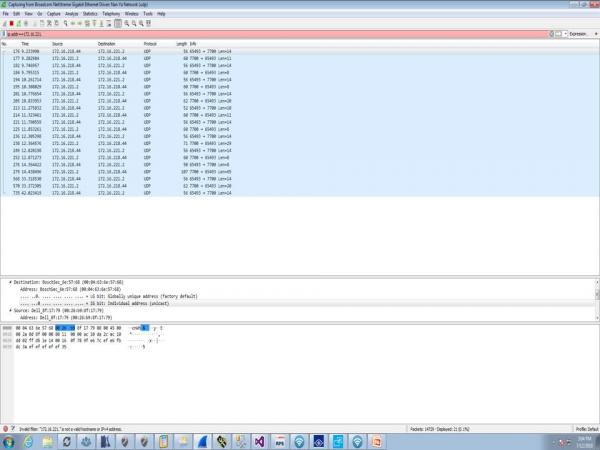
I have sent packets from my program and WireShark shows it is receiving them but still no reaction from the panel.
I compared what I sent from my code to the actual Bosch software but the size is different.
At the bottom of WireShark is this the HEX that was sent?
-
Jul 12th, 2018, 04:04 PM
#35
Re: Ethernet Sending & Receiving
It is difficult to read posted images, as they are shunk when added to the page. The hex data is showing the complete transfer, which will include transport overhead and protocol overhead. You are sending UDP, so the first level of the message should the IP protocol header, then the UDP protocol header, then the data you sent.
If you hover your mouse over the byte display in the bottom window, it should highlight some number of bytes, which correspond to different parts of the total message.
If you click on various parts of the middle section, it should highlight the bytes in the hex dump that correspond to that part of the message. The middle window is trying to identify the values of things it recognizes and show you the interpreted values, i.e. you have a destination IP address and port, and a source IP and port, so it will highlight the bytes that make up those fields, and show you an interpretation of those byte.
The Length column value is probably the length of the UDP packet, including UDP protocol header and your data. At the end there is a Len=xx note which may be the length of just the data being sent, so your packet or message, or whatever you want to call it, would be the last xx bytes of the displayed hex data.
The data that you send, should be the last bytes of the message, so if you click on the "payload" or "data" field, or whatever the last item is called in the middle window, it should highlight the data bytes below, and they should match what you are sending.
It looks like every time you send something, you are getting a response back, so you might want to see what that response is and if it makes sense. It might be telling you that you are not sending good data. The format of the commands to send over the Ethernet may not be the same format as the commands sent over the serial. I don't know, since I don't know anything about the interface.
Also, it doesn't look like there is five seconds between transfers. From the timing column on the left, it looks like you're sending (and getting a response) about two times per second.
Perhaps the portion of the capture you're showing isn't the part where you sending the messages with a delay.
The last three transmissions you're showing to appear to be more spaced out. Can't quite make it out, but it looks like if goes from 14 to 23 or 33, to 43 (or something) so perhaps about 10 or 20 seconds between sends.
You'll need to verify what the format of the data is suppose to be when using the UDP interface, and what the response from the panel (an acknowledge or error response) may be telling you.
Other than that, it looks like you are sending data to something, and are receiving data from that thing, so that is the first step.
-
Jul 13th, 2018, 07:04 AM
#36
Member
Re: Ethernet Sending & Receiving
Originally Posted by passel
It is difficult to read posted images, as they are shunk when added to the page. The hex data is showing the complete transfer, which will include transport overhead and protocol overhead. You are sending UDP, so the first level of the message should the IP protocol header, then the UDP protocol header, then the data you sent.
If you hover your mouse over the byte display in the bottom window, it should highlight some number of bytes, which correspond to different parts of the total message.
If you click on various parts of the middle section, it should highlight the bytes in the hex dump that correspond to that part of the message. The middle window is trying to identify the values of things it recognizes and show you the interpreted values, i.e. you have a destination IP address and port, and a source IP and port, so it will highlight the bytes that make up those fields, and show you an interpretation of those byte.
The Length column value is probably the length of the UDP packet, including UDP protocol header and your data. At the end there is a Len=xx note which may be the length of just the data being sent, so your packet or message, or whatever you want to call it, would be the last xx bytes of the displayed hex data.
The data that you send, should be the last bytes of the message, so if you click on the "payload" or "data" field, or whatever the last item is called in the middle window, it should highlight the data bytes below, and they should match what you are sending.
It looks like every time you send something, you are getting a response back, so you might want to see what that response is and if it makes sense. It might be telling you that you are not sending good data. The format of the commands to send over the Ethernet may not be the same format as the commands sent over the serial. I don't know, since I don't know anything about the interface.
Also, it doesn't look like there is five seconds between transfers. From the timing column on the left, it looks like you're sending (and getting a response) about two times per second.
Perhaps the portion of the capture you're showing isn't the part where you sending the messages with a delay.
The last three transmissions you're showing to appear to be more spaced out. Can't quite make it out, but it looks like if goes from 14 to 23 or 33, to 43 (or something) so perhaps about 10 or 20 seconds between sends.
You'll need to verify what the format of the data is suppose to be when using the UDP interface, and what the response from the panel (an acknowledge or error response) may be telling you.
Other than that, it looks like you are sending data to something, and are receiving data from that thing, so that is the first step.
Here is what I have found so far from viewing the WireShark data using the Bosch software.
The HEX Data changes based on the sender's port which is different every time.
So I matched the port to the HEX data sent now that is the same.
But still can't get the panel to reboot.
The only thing I see different now is the Identification Number and it changes every time the Bosch software sends a HEX string, would this make a difference?
Tags for this Thread
 Posting Permissions
- You may not post new threads
- You may not post replies
- You may not post attachments
- You may not edit your posts
-
Forum Rules
|
Click Here to Expand Forum to Full Width
|



 Reply With Quote


