This demonstrates, how one can implement robust, asynchronous Workers in VB6 -
by using a (cross-process) SharedMemory-approach (which is one of the common IPC-mechanisms).
For convenient usage, the more complex stuff (the MemoryMapping- as well as the CreateProcess-APIs),
are encapsulated in two generic "Drop-In"-Classes (cIPCMaster and cIPCWorker).
Those Classes can be used either "split-up" (in separate VB6-Projects for Master and Worker) -
but also "all-in-one" (when the same Project - or Process - is used to act as Master and Worker both).
The latter case (using an "all-in-one"-Project), is the most convenient for developing/testing.
Here the Worker-Process is "shelled" against the same ExeName as the Main- (or Master-) Project,
using a simple "forking" in Sub Main() ... (as shown below from the content of Demo1 modMain.bas):
Code:
Option Explicit

Sub Main() 'Process-Startup-Forking
  If Len(Trim$(Command$)) = 0 Then 'no Cmd-Arg was passed (it was started as the Master-Process)
    fMaster.Show '... so we simply startup the Main-Form

  Else 'it was started as a WorkerProcess (pass the CommandLine-Arg into the WorkerRoutine)
    EnterWorkerLoop New cIPCWorker, Trim$(Command$)
  End If
End Sub
Above, the blue-colored call represents the "master-fork-path" to your normal "GUI-Project-Code"
(entered when no Commandline-Param was passed to your Executable).
And as the magenta-colored routine-name (in the "worker-fork-path") suggests, the upstarting worker is not fired up
like in an old "classic WebServer-CGI-call" (where the Process exits, after only a single Job was performed).
Instead the current mechanism is implemented in a way, that the WorkerProcess is fired up once -
and then enters an "IDLE-loop" (waiting for Jobs, provided by the Master-Process later).
This way one of the disadvantages of MultiProcessing (the higher Startup-Costs, compared to MultiThreading) is avoided.
The advantages of doing MultiProcessing instead of threading are:
- no typelibs, no extra-Dlls are needed
- in the IDE (after compiling the same Project), the asynchronous workers will behave the same way as in the compiled binary
- a hard terminate of a worker is possible in a stable and "residue-free" manner (though graceful termination-support is of course built-in)
- the communication between Master and Worker(s) happens in an absolute "non-blocking" way
To explain the last point above a bit more... "non-blocking" means, that neither Post- or SendMessage-calls are involved
(as in VB6-OleBased-Communications between "threaded Apartments", where Events, raised from the Workers will block the Main-Thread) -
nor are there other mechanisms in play like Mutexes or CriticalSections, which are normally used in conjunction with shared memory...
Instead the Demo shows, how "state-machine-based" communication (using the shared mem-area) can be implemented.
The approach is extremely robust, completely IDE- and crash-safe, and "cleans up after itself" under any circumstances:
- upstarted Worker-Processes will automatically close, when the Master-Class goes out of scope
- you can even use the IDE-stop-button, whilst asynchronous workers are "deep within a Job" (worker-processes will autoclose nevertheless)
There is also not a single thing, which is "forbidden to use" in the workers (like in many of the threading-approaches for VB6)...
The Zip below comes with 3 Demo-Folders (a simple one to get up to speed - and two "medium-difficult" ones for MandelBrot-rendering).
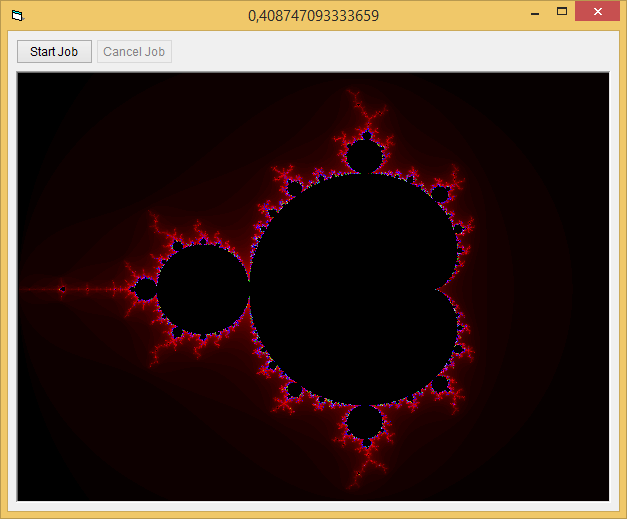
Ok, here is, what the MandelBrot-Demos will produce (using two Workers, independent from the Main-App):
Re: VB6 MultiProcessing (StdExe-IPC via SharedMemory)
This looks really useful. I could never get named pipes working for IPC, and TCP is just so much overhead when you only need simple communication between processes.
Re: VB6 MultiProcessing (StdExe-IPC via SharedMemory)
Originally Posted by Schmidt
This demonstrates, how one can implement robust, asynchronous Workers in VB6 -
by using a (cross-process) SharedMemory-approach (which is one of the common IPC-mechanisms).
For convenient usage, the more complex stuff (the MemoryMapping- as well as the CreateProcess-APIs),
are encapsulated in two generic "Drop-In"-Classes (cIPCMaster and cIPCWorker).
Those Classes can be used either "split-up" (in separate VB6-Projects for Master and Worker) -
but also "all-in-one" (when the same Project - or Process - is used to act as Master and Worker both).
The latter case (using an "all-in-one"-Project), is the most convenient for developing/testing.
Here the Worker-Process is "shelled" against the same ExeName as the Main- (or Master-) Project,
using a simple "forking" in Sub Main() ... (as shown below from the content of Demo1 modMain.bas):
Code:
Option Explicit

Sub Main() 'Process-Startup-Forking
  If Len(Trim$(Command$)) = 0 Then 'no Cmd-Arg was passed (it was started as the Master-Process)
    fMaster.Show '... so we simply startup the Main-Form

  Else 'it was started as a WorkerProcess (pass the CommandLine-Arg into the WorkerRoutine)
    EnterWorkerLoop New cIPCWorker, Trim$(Command$)
  End If
End Sub
Above, the blue-colored call represents the "master-fork-path" to your normal "GUI-Project-Code"
(entered when no Commandline-Param was passed to your Executable).
And as the magenta-colored routine-name (in the "worker-fork-path") suggests, the upstarting worker is not fired up
like in an old "classic WebServer-CGI-call" (where the Process exits, after only a single Job was performed).
Instead the current mechanism is implemented in a way, that the WorkerProcess is fired up once -
and then enters an "IDLE-loop" (waiting for Jobs, provided by the Master-Process later).
This way one of the disadvantages of MultiProcessing (the higher Startup-Costs, compared to MultiThreading) is avoided.
The advantages of doing MultiProcessing instead of threading are:
- no typelibs, no extra-Dlls are needed
- in the IDE (after compiling the same Project), the asynchronous workers will behave the same way as in the compiled binary
- a hard terminate of a worker is possible in a stable and "residue-free" manner (though graceful termination-support is of course built-in)
- the communication between Master and Worker(s) happens in an absolute "non-blocking" way
To explain the last point above a bit more... "non-blocking" means, that neither Post- or SendMessage-calls are involved
(as in VB6-OleBased-Communications between "threaded Apartments", where Events, raised from the Workers will block the Main-Thread) -
nor are there other mechanisms in play like Mutexes or CriticalSections, which are normally used in conjunction with shared memory...
Instead the Demo shows, how "state-machine-based" communication (using the shared mem-area) can be implemented.
The approach is extremely robust, completely IDE- and crash-safe, and "cleans up after itself" under any circumstances:
- upstarted Worker-Processes will automatically close, when the Master-Class goes out of scope
- you can even use the IDE-stop-button, whilst asynchronous workers are "deep within a Job" (worker-processes will autoclose nevertheless)
There is also not a single thing, which is "forbidden to use" in the workers (like in many of the threading-approaches for VB6)...
The Zip below comes with 3 Demo-Folders (a simple one to get up to speed - and two "medium-difficult" ones for MandelBrot-rendering).
Ok, here is, what the MandelBrot-Demos will produce (using two Workers, independent from the Main-App):
Private Sub cmdStart_Click()
M.JobState = jobPrepared '' if JobState= jobPrepared ,in sub "M_JobStateChanged" JobState =processing why ≠ Prepared ? Is it ignored automatically?
End Sub
Private Sub M_JobStateChanged(ByVal JobState As eJobState)
cmdCancel.Enabled = (JobState = jobProcessing)
cmdStart.Enabled = Not cmdCancel.Enabled
Caption = M.JobStateFriendlyName ----------------------
End Sub
Last edited by xxdoc123; Jun 1st, 2018 at 02:21 AM.
Re: VB6 MultiProcessing (StdExe-IPC via SharedMemory)
Yes, apparently the StateSwitch (from jobPrepared to jobProcessing) happens so fast, that the JobStateChanged-Event skips it.
Well, and besides - it is of no interest for the Master-Process (who initiated that State-Switch in the first place).
Instead the Master-Process is interested in those State-Switches, which were triggered inside the Worker:
- jobProcessing (which the Worker switches to, after the Master has signaled it "New Input-Parameters" via jobPrepared
- jobFinished (which the Worker switches to from jobProcessing, after successful finishing a given Job)
Re: VB6 MultiProcessing (StdExe-IPC via SharedMemory)
When running the program (either the combined or separated programs), one copy appears in the Apps section of the Task Manager, and the other in the Background section. It seems to me that using a separate worker thread would be more efficient from a memory usage perspective. To that end, and to get a better understanding of the internal workings of the program, I converted the Simple Demo into 2 separate programs. I did take a few liberties with the code to make it easier to follow, so I hope you don't mind.
J.A. Coutts
Last edited by couttsj; Aug 20th, 2021 at 12:40 PM.
Re: VB6 MultiProcessing (StdExe-IPC via SharedMemory)
Originally Posted by couttsj
When running the program (either the combined or separated programs), one copy appears in the Apps section of the Task Manager, and the other in the Background section. It seems to me that using a separate worker thread would be more efficient from a memory usage perspective. To that end, and to get a better understanding of the internal workings of the program, I converted the Simple Demo into 2 separate programs. I did take a few liberties with the code to make it easier to follow, so I hope you don't mind.
J.A. Coutts
I have a need is a work process to read the server data used winhttp or your http mod, processed and passed to the control main process to show, do not know if the work process will die. I haven't done this yet.
Re: VB6 MultiProcessing (StdExe-IPC via SharedMemory)
Originally Posted by Schmidt
This demonstrates, how one can implement robust, asynchronous Workers in VB6 -
by using a (cross-process) SharedMemory-approach (which is one of the common IPC-mechanisms).
For convenient usage, the more complex stuff (the MemoryMapping- as well as the CreateProcess-APIs),
are encapsulated in two generic "Drop-In"-Classes (cIPCMaster and cIPCWorker).
Those Classes can be used either "split-up" (in separate VB6-Projects for Master and Worker) -
but also "all-in-one" (when the same Project - or Process - is used to act as Master and Worker both).
The latter case (using an "all-in-one"-Project), is the most convenient for developing/testing.
Here the Worker-Process is "shelled" against the same ExeName as the Main- (or Master-) Project,
using a simple "forking" in Sub Main() ... (as shown below from the content of Demo1 modMain.bas):
Code:
Option Explicit

Sub Main() 'Process-Startup-Forking
  If Len(Trim$(Command$)) = 0 Then 'no Cmd-Arg was passed (it was started as the Master-Process)
    fMaster.Show '... so we simply startup the Main-Form

  Else 'it was started as a WorkerProcess (pass the CommandLine-Arg into the WorkerRoutine)
    EnterWorkerLoop New cIPCWorker, Trim$(Command$)
  End If
End Sub
Above, the blue-colored call represents the "master-fork-path" to your normal "GUI-Project-Code"
(entered when no Commandline-Param was passed to your Executable).
And as the magenta-colored routine-name (in the "worker-fork-path") suggests, the upstarting worker is not fired up
like in an old "classic WebServer-CGI-call" (where the Process exits, after only a single Job was performed).
Instead the current mechanism is implemented in a way, that the WorkerProcess is fired up once -
and then enters an "IDLE-loop" (waiting for Jobs, provided by the Master-Process later).
This way one of the disadvantages of MultiProcessing (the higher Startup-Costs, compared to MultiThreading) is avoided.
The advantages of doing MultiProcessing instead of threading are:
- no typelibs, no extra-Dlls are needed
- in the IDE (after compiling the same Project), the asynchronous workers will behave the same way as in the compiled binary
- a hard terminate of a worker is possible in a stable and "residue-free" manner (though graceful termination-support is of course built-in)
- the communication between Master and Worker(s) happens in an absolute "non-blocking" way
To explain the last point above a bit more... "non-blocking" means, that neither Post- or SendMessage-calls are involved
(as in VB6-OleBased-Communications between "threaded Apartments", where Events, raised from the Workers will block the Main-Thread) -
nor are there other mechanisms in play like Mutexes or CriticalSections, which are normally used in conjunction with shared memory...
Instead the Demo shows, how "state-machine-based" communication (using the shared mem-area) can be implemented.
The approach is extremely robust, completely IDE- and crash-safe, and "cleans up after itself" under any circumstances:
- upstarted Worker-Processes will automatically close, when the Master-Class goes out of scope
- you can even use the IDE-stop-button, whilst asynchronous workers are "deep within a Job" (worker-processes will autoclose nevertheless)
There is also not a single thing, which is "forbidden to use" in the workers (like in many of the threading-approaches for VB6)...
The Zip below comes with 3 Demo-Folders (a simple one to get up to speed - and two "medium-difficult" ones for MandelBrot-rendering).
Ok, here is, what the MandelBrot-Demos will produce (using two Workers, independent from the Main-App):
If I want to pass string data to the shared memory from the main process, how does the working process know the length of the shared string when reading data?
Public Type RecordType
str As String * 100 ------Must use a fixed-length string
End Type
Now I think of this method to solve this problem
'====add
Private Declare Function lstrcpyn _
Lib "kernel32" _
Alias "lstrcpynA" (ByVal lpString1 As Any, _
ByVal lpString2 As Any, _
ByVal iMaxLength As Long) As Long
Private Declare Function lstrlen _
Lib "kernel32" _
Alias "lstrlenA" (ByVal lpString As Any) As Long
Private str As String
Re: VB6 MultiProcessing (StdExe-IPC via SharedMemory)
Originally Posted by xxdoc123
I have a need is a work process to read the server data used winhttp or your http mod, processed and passed to the control main process to show, do not know if the work process will die. I haven't done this yet.
As far as I can tell, the worker thread remains in memory as long as the main thread.
Re: VB6 MultiProcessing (StdExe-IPC via SharedMemory)
Originally Posted by couttsj
As far as I can tell, the worker thread remains in memory as long as the main thread.
To be precise, the WorkerProcess remains alive (assuming your own Worker-Functions don't cause an unhandled VB6-error-condition) until:
- the cIPCMaster-Object of the Main-Process calls its .CloseWorkerGracefully(TimeOutSeconds) method
- or is set to Nothing "roughly" (in which case it performs a Hard-Terminate of the Worker-Process)
There's also a third condition under which a WokerProcess automatically closes itself:
- if the Form.hWnd one has passed via InitAndBindWorkerTo(...) dies, the Worker will recognize this also and will automatically close
.. (this is BTW the mechanism which ensures automatic Worker-closing, when you press the Stop-Button in the IDE)
Ok, so the only other condition (the fourth one) under which a WorkerProcess can "go out" is the one I mentioned at the top of this posting:
- you run into an unhandled error-condition in your own Worker-Code
A cIPCMaster-Instance in your Main-App-Thread can always ask, whether a Worker ran into such a condition (is still alive) via:
oMaster.IsWorkerActive
If you poll that IsWorkerActive-Property against a given cIPCMaster-Instance, (e.g. when you manage a few of them in
a dedicated "Worker-Pool-Manager-Class") - you could easily react to "unexpected closing" of a worker, by removing
said Master-instance (which only refers to a "dead worker") from your "Worker-Pool-Collection" - readding a new one instead.
This allows for an easy way to set up a real stable-working "WorkerPool-Manager-Process" (e.g. for a robust Server-Scenario).
As to your other question:
It seems to me that using a separate worker thread would be more efficient from a memory usage perspective.
An upstarted VB-Process (with no GUI) consumes about 1.5MB of memory...
So, yes - that's a bit more overhead than an upstarting "normal thread" would consume (memory-wise).
But these days, I'd consider that amount of memory-overhead not really "an issue" (even if you run a pool of 16 Workers or so).
Re: VB6 MultiProcessing (StdExe-IPC via SharedMemory)
Originally Posted by xxdoc123
If I want to pass string data to the shared memory from the main process, how does the working process know the length of the shared string when reading data?
Now I think of this method to solve this problem...
Do you have other methods?
There is no need to apply a (non-unicode-capable) API for that.
I'd simply:
- define all Strings of a Shared-Memory-Area as fixed-length-string-members of an UDT
- then later always read (or write) the entire UDT-content from (or to) the Shared-Area via: UserDataWrite VarPtr(MyUDT), LenB(MyUDT)
- and for "InBetween" happening changes of the UDTs FixedLength-StringMembers I'd use a simple "Property-Helper" like shown below:
Code:
Option Explicit

Private Type tMyUDT
  S As String * 100
End Type

Private Sub Form_Load()
  Dim MyUDT As tMyUDT
  Debug.Print Len(FLS(MyUDT.S)), FLS(MyUDT.S) 'print the S-member content from a fresh initialized UDT

  FLS(MyUDT.S) = "123": Debug.Print Len(FLS(MyUDT.S)), FLS(MyUDT.S) 'print it after assigning "123"
  FLS(MyUDT.S) = "":    Debug.Print Len(FLS(MyUDT.S)), FLS(MyUDT.S) 'print it again, after assigning ""
End Sub

Private Property Let FLS(FLSmember As String, RHS As String)
  If Len(FLSmember) <= Len(RHS) Then Err.Raise 7
  FLSmember = RHS & vbNullChar
End Property
Private Property Get FLS(FLSmember As String) As String
  Dim Pos As Long: Pos = InStr(FLSmember, vbNullChar)
  If Pos > 0 Then FLS = Left$(FLSmember, Pos - 1)
End Property
Re: VB6 MultiProcessing (StdExe-IPC via SharedMemory)
Originally Posted by couttsj
... to get a better understanding of the internal workings of the program, I converted the Simple Demo into 2 separate programs.
I did take a few liberties with the code to make it easier to follow, so I hope you don't mind.
Just tried to run your Demo1B.zip above... -
though it seems you forgot to include a Sub Main() triggering of EnterWorkerLoop within your modWorker.bas:
Code:
Sub Main()
  If Len(Trim$(Command$)) Then EnterWorkerLoop New cIPCWorker, Trim$(Command$)
End Sub
Re: VB6 MultiProcessing (StdExe-IPC via SharedMemory)
Originally Posted by Schmidt
There is no need to apply a (non-unicode-capable) API for that.
I'd simply:
- define all Strings of a Shared-Memory-Area as fixed-length-string-members of an UDT
- then later always read (or write) the entire UDT-content from (or to) the Shared-Area via: UserDataWrite VarPtr(MyUDT), LenB(MyUDT)
- and for "InBetween" happening changes of the UDTs FixedLength-StringMembers I'd use a simple "Property-Helper" like shown below:
Code:
Option Explicit

Private Type tMyUDT
  S As String * 100
End Type

Private Sub Form_Load()
  Dim MyUDT As tMyUDT
  Debug.Print Len(FLS(MyUDT.S)), FLS(MyUDT.S) 'print the S-member content from a fresh initialized UDT

  FLS(MyUDT.S) = "123": Debug.Print Len(FLS(MyUDT.S)), FLS(MyUDT.S) 'print it after assigning "123"
  FLS(MyUDT.S) = "":    Debug.Print Len(FLS(MyUDT.S)), FLS(MyUDT.S) 'print it again, after assigning ""
End Sub

Private Property Let FLS(FLSmember As String, RHS As String)
  If Len(FLSmember) <= Len(RHS) Then Err.Raise 7
  FLSmember = RHS & vbNullChar
End Property
Private Property Get FLS(FLSmember As String) As String
  Dim Pos As Long: Pos = InStr(FLSmember, vbNullChar)
  If Pos > 0 Then FLS = Left$(FLSmember, Pos - 1)
End Property
Olaf
thanks .
I have a suggestion to add a length shared variable in the two class module. You can directly return the length
Private Type tShared 'a convenience-UDT, sitting at the top of the shared mem-area
UserDataLen As Long
MasterHwnd As Long
JobProgress As Single
JobPreparedHPSec As Double
JobStartedHPSec As Double
JobFinishedHPSec As Double
JobState As eJobState
UserWriteDataLen As Long '
End Type
Public Sub UserDataWrite(ByVal pSrc As Long, _
ByVal ByteLen As Long, _
Optional ByVal Offs As Long)
If BaseAddr Then
RtlMoveMemory ByVal UserDataPtr + Offs, ByVal pSrc, ByteLen
T.UserWriteDataLen = ByteLen
WriteInternalType T
End If
End Sub
I can know the length of the currently written data, and if it needs to be read, I can initialize the length of the variable.
Re: VB6 MultiProcessing (StdExe-IPC via SharedMemory)
Originally Posted by Schmidt
Just tried to run your Demo1B.zip above... -
though it seems you forgot to include a Sub Main() triggering of EnterWorkerLoop within your modWorker.bas:
Olaf
You are right! Don't know how I managed that. Probably added it, created the executable, and created the zip without saving the file. Anyway, I added a message to tell me I can't run it in the IDE.
Code:
Sub Main()
    If Len(Trim$(Command$)) Then
        EnterWorkerLoop New cIPCWorker, Trim$(Command$)
    Else
        MsgBox "To be able to start a Worker, this Project needs to be compiled first"
    End If
End Sub
Still looking for an appropriate application to use this.
Re: VB6 MultiProcessing (StdExe-IPC via SharedMemory)
Originally Posted by couttsj
Still looking for an appropriate application to use this.
We use it (at the place where I currently work) for one type of special report (which takes quite long to generate, interacting with MS-Word-XML) -
and as well for validation of larger amounts of Email-addresses (which involve DNS-queries with potentially longer blocking whilst asking for MX-record-entries)...
Basically it has the same async use-cases as threading, but the advantage of being more robust -
due to allowing for "proper-cleanup of single Workers from a WorkerPool" without affecting the "Pool-Hosting-App".
Also device-communication for time-critical (e.g. streaming-) devices comes to mind (one Worker being responsible for exactly one device).
Over a decade ago, I've used a quite similar approach to manage the incoming DataStreams from up to 12 Gig-E cameras, which pumped
their incoming frames with 200Hz each into a larger RingBuffer in each WorkerProcess (on a quite powerful Server-Host, which ran 24/7).
Re: VB6 MultiProcessing (StdExe-IPC via SharedMemory)
Hello
I thought I could implement MultiProcess (Or multithread) in my PhotoModularFX program.
Initially I thought about creating a thread for each "Node" / effect, but this way is not good because some very slow effects can create bottlenecks in the processing flow.
(Before executing the operations of a "node" you have to wait until all its inputs are ready)
So it is better to create more threads or processes for each node. (although not all nodes / effects are "spatially separable")
I tried using this proposed way (StdExe-IPC-via-SharedMemory)
But without success.
I tried to understand how it worked.
I can not understand:
Code:
Private Function CreateWorkerProcess (MemSizeToReserve) As cIPCMaster
  Set CreateWorkerProcess = New cIPCMaster
  If CreateWorkerProcess.InitAndBindWorkerTo (Me, MemSizeToReserve, ProcessPath) = 0 Then
     MsgBox "To be able to start a Worker", this Project needs to be compiled first "
  End If
End Function
- How much must be the memory to reserve?
- How to pass a 2D Array as input ?
Basically in my program I have various functions that have as input and output 2D arrays of singles.
So I have a list of "DoJob" functions which, for simplification, could be represented as follows:
Code:
Sub DoJob_Effect1 (sngInput () As Single, sngOutput () As Single)
    Dim X As Long, Y As Long, W As Long, H As Long
    W = UBound (sngInput, 1)
    H = UBound (sngInput, 2)
    ReDim sngOutput (W, H)
    For X = 0 To W
        For Y = 0 To H
            sngOutput (X, Y) = sngInput (X, Y) ^ 2 '' '' some result from sngInput ()
        Next
        'setProgress 100 * X / W
    Next
End Sub
The number of input and output 2D arrays can be different:
For example, 3 inputs and 1 output. (depending on the "effect")
Code:
Sub DoJob_Effect3 (sngInput1 () As Single, sngInput2 () As Single, sngInput3 () As Single, _
                  sngOutput () As Single)
    Dim X As Long, Y As Long, W As Long, H As Long
    W = UBound (sngInput1, 1)
    H = UBound (sngInput1, 2)
    ReDim sngOutput (W, H)
    For X = 0 To W
        For Y = 0 To H
            sngOutput (X, Y) = (sngInput1 (X, Y) + sngInput2 (X, Y) + sngInput3 (X, Y)) / 3
        Next
        'setProgress 100 * X / W
    Next
End Sub
The flow of operations performed by the "nodes" is managed in such a way that as soon as all the inputs of a node are ready, it begins processing.
So, a very important point to take into consideration is how to handle the end of single function processing (Node / Effect).
As this determines whether the inputs of the next Node (s) are ready or not.
Re: VB6 MultiProcessing (StdExe-IPC via SharedMemory)
I almost succeed.
I'm not very sure it's the best way.
Everything seems a little cumbersome. And above all perhaps it is not correct to have 2 outputs to manage. (instead it should be one)
Re: VB6 MultiProcessing (StdExe-IPC via SharedMemory)
Question:
If I have a 2D input array which size is not constant.
How can I change the memory size to reserve? (Since it can be different (per call))
Do I have to Destroy and re-create WorkerProcesses ? or is there another way ?
Related:
Still unclear how much must be the memory size to reserve "MemSizeToReserve"
Impossible to understand where + 8192 value comes from.
Last edited by reexre; Nov 26th, 2018 at 05:48 AM.
Re: VB6 MultiProcessing (StdExe-IPC via SharedMemory)
As for the implementation of multiprocess in my project, I made some progress.
I think it's a very powerful tool.
And I'm starting to handle it with a little more familiarity, (Better than #17)
Now another question arises:
Is it possible to have a "worker" who is able to perform different types of "Jobs"?
Practically I have many types of jobs, and I wonder if, to perform them, it is necessary to have as many types of workers, or, if in some way it is possible to have only one type of worker who performs more types of jobs. (one at a time)
.... I wonder if I'm asking you stupid questions, seeing the number of answers I've received.
Last edited by reexre; Nov 28th, 2018 at 12:11 PM.
Re: VB6 MultiProcessing (StdExe-IPC via SharedMemory)
Originally Posted by reexre
As for the implementation of multiprocess in my project, I made some progress.
I think it's a very powerful tool.
And I'm starting to handle it with a little more familiarity, (Better than #17)
Glad you got your head wrapped around it some more...
(Shared-Memory-stuff with "concurrent access" always needs a bit of time - in any language).
Originally Posted by reexre
Now another question arises:
Is it possible to have a "worker" who is able to perform different types of "Jobs"?
Practically I have many types of jobs, and I wonder if, to perform them, it is necessary to have as many types of workers, or, if in some way it is possible to have only one type of worker who performs more types of jobs. (one at a time)
Sure, the "MemSizeToReserve" is your own reserved Memory-area (in Bytes) -
and you can split it up in any way you like:
- e.g. the first 2KByte for example, to be reserved for your own UDT-like "JobDescriptions" and Input-Params.
- and then maybe another 2MegaBytes as a large enough Buffer for your raw input-pixels
- and maybe another 2MB for your output-pixels
so MemSizeToReserve would be 4MBytes + 2KBytes "total size"
And yes, the MultiProcesses are thought for exactly that (sitting there idling, waiting for the next Job) -
they are not really thought for a sequence of:
- Process-Startup
- Do something specific
- Process-Terminate
for every single Job - no.
You can use them to handle different kind of Jobs (if you pass the right params - and have large enough Buffers reserved, to allow for some flexibility also memory-allocation-wise).
Originally Posted by reexre
.... I wonder if I'm asking you stupid questions, seeing the number of answers I've received.
No - it's just that I don't have much time these days - and whilst I'm answering some simpler questions now and then in this forum -
those usually don't require me to "clean out everything else, to dive in deeply" - which this stuff here demands...
Maybe I find time at the coming weekend to go over - and comment on - your first try with a "multijob-capable example"
(if you find time to upload one for me or other readers of this thread).
Re: VB6 MultiProcessing (StdExe-IPC via SharedMemory)
Thank you!
At the moment I am able to have "Worker" that perform multiple types of "jobs". (Just by usging JobType )
I will post it when I have perfected it a little. (it will be a little customized according to my needs)
This is the structure of Shared Type
Code:
Public Type tParams
     P (1 To 10) As String * 25
End Type

Public Type tWorkDATA
     W As Long
     H As Long
     StartY As Long
     EndY As Long
     CurrProcess As Long  '
     NProcesses As Long
     JobType As Long   'To have many Types of Jobs
     JobParams As tParams 'Job Parameters
End Type
Re: VB6 MultiProcessing (StdExe-IPC via SharedMemory)
I managed to "destroy" Master and re-initialize it with a larger Memory to reserve.
I did this:
- Initialize the Masters with the memory I need.
- If I need less memory, I do nothing. (I leave the first initialization)
- If I need more memory, I do this:
1) If Not (fMain.Master1 Is Nothing) Then fMain.Master1.CloseWorkerGracefully: Set fMain.Master1 = Nothing
2) Set fMain.Master1 = CreateWorkerProcess (MemoryToReserve) 'Bigger memory to reserve
3) To avoid error on tmrJobState creation (Runtime Error 727 There is already a control named: ...) I have changed this line of code in InitAndBindWorkerTo
from
Code:
If tmrJobState Is Nothing Then Exit Function Else tmrJobState.Interval = 7
to
Code:
     If tmrJobState Is Nothing Then
         MasterForm.Controls.Remove "tmrJobState" & ObjPtr (Me)
         Set tmrJobState = MasterForm.Controls.Add ("VB.Timer", "tmrJobState" & ObjPtr (Me))
     End If
     tmrJobState.Interval = 7
It seems to work !!! (however, I do not know if this way implies other "hidden" consequences)
Re: VB6 MultiProcessing (StdExe-IPC via SharedMemory)
Originally Posted by reexre
It seems to work !!! (however, I do not know if this way implies other "hidden" consequences)
If this refers to the timer-handling - you can always replace the VB.Timer (and thus the necessary VB-Form)
whit an RC5-Timer-Class (which won't force you to Add/Remove a Control, just to get a "tick-event").
Code:
If tmrJobState Is Nothing then Set tmrJobState = New_c.Timer(7, True) '<- Optional True, if you want to enable it already
You'd have to change the Type of tmrJobState from VB.Timer to cTimer in the Declaration-Section.
Re: VB6 MultiProcessing (StdExe-IPC via SharedMemory)
This is my example of use for image processing.
The advantage is that in this way all the CPUs are used so that, the same "Effect" algorithm, can be performed 4 times faster (compared to the use of a single process) if you have a 4Cores.
Raw description:
- STARTUPProcesses
We Initialize Master workers. The Number of them is equal to Environ("NUMBER_OF_PROCESSORS")
-SETUPProcessesMemory
Memory to reserve for each worker process depends by Picture size , number of Input and Output Channels and Number of the Workers.
If we need less memory than before we do not re-initialize workers.
Each time we start an Effect-job, before we must run this sub. (at least to check if we have reserved enought memory)
-StartJOBS_11 StartJOBS_33 Public Sub StartJOBS_11(parameters As tParams, Inp() As Single, Out() As Single, JobType As Long, Optional NIterations As Long = 1)
We use this sub to start processing an Effect. JobType indicates which Effect we want to Run.
11 stands for 1 input 1 outoput
33 stands for 3 inputs 3 outoputs
Inputs are get by GetRGBPixelValues that transforms 0-255 RGB bytes to 0-1 Singles.
-StartStripeJob1Input(M As cIPCMaster, sngINP() As Single, Proc As Long, ofProc As Long, JobType As Long, Params As tParams)
The previous sub calls this one.
Were we (pass and) write Inputs channels Data plus other info (Parameters and typeOfJob [tWorkDATA]) to Workers.
There are many kind of this sub , depending on the Number of Input channels.
We set M.JobState = jobPrepared to start Worker to do jobs.
Then we wait for all Jobs to be completed. (Maybe there's a better way) Do
Wait 100
Loop While Not (ProcessDone1 And ProcessDone2)
Once they are completed we Read Workers Output and put them to Out() arrays.
Now Out() arrays are ready to be shown on Picture
So we: Output3ToPIC PIC.Image.Handle, out1, out2, out3
PIC.Refresh
-Output3ToPIC
Converts 0-1 single values to 0-255 RGB and show them on PIC.
BTW:
I use 0-1 singles because in my software there is a cascade of effects.
0-255 values are used only in 1st image input and last Image result. While between intermediate effects are used float 0-1 Values. In many case this leads to higher final output precision.
(Sort of Continuous vs. Discrete)
At the moment I am satisfied with what I have achieved.
(If there are changes, I will update the attachment of this post or delete it to post a new one)
Re: VB6 MultiProcessing (StdExe-IPC via SharedMemory)
I don't like to have timers with small interval enabled continuously firing useless events.
So in the "cIPCmaster" class I added these two enable/disable timer lines:
Code:
Private Sub tmrJobState_Timer()

    Static JobState As eJobState, JobPSec#, JobFSec#, Progress!
    T = ReadInternalType
    If JobState <> T.JobState Or JobPSec <> T.JobPreparedHPSec Or JobFSec <> T.JobFinishedHPSec Then
        JobState = T.JobState: JobPSec = T.JobPreparedHPSec: JobFSec = T.JobFinishedHPSec

        RaiseEvent JobStateChanged(JobState)

        If JobState = jobFinished Then tmrJobState.Enabled = False

    End If
    If Progress <> T.JobProgress Then
        Progress = T.JobProgress
        RaiseEvent ProgressChanged(Progress)
    End If

End Sub
Code:
Public Property Let JobState(ByVal RHS As eJobState)
    If BaseAddr = 0 Then Exit Property
    T = ReadInternalType
    T.JobState = RHS
    If RHS = jobPrepared Then T.JobPreparedHPSec = HPTimer: T.JobProgress = 0
    WriteInternalType T

    If RHS = jobPrepared Then tmrJobState.Enabled = True

End Property
could this lead to bad consequences ?
Last edited by reexre; Dec 18th, 2018 at 11:30 AM.
Re: VB6 MultiProcessing (StdExe-IPC via SharedMemory)
Originally Posted by couttsj
You are right! Don't know how I managed that. Probably added it, created the executable, and created the zip without saving the file. Anyway, I added a message to tell me I can't run it in the IDE.
Code:
Sub Main()
    If Len(Trim$(Command$)) Then
        EnterWorkerLoop New cIPCWorker, Trim$(Command$)
    Else
        MsgBox "To be able to start a Worker, this Project needs to be compiled first"
    End If
End Sub
Still looking for an appropriate application to use this.
J.A. Coutts
all sample files here have same bug for me:
MsgBox "To be able to start a Worker, this Project needs to be compiled first"
i try include the code above into sample projects but not know the place to put the code, or if i need create some class or module.
i compiled the exe of the last sample file but same problem
exists a working version of the last sample file or the place i can include the code above?
Re: VB6 MultiProcessing (StdExe-IPC via SharedMemory)
yes, runs ok now, i include the code Sub main of post#14 into worker project, worker module, and copiled this worker project first, after compiled the Multiprocess project and then runs the Multiprocess exe fine.
Re: VB6 MultiProcessing (StdExe-IPC via SharedMemory)
This is a great engine. Everything is designed for people, and the methods are named in a clear and even artistic way! (I was very pleased with the "CloseWorkerGracefully" method and the "MasterWantsToClose" property).
But there's an annoying flaw: when called from the IDE, the Worker always causes a memory leak! The Task Manager shows that the memory in the "IPCSimpleWorker.exe" process is increasing, even if the Master has not called JobState = jobPrepared, which means that the Worker is not doing anything. (Visual Basic 6, Windows 7 x 64.) However, if the Worker is called from a compiled EXE, there is no memory leak. Is it possible to fix its behavior from the IDE?
Last edited by Svetlana; Jun 27th, 2025 at 07:51 AM.
Re: VB6 MultiProcessing (StdExe-IPC via SharedMemory)
Just curious, is there a special need for running it from the IDE?
Except of course during development, but it's only important to have it stable when using compiled applications.
Re: VB6 MultiProcessing (StdExe-IPC via SharedMemory)
It does not matter. sometimes other's mistakes are a benefit to others. I did not know this thread existed. I did not know Olaf's solution existed. I now do. I will use it.
Skillset: VMS,DOS,Windows Sysadmin from 1985, fault-tolerance, VaxCluster, Alpha,Sparc. DCL,QB,VBDOS- VB6,.NET, PHP,NODE.JS, Graphic Design, Project Manager, CMS, Quad Electronics. classic cars & m'bikes. Artist in water & oils. Historian.
By the power invested in me, all the threads I start are battle free zones - no arguing about the benefits of VB6 over .NET here please. Happiness must reign.




 Reply With Quote
 Originally Posted by Schmidt


 Re: VB6 MultiProcessing (StdExe-IPC via SharedMemory)


