|

-
May 7th, 2018, 09:13 PM
#1
Thread Starter
Fanatic Member


i have a big problem with permission for change value registry(any help)
hi.i have problem for change value in registry for special paths.
for exmple :
Code:
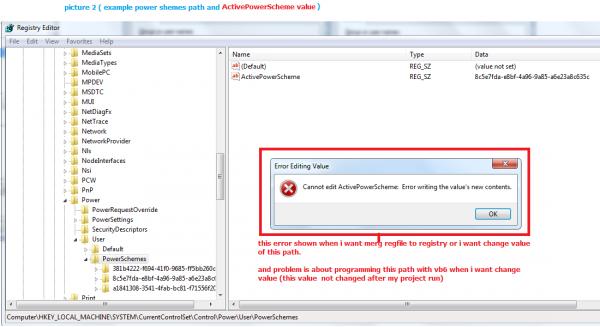
[HKEY_LOCAL_MACHINE\SYSTEM\ControlSet001\Control\Power\User\PowerSchemes]
and then value will be change to :
Code:
"ActivePowerScheme"="8c5e7fda-e8bf-4a96-9a85-a6e23a8c635c"
now my problem is about permission because i can not merge reg files with double click or write program in vb6 for set or change value "ActivePowerScheme"
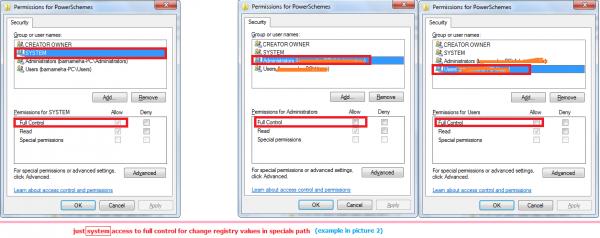
this path permission can access to system and administrators or users can not full access.
so when i write code this value will be not change or when i double click on reg file i got error.(picture1 and picture2 is about descriptions or accesses)
pic 1:
pic2:
how can write program to can access grant for set value?
i created a install program with setup factory 9 and writed code for change value this path too but not worked because of permission ( system permission)
my program is about change power option from balanced to highperformance with my code in vb6.
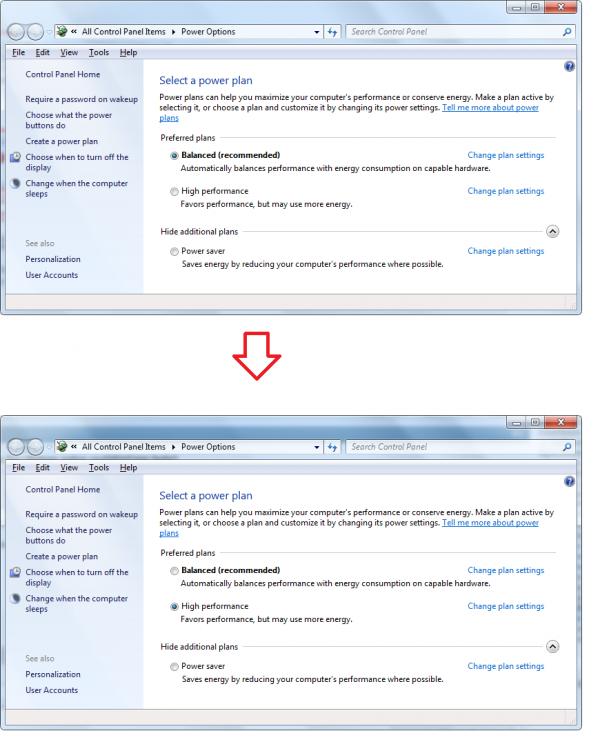
how can do that?
Last edited by Black_Storm; May 7th, 2018 at 09:17 PM.
-
May 7th, 2018, 09:32 PM
#2
Hyperactive Member
Re: i have a big problem with permission for change value registry(any help)
http://www.vbforums.com/showthread.p...-Power-Options
note that this may not work in a environment where they lock down user accounts with minimal rights. If you only need to do this at installation, look the installer options and see if there is a "admin account required" option and then run the code as a script or "run after" exe.
-
May 13th, 2018, 08:56 PM
#3
Thread Starter
Fanatic Member
Re: i have a big problem with permission for change value registry(any help)
 Originally Posted by DllHell

http://www.vbforums.com/showthread.p...-Power-Options
note that this may not work in a environment where they lock down user accounts with minimal rights. If you only need to do this at installation, look the installer options and see if there is a "admin account required" option and then run the code as a script or "run after" exe.
did u see my problem? my problem is not about user permission in windows or privilages in setup,my problem is about users roles in registry,can u send a sample vb code to can change this path and value for example ([HKEY_LOCAL_MACHINE\SYSTEM\ControlSet001\Control\Power\User\PowerSchemes]) and data : "ActivePowerScheme"="8c5e7fda-e8bf-4a96-9a85-a6e23a8c635c"
if u create a setup and run as admin or with any permission in windows but not worked because this is about registry users roles.
for exmple when i want change a value under some keys (system can change value only) and with vb6 or setup programs can not change it.
-
May 14th, 2018, 11:10 AM
#4
Hyperactive Member
Re: i have a big problem with permission for change value registry(any help)
Originally Posted by Black_Storm
did u see my problem? my problem is not about user permission in windows or privilages in setup,my problem is about users roles in registry,can u send a sample vb code to can change this path and value for example ([HKEY_LOCAL_MACHINE\SYSTEM\ControlSet001\Control\Power\User\PowerSchemes]) and data : "ActivePowerScheme"="8c5e7fda-e8bf-4a96-9a85-a6e23a8c635c"
if u create a setup and run as admin or with any permission in windows but not worked because this is about registry users roles.
for exmple when i want change a value under some keys (system can change value only) and with vb6 or setup programs can not change it.
If the change is being block by group policy or some other lockdown method, you will never be able to edit that value with vb6 code. Did you try powercfg?
Last edited by DllHell; May 14th, 2018 at 11:14 AM.
-
May 15th, 2018, 11:24 PM
#5
Thread Starter
Fanatic Member
Re: i have a big problem with permission for change value registry(any help)
Tags for this Thread
 Posting Permissions
- You may not post new threads
- You may not post replies
- You may not post attachments
- You may not edit your posts
-
Forum Rules
|
Click Here to Expand Forum to Full Width
|



 Reply With Quote
