|

-
Apr 29th, 2018, 06:55 AM
#1
Thread Starter
Lively Member


How can I integrate usercontrol's properties into form's properties?
Greetings to everyone!!! 
I have create a custom form and a UserControl which acts like custom form's title bar. What I want to achieve, is to integrate UserControl's properties into custom form's properties. Something like nested properties. Something like this...
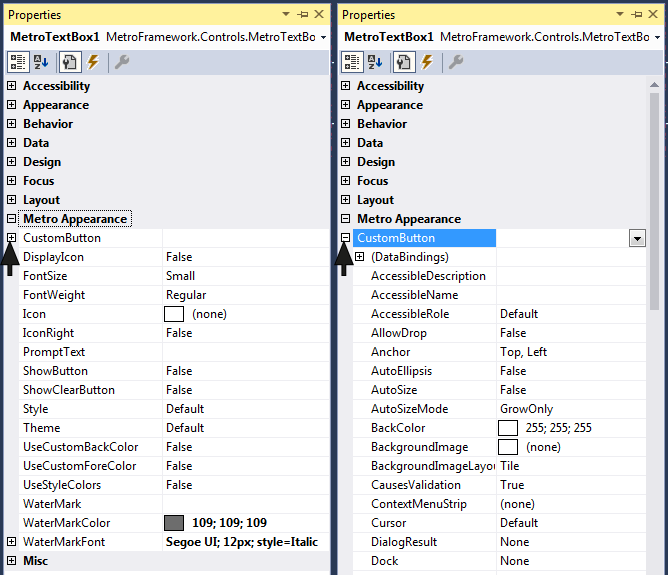
In this case we have Button's properties integrated into TextBox's properties. Any idea how can I do that?
Thank you in advance!!!
Last edited by Simonetos The Greek; May 11th, 2018 at 06:17 AM.
-
Apr 29th, 2018, 07:54 AM
#2
Re: UserControl's properties into Form's properties at Properties Window as new categ
Do you have an example of where something similar has already been done?
-
Apr 29th, 2018, 08:19 AM
#3
Thread Starter
Lively Member
Re: UserControl's properties into Form's properties at Properties Window as new categ
Yes, something like the image at my first post!!!
Last edited by Simonetos The Greek; May 11th, 2018 at 06:21 AM.
-
May 11th, 2018, 05:55 AM
#4
Thread Starter
Lively Member
Re: UserControl's properties into Form's properties at Properties Window as new categ
Anybody? I changed my question a bit, please take a look at my first post!!!
Last edited by Simonetos The Greek; May 11th, 2018 at 06:18 AM.
-
May 11th, 2018, 12:22 PM
#5
Re: How can I integrate usercontrol's properties into form's properties?
Not sure about a usercontrol, but it's possible with a component... the ToolTipComponent does it by adding a ToolTipText property to each of the controls on the form. So it should certainly be possible... HOW it's done though... I don't know....
-tg
-
May 11th, 2018, 09:37 PM
#6
Re: How can I integrate usercontrol's properties into form's properties?
 Originally Posted by techgnome

Not sure about a usercontrol, but it's possible with a component... the ToolTipComponent does it by adding a ToolTipText property to each of the controls on the form. So it should certainly be possible... HOW it's done though... I don't know....
-tg
That is done by implementing the IExtenderProvider interface, an example of which you can find in my CodeBank thread about Simulating Control Arrays In VB.NET. If you take a look at the screenshot though, I don't think that that's the aim.
All you need to do is add a ReadOnly property that exposes a child control on your user control. I just created a new WinForms project, added a user control, added a Button to the user control and then added this code:
vb.net Code:
Imports System.ComponentModel Public Class UserControl1 <Category("Metro Appearance")> Public ReadOnly Property CustomButton As Button Get Return Button1 End Get End Property End Class
When I added an instance of that user control to the form and opened the Properties window, I saw pretty much exactly what you show in post #1, i.e. a Metro Appearance section with a CustomButton property that could be expanded to show all the properties of that child control.
Tags for this Thread
 Posting Permissions
- You may not post new threads
- You may not post replies
- You may not post attachments
- You may not edit your posts
-
Forum Rules
|
Click Here to Expand Forum to Full Width
|



 Reply With Quote


