|

-
Mar 28th, 2018, 10:03 AM
#1
Thread Starter
New Member

ArgumentOutOfRangeException was unhandled by user code Yet works on another form
Hi All
I have 2 forms. The first is a dashboard and the second is a specific form Technical Analysis. I did all my playing around on the dashboard form. I copied the form panels which contain charts and bits to the second form and also the code for one of graphs. On the dashboard the graph works, but on the second it comes up with exception error. The second form has different names for graph, panel etc.. so i dont see why it doesnt work. Any ideas?
Working version on Dashboard:
Code:
 'The Excel file name
        Dim fileNameString As String = "D:\userdata\thorley\Cell switch off\AR\ASB\DB\NetAct_Data1.xlsx"

        'connection string for Xlsx files -   Microsoft ACE OLEDB 12.0
        'Connect to Excel 2007 (and later) files with the Xlsx file extension.
        'That is the Office Open XML format with macros disabled.
        ' "HDR=Yes;" indicates that the first row contains columnnames, not data.
        '"HDR=No;" indicates the opposite.
        Dim sConn As String = "Provider=Microsoft.ACE.OLEDB.12.0;Data Source=" + fileNameString + ";Extended Properties=""Excel 12.0 Xml;HDR=YES"""

        Dim myConnection As New OleDbConnection(sConn)
        myConnection.Open()

        ' The code to follow uses a SQL SELECT command to display the data from the worksheet.
        ' Create new OleDbCommand to return data from worksheet.
        ' change range
        Dim myCommand As New OleDbCommand("Select * From [Delay$h1:u601]", myConnection)

        ' create a database reader
        Dim myReader As OleDbDataReader = myCommand.ExecuteReader  '(CommandBehavior.CloseConnection)
        ' Populate the chart with data in the file
        ' can also use Chart.DataBindTable
        DashTopLeftGraph.Series(1).Points.DataBindXY(myReader, "Time seconds", myReader, "Major%")
        myReader.Close()
        Dim myReader1 As OleDbDataReader = myCommand.ExecuteReader  '(CommandBehavior.CloseConnection)
        DashTopLeftGraph.Series(2).Points.DataBindXY(myReader1, "Time seconds", myReader1, "Minor%")
        myReader1.Close()
        Dim myReader2 As OleDbDataReader = myCommand.ExecuteReader  '(CommandBehavior.CloseConnection)
        DashTopLeftGraph.Series(0).Points.DataBindXY(myReader2, "Time seconds", myReader2, "Critical%")
        myReader1.Close()
        ' close the reader and the connection
        'myReader.Close()
        myConnection.Close()

        DashTopLeftGraph.ChartAreas("DashTopLeftGraph").AxisX.Title = "Time Secs"
        DashTopLeftGraph.ChartAreas("DashTopLeftGraph").AxisY.Title = "%"
        DashTopLeftGraph.ChartAreas("DashTopLeftGraph").AxisY.Maximum = 100
Non-working version on Techncal Analysis form:
Error comes at
"TechAnalTopLeftGraph.Series(1).Points.DataBindXY(myReader, "Time seconds", myReader, "Major%")"
Code:
If Int(ASB_Tech_Anal_Inf_Delay_Time.Text) > 0 Then

        Else
            MsgBox("Check Delay Time Entry!", vbOK, "ASB Entry Error")
            GoTo Jumpover
        End If

        'The Excel file name
        Dim fileNameString As String = "D:\userdata\thorley\Cell switch off\AR\ASB\DB\NetAct_Data1.xlsx"

        'connection string for Xlsx files -   Microsoft ACE OLEDB 12.0
        'Connect to Excel 2007 (and later) files with the Xlsx file extension.
        'That is the Office Open XML format with macros disabled.
        ' "HDR=Yes;" indicates that the first row contains columnnames, not data.
        '"HDR=No;" indicates the opposite.
        Dim sConn As String = "Provider=Microsoft.ACE.OLEDB.12.0;Data Source=" + fileNameString + ";Extended Properties=""Excel 12.0 Xml;HDR=YES"""

        Dim myConnection As New OleDbConnection(sConn)
        myConnection.Open()

        ' The code to follow uses a SQL SELECT command to display the data from the worksheet.
        ' Create new OleDbCommand to return data from worksheet.
        ' change range
        Dim myCommand As New OleDbCommand("Select * From [Delay$h1:u601]", myConnection)

        ' create a database reader
        Dim myReader As OleDbDataReader = myCommand.ExecuteReader  '(CommandBehavior.CloseConnection)
        ' Populate the chart with data in the file
        ' can also use Chart.DataBindTable

        TechAnalTopLeftGraph.Series(1).Points.DataBindXY(myReader, "Time seconds", myReader, "Major%")
        myReader.Close()
        Dim myReader1 As OleDbDataReader = myCommand.ExecuteReader  '(CommandBehavior.CloseConnection)
        TechAnalTopLeftGraph.Series(2).Points.DataBindXY(myReader1, "Time seconds", myReader1, "Minor%")
        myReader1.Close()
        Dim myReader2 As OleDbDataReader = myCommand.ExecuteReader  '(CommandBehavior.CloseConnection)
        TechAnalTopLeftGraph.Series(0).Points.DataBindXY(myReader2, "Time seconds", myReader2, "Critical%")
        myReader1.Close()
        ' close the reader and the connection
        'myReader.Close()
        myConnection.Close()

        TechAnalTopLeftGraph.ChartAreas("TechAnalTopLeftGraph").AxisX.Title = "Time Secs"
        TechAnalTopLeftGraph.ChartAreas("TechAnalTopLeftGraph").AxisY.Title = "%"
        TechAnalTopLeftGraph.ChartAreas("TechAnalTopLeftGraph").AxisY.Maximum = 100


jumpover:
Any help welcomed. I hope its something silly
-
Mar 28th, 2018, 11:19 AM
#2
Re: ArgumentOutOfRangeException was unhandled by user code Yet works on another form
The most likely item in that line is the series, so the first thing to do is to put a breakpoint on that line. When execution stops on the breakpoint, highlight this part:
TechAnalTopLeftGraph.Series(1)
and press Shift+F9. If it shows you the same error, then the Series is the issue. If it doesn't show you any error message, then the series is not the issue, at which point you can look elsewhere in the line for the cause of the problem, but it doesn't seem like any other part of that should throw THAT particular exception.
My usual boring signature: Nothing
 
-
Mar 28th, 2018, 10:34 PM
#3
Re: ArgumentOutOfRangeException was unhandled by user code Yet works on another form
When an exception is thrown, the IDE highlights the line that threw it. If an ArgumentOutOfRangeException is thrown then the obvious first thing to do is determine what argument(s) were passed on that line. The next thing to do is to determine what the valid range for that argument is. The documentation for the method you're calling should provide an indication of that. If it's not immediately obvious, you then need to go backwards through the code to see where that argument came from and why it's out of range. Maybe the argument is not the value you expected or maybe your logic as far as what argument to pass is flawed. There's no good reason that we should have to trawl that code to try to work out what line is at issue though, because you would have been told when the exception was thrown.
As far as why the same code seems to work in one place and not in another, the issue is a specific argument so the same code with different arguments can certainly behave differently.
Also, that is bad code right out of the gate because it contains a GoTo. There is simply no excuse for using GoTo in this day and age. It doesn't guarantee that the code won't work but it makes it more likely and just makes things harder to follow for no good reason. I have a policy of never helping directly with code that contains a GoTo. I cannot urge you strongly enough to rethink your design and get rid of that.
-
Mar 28th, 2018, 10:37 PM
#4
Re: ArgumentOutOfRangeException was unhandled by user code Yet works on another form
 Originally Posted by Shaggy Hiker

The most likely item in that line is the series, so the first thing to do is to put a breakpoint on that line. When execution stops on the breakpoint, highlight this part:
TechAnalTopLeftGraph.Series(1)
and press Shift+F9. If it shows you the same error, then the Series is the issue. If it doesn't show you any error message, then the series is not the issue, at which point you can look elsewhere in the line for the cause of the problem, but it doesn't seem like any other part of that should throw THAT particular exception.
I wonder whether you might be thinking of an IndexOutOfRangeException rather than an ArgumentOutOfRangeException. The latter can be generated by any method argument of any type, if only certain values of that type are acceptable. The former is restricted only to integral collection or array indexes.
-
Mar 29th, 2018, 03:35 AM
#5
Thread Starter
New Member
Re: ArgumentOutOfRangeException was unhandled by user code Yet works on another form
Hi, Thanks for your replies. I used the brealpoint and shift F9 and it highlighted "TechAnalTopLeftGraph". Opening the quick watch i saw several errors all the same message "Error - No children available":
- Annotations Count = (Count) threw an exception of type System.TypeLoadException. System.Windows.Forms.DataVisualization.Charting.AnnotationCollection
Error - No children available
- ChartAreas Count = (Count) threw an exception of type System.TypeLoadException. System.Windows.Forms.DataVisualization.Charting.ChartAreaCollection
Error - No children available
- Images Count = (Count) threw an exception of type System.TypeLoadException. System.Windows.Forms.DataVisualization.Charting.NamedImagesCollection
Error - No children available
- Legends Count = (Count) threw an exception of type System.TypeLoadException. System.Windows.Forms.DataVisualization.Charting.LegendCollection
- Series Count = (Count) threw an exception of type System.TypeLoadException. System.Windows.Forms.DataVisualization.Charting.SeriesCollection
- Titles Count = (Count) threw an exception of type System.TypeLoadException. System.Windows.Forms.DataVisualization.Charting.TitleCollection
if i run the line I get the error message in attached pic: (having probs attaching the JPG. might send separately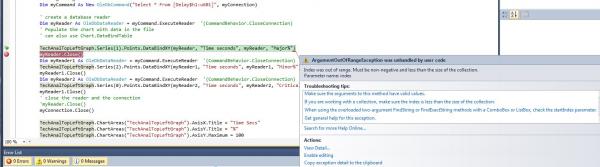
should i delete the graph and put in a new one?
-
Mar 29th, 2018, 03:42 AM
#6
Re: ArgumentOutOfRangeException was unhandled by user code Yet works on another form
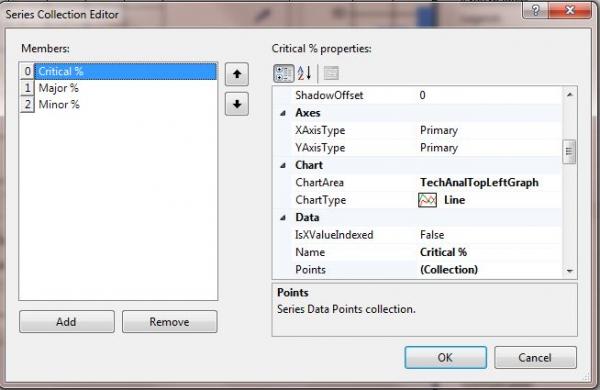
Are you aware that .NET arrays and collections are zero-based, i.e. the first element or item is at index zero? By specifying an index of 1 you are saying that you want the second item in the collection. Does your chart have two or more series? The exception seems to suggest not. In fact, the additional information you provided might indicate that it has no series at all.
By the way, the image you posted includes an error message that I can just make out in the blur that you haven't actually posted previously. If an error occurs, logic dictates that providing the error message to those you want to help is a good idea.
-
Mar 29th, 2018, 03:50 AM
#7
Thread Starter
New Member
Re: ArgumentOutOfRangeException was unhandled by user code Yet works on another form
Is there a better way to attach picture?
If the order was an issue why would the same code on another chart work? The chart was copied to another form. So the legend, series is in there already All i have done is rename the chrt area to the new name and copied the code over and change the chart name. attached picture. Hopefully this is visible!
-
Mar 29th, 2018, 04:14 AM
#8
Re: ArgumentOutOfRangeException was unhandled by user code Yet works on another form
Originally Posted by Neil Thorley
Is there a better way to attach picture?
Not really. The site has a maximum dimension for an image and anything else will be resized so you just need to make sure that you don't post big screenshots. Your first screenshot wasn't needed though, because everything could have been posted as text.
As for the issue, instead of asking us question like that, debug your code. Set a breakpoint on that line and then examine the state of the application when it gets hit. That's why VS has a debugger. If the Series property is Nothing or it's an empty collection then debugging will tell you where we can only guess.
-
Mar 29th, 2018, 05:01 AM
#9
Thread Starter
New Member
Re: ArgumentOutOfRangeException was unhandled by user code Yet works on another form
Solved. I just stopped in running when the page loads and it now works as required. Thank you.
-
Mar 29th, 2018, 09:02 AM
#10
Re: ArgumentOutOfRangeException was unhandled by user code Yet works on another form
Originally Posted by jmcilhinney
I wonder whether you might be thinking of an IndexOutOfRangeException rather than an ArgumentOutOfRangeException. The latter can be generated by any method argument of any type, if only certain values of that type are acceptable. The former is restricted only to integral collection or array indexes.
Yes, that's exactly what I was thinking. I read the words I want to read, neither more nor less. If people don't write what I want to read, that's no impediment.
My usual boring signature: Nothing
Tags for this Thread
 Posting Permissions
- You may not post new threads
- You may not post replies
- You may not post attachments
- You may not edit your posts
-
Forum Rules
|
Click Here to Expand Forum to Full Width
|



 Reply With Quote


