|

-
Mar 21st, 2018, 03:48 AM
#1961
Fanatic Member

Re: CommonControls (Replacement of the MS common controls)
MSGBOX QUESTION
Perhaps a stupid question:
In common.bas, there is the Public Function MsgBox.
What is it's advantage over the intrinsic function?
-
Mar 21st, 2018, 04:23 AM
#1962
Re: CommonControls (Replacement of the MS common controls)
Maybe also a Unicode variant?
-
Mar 21st, 2018, 04:35 AM
#1963
Hyperactive Member
Re: CommonControls (Replacement of the MS common controls)
Or mabye non-blocking? the intrinsic function blocks everything.
-
Mar 21st, 2018, 05:36 AM
#1964
Fanatic Member
Re: CommonControls (Replacement of the MS common controls)
 Originally Posted by SuperDre

Or mabye non-blocking? the intrinsic function blocks everything.
Aha, I'll test.
Originally Posted by Arnoutdv
Maybe also a Unicode variant?
Ah, of course!
Thank you both for answering my too basic question.
-
Mar 21st, 2018, 09:37 AM
#1965
Fanatic Member
Re: CommonControls (Replacement of the MS common controls)
TOOLBAR PROBLEM
Place a toolbar, ShowTips=True, on a form.
Use a timer to Debug.Print the toolbar's ShowTips property value.
Place a command button to set ShowTips=False.
Fill it with buttons and set their tooltips by code.
Start.
See it working: ShowTips=True
Hit the command button to set ShowTips=False.
See in the Debug window that this worked.
Move over the buttons, and still see the tooltips.
---
I need to kill the tooltip in special cases.
I tried to ShowTips=False to kill it, and ShowTips=True afterwards.
Doesn't work.
Ideas?
-
Mar 22nd, 2018, 03:16 AM
#1966
Re: CommonControls (Replacement of the MS common controls)
Normally I don't try to kill a Tooltip but I just clear it's contents.
An empty tooltip is not shown
This works for most controls/components I use (and tested).
-
Mar 22nd, 2018, 07:37 AM
#1967
Fanatic Member
Re: CommonControls (Replacement of the MS common controls)
Originally Posted by Arnoutdv
Normally I don't try to kill a Tooltip but I just clear it's contents.
An empty tooltip is not shown
This works for most controls/components I use (and tested).
Ok, good idea, I'll test that.
Thank you
EDIT:
While it is a good idea, it is not sufficient.
It takes the normal time for the tooltip to disappear.
I need it immediately.
Last edited by Karl77; Mar 22nd, 2018 at 10:34 AM.
-
Mar 22nd, 2018, 02:59 PM
#1968
Re: CommonControls (Replacement of the MS common controls)
Originally Posted by Karl77
I need to kill the tooltip in special cases.
I tried to ShowTips=False to kill it, and ShowTips=True afterwards.
Doesn't work.
In the ComCtlsDemo I have put in Command2_Click the following code, and it worked:
Code:
ToolBar1.ShowTips = Not ToolBar1.ShowTips
When True the first two buttons do show info tip, when false they don't. So for me it works..
Can you double check this example?
-
Mar 23rd, 2018, 02:23 AM
#1969
Fanatic Member
Re: CommonControls (Replacement of the MS common controls)
Originally Posted by Krool
In the ComCtlsDemo I have put in Command2_Click the following code, and it worked:
Code:
ToolBar1.ShowTips = Not ToolBar1.ShowTips
When True the first two buttons do show info tip, when false they don't. So for me it works..
Can you double check this example?
Double checked, and no, no effect.
I have made a short example:
Toolbar Tooltip.zip
In the IDE, it doesn't work.
Compiled to EXE, it works.
Difference:
In the IDE the Visual Styles are active.
Not in the EXE.
Last edited by Karl77; Mar 23rd, 2018 at 02:43 AM.
-
Mar 23rd, 2018, 10:45 AM
#1970
Hyperactive Member
Re: CommonControls (Replacement of the MS common controls)
Originally Posted by Karl77
I have made a short example:
Toolbar Tooltip.zip
In the IDE, it doesn't work.
Compiled to EXE, it works.
Difference:
In the IDE the Visual Styles are active.
Not in the EXE.
I tested in IDE twice:
It works (VB6.exe with and without Theme manifest)
Also tested project1.exe twice:
It works (with and without Theme manifest)
-
Mar 23rd, 2018, 01:04 PM
#1971
Fanatic Member
Re: CommonControls (Replacement of the MS common controls)
This is what I see:
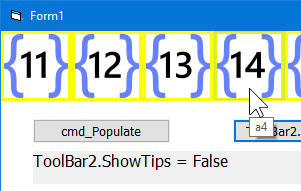
Chosk, which OS are you on? Not Win10?
EDIT:
I made a manifested EXE as well now.
On Win7, it works as expected.
On Win10, it doesn't.
Both tested in VMs.
Last edited by Karl77; Mar 23rd, 2018 at 01:31 PM.
-
Mar 23rd, 2018, 08:34 PM
#1972
Hyperactive Member
Re: CommonControls (Replacement of the MS common controls)
Originally Posted by Karl77
Chosk, which OS are you on? Not Win10?
I was on Win7.
I just tested in Win10. Yes, .ShowTips = False does not work with Theme.
I also just tested MS toolbar v5 and v6 to check the problem. Their .ShowTips is read-only.
-
Mar 27th, 2018, 04:17 AM
#1973
Fanatic Member
Re: CommonControls (Replacement of the MS common controls)
PERFORMANCE PROBLEM
VBCCR15
I have one form for all settings.
The settings are a lot, so many controls are needed.
Labels, OptionButtons, CheckBoxes etc..
This settings form takes a long time to load, barely acceptable long.
I investigated why, and I found that the VBCCR controls are the cause.
The slow loading is seen even when no code, but only the controls, are on the form.
The same form with intrinsic controls has no noticeable load time.
To prove it, I made a little test app that shows the effect.
I found out the OptionButtonW is the slowest control.
Here: Performance.zip
Of course a control count of 1000 (each) in not realistic.
But it shows the tendency.
In my tests, I didn't see a real difference if VisualStyles are enabled or not, and I see the same on Win7/10.
Is there a chance to get this a bit better?
Thank you
-
Mar 27th, 2018, 04:43 AM
#1974
Re: CommonControls (Replacement of the MS common controls)
Do you see this performance drop only when running your application in the IDE or also when compiled?
How is the performance if you use the precompiled OCX version?
-
Mar 27th, 2018, 05:00 AM
#1975
Fanatic Member
Re: CommonControls (Replacement of the MS common controls)
Originally Posted by Arnoutdv
Do you see this performance drop only when running your application in the IDE or also when compiled?
Both the same.
How is the performance if you use the precompiled OCX version?
I do so already (VBCCR15.OCX), see example.
-
Mar 27th, 2018, 06:54 AM
#1976
Re: CommonControls (Replacement of the MS common controls)
My bad, because this thread is about the CTL versions I assumed you were using these.
-
Mar 27th, 2018, 08:44 AM
#1977
Fanatic Member
Re: CommonControls (Replacement of the MS common controls)
Originally Posted by Arnoutdv
My bad, because this thread is about the CTL versions I assumed you were using these.
Is it?
-
Mar 27th, 2018, 01:15 PM
#1978
Re: CommonControls (Replacement of the MS common controls)
Is the ToolBar ShowTips issue resolved? I don't know what to fix. Could this be a Win 10 bug?
Originally Posted by Karl77
To prove it, I made a little test app that shows the effect.
I found out the OptionButtonW is the slowest control.
Here: Performance.zip
Of course a control count of 1000 (each) in not realistic.
Hmm, interesting. I could replicate your demo and confirm.
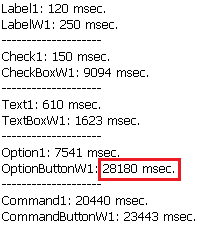
Beside OptionButtonW1 the CheckBoxW1 is also slow. CommandButtonW1 is also slow but the intrinsic one is not really better.
Right now I'm clueless. By each Load command the UserControl_Intialize and UserControl_ReadProperties is called, which is OK and necessary.
I cannot tell now if it's VB.UserControl fault or some overhead in my sources..
-
Mar 27th, 2018, 03:13 PM
#1979
Fanatic Member
Re: CommonControls (Replacement of the MS common controls)
Originally Posted by Krool
Is the ToolBar ShowTips issue resolved? I don't know what to fix. Could this be a Win 10 bug?
No, not really resolved.
For now, I decided to use a short tooltip for the 'special' buttons.
Hmm, interesting. I could replicate your demo and confirm.
And it becomes even more interesting:
In the calling form, make a menu using the menu designer.
From a submenu, call form 2.
Test the form2 behavior by clicking the menu with the MOUSE.
Note the values by screenshot or alike.
Quit and restart.
Hit F10 to activate the menu, and hit Enter on the menu by KEYBOARD.
This is _a lot_ faster than the mouse method.
I can't see such a difference when using intrinsic controls.
Perhaps this fires your fantasies?
Right now I'm clueless. By each Load command the UserControl_Intialize and UserControl_ReadProperties is called, which is OK and necessary.
I cannot tell now if it's VB.UserControl fault or some overhead in my sources..
I don't expect the same speed as with the intrinsic controls.
Option and Check are very slow.
CommandButton is good enough, as there won't be 100 of them in one Form.
The LabelW is "acceptable".
I doubt the slowness is because of the UserControl model only.
But I didn't investigate deeper.
-
Mar 28th, 2018, 01:37 PM
#1980
Re: CommonControls (Replacement of the MS common controls)
Update relased in ComCtlsBase.bas.
In the internal ComCtlsShowAllUIStates the message WM_CHANGEUISTATE (travels down tree up and down; overhead) has been replaced by the direct WM_UPDATEUISTATE. No side effects detected by this change, so it's ok.
As you see the performance for CheckBoxW is increased drastically, though still OptionButtonW is weak.
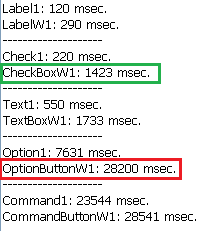
However, when skipping some control load loop, the performance of OptionButtonW is also increased.
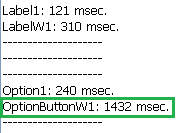
So the problem has been partially resolved; performance still gets weak the more controls there are.
-
Mar 29th, 2018, 02:19 AM
#1981
Fanatic Member
Re: CommonControls (Replacement of the MS common controls)
Originally Posted by Krool
performance for [...] is increased drastically
Yes, confirmed.
Drastically is the right term.
Wow!
My settings dialog loads in an acceptable time now.
Also there is no real difference if started by mouse click or Enter.
I'm very curious how this mouse/Enter difference came.
I can't imagine...
-
Apr 20th, 2018, 07:55 AM
#1982
Fanatic Member

 run-time error -2147024770 run-time error -2147024770
one of my users gets an error window titled VBCCR15 which states the run-time error -2147024770 when starting my app.
he uses win8.1x64 but i cant reproduce this error when using win8.1x64.
i already googled for -2147024770 but no results.
any hints how to fix that?
Last edited by Mith; Apr 20th, 2018 at 08:26 PM.
Reason: added more information
-
Apr 20th, 2018, 10:07 AM
#1983
Re: CommonControls (Replacement of the MS common controls)
sounds like a deployment issue. How was VBCCR installed?
-
Apr 20th, 2018, 11:09 AM
#1984
Fanatic Member
Re: CommonControls (Replacement of the MS common controls)
Originally Posted by DEXWERX
sounds like a deployment issue. How was VBCCR installed?
side-by-side (embedded manifest inside the exe via res-file)
-
May 5th, 2018, 02:27 PM
#1985
Fanatic Member
Re: CommonControls (Replacement of the MS common controls)
Hi Krool
I'm trying to save the content of the TextBoxWs in inifiles but when I load them I'm getting question marks.
The content of the TextBoxWsis is in Arabic Language.
This is how I'm doing:
For Saving
Code:
If TypeOf ctl Is TextBoxW Then

   RetVal = WriteToAppINI(Me.Name & "Control", ctl.Name & " FontSize", CStr(ctl.Font.Size), App.Path & "\MyAppSettings.dat")
    RetVal = WriteToAppINI(Me.Name & "Control", ctl.Name & " text", CStr(ctl.text), App.Path & "\MyAppSettings.dat")
    RetVal = WriteToAppINI(Me.Name & "Control", ctl.Name & " FontName", CStr(ctl.Font.Name), App.Path & "\MyAppSettings.dat")
    RetVal = WriteToAppINI(Me.Name & "Control", ctl.Name & " Font_CharSet", CStr(ctl.Font.Charset), App.Path & "\MyAppSettings.dat")
   RetVal = WriteToAppINI(Me.Name & "Control", ctl.Name & " FontBold", CStr(ctl.Font.Bold), App.Path & "\MyAppSettings.dat")
  RetVal = WriteToAppINI(Me.Name & "Control", ctl.Name & " FontItalic", CStr(ctl.Font.Italic), App.Path & "\MyAppSettings.dat")

End If
For Loading
Code:
If TypeOf ctl Is TextBoxW Then
ctl.Font.Size = ReadFromAppINI(Me.Name & "Control", ctl.Name & " font.size", ctl.Font.Size, App.Path & "\MyAppSettings.dat")
ctl.text = ReadFromAppINI(Me.Name & "Control", ctl.Name & " text", ctl.text, App.Path & "\MyAppSettings.dat")
ctl.Font.Name = ReadFromAppINI(Me.Name & "Control", ctl.Name & " Font.name", CStr(ctl.Font.Name), App.Path & "\MyAppSettings.dat")
ctl.Font.Charset = ReadFromAppINI(Me.Name & "Control", ctl.Name & " Font_CharSet", ctl.Font.Charset, App.Path & "\MyAppSettings.dat")
ctl.Font.Bold = ReadFromAppINI(Me.Name & "Control", ctl.Name & " Font.Bold", ctl.Font.Bold, App.Path & "\MyAppSettings.dat")
ctl.Font.Italic = ReadFromAppINI(Me.Name & "Control", ctl.Name & " Font.Italic", ctl.Font.Italic, App.Path & "\MyAppSettings.dat")
End If
Code:
Public Function ReadFromAppINI(SectionHeader As String, VarName As String, ByVal Default As String, strFile As String) As String
Dim RetStr As String
RetStr = String(255, Chr(0))
ReadFromAppINI = Left(RetStr, GetPrivateProfileString(SectionHeader, ByVal VarName$, Default, RetStr, Len(RetStr), strFile))
End Function
Code:
Public Function WriteToAppINI(strSection As String, strKeyName As String, strValue As String, strFile As String) As Long
Dim intStatus As Long
On Error GoTo PROC_ERR
intStatus = WritePrivateProfileString(strSection, strKeyName, strValue, strFile)
WriteToAppINI = (intStatus <> 0)
PROC_EXIT:
Exit Function
PROC_ERR:
MsgBox "Error: " & Err.Number & "   " & Err.Description, , "WriteToAppINI"
Resume PROC_EXIT
End Function
Any idea please?
Last edited by Mustaphi; May 5th, 2018 at 02:42 PM.
-
May 5th, 2018, 02:40 PM
#1986
Re: CommonControls (Replacement of the MS common controls)
Mustaphi, you need to use the unicode API for writing and reading INI.
-
May 5th, 2018, 02:44 PM
#1987
Fanatic Member
Re: CommonControls (Replacement of the MS common controls)
Originally Posted by Krool
Mustaphi, you need to use the unicode API for writing and reading INI.
Thank you Krool for the quick reply
Is the Appi included in the Demo?
-
May 6th, 2018, 01:33 AM
#1988
Re: CommonControls (Replacement of the MS common controls)
Originally Posted by frog357
Thank you for your great work towards improving the community. I have discovered a minor issue with the Listview control. To demonstrate, modify your Standard EXE example so that the top right Listview has Multiselect = True. Next scroll to the far bottom right and click with the left button in an empty area as if you were about to create a box to draw a selection around everything in this window. What happens for me is the mouse jumps to the top left of the screen. The jump seems to happen in mouse down. I can move the mouse back down and eventually finish my selection. I discovered this behavior with the listview set to report but it was much more difficult to reproduce.
Reportedly this issue has been resolved by MS on the 1 May spring update.
-
May 7th, 2018, 06:25 AM
#1989
Re: CommonControls (Replacement of the MS common controls)
Originally Posted by Mustaphi
Thank you Krool for the quick reply
Is the Appi included in the Demo?
You need to use the W APIs and the INI file needs to have a Unicode BOM at the beginning as well.
If you don't know how to add a BOM notepad can do it automatically, open up the INI in notepad, click Save As, and change the encoding from ANSI to Unicode.
Last edited by DEXWERX; May 7th, 2018 at 06:29 AM.
-
Jun 2nd, 2018, 11:15 AM
#1990
Re: CommonControls (Replacement of the MS common controls)
Update released.
It concerns the drop-down in the DTPicker control, though only on comctl version 5.8x and 6.0. Vista+ not affected (>= 6.1)
The bug was that the drop-down does not show at all when having some of the Calendar* properties not at default setting. (e.g. CalendarShowWeekNumbers = True)
The actual bug was a stupidity. The red marked element was missing and has now been added.
Code:
SendMessage CalendarHandle, MCM_GETMINREQRECT, 0, ByVal VarPtr(WndRect)
It resulted in the WndRect struct not properly set and thus sizing the drop-down to zeros.
What was strange though that this bug only affected the OCX version. The Std-EXE version did work.. curious.
And btw that was also the reason it did not come to my attention before. 
However, it was fixed now in both versions of course.
-
Jun 6th, 2018, 05:08 AM
#1991
Fanatic Member
Run-time-error ´429´ ActiveX component can´t create object
VBCCR15 v1.5.20 (side by side)
some users got the following error message box when starting my app under windows 10:
Code:
VBCCR15
Run-time-error ´429´
ActiveX component can´t create object
This error message displays 2 more times after clicking the OK button.
after that the app shows "Run-time-error ´440 Automation error" and the app GUI never displays.
Any ideas how to fix or debug this problem?
Does anyone know what kind of objects will be created by VBCCR15 ?
Maybe it is some kind of a dependency problem?
BTW: i cant reproduce this problem by myself using win10...
-
Jun 15th, 2018, 12:38 PM
#1992
Re: CommonControls (Replacement of the MS common controls)
Update released.
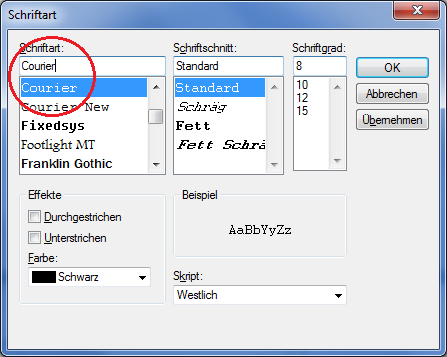
AutoSelect property included in the ComboBoxW control.
It mimics certainly the auto-selecting feature of the combo box in the font common dialog box. (as example)
-
Jul 8th, 2018, 02:40 PM
#1993
Re: CommonControls (Replacement of the MS common controls)
Update released.
New common control 'FontCombo' included. Demo usage has been implemented into the RichTextBoxForm.
-
Jul 9th, 2018, 02:49 AM
#1994
Member
Re: CommonControls (Replacement of the MS common controls)
Hi, Good work !
I always use a VM with winXP to VB6 . This code need a COMCTL32.dll V6. But my VM have the 5.82 version. If I copy the v6.10 (from my win10) XP, XP refuses because it is used. Any idea ? Thx
-
Jul 9th, 2018, 04:46 AM
#1995
Fanatic Member
Re: CommonControls (Replacement of the MS common controls)
Originally Posted by Krool
Demo usage has been implemented into the RichTextBoxForm.
Worth to mention is that this new control provides mechanisms to manage the recently used fonts.
-
Jul 9th, 2018, 10:54 AM
#1996
Lively Member
Re: CommonControls (Replacement of the MS common controls)
Originally Posted by Krool
Update released.
New common control 'FontCombo' included. Demo usage has been implemented into the RichTextBoxForm.
Very Nice, Thanks
when will this be included in the OCX version
-
Jul 9th, 2018, 01:35 PM
#1997
Re: CommonControls (Replacement of the MS common controls)
Originally Posted by Semke
when will this be included in the OCX version
The time span get's longer for any next OCX major release as they are not so more new features.
However, I will look forward to bundle in Q3 or latest in Q4 2018.
Originally Posted by Karl77
Worth to mention is that this new control provides mechanisms to manage the recently used fonts.
A few more words about the new FontCombo control:
The FontCombo is actually a clon of the ComboBoxW control, but trimmed down to it's essential features and needs.
It's also trimmed to a 'read-only' control. Means no .AddItem or changing .List() property.
Also at initial the control is setup with style 2 - FtcStyleDropDownList instead of 0 - FtcStyleDropDownCombo.
And the AutoSelect property is by default set to True. (meaningful for style other than 2 -FtcStyleDropDownList)
The core property are the FontPitch and FontType property which determines what kind of fonts are loaded at init.
Just use the .Text property to read and set the selected font name.
Another core feature is the recent list. By default though the RecentMax property is set to 0 - off.
When set higher than 0 the feature is turned on.
Then whenever the user picks a font from the list it is added into the recent list up to RecentMax.
To know the offset to the core list and to know how many items are in the recent list you can read the RecentCount property.
The RecentBackColor/RecentForeColor is intended to visually seperate the recent list from the core list.
ClearRecent method sets the RecentCount to zero and clears the recent list.
SaveRecent/RestoreRecent receives and sets a variant (string) array. By that you can save a recent list to a file or registry.
It's also possible to restore a recent list by hard code:
Code:
FontCombo1.RestoreRecent Array("Arial", "MS Sans Serif")
-
Jul 10th, 2018, 12:14 PM
#1998
Re: CommonControls (Replacement of the MS common controls)
Originally Posted by christ62
Hi, Good work !
I always use a VM with winXP to VB6 . This code need a COMCTL32.dll V6. But my VM have the 5.82 version. If I copy the v6.10 (from my win10) XP, XP refuses because it is used. Any idea ? Thx
OMG. You can't change the system file.
You can access 5.82 or 6.00 in XP depending if you have an manifest for the app. If you have no clue search around concerning theming and VB6.
You can't use the >=6.10 Vista+ features of comctl32.dll in a XP VM.
Why you don't install the VB6 IDE directly on your Win 10?
-
Jul 11th, 2018, 01:32 AM
#1999
Member
Re: CommonControls (Replacement of the MS common controls)
Why you don't install the VB6 IDE directly on your Win 10?
Just because, I had done it but in the IDE of Visual Studio 6, I had "jerks" when, by example, I move Controls on form etc... 
-
Jul 12th, 2018, 04:02 AM
#2000
Fanatic Member
Re: CommonControls (Replacement of the MS common controls)
FONTCOMBO
Small problem
This occurs only if the control is set to RecentMax > 0.
Let's say, the last selected font name was "Zürich".
Then it appears at the top of the list.
If we now press 'End' on the keyboard, the list doesn't scroll down to "Zürich".
It stops at the top, the place where "Zürich" ist found in the recents list.
I would expect that 'End' would go down to the list.
---
Otherwise, a very handy control.
Also it is quite fast, even with a lot of installed fonts in Windows.
Really good to have - thank you.
 Posting Permissions
- You may not post new threads
- You may not post replies
- You may not post attachments
- You may not edit your posts
-
Forum Rules
|
Click Here to Expand Forum to Full Width
|



 Reply With Quote
