|

-
Mar 27th, 2018, 06:09 AM
#1
Thread Starter
Junior Member

 [RESOLVED] Transferred Values between forms with Public Property not being retained [RESOLVED] Transferred Values between forms with Public Property not being retained
Good morning,
I know there are several threads I have seen on here for transferring values, but my problem is that the value gets to the correct form but it isnt "sticking" to the variable it is assigned to? If that makes sense.
I am using a Public property, the value is being returned correctly because I tested for it, but when it comes to the variable its supposed to be assigned to, it isnt changing.
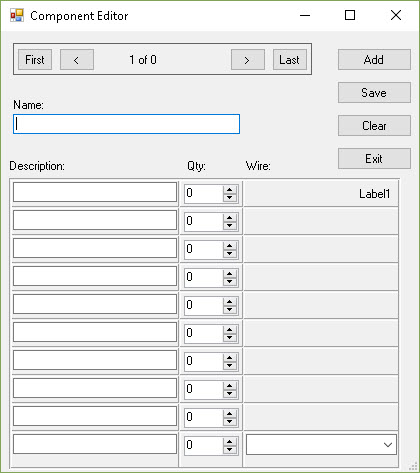
This is the portion of the code in form 2 that "sends" the values from frmWire to frmComponentEditor.
Code:
Private Sub btnExit_Click_1(sender As Object, e As EventArgs) Handles btnExit.Click

        frmComponentEditor.descText = lblWireType.Text

        Me.Close()

    End Sub
This is the code I am using in ffrmComponentEditor to get the values from form2 to form1, I am using the Msgbox() to test if the values are actually being transferred and they are.
Code:
Public Property descText As String
        Get
            Return MyData
            MsgBox(MyData & "A")
        End Get
        Set(ByVal value As String)

            MsgBox("Set " & value)

            lblDesc_1.Text = value

            MsgBox(lblDesc_1.Text)
        End Set
    End Property
This is what I use to initiate frmWire.
Code:
Public Sub lblDesc_1_MouseHover(sender As Object, e As EventArgs) Handles lblDesc_1.MouseHover

        Dim X As frmWire = New frmWire

        X.ShowDialog()

        MsgBox(lblDesc_1.Text) <--- Tests value and is not updating.

    End Sub
The label1 under Wire: isn't being updated, nor is the value retaining its assignment to "Desc_1.text".
The assignment seems to work within the Public Property descText, but after that finalizes it's gone.
So, I know I am missing something really simple here, so if you could assist me in understanding what my mistake is and how to correct the error, I would be grateful.
Richard
-
Mar 27th, 2018, 07:22 AM
#2
Re: Transferred Values between forms with Public Property not being retained
The most likely issue here is that you are looking at one form in the UI and referencing a different one in code. In that first code snippet, what EXACTLY is 'frmComponentEditor'? Is it a variable or is it a type? My guess is that it is the latter, which means that you are referencing the default instance of that type. Now, how EXACTLY did you display that instance of the form that you're looking at? Did you use the default instance there too, or did you create an instance with the New keyword? If it's the latter then that is NOT the default instance and you are indeed looking at a different object to the one you're referencing in code. In that case, the data is indeed "sticking" but you just can't see it.
This is an example of why experienced developers don't like default instances: they cause as much confusion as they resolve. Basically, if you expect to affect an instance of a type then you have to refer to that instance. If you display the default instance then reference the default instance to make changes. If you create an instance explicitly, refer to that instance to make changes.
-
Mar 27th, 2018, 07:52 AM
#3
Re: Transferred Values between forms with Public Property not being retained
In addition, the child form shouldn't know or care about the parent form. I'd reverse the process. Have the parent form create an instance of the child form, display it as a modal form, then when it closes, it closes. Then the parent form asks the child form for the value. The Child form shouldn't force the value to the parent, the parent should ask the child for it.
frmComponentEditor
Code:
dim f2 as New Form2
f2.ShowDialog
lblDesc_1.Text = f2.DescText
form2
Code:
Friend ReadOnly Property DescText as String
  return lblWireType.Text
End Property
Something along those lines.
-tg
-
Mar 27th, 2018, 08:41 AM
#4
Thread Starter
Junior Member
Re: Transferred Values between forms with Public Property not being retained
I was using the code you posted for Form2 and I get this error
statement cannot appear outside a method body.
I am not sure what its issue is, but I am unable to place this code and get it to not have an error.
Richard
 Originally Posted by techgnome

In addition, the child form shouldn't know or care about the parent form. I'd reverse the process. Have the parent form create an instance of the child form, display it as a modal form, then when it closes, it closes. Then the parent form asks the child form for the value. The Child form shouldn't force the value to the parent, the parent should ask the child for it.
frmComponentEditor
Code:
dim f2 as New Form2
f2.ShowDialog
lblDesc_1.Text = f2.DescText
form2
Code:
Friend ReadOnly Property DescText as String
  return lblWireType.Text
End Property
Something along those lines.
-tg
-
Mar 27th, 2018, 08:49 AM
#5
Thread Starter
Junior Member
Re: Transferred Values between forms with Public Property not being retained
Figured it out. The code should have been:
Code:
Friend ReadOnly Property DescText as String
Get
  return lblWireType.Text
End Get
End Property
Thanks for the help.
Tags for this Thread
 Posting Permissions
- You may not post new threads
- You may not post replies
- You may not post attachments
- You may not edit your posts
-
Forum Rules
|
Click Here to Expand Forum to Full Width
|



 Reply With Quote


