|

-
Mar 1st, 2018, 12:09 PM
#1
Thread Starter
Fanatic Member


 Error VB 372 - Failed to load Control Error VB 372 - Failed to load Control
Hi
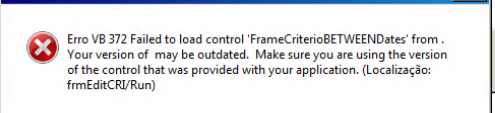
The user use a metaframe (CITRIX) to access EXE, In a Environment show the error VB 372 , The Exe have user controls inside vbp, in other Enivoronment (same server) work fine
-
Mar 2nd, 2018, 10:52 AM
#2
Re: Error VB 372 - Failed to load Control
I had an error of this type just yesterday.
Weird as it may sound the problem went away when I opened the Project, replaced a UserControl's toolbox bitmap (with the same image as originally used), and recompiled.
Weird, but I suspect that the .CTX file had been corrupted somehow.
Previous to the problem I was getting weird "file I/O error" dialogs when I compiled and saved. Still no idea what I was doing wrong, but after a reboot I had reopened the Project, compiled, and then the compiled EXE got those "Your version may be outdated" pointing an accusing finger at my UserControl.
Again, replacing the toolbox bitmap and recompiling solved it.
-
Mar 2nd, 2018, 11:08 AM
#3
Thread Starter
Fanatic Member
Re: Error VB 372 - Failed to load Control
 Originally Posted by dilettante

I had an error of this type just yesterday.
Weird as it may sound the problem went away when I opened the Project, replaced a UserControl's toolbox bitmap (with the same image as originally used), and recompiled.
Weird, but I suspect that the .CTX file had been corrupted somehow.
Previous to the problem I was getting weird "file I/O error" dialogs when I compiled and saved. Still no idea what I was doing wrong, but after a reboot I had reopened the Project, compiled, and then the compiled EXE got those "Your version may be outdated" pointing an accusing finger at my UserControl.
Again, replacing the toolbox bitmap and recompiling solved it.
Thank you , But the problem occur in the client in only machine (CITRIX) in others run work fine
-
Mar 2nd, 2018, 11:24 AM
#4
Re: Error VB 372 - Failed to load Control
I just went back and looked at this and I had the same thing happen again.
This time the fix was not so easy... and I am still not sure what did fix it. I will have to look harder, I have never seen this before. The error dialog that heralded the problem said "Device I/O error."
I wonder if this has something to do with a recent security patch. But I know that's grasping at straws and I have no evidence to support such a suspicion.
-
Mar 2nd, 2018, 12:01 PM
#5
Re: Error VB 372 - Failed to load Control
I still don't have a good fix.
What I have tried last (and it seems to work repeatedly) is to remove the EXE before recompiling a new one. Weird.
Tags for this Thread
 Posting Permissions
- You may not post new threads
- You may not post replies
- You may not post attachments
- You may not edit your posts
-
Forum Rules
|
Click Here to Expand Forum to Full Width
|



 Reply With Quote

