|

-
Nov 15th, 2017, 01:21 PM
#1
Thread Starter
Fanatic Member

 [RESOLVED] Column order in DGV [RESOLVED] Column order in DGV
I have the following form:
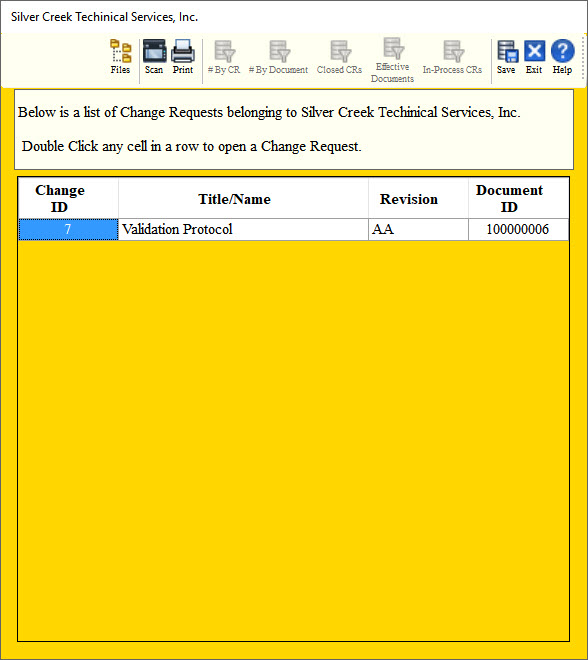
What I would like to do is have the last column be the second column and I am unable to figure out how to accomplish this. In the table adapter the last column is actually column 19 (of 19).
It appears to me, from this, that the columns can only be displayed in the order the columns are set in the tableadapter. That being the case, I have no idea how one would change the order of the columns so that I can arrange the columns in the DGV in the order I want them. I do know that I can change column order in a databound DGV using the DGV Task Window, but this cannot be applied for this particular DGV.
Code:
    Private Sub DocChangeListLoad()
        With dgvList
            .DefaultCellStyle.Font = New Font("Times New Roman", 11)
            .DefaultCellStyle.ForeColor = Color.Black
            .DefaultCellStyle.Alignment = DataGridViewContentAlignment.MiddleLeft
            .ColumnHeadersDefaultCellStyle.Alignment = DataGridViewContentAlignment.MiddleCenter
        End With
        dgvList.DataSource = Me._MasterBase5_0DataSet
        dgvList.DataMember = "tblChangeRequest"
        With dgvList.Columns(0)
            .Visible = True
            .Width = 100
            .HeaderText = "Change ID"
            .DefaultCellStyle.Alignment = DataGridViewContentAlignment.MiddleCenter
        End With
        With dgvList.Columns(19)
            .Visible = True
            .Width = 100
            .HeaderText = "Document ID"
            .DefaultCellStyle.Alignment = DataGridViewContentAlignment.MiddleCenter
        End With
        With dgvList.Columns(1)
            .Visible = True
            .Width = 250
            .HeaderText = "Title/Name"
        End With
        With dgvList.Columns(2)
            .Visible = True
            .Width = 100
            .HeaderText = "Revision"
        End With
        dgvList.Columns(3).Visible = False
        dgvList.Columns(4).Visible = False
        dgvList.Columns(5).Visible = False
        dgvList.Columns(6).Visible = False
        dgvList.Columns(7).Visible = False
        dgvList.Columns(8).Visible = False
        dgvList.Columns(9).Visible = False
        dgvList.Columns(10).Visible = False
        dgvList.Columns(11).Visible = False
        dgvList.Columns(12).Visible = False
        dgvList.Columns(13).Visible = False
        dgvList.Columns(14).Visible = False
        dgvList.Columns(15).Visible = False
        dgvList.Columns(16).Visible = False
        dgvList.Columns(17).Visible = False
        dgvList.Columns(18).Visible = False
    End Sub
-
Nov 15th, 2017, 01:39 PM
#2
Re: Column order in DGV
Try this:
Code:
dgvList.Columns(19).DisplayIndex = 1
-
Nov 15th, 2017, 01:49 PM
#3
Re: Column order in DGV
Also, if your DGV is bound at design time then you can use the DGV designer to arrange the columns. Also, you can open the dataset in the IDE and EDIT the TableAdapter SQL statement. Just right click on the tableadapter method you want to change and then select Configure. You can retrieve the ccolumns in any order you want.
-
Nov 15th, 2017, 02:37 PM
#4
Thread Starter
Fanatic Member
Re: Column order in DGV
Wes, No it isn't bound at design time. Nothing is ever that easy.
Geek, Thanks, that works perfectly. Now that I see it, I probably should have been able to figure that out. But then that can be said for almost anything. It always looks simple after the fact.
-
Nov 15th, 2017, 06:19 PM
#5
Re: [RESOLVED] Column order in DGV
Wes, No it isn't bound at design time. Nothing is ever that easy.
No problem but I would still suggest checking out how to manually configure the TableAdapter Fill method, as I described in my previous post. If your going to be using TableAdapters you'll find this skill can be very helpful.
-
Nov 15th, 2017, 06:56 PM
#6
Thread Starter
Fanatic Member
Re: [RESOLVED] Column order in DGV
Wes, Sorry man, I did not read the whole thing. I kind of dropped it at DGV designer, which I use all the time for bound tables. I have never used an SQL to order columns before. I will definitely take a look at that. Thanks.
-
Nov 16th, 2017, 06:24 AM
#7
Re: [RESOLVED] Column order in DGV
It's actually rather simple, you already do (or can) specify the fields in the SELECT clause, and you just put them in the order you want, eg:
Code:
SELECT field1, field8, field3
FROM ...
Tags for this Thread
 Posting Permissions
- You may not post new threads
- You may not post replies
- You may not post attachments
- You may not edit your posts
-
Forum Rules
|
Click Here to Expand Forum to Full Width
|



 Reply With Quote


