|

-
Oct 25th, 2017, 12:18 AM
#1
Thread Starter
Fanatic Member

-
Oct 25th, 2017, 12:29 AM
#2
Re: Unwanted trigger of an event.
If you add items directly to a ComboBox then no item is selected by default. If you bind a list then the first item is selected by default. There's nothing you can do about that. As you're doing, you must unselect that first item to clear the control.
The SelectedIndexChangedEvent is raised every time the value of the SelectedIndexChanged property changes. If an item is selected when you bind and then you clear the selection, the SelectedIndex property values changes twice. There's nothing you can do about that.
If what you actually care about is that the user has selected an item rather than that the SelectedIndex property value has changed then handle SelectionChangeCommitted rather than SelectedIndexChanged. It is only raised when a selection is made via the UI.
-
Oct 25th, 2017, 01:04 AM
#3
Thread Starter
Fanatic Member
Re: Unwanted trigger of an event.
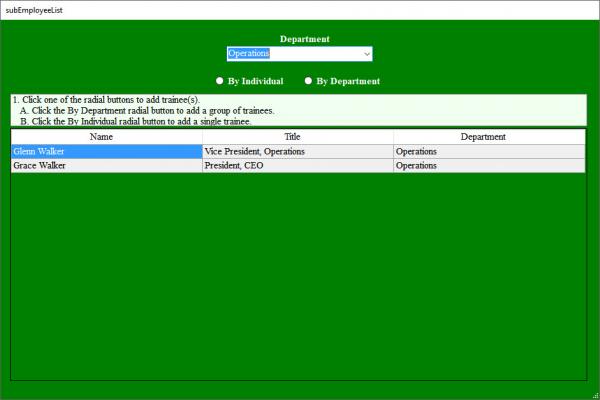
Thanks JM. I can see how that works. I discovered this problem when I was playing around with the code. In the code above I originally had an If Branch around the method i.e. I was looking to make sure that the variable I was using was defined with what I wanted. and it turned out that the variable was = Nothing, obviously due to the fact that I set the SelectedIndex = -1. So anyway, I no longer needed the branch or the Try Catch, got rid of them and the code was reverted to what you see above.
Now stay with me here. I can run that code now and It works exactly as I had thought it should. So there is something more going on here. At that point I stepped through the code and it does exactly what it did before except it appears to go through a second time (that is the best I can figure it out) and the form Displays like screen shot one, except with an empty combobox, which I can then make a selection from and get the second window seen above. WDF!!! I am so confused!
Code:
Try
If Me.TblEmployeeTableAdapter.FillByDepartment(Me._MasterBase4_0ItemMasterDataSet.tblEmployee, glbstrDept) = Nothing Then
    Throw error
EndIf
Catch
  Message
End Try
-
Oct 25th, 2017, 04:12 AM
#4
Re: Unwanted trigger of an event.
If you add your handlers in code rather than in the designer (which is where they are added if you just double click on an event in the properties window, or double click on a control to create an event), then you can control exactly when they are bound.
This means you can do your call to Fill your ComboBox and set its SelectedIndex first, then add your handler. This way it won't trigger while you loading data on form load, but it will trigger the rest of the time.
Generally i now add all my handlers in a sub that i call at the end of Form_Load after i have loaded all data so i have full control as to what event are firing when.
Please Mark your Thread "Resolved",  if the query is solved & Rate those who have helped you 
-
Oct 25th, 2017, 07:34 AM
#5
Re: Unwanted trigger of an event.
^NeedSomeAnswers is spot on.
AddHandler
RemoveHandler
-
Oct 25th, 2017, 07:45 AM
#6
Re: Unwanted trigger of an event.
 Originally Posted by NeedSomeAnswers

If you add your handlers in code rather than in the designer (which is where they are added if you just double click on an event in the properties window, or double click on a control to create an event), then you can control exactly when they are bound.
This means you can do your call to Fill your ComboBox and set its SelectedIndex first, then add your handler. This way it won't trigger while you loading data on form load, but it will trigger the rest of the time.
Generally i now add all my handlers in a sub that i call at the end of Form_Load after i have loaded all data so i have full control as to what event are firing when.
Originally Posted by kpmc
Agreed... half-way through the first post, my thought was "Oh, hey... so the problem is the code fires off before it needs to because of the way things are bound... simple fix... don't wire up the event handler until after the combo box is bound and the -1 index is set... then use AddHandler to set the SelectedIndexChange event handler."
I do this just about anytime I deal with bound data where controls also use their change event - or other events - to then act upon the data.It might seem like a hassle, but using AddHandler is really simple, so it's not that big of a deal.
-tg
-
Oct 25th, 2017, 09:31 AM
#7
Re: Unwanted trigger of an event.
If the action should only happen when the user selects an item, then the SelectedIndexChange is the wrong event to handle. You should be handling the ChangeCommited event as JM points out. I've used the approach of waiting to add the handlers until after some other stuff happens, but this becomes just another thing to make sure is right when making future changes. Using the correct event for the job at hand is a better approach.
2 cents.
Process control doesn't give you good quality, it gives you consistent quality.
Good quality comes from consistently doing the right things.
Vague general questions have vague general answers. A $100 donation is required for me to help you if you PM me asking for help. Instructions for donating to one of our local charities will be provided.
______________________________ Last edited by kebo : Now. Reason: superfluous typo's
-
Oct 25th, 2017, 10:02 AM
#8
Re: Unwanted trigger of an event.
Eh, there's a few approaches and not all are one-size-fits-all.
In any case, -1 is a valid value for SelectedIndex, so your code needs to be able to handle that case. -1 always means "no item is selected", so your appropriate action for it in this app is probably "clear the DGV".
Once you handle that you're basically done, but there are other practices people follow to help manage situations like this.
One approach uses a Boolean to indicate "I want to ignore certain property changes right now". Your form might startup with an 'isComboInitialized' Boolean set to False, and your SelectedIndexChanged handler would check that. If it's false, the handler would do nothing. When you've finished initializing the ComboBox, you would set the flag to true.
This approach is relatively easy to implement, but gets out of hand when there are a lot of different events you care about. Often the Boolean becomes a generic "isInitialized" and is a bit of a wart, but it is what it is. I don't like it because as the app gets larger it gets harder to figure out who sets it to what states and when.
Another approach involves unwiring/rewiring the event handler to do the same thing as the Boolean. When you don't want the change event to do things, you remove the event handler then do your stuff. When you want to restore normal functionality, you use AddHandler to start handling the event again.
This is basically the Boolean flag but harder to discover. I don't like it for the same reason: it becomes difficult to answer questions about when the event is removed and added.
Personally I'm wary of the ChangeCommitted event. The documentation itself points out that in various configurations, it isn't always raised when the selection changes. I imagine that probably means in those configurations the user has to make a selection and push Enter.
In both approaches there's a decent likelihood you'll spend some time debugging the equivalent of, "Whoops, I did a remove without an add". So it turns out to be a lot easier to implement "do nothing if SelectedIndex = -1" and it handles most cases where people try to create code like this.
I can think of some more complex approaches, but practically all of them involve ignoring -1 in the "go load my data" part of the code. Not even fancy Presentation Model patterns can save you from "Pre-binding the control will likely have this value".
This answer is wrong. You should be using TableAdapter and Dictionaries instead.
-
Oct 25th, 2017, 10:12 AM
#9
Thread Starter
Fanatic Member
Re: Unwanted trigger of an event.
I will be looking into the add handler. It sounds very interesting. However, I thought about it a lot last night and like Kebo and JM both said, the problem is really the change event. This is one of those cases where there is something in your code that is actually a problem, but it does not surface until you are doing something else. It seems that the more I learn, the less I know. Kind of like when I was in school (about 100 years ago) first learning science and just as I started to understand something I got slammed with the realization that what I just learned was full of qualifiers. Anyway, thanks all.
Tags for this Thread
 Posting Permissions
- You may not post new threads
- You may not post replies
- You may not post attachments
- You may not edit your posts
-
Forum Rules
|
Click Here to Expand Forum to Full Width
|




 Reply With Quote


