|

-
Oct 20th, 2017, 12:26 PM
#1
Thread Starter
Lively Member

Time only data entry
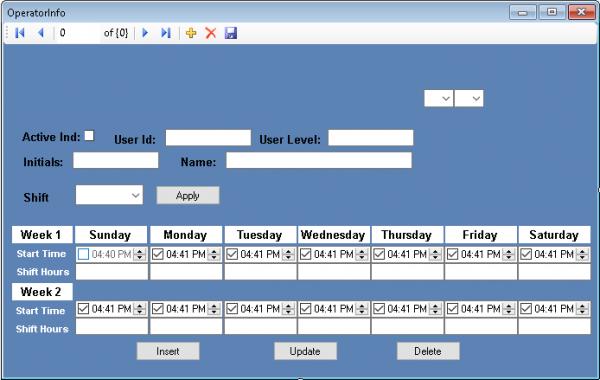
I have a project where the user has a two week work schedule. Over the 14 days each worker is scheduled for 40 hours. That can be broken up either into 7 11.5 hour shifts, or 10 8 hour shifts. The user wants it to be flexible. So I created the screen below. My problem is the start time fields. If I use a date/time picker it defaults to the current time when the field is NULL. This is confusing to the user and me. I need to have the Start time and hours blank if the person is not scheduled that day. What I would like to do is if the Checkbox is checked there needs to be a valid start time and hours if the checkbox is not checked the control display’s nothing and the Database fields are Null. Has anyone dealt with this kind of problem?
-
Oct 20th, 2017, 01:06 PM
#2
Re: Time only data entry
Since a DateTime is a value type it cannot be null. You can create a nullable DateTime by using DateTime? but the DTP does not do that so it is not nullable.
Can't you simply set the DTP visibility based on the checkbox's checked value? As far as nulling the DB fields, that's up to you to do in code.
Process control doesn't give you good quality, it gives you consistent quality.
Good quality comes from consistently doing the right things.
Vague general questions have vague general answers. A $100 donation is required for me to help you if you PM me asking for help. Instructions for donating to one of our local charities will be provided.
______________________________ Last edited by kebo : Now. Reason: superfluous typo's
-
Oct 20th, 2017, 02:03 PM
#3
Re: Time only data entry
Or, allow the user to configure their own start/end times... when loading the display, if the value is null, then set the time in the DTP to the configured default start/end times.
-tg
-
Oct 20th, 2017, 02:36 PM
#4
Thread Starter
Lively Member
Re: Time only data entry
 Originally Posted by kebo

Since a DateTime is a value type it cannot be null. Can't you simply set the DTP visibility based on the checkbox's checked value? As far as nulling the DB fields, that's up to you to do in code.
Thanks kebo, So do you have a suggestion as to how I can make this happen? Perhaps without using DTP! I really just need to provide a field to hold start time and hours per day. My one constraint would be the space required for two or three combo boxes. As I tried to do with the two on the top of the form.
-
Oct 20th, 2017, 03:43 PM
#5
Re: Time only data entry
The DTP should be used when the user is picking a dateTime (hence the name DateTimePicker). Since you are only showing a value, you should be using a label. You would then format the date to be shown however you need it and set the label.text property accordingly. If it should be "null" then set the label text to a empty string.
Last edited by kebo; Oct 20th, 2017 at 04:16 PM.
Process control doesn't give you good quality, it gives you consistent quality.
Good quality comes from consistently doing the right things.
Vague general questions have vague general answers. A $100 donation is required for me to help you if you PM me asking for help. Instructions for donating to one of our local charities will be provided.
______________________________ Last edited by kebo : Now. Reason: superfluous typo's
-
Oct 20th, 2017, 07:01 PM
#6
Re: Time only data entry
If you want the display to be blank in a DateTimePicker then you can set the Format to Custom and the CustomFormat to a single space character.
Tags for this Thread
 Posting Permissions
- You may not post new threads
- You may not post replies
- You may not post attachments
- You may not edit your posts
-
Forum Rules
|
Click Here to Expand Forum to Full Width
|



 Reply With Quote


