|

-
Oct 2nd, 2017, 09:32 AM
#5
Re: [RESOLVED] View images in the debugger
I've rolled up to VS2017, and my visualizer broke with the following message,
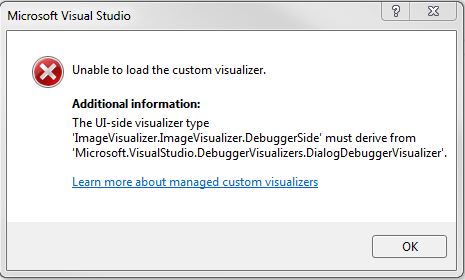 . .
It was working, and still does work in VS2013.
I've tried rebuilding the visualizer in VS2017, but to no avail. This is the code, which as you can see inherits from DialogDebuggerVisualizer.
vb.net Code:
Imports Microsoft.VisualStudio.DebuggerVisualizers ' < -- import the namespace
Imports System.Windows.Forms
Imports System.Drawing
 <Assembly: System.Diagnostics.DebuggerVisualizer(GetType(ImageVisualizer.DebuggerSide), GetType(VisualizerObjectSource), Target:=GetType(System.Drawing.Image), Description:="Image Visualizer")>
Namespace ImageVisualizer
    Public Class DebuggerSide
        Inherits DialogDebuggerVisualizer ' < - inherit the Visualizer
        Protected Overrides Sub Show(windowService As IDialogVisualizerService, objectProvider As IVisualizerObjectProvider)
            Dim image As Image = DirectCast(objectProvider.GetObject(), Image)
            Dim form As New Form With {.Text = image.Size.ToString, .AutoSize = True}
            Dim pictureBox As New PictureBox With {.BackgroundImage = image, .Parent = form, .BackgroundImageLayout = ImageLayout.Zoom, .Dock = DockStyle.Fill}
             Try
                windowService.ShowDialog(form)
            Catch ex As Exception
                MessageBox.Show(String.Format("{0}{1}{1}{2}", ex.Message, Environment.NewLine, ex.ToString))
            End Try
         End Sub
    End Class
End Namespace
Not sure whats going on here.Has anyone seen this with their visualizers, or is there something special I need to do for VS2017
Process control doesn't give you good quality, it gives you consistent quality.
Good quality comes from consistently doing the right things.
Vague general questions have vague general answers. A $100 donation is required for me to help you if you PM me asking for help. Instructions for donating to one of our local charities will be provided.
______________________________ Last edited by kebo : Now. Reason: superfluous typo's
 Posting Permissions
- You may not post new threads
- You may not post replies
- You may not post attachments
- You may not edit your posts
-
Forum Rules
|
Click Here to Expand Forum to Full Width
|



 Reply With Quote