|

-
Sep 21st, 2017, 03:06 AM
#1
Thread Starter
Fanatic Member


 Psd :: read layers :: save as png :: show like as layerd window Psd :: read layers :: save as png :: show like as layerd window
hi i completed my psd project in vb6 like this picture:
full size image link : https://cdn.pbrd.co/images/GLmxSDw.gif
but i hv optimize my code to better way like these :
i need a simple code to use (draw a simple line or pixel on hdc with gdi+ and then save as transparent png format) - i want just use module or class i dont want use activex
i am using draw pixel on hdc with SetPixelA like
Code:
SetPixelA theHdc, X + FLeft, Y + FTop, r, g, b, a but
i did try for save as png but saved with black background from hdc.
now i want a sample code or module for draw on hdc and save as transparent png (i dont need any gdi full sources or like this i need just simple code)
-
Sep 21st, 2017, 04:37 PM
#2
Re: Psd :: read layers :: save as png :: show like as layerd window
Thread moved from CodeBank, which is for finished snippets.
My usual boring signature: Nothing
 
-
Sep 21st, 2017, 05:08 PM
#3
Re: Psd :: read layers :: save as png :: show like as layerd window
Some clarification please...
Layered windows require a bitmap in premultiplied RGB format, correct? If so, you can't save that to a PNG format without converting it to non-premultiplied format. If I understand you correctly, you are asking to draw to a HDC to be used for layered windows in a format that shouldn't be saved as PNG without re-converting it to a non-premultiplied format.
 Originally Posted by Black_Storm

i am using draw pixel on hdc with SetPixelA like
Code:
SetPixelA theHdc, X + FLeft, Y + FTop, r, g, b, a but
Think we'll need to see your SetPixelA routine
Originally Posted by Black_Storm
... then save as transparent png format) - i want just use module or class i dont want use activex
If using SetPixelA routine to draw to a hDC, why do you need a PNG?
-
Sep 21st, 2017, 05:25 PM
#4
Re: Psd :: read layers :: save as png :: show like as layerd window
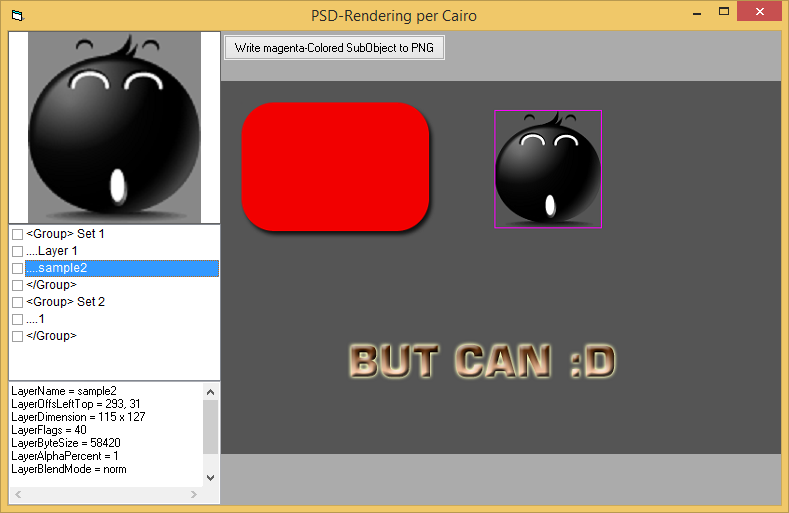
I've also made a little PSD-Parser/Viewer-App - but implemented it with Cairo-Drawing (vbRichClient5) instead of GDI+.
It is based on the Parser you've posted some time ago, but I've changed and optimized it quite a bit -
especially for the BlendModes of the PSD-format one can find many equivalent BlendModes in cairo
(not sure about the matches with GDI+ there)...
And yes, antialiased Lines, Gaussian-Blur-Shadows and what not can be expressed with cairo-drawing
even easier than with GDI+ (usually with one line of code, e.g. overlayed on top of one of the found SubImages in a given PSD).
In case you want to give it a try, here is the Demo-Zip for the little App:
PSDParsing.zip
Here a ScreenShot, what the Parser/Viewer currently looks like (still quite some stuff to do,
but it recognizes/renders quite a lot of PSD-SubObjects correctly - and has a stable code-base to built upon).
HTH
Olaf
-
Sep 21st, 2017, 11:37 PM
#5
Thread Starter
Fanatic Member
Re: Psd :: read layers :: save as png :: show like as layerd window
i checked your sent attachment.
Last edited by Black_Storm; Sep 21st, 2017 at 11:52 PM.
-
Sep 21st, 2017, 11:37 PM
#6
Thread Starter
Fanatic Member
Re: Psd :: read layers :: save as png :: show like as layerd window
Originally Posted by Schmidt
I've also made a little PSD-Parser/Viewer-App - but implemented it with Cairo-Drawing (vbRichClient5) instead of GDI+.
It is based on the Parser you've posted some time ago, but I've changed and optimized it quite a bit -
especially for the BlendModes of the PSD-format one can find many equivalent BlendModes in cairo
(not sure about the matches with GDI+ there)...
And yes, antialiased Lines, Gaussian-Blur-Shadows and what not can be expressed with cairo-drawing
even easier than with GDI+ (usually with one line of code, e.g. overlayed on top of one of the found SubImages in a given PSD).
In case you want to give it a try, here is the Demo-Zip for the little App:
PSDParsing.zip
Here a ScreenShot, what the Parser/Viewer currently looks like (still quite some stuff to do,
but it recognizes/renders quite a lot of PSD-SubObjects correctly - and has a stable code-base to built upon).

HTH
Olaf
hi,i seen ur source and ur srouce code was been like me (i used cairo in my source code too but i wanted dont use cairo so i writed without activex in my question).
-
Sep 21st, 2017, 11:46 PM
#7
Thread Starter
Fanatic Member
Re: Psd :: read layers :: save as png :: show like as layerd window
Originally Posted by LaVolpe
Some clarification please...
Layered windows require a bitmap in premultiplied RGB format, correct? If so, you can't save that to a PNG format without converting it to non-premultiplied format. If I understand you correctly, you are asking to draw to a HDC to be used for layered windows in a format that shouldn't be saved as PNG without re-converting it to a non-premultiplied format.
Think we'll need to see your SetPixelA routine
If using SetPixelA routine to draw to a hDC, why do you need a PNG?
my SetPixelA is simple
' created a dc with createcompatibledc and puted in theHdc with basical functions for make ready
Code:
for a=0 to 100
for b=0 to 100
SetPixelA theHdc, a, b, redcolor, greencolor, bluecolor, alpha
next b
next a
If using SetPixelA routine to draw to a hDC, why do you need a PNG?
because i need learn how draw on hdc (created with createcompatibledc) pixel per pixel and then when my drawing on dc finished save as png file (keep transparent)
can send a simple code for draw on hdc(created with api) and then save as png?
i dont want use cairo and surface and .... with cairo i want just use simple modules or class or .... without other refrecnes(dll) or (tlb)
Last edited by Black_Storm; Sep 21st, 2017 at 11:54 PM.
-
Sep 23rd, 2017, 10:36 AM
#8
Re: Psd :: read layers :: save as png :: show like as layerd window
SetPixelA is not an API function that I am aware of. I believe it is a custom function, that is the code I'm asking to look at. Maybe SetPixelA is a Cairo function? If so, and you don't want to use Olaf's library, you'll need to create your own per-pixel rendering routine. Below can help.
Saving a properly formatted 32bpp (transparency) bitmap to PNG is very easy with GDI+. There should be plenty of examples on this forum.
For your information. 32bpp bitmaps can be formatted two ways:
In the examples below. We will say that the color gray has the RGB component values of 80, 80, 80
1) Standard. PNG specifications expect this format.
This means each RGB value is saved in its true color. For example, gray is saved as 80, 80, 80 and the alpha byte is saved as is.
2) Premultiplied. This means each RGB component value is saved in relation to the alpha byte's value. The alpha byte is saved as is. Layered window APIs, AlphaBlend, and some other APIs expect this format when applicable.
PreMultipliedRed = RedComponentValue * (AlphaValue / 255)
PreMultipliedGreen = GreenComponentValue * (AlphaValue / 255)
PreMultipliedBlue= BlueComponentValue * (AlphaValue / 255)
Using the above formula...
If the alpha byte is 255 (full opacity), then gray is saved same as #1 above
80 * (255 / 255) = 80. No change for full opacity If the alpha byte is 0 (full transparency), then gray is saved as 0, 0, 0
80 * (0 / 255) = 0 If the alpha byte is 128 (50% opaque/transparent), then the gray is saved as 40, 40, 40
80 * (128 / 255) = 40.15689 and rounding for a byte value, becomes 40
Here's the MSDN documentation on manually blending pixels to be used with the AlphaBlend (and layered windows) APIs
-
Sep 24th, 2017, 01:27 AM
#9
Thread Starter
Fanatic Member
Re: Psd :: read layers :: save as png :: show like as layerd window
my optimized code :


this is my rutine :
Code:
Declare Function SetPixel Lib "gdi32" (ByVal hDC As Long, ByVal X As Long, ByVal Y As Long, ByVal crColor As Long) As Long
Declare Function GetPixel Lib "gdi32" (ByVal hDC As Long, ByVal X As Long, ByVal Y As Long) As Long


Sub SetPixelA(dc As Long, x1 As Long, y1 As Long, r1 As Integer, g1 As Integer, b1 As Integer, a1 As Integer)
    Dim col2 As Long, r As Integer, g As Integer, b As Integer, diff As Integer
    col2 = GetPixel(dc, x1, y1)
    b = (col2 \ 65536) And &HFF
    g = (col2 \ 256) And &HFF
    r = col2 And &HFF
    diff = CLng(b1 - b) * a1 / 256
    b = b + diff
    diff = CLng(g1 - g) * a1 / 256
    g = g + diff
    diff = CLng(r1 - r) * a1 / 256
    r = r + diff
    SetPixel dc, x1, y1, RGB(r, g, b)
End Sub


and drawing rutin :

For Y = 0 To height - 1
	For X = 0 To width - 1
		r = redcolortaked
		g = greencolortaked
		b = bluecolortaked
		a = alphataked
		SetPixelA theHdc, X + FLeft, Y + FTop, r, g, b, a
	Next X
Next Y
i dont want use cairo i want just use class or module
can send a simple project like this :
1-create dc with api
2- then draw line or any darwing method on that dc crated.
3- save as png (with transparent background)
i can draw and save on dc with cairo in 5 lines code but i dont want use cairo.
i hv more than 100 source code worked with gdi+ to created png or draw or ... but i want hv a simple code just i wanted and just need draw on dc and save as png(transparent background) only and dont need more.
Last edited by Black_Storm; Sep 24th, 2017 at 02:37 AM.
-
Sep 24th, 2017, 09:58 AM
#10
Re: Psd :: read layers :: save as png :: show like as layerd window
Here is a stripped down class with basic GDI+ methods. Name this class: cGDIplusBase
The class should not be created more than once in the project. If gonna be referenced by multiple forms, declare it in a module as public. Reason is that each class creation creates another GDI+ token. Only need one token for the entire project.
Code:
Option Explicit

Private Declare Function LoadLibrary Lib "kernel32.dll" Alias "LoadLibraryA" (ByVal lpLibFileName As String) As Long
Private Declare Function FreeLibrary Lib "kernel32.dll" (ByVal hLibModule As Long) As Long
Private Declare Function GetProcAddress Lib "kernel32.dll" (ByVal hModule As Long, ByVal lpProcName As String) As Long
Private Declare Sub CopyMemory Lib "kernel32.dll" Alias "RtlMoveMemory" (ByRef Destination As Any, ByRef Source As Any, ByVal length As Long)
Private Declare Function lstrlenW Lib "kernel32.dll" (ByVal psString As Any) As Long
Private Declare Function GetSysColor Lib "user32.dll" (ByVal nIndex As Long) As Long

Private Declare Sub GdiplusShutdown Lib "gdiplus" (ByVal Token As Long)
Private Declare Function GdiplusStartup Lib "gdiplus" (Token As Long, inputbuf As Any, Optional ByVal outputbuf As Long = 0) As Long
Private Declare Function GdipLoadImageFromFile Lib "GdiPlus.dll" (ByVal mFilename As Long, ByRef mImage As Long) As Long
Private Declare Function GdipDisposeImage Lib "GdiPlus.dll" (ByVal mImage As Long) As Long
Private Declare Function GdipBitmapLockBits Lib "gdiplus" (ByVal gdipBitmap As Long, gdipRect As RECTL, ByVal gdipFlags As Long, ByVal iPixelFormat As Long, lockedBitmapData As BitmapData) As Long
Private Declare Function GdipBitmapUnlockBits Lib "gdiplus" (ByVal gdipBitmap As Long, lockedBitmapData As BitmapData) As Long
Private Declare Function GdipCreateBitmapFromScan0 Lib "GdiPlus.dll" (ByVal Width As Long, ByVal Height As Long, ByVal stride As Long, ByVal PixelFormat As Long, scan0 As Any, BITMAP As Long) As Long
Private Declare Function GdipDeleteGraphics Lib "GdiPlus.dll" (ByVal mGraphics As Long) As Long
Private Declare Function GdipCreateFromHDC Lib "GdiPlus.dll" (ByVal hDC As Long, hGraphics As Long) As Long
Private Declare Function GdipGetImageGraphicsContext Lib "GdiPlus.dll" (ByVal pImage As Long, ByRef graphics As Long) As Long
Private Declare Function GdipGetImageEncodersSize Lib "GdiPlus.dll" (numEncoders As Long, Size As Long) As Long
Private Declare Function GdipGetImageEncoders Lib "GdiPlus.dll" (ByVal numEncoders As Long, ByVal Size As Long, Encoders As Any) As Long
Private Declare Function GdipSaveImageToStream Lib "GdiPlus.dll" (ByVal Image As Long, ByVal Stream As IUnknown, clsidEncoder As Any, encoderParams As Any) As Long

Private Declare Function GlobalAlloc Lib "kernel32.dll" (ByVal uFlags As Long, ByVal dwBytes As Long) As Long
Private Declare Function GlobalLock Lib "kernel32" (ByVal hMem As Long) As Long
Private Declare Function GlobalUnlock Lib "kernel32.dll" (ByVal hMem As Long) As Long
Private Declare Function GlobalFree Lib "kernel32.dll" (ByVal hMem As Long) As Long
Private Declare Function CreateStreamOnHGlobal Lib "ole32.dll" (ByVal hGlobal As Long, ByVal fDeleteOnRelease As Long, ppstm As Any) As Long
Private Declare Function GetHGlobalFromStream Lib "ole32.dll" (ByVal ppstm As Long, hGlobal As Long) As Long
Private Declare Function GlobalSize Lib "kernel32.dll" (ByVal hMem As Long) As Long

Private Type GdiplusStartupInput
    GdiplusVersion           As Long
    DebugEventCallback       As Long
    SuppressBackgroundThread As Long
    SuppressExternalCodecs   As Long
End Type
Private Type RECTF                   ' GDI+ rectangle w/Single vartypes
    nLeft As Single
    nTop As Single
    nWidth As Single
    nHeight As Single
End Type
Private Type RECTL                   ' GDI+ rectangle w/Long vartypes
    nLeft As Long
    nTop As Long
    nWidth As Long
    nHeight As Long
End Type
Private Enum LockModeConstants
    ImageLockModeRead = &H1
    ImageLockModeWrite = &H2
    ImageLockModeUserInputBuf = &H4
End Enum
Private Type BitmapData              ' GDI+ lock/unlock bits structure
    Width As Long
    Height As Long
    stride As Long
    PixelFormat As Long
    Scan0Ptr As Long
    ReservedPtr As Long
End Type
Private Type EncoderParameter       ' GDI+ image format encoding structure
    GUID(0 To 3)   As Long
    NumberOfValues As Long
    Type           As Long
    Value          As Long
End Type
'-- Encoder Parameters structure
Private Type EncoderParameters
    Count     As Long
    Parameter(0 To 5) As EncoderParameter
End Type
Private Type ImageCodecInfo         ' GDI+ codec structure
    ClassID(0 To 3)   As Long
    FormatID(0 To 3)  As Long
    CodecName         As Long
    DllName           As Long
    FormatDescription As Long
    FilenameExtension As Long
    MimeType          As Long
    Flags             As Long
    Version           As Long
    SigCount          As Long
    SigSize           As Long
    SigPattern        As Long
    SigMask           As Long
End Type

Public Enum GDIpColorConstants
    Color1bpp = &H30101      'Specifies that the format is 1 bit per pixel, indexed.
    Color4bpp = &H30402      'Specifies that the format is 4 bits per pixel, indexed.
    Color8bpp = &H30803      'Specifies that the format is 8 bits per pixel, indexed.
    Color16bppGrayscale = &H101004 'Specifies that the format is 16 bits per pixel, grayscale.
    Color16bpp555 = &H21005  'Specifies that the format is 16 bits per pixel; 5 bits each are used for the red, green, and blue components. The remaining bit is not used.
    Color16bpp565 = &H21006  'Specifies that the format is 16 bits per pixel; 5 bits are used for the red component, 6 bits are used for the green component, and 5 bits are used for the blue component.
    Color16bpp555Alpha = &H61007  'Specifies that the format is 16 bits per pixel; 1 bit is used for the alpha component, and 5 bits each are used for the red, green, and blue components.
    Color24bpp = &H21808     'Specifies that the format is 24 bits per pixel; 8 bits each are used for the red, green, and blue components.
    Color32bpp = &H22009     'Specifies that the format is 32 bits per pixel; 8 bits each are used for the red, green, and blue components. The remaining 8 bits are not used.
    Color32bppAlpha = &H26200A 'Specifies that the format is 32 bits per pixel; 8 bits each are used for the alpha, red, green, and blue components.
    Color32bppAlphaMultiplied = &HE200B     'Specifies that the format is 32 bits per pixel; 8 bits each are used for the alpha, red, green, and blue components. The red, green, and blue components are premultiplied according to the alpha component.
    Color48bpp = &H10300C    'Specifies that the format is 48 bits per pixel; 16 bits each are used for the red, green, and blue components.
    Color64bppAlpha = &H34400D 'Specifies that the format is 64 bits per pixel; 16 bits each are used for the alpha, red, green, and blue components.
    Color64bppAlphaMultiplied = &H1C400E 'Specifies that the format is 64 bits per pixel; 16 bits each are used for the alpha, red, green, and blue components. The red, green, and blue components are premultiplied according to the alpha component.
End Enum

Private m_Token As Long
Private m_Version As Single

Private Sub Class_Initialize()
    Dim GSI As GdiplusStartupInput
    Dim pa As Long, hMod As Long

    On Error Resume Next
    GSI.GdiplusVersion = 1&
    Call GdiplusStartup(m_Token, GSI)
    If m_Token Then                                         ' is v1.1 GDI+?
        hMod = LoadLibrary("gdiplus.dll")                   ' test it
        If hMod Then
            pa = GetProcAddress(hMod, "GdipDrawImageFX")    ' if it has this function, then at least GDI+ v1.1
            If pa Then m_Version = 1.1!
            FreeLibrary hMod
        End If
        If m_Version = 0! Then m_Version = 1!
    Else
        m_Token = -1&                                       ' prevent calling this time & time again if failure
    End If
End Sub

Private Sub Class_Terminate()
    If Not (m_Token = 0 Or m_Token = -1) Then GdiplusShutdown m_Token
    m_Token = 0&
End Sub

Private Function pvStreamFromArray(ArrayPtr As Long, ArraySize As Long) As IUnknown

    On Error GoTo HandleError
    Dim o_hMem As Long
    Dim o_lpMem  As Long

    If ArrayPtr = 0& Then
        CreateStreamOnHGlobal 0&, 1&, pvStreamFromArray
    ElseIf ArraySize <> 0& Then
        o_hMem = GlobalAlloc(&H2&, ArraySize)
        If o_hMem <> 0 Then
            o_lpMem = GlobalLock(o_hMem)
            If o_lpMem <> 0 Then
                CopyMemory ByVal o_lpMem, ByVal ArrayPtr, ArraySize
                Call GlobalUnlock(o_hMem)
                Call CreateStreamOnHGlobal(o_hMem, 1&, pvStreamFromArray)
            End If
        End If
    End If

HandleError:
End Function

Private Function pvStreamToArray(hStream As IUnknown, arrayBytes() As Byte) As Boolean

    ' Return array of bytes contained in an IUnknown interface (stream)

    Dim o_hMem As Long, o_lpMem As Long
    Dim o_lngByteCount As Long

    If Not hStream Is Nothing Then
        If GetHGlobalFromStream(ByVal ObjPtr(hStream), o_hMem) = 0 Then
            o_lngByteCount = GlobalSize(o_hMem)
            If o_lngByteCount > 0 Then
                o_lpMem = GlobalLock(o_hMem)
                If o_lpMem <> 0 Then
                    ReDim arrayBytes(0 To o_lngByteCount - 1)
                    CopyMemory arrayBytes(0), ByVal o_lpMem, o_lngByteCount
                    GlobalUnlock o_hMem
                    pvStreamToArray = True
                End If
            End If
        End If
    End If

End Function

Private Function pvGetEncoderClsID(strMimeType As String, ClassID() As Long) As Long

 ' Routine is a helper function for the various SaveAsxxxx routines

  Dim lCount   As Long
  Dim lSize    As Long
  Dim lIdx     As Long
  Dim ICI()    As ImageCodecInfo
  Dim buffer() As Byte, sMime As String

    '-- Get the encoder array size
    Call GdipGetImageEncodersSize(lCount, lSize)
    If (lSize = 0& Or lCount = 0&) Then Exit Function ' Failed!

    '-- Allocate room for the arrays dynamically
    ReDim ICI(1 To lCount) As ImageCodecInfo
    ReDim buffer(1 To lSize) As Byte

    '-- Get the array and string data
    Call GdipGetImageEncoders(lCount, lSize, buffer(1))
    '-- Copy the class headers
    Call CopyMemory(ICI(1), buffer(1), (Len(ICI(1)) * lCount))

    lSize = Len(strMimeType)
    sMime = String$(lSize, vbNullChar)
    '-- Loop through all the codecs
    For lIdx = lCount To 1& Step -1&
        '-- Must convert the pointer into a usable string
        With ICI(lIdx)
            If lSize = lstrlenW(ByVal .MimeType) Then
                Call CopyMemory(ByVal StrPtr(sMime), ByVal .MimeType, lSize * 2&)
                If StrComp(sMime, strMimeType, vbTextCompare) = 0 Then
                    CopyMemory ClassID(0), .ClassID(0), 16&
                    Exit For
                End If
            End If
        End With
    Next lIdx
    pvGetEncoderClsID = lIdx
End Function

Public Function Color_RGBtoARGB(ByVal RGBColor As Long, ByVal Opacity As Long) As Long

    ' GDI+ color conversion routines. Most GDI+ functions require ARGB format vs standard RGB format
    ' This routine will return the passed RGBcolor to RGBA format

    If (RGBColor And &H80000000) Then RGBColor = GetSysColor(RGBColor And &HFF&)
    Color_RGBtoARGB = (RGBColor And &HFF00&) Or (RGBColor And &HFF0000) \ &H10000 Or (RGBColor And &HFF) * &H10000
    If Opacity < 128 Then
        If Opacity < 0& Then Opacity = 0&
        Color_RGBtoARGB = Color_RGBtoARGB Or Opacity * &H1000000
    Else
        If Opacity > 255& Then Opacity = 255&
        Color_RGBtoARGB = Color_RGBtoARGB Or (Opacity - 128&) * &H1000000 Or &H80000000
    End If

End Function

Public Function Color_ARGBtoRGB(ByVal ARGBcolor As Long, Optional ByRef Opacity As Long) As Long

    ' This routine is the opposite of Color_RGBtoARGB
    ' Returned color is always RGB format, Opacity parameter will contain RGBAcolor opacity (0-255)

   If (ARGBcolor And &H80000000) Then
        Opacity = (ARGBcolor And Not &H80000000) \ &H1000000 Or &H80
    Else
        Opacity = (ARGBcolor \ &H1000000)
    End If
    Color_ARGBtoRGB = (ARGBcolor And &HFF00&) Or (ARGBcolor And &HFF0000) \ &H10000 Or (ARGBcolor And &HFF) * &H10000

End Function

Public Sub DisposeImage(hGDIpImage As Long)
    GdipDisposeImage hGDIpImage
End Sub

Public Sub DisposeGraphics(hGDIpGraphics As Long)
    GdipDeleteGraphics hGDIpGraphics
End Sub

Public Function CreateGraphicsFromHIMAGE(hGDIpImage As Long) As Long
    GdipGetImageGraphicsContext hGDIpImage, CreateGraphicsFromHIMAGE
End Function

Public Function CreateGraphicsFromHDC(hDC As Long) As Long
    GdipCreateFromHDC hDC, CreateGraphicsFromHDC
End Function

Public Function CreateImageFromScan0(BitsPointer As Long, BitsScanWidth As Long, _
                                        Width As Long, Height As Long, _
                                        ColorType As GDIpColorConstants) As Long

    ' returns GDI+ hImage form an array, dib pointer, etc
    ' only supports 16, 24 & 32 bpp as written here. don't pass anything else

    Dim dstBoundsI As RECTL
    Dim tBMPsrc As BitmapData
    Dim hImage As Long

    With tBMPsrc
        .Height = Height
        .Width = Width
        .Scan0Ptr = BitsPointer
        .stride = BitsScanWidth
        .PixelFormat = ColorType
    End With
    dstBoundsI.nHeight = Height: dstBoundsI.nWidth = Width
    GdipCreateBitmapFromScan0 dstBoundsI.nWidth, dstBoundsI.nHeight, 0&, tBMPsrc.PixelFormat, ByVal 0&, hImage
    If hImage = 0& Then Exit Function

    If BitsPointer Then
        If GdipBitmapLockBits(hImage, dstBoundsI, ImageLockModeWrite Or ImageLockModeUserInputBuf, tBMPsrc.PixelFormat, tBMPsrc) Then
            GdipDisposeImage hImage: hImage = 0
        Else
            GdipBitmapUnlockBits hImage, tBMPsrc
        End If
    End If
    CreateImageFromScan0 = hImage

End Function

Public Function SaveAsPNG(hGDIpImage As Long, arrBytes() As Byte) As Boolean

    Dim uEncCLSID(0 To 3) As Long
    Dim IIStream As IUnknown
    Const MimeType As String = "image/png"

    If pvGetEncoderClsID(MimeType, uEncCLSID) <> -1& Then
        Set IIStream = pvStreamFromArray(0&, 0&)
        If Not IIStream Is Nothing Then
            If GdipSaveImageToStream(hGDIpImage, IIStream, uEncCLSID(0), ByVal 0&) = 0& Then
                SaveAsPNG = pvStreamToArray(IIStream, arrBytes)
            End If
            Set IIStream = Nothing
        End If
    End If

End Function

Public Property Get Version() As Single
    Version = m_Version
End Property
Public Property Get Token() As Long
    Token = m_Token
End Property
Here is a simple routine that draws a diagonal red line from top left to bottom right and saves as a PNG. Edit the file's path near last line of code.
Code:
Private Declare Function GdipDrawLine Lib "GdiPlus.dll" (ByVal graphics As Long, ByVal pen As Long, ByVal x1 As Single, ByVal y1 As Single, ByVal x2 As Single, ByVal y2 As Single) As Long
Private Declare Function GdipCreatePen1 Lib "GdiPlus.dll" (ByVal pColor As Long, ByVal nWidth As Single, ByVal unit As Long, ByRef pen As Long) As Long
Private Declare Function GdipDeletePen Lib "GdiPlus.dll" (ByVal pen As Long) As Long

Private m_GDIplus As cGDIplusBase

Private Sub Command1_Click()

    Debug.Assert m_GDIplus.Token ' GDI+ failed to start up if code breaks here

    Dim hImage As Long
    hImage = m_GDIplus.CreateImageFromScan0(0, 0, 256, 256, Color32bppAlpha)

    Dim hPen As Long, hGraphics As Long, tData() As Byte
    Const UnitPixels As Long = 2

    hGraphics = m_GDIplus.CreateGraphicsFromHIMAGE(hImage)
    GdipCreatePen1 m_GDIplus.Color_RGBtoARGB(vbRed, 255), 2, UnitPixels, hPen
    GdipDrawLine hGraphics, hPen, 0, 0, 255, 255
    GdipDeletePen hPen
    m_GDIplus.DisposeGraphics hGraphics

    m_GDIplus.SaveAsPNG hImage, tData()
    Open "[add your own path]\test.png" For Binary As #1
    Put #1, 1, tData()
    Close #1

    m_GDIplus.DisposeImage hImage
End Sub

Private Sub Form_Load()
    Set m_GDIplus = New cGDIplusBase
End Sub
Some notes regarding drawing on transparent backgrounds. Don't expect to draw on VB controls' hDC and maintain transparency. If you want to create your own DC and bitmap, then do that via APIs. Use CreateCompatibleDC and CreateDibSection APIs. The bitmap must be 32bpp to support transparency. Nearly all GDI (not GDI+) APIs don't support transparency when drawing.
The code above creates a GDI+ image, fully transparent. Then it creates a pen and draws a diagonal line. You'll want to play with other GDI+ methods too like GdipSetInterpolationMode & GdipSetSmoothingMode
Edited: Here is a good link describing GDI+ methods
And if you want to continue using SetPixel-like methods, here is the GDI+ version: GdipBitmapSetPixel. You cannot use SetPixel API since it does not set the alpha byte.
Last edited by LaVolpe; Sep 24th, 2017 at 11:53 AM.
-
Sep 24th, 2017, 11:26 AM
#11
Re: Psd :: read layers :: save as png :: show like as layerd window
Black
This is a little OT (sorry), but I noticed that your second "image" is a GIF file.
Could you explain to a newbie like me how you did that?
Spoo
-
Sep 26th, 2017, 05:46 PM
#12
Thread Starter
Fanatic Member
Re: Psd :: read layers :: save as png :: show like as layerd window
Originally Posted by Spooman
Black
This is a little OT (sorry), but I noticed that your second "image" is a GIF file.
Could you explain to a newbie like me how you did that?
Spoo
hi my language is not english so i can not not write words good but u can download attached source and process source codes,whats ur problem with source?
-
Sep 26th, 2017, 09:28 PM
#13
Addicted Member
Re: Psd :: read layers :: save as png :: show like as layerd window
Hi Black_Storm,
I don't want to hijack your thread but I remember in past you asked for a way to make Animated PNG with Alpha Blending directly on Desktop.
at that time I failed to find the solution and I wasn't even sure it was possible. All I remember, it was related to this psd project.
Lavolpe made an excellent example on how to do it with a "firefox" Alpha Png rotating
unfortunately, I cannot find back the post where I got the source. Maybe Lavolpe can provide the url of where I got it.
if not, I can provide the modified version I got at hand.
-
Sep 26th, 2017, 09:50 PM
#14
Re: Psd :: read layers :: save as png :: show like as layerd window
@Spooman - I'm not sure what application Black_Storm used to generate his animated GIF, but I've used the open-source LICEcap application with good results:
https://www.cockos.com/licecap/
The full application source is also provided at that link, if you'd like to see how it works.
-
Sep 26th, 2017, 10:49 PM
#15
Addicted Member
Re: Psd :: read layers :: save as png :: show like as layerd window
Originally Posted by Tanner_H
@Spooman - I'm not sure what application Black_Storm used to generate his animated GIF, but I've used the open-source LICEcap application with good results:
https://www.cockos.com/licecap/
The full application source is also provided at that link, if you'd like to see how it works.
Thanks, I was looking for this kind of tools.
Wonder if that is what Black_Storm used.
-
Sep 27th, 2017, 03:39 AM
#16
Re: Psd :: read layers :: save as png :: show like as layerd window
Originally Posted by Tanner_H
@Spooman - I'm not sure what application Black_Storm used to generate his animated GIF, but I've used the open-source LICEcap application with good results:
https://www.cockos.com/licecap/
The full application source is also provided at that link, if you'd like to see how it works.
Indeed .. thanks for the link
Spoo
-
Sep 27th, 2017, 01:32 PM
#17
Thread Starter
Fanatic Member
Re: Psd :: read layers :: save as png :: show like as layerd window
i always use camtasia for record screens (i used camtasia v9 for capture screens and published as gif).
in old times i used "Screen GIF" too but i like camtasia.
here u can download cracked
but u should be read structure for cracks too.
and anybody here can answer to my thread at (#607).

With AIC
Last edited by Shaggy Hiker; Sep 27th, 2017 at 02:58 PM.
Reason: Removed link.
-
Sep 27th, 2017, 02:59 PM
#18
Re: Psd :: read layers :: save as png :: show like as layerd window
Originally Posted by Black_Storm
i always use camtasia for record screens (i used camtasia v9 for capture screens and published as gif).
in old times i used "Screen GIF" too but i like camtasia.
here u can download cracked
but u should be read structure for cracks too.
We don't condone the cracking of software or the use of software. Don't suggest such a thing again.
My usual boring signature: Nothing
-
Sep 28th, 2017, 04:06 AM
#19
Thread Starter
Fanatic Member
Re: Psd :: read layers :: save as png :: show like as layerd window
any body here can answet to this thread (#607)?
and i hv another questoin about hdc and use in imgex class or stdPicEx.
when i did draw on hdc with use by (#10) how can load hdc on imgex or stdpicex class after save as png?
my means is exactly use (#10) sample code and just show to image by stdpicex or imgex (dont need save as png so,just show)
Last edited by Black_Storm; Sep 28th, 2017 at 04:10 AM.
-
Sep 28th, 2017, 05:04 AM
#20
Thread Starter
Fanatic Member
Re: Psd :: read layers :: save as png :: show like as layerd window
Originally Posted by Black_Storm
any body here can answet to this thread ( #607)?
and i hv another questoin about hdc and use in imgex class or stdPicEx.
when i did draw on hdc with use by ( #10) how can load hdc on imgex or stdpicex class after save as png?
my means is exactly use ( #10) sample code and just show to image by stdpicex or imgex (dont need save as png so,just show)
i fixed my problem like this :
Code:
    Dim hImage As Long
    hImage = m_GDIplus.CreateImageFromScan0(0, 0, 256, 256, Color32bppAlpha)

    Dim hPen As Long, hGraphics As Long, tData() As Byte
    Const UnitPixels As Long = 2

    hGraphics = m_GDIplus.CreateGraphicsFromHIMAGE(hImage)

    GdipCreatePen1 m_GDIplus.Color_RGBtoARGB(vbRed, 255), 2, UnitPixels, hPen
    GdipDrawLine hGraphics, hPen, 0, 0, 255, 255
    GdipDeletePen hPen
    m_GDIplus.DisposeGraphics hGraphics

    m_GDIplus.SaveAsPNG hImage, tData()
    Set p.Picture = StdPictureEx.LoadPicture(tData(), , , , , , vbPicTypeBitmap)
     m_GDIplus.DisposeImage hImage
but thread #607 is not solved yet
-
Sep 28th, 2017, 10:23 AM
#21
Addicted Member
Re: Psd :: read layers :: save as png :: show like as layerd window
Originally Posted by Black_Storm
thread #607 is not solved yet
The reason why I didn't try to answer post #607 is because I don't understand it.
could you include picture of state you want to go FROM and TO
and what you meant by Fade In ? (what kind of fadeIn)
The main problem I encountered with AIC for small game like you're doing is the fact we don't have access to the DC itself.
as for myself, I'm using AIC for the background and for active element (animated PNG)
but for the sprite itself, I'm using several regular picturebox (hidden)
1. I first, I copy the background into one of theses hiden picture box
2. then I bitblt my sprite with mask (so I can use transparent background)
3. I repeat for each move.
That way I got access directly to the DC and I "could" use a FadeIn FadeOut technique using GetPixel/SetPixel
there is probably better method, this one worked for me.
as for Camstasia, I looked at it... at 300$ I'll pass... but thanks, seem a good software.
looking for it though, I found an alternative for about 50$
movavi.com worth trying, they offer "demo"
Tags for this Thread
 Posting Permissions
- You may not post new threads
- You may not post replies
- You may not post attachments
- You may not edit your posts
-
Forum Rules
|
Click Here to Expand Forum to Full Width
|



 Reply With Quote


