|

-
Sep 12th, 2017, 04:04 AM
#1
Thread Starter
Lively Member

 Find Next in a Search Find Next in a Search
Hey everyone,
I'm using this nice bit of code from "http://www.authorcode.com/search-text-in-your-excel-file-or-sheet-in-vb-net/"
It creates a search using a specified word
Code:
Private Sub SearchText()
        Dim oXL As Excel.Application
        Dim oWB As Excel.Workbook
        Dim oSheet As Excel.Worksheet
        Try
            Dim File_name As String = "C:\test.xls"
            oXL = CreateObject("Excel.Application")
            oWB = oXL.Workbooks.Open(File_name)
            oSheet = oWB.Worksheets(1)

            Dim oRng As Excel.Range = GetSpecifiedRange("get", oSheet)
            If oRng IsNot Nothing Then
                MessageBox.Show("Text found, position is Row-" & oRng.Row & " and column-" & oRng.Column)
            Else
                MessageBox.Show("Text is not found")
            End If
            oWB.Close()

            oSheet = Nothing
            oWB = Nothing
            oXL.Quit()

        Catch ex As Exception
            If oSheet IsNot Nothing Then
                oSheet = Nothing
            End If
            If oWB IsNot Nothing Then
                oWB = Nothing
            End If
            If oXL IsNot Nothing Then
                oXL.Quit()
            End If
        End Try
    End Sub
Which uses this function:
Code:
  Private Function GetSpecifiedRange(ByVal matchStr As String, ByVal objWs As Excel.Worksheet) As Excel.Range
        Dim currentFind As Excel.Range = Nothing
        Dim firstFind As Excel.Range = Nothing
        currentFind = objWs.Range("A1:AM100").Find(matchStr, , _
Excel.XlFindLookIn.xlValues, Excel.XlLookAt.xlPart, _
Excel.XlSearchOrder.xlByRows, Excel.XlSearchDirection.xlNext, False)
        Return currentFind
    End Function
It all works rather well, but the webpage mentions the use of being able to "find next" and "find previous".
I've been trying for a while and can't figure out how to do it. Any Help?
Thanks
VS 2017 - Need as much help as you can give (write it all for me!)
-
Sep 12th, 2017, 04:35 AM
#2
Re: Find Next in a Search
Hi,
I posted this the other day for somebody else, hope it helps
Code:
Private Sub Button7_Click(ByVal sender As System.Object, ByVal e As System.EventArgs) Handles Button7.Click

        Dim xlApp As New Application
        Dim xlWorkbook As Workbook
        Dim xlWorksheet As Worksheet
        xlWorkbook = xlApp.Workbooks.Open("C:\TestExcelToAccess.xls")
        xlWorksheet = CType(xlWorkbook.Worksheets("Sheet1"), Excel.Worksheet)

        'find the Last row:
        TextBox1.Text = xlWorkbook.Sheets(1).Cells(xlWorksheet.Rows.Count, 1).End(-4162).Row()

        'Test search A1:C Value from Textbox1
        Dim suchRng As Excel.Range = xlWorksheet.Range("A1:" & "C" & TextBox1.Text)
        Dim Row, Col As Long
        For Each rng As Excel.Range In suchRng
            If String.IsNullOrEmpty(rng.Value.ToString) Then Exit For
            If rng.Value.ToString = txtSearch.Text Then
                'add the Cell and the Text to Listbox
                ListBox1.Items.Add(rng.Address & " " & rng.Offset(Row, Col).Value)
            End If
        Next
        xlWorksheet = Nothing
        xlWorkbook = Nothing
        xlApp.Quit()
        xlApp = Nothing
    End Sub
regards
Chris
to hunt a species to extinction is not logical !
since 2010 the number of Tigers are rising again in 2016 - 3900 were counted. with Baby Callas it's 3901, my wife and I had 2-3 months the privilege of raising a Baby Tiger.
-
Sep 12th, 2017, 04:48 AM
#3
Thread Starter
Lively Member
Re: Find Next in a Search
Does that enable the user to see the next search result? I can't see if it does :/
Also, if it helps. My "next" and "previous" are on buttons so the user has to decide to want to see the next result.
Thanks again
VS 2017 - Need as much help as you can give (write it all for me!)
-
Sep 12th, 2017, 04:51 AM
#4
Re: Find Next in a Search
Hi,
it will return all found Cells(in Listbox) with the searchtext that was entered in txtSearch.
I did not use a Button "next" and "previous"
Edit:
what if the entered searchtext would result in 45 find's
do you really want the user to click 45 times "next" and "previous" ?
regards
Chris
to hunt a species to extinction is not logical !
since 2010 the number of Tigers are rising again in 2016 - 3900 were counted. with Baby Callas it's 3901, my wife and I had 2-3 months the privilege of raising a Baby Tiger.
-
Sep 12th, 2017, 04:53 AM
#5
Thread Starter
Lively Member
Re: Find Next in a Search
Ahh, I see.. interesting I'll give it a try.
VS 2017 - Need as much help as you can give (write it all for me!)
-
Sep 12th, 2017, 05:13 AM
#6
Thread Starter
Lively Member
Re: Find Next in a Search
Its for a stock list so that scenario is unlikely bit still very true.
Im getting System.NullReferenceException on both if statements.
Code:
Dim suchRng As Excel.Range = oSheet.Range("B1:B5500")
                Dim Row, Col As Long
                For Each rng As Excel.Range In suchRng
                    If String.IsNullOrEmpty(rng.Value.ToString) Then Exit For
                    If rng.Value.ToString = Form1.TextBox2.Text Then
                        'add the Cell and the Text to Listbox
                        ListBox1.Items.Add(rng.Address & " " & rng.Offset(Row, Col).Value)
                    End If
                Next
VS 2017 - Need as much help as you can give (write it all for me!)
-
Sep 12th, 2017, 05:25 AM
#7
Re: Find Next in a Search
Refer to post #8 in your other thread on this topic. The error is similar.
http://www.vbforums.com/showthread.p...rch-A-Workbook
Please remember next time...elections matter!
-
Sep 12th, 2017, 05:40 AM
#8
Thread Starter
Lively Member
Re: Find Next in a Search
So its the "value" being empty? What do I need to put in it 
VS 2017 - Need as much help as you can give (write it all for me!)
-
Sep 12th, 2017, 05:53 AM
#9
Re: Find Next in a Search
Hi,
well evan if a certain Product in Stock is empty it should be 0 and not Blank
well anyway try this change
Code:
 Dim suchRng As Excel.Range = xlWorksheet.Range("A1:" & "C" & TextBox1.Text)
        Dim Row, Col As Long
        Dim s As String
Edit: sorry this can go
       ' s = Nothing
        For Each rng As Excel.Range In suchRng
            If String.IsNullOrEmpty(rng.Value) Then
                rng.Value = Nothing
                ListBox1.Items.Add(rng.Address & "Empty " & rng.Offset(Row, Col).Value) 'add the Cell and state it's empty
            ElseIf rng.Value.ToString = txtSearch.Text Then
                'add the Cell and the Text to Listbox
                ListBox1.Items.Add(rng.Address & " " & rng.Offset(Row, Col).Value)
            End If
        Next
regards
Chris
Last edited by ChrisE; Sep 12th, 2017 at 06:19 AM.
to hunt a species to extinction is not logical !
since 2010 the number of Tigers are rising again in 2016 - 3900 were counted. with Baby Callas it's 3901, my wife and I had 2-3 months the privilege of raising a Baby Tiger.
-
Sep 12th, 2017, 06:39 AM
#10
Thread Starter
Lively Member
Re: Find Next in a Search
I don't think its searching properly... Might have to revert back to the "Find Next" option so I don't loose my sanity haha.
VS 2017 - Need as much help as you can give (write it all for me!)
-
Sep 12th, 2017, 06:53 AM
#11
Re: Find Next in a Search
Hi,
well I tried it
I changed a couple of Cells in Excel to Blank Cells
and it returned my Searchtext and also added the empty cells to the Listbox
regards
Chris
to hunt a species to extinction is not logical !
since 2010 the number of Tigers are rising again in 2016 - 3900 were counted. with Baby Callas it's 3901, my wife and I had 2-3 months the privilege of raising a Baby Tiger.
-
Sep 12th, 2017, 06:55 AM
#12
Thread Starter
Lively Member
Re: Find Next in a Search
mine returns every blank cell and ignores every cell with data in
VS 2017 - Need as much help as you can give (write it all for me!)
-
Sep 12th, 2017, 07:02 AM
#13
Re: Find Next in a Search
 Originally Posted by callumwk

mine returns every blank cell and ignores every cell with data in
well then you are doing something wrong
here again with changes
Code:
  Dim xlApp As New Application
        Dim xlWorkbook As Workbook
        Dim xlWorksheet As Worksheet
        xlWorkbook = xlApp.Workbooks.Open("C:\TestExcelToAccess.xls")
        xlWorksheet = CType(xlWorkbook.Worksheets("Sheet1"), Excel.Worksheet)

        'find the Last row:
        TextBox1.Text = xlWorkbook.Sheets(1).Cells(xlWorksheet.Rows.Count, 1).End(-4162).Row()

        'Test search A1:C Value from Textbox1
        Dim suchRng As Excel.Range = xlWorksheet.Range("A1:" & "C" & TextBox1.Text)
        Dim Row, Col As Long

        For Each rng As Excel.Range In suchRng
            If String.IsNullOrEmpty(rng.Value) Then
                rng.Value = Nothing
                ListBox1.Items.Add(rng.Address & "Empty " & rng.Offset(Row, Col).Value)
            ElseIf rng.Value.ToString = txtSearch.Text Then
                'add the Cell and the Text to Listbox
                ListBox1.Items.Add(rng.Address & " " & rng.Offset(Row, Col).Value)
            End If
        Next
        xlWorksheet = Nothing
        xlWorkbook = Nothing
        xlApp.Quit()
        xlApp = Nothing
regards
Chris
to hunt a species to extinction is not logical !
since 2010 the number of Tigers are rising again in 2016 - 3900 were counted. with Baby Callas it's 3901, my wife and I had 2-3 months the privilege of raising a Baby Tiger.
-
Sep 12th, 2017, 08:29 AM
#14
Thread Starter
Lively Member
Re: Find Next in a Search
Last edited by callumwk; Sep 12th, 2017 at 08:33 AM.
VS 2017 - Need as much help as you can give (write it all for me!)
-
Sep 12th, 2017, 08:38 AM
#15
Re: Find Next in a Search
Originally Posted by callumwk
Code:
'find the Last row:
                TextBox5.Text = oWB.Sheets(1).Cells(oSheet.Rows.Count, 1).End(-4162).Row()

                'Test search A1:C Value from Textbox1
                Dim suchRng As Excel.Range = oSheet.Range("A1:" & "C" & TextBox5.Text)
                Dim Row, Col As Long

                For Each rng As Excel.Range In suchRng
                    If String.IsNullOrEmpty(rng.Value) Then
                        rng.Value = Nothing
                        ListBox1.Items.Add(rng.Address & "Empty " & rng.Offset(Row, Col).Value)
                    ElseIf rng.Value.ToString = Form1.textbox2.Text Then
                        'add the Cell and the Text to Listbox
                        ListBox1.Items.Add(rng.Address & " " & rng.Offset(Row, Col).Value)
                    End If
                Next
Text box 5 = the last row containing text
list box =
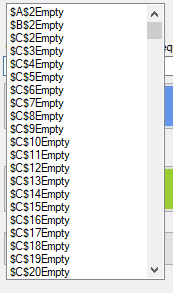
the spreadsheet contains stock codes in column A and descriptions in B. I only want to search for matches in column B, but as you can see the list box only shows empty cells.
I don't understand your Textbox5 =
Text box 5 = the last row containing text
in Textbox5 should be a number (number of rows in you Excelsheet)
I think I will upload my sample and you can see better.
regards
Chris
to hunt a species to extinction is not logical !
since 2010 the number of Tigers are rising again in 2016 - 3900 were counted. with Baby Callas it's 3901, my wife and I had 2-3 months the privilege of raising a Baby Tiger.
-
Sep 12th, 2017, 08:41 AM
#16
Thread Starter
Lively Member
Re: Find Next in a Search
Originally Posted by ChrisE
I don't understand your Textbox5 =
in Textbox5 should be a number (number of rows in you Excelsheet)
I think I will upload my sample and you can see better.
regards
Chris
That's what I'm saying. Text box 5 contains the number of the last row containing text. I.E, the number of rows on the sheet.
VS 2017 - Need as much help as you can give (write it all for me!)
-
Sep 12th, 2017, 08:58 AM
#17
Re: Find Next in a Search
Hi,
here a screenshot of my result. I have 78 rows in my Excelfile, you can see the
search text and the result in the listbox

regards
Chris
to hunt a species to extinction is not logical !
since 2010 the number of Tigers are rising again in 2016 - 3900 were counted. with Baby Callas it's 3901, my wife and I had 2-3 months the privilege of raising a Baby Tiger.
-
Sep 12th, 2017, 09:15 AM
#18
Thread Starter
Lively Member
Re: Find Next in a Search
I understand your search is searching for exact terms. I have made some adjustments:
Code:
 Dim rownum As Integer = oWB.Sheets(1).Cells(oSheet.Rows.Count, 1).End(-4162).Row()
                Dim suchRng As Excel.Range = oSheet.Range("B3:" & "B" & rownum)
                Dim Row, Col As Long

                For Each rng As Excel.Range In suchRng
                    If String.IsNullOrEmpty(rng.Value) Then
                        rng.Value = Nothing
                        ListBox1.Items.Add(rng.Address & "Empty " & rng.Offset(Row, Col).Value)
                    ElseIf InStr(LCase(rng.Value.ToString), Form1.TextBox2.Text, CompareMethod.Text) <> 0 Then
                        'add the Cell and the Text to Listbox
                        ListBox1.Items.Add(rng.Address & " " & rng.Offset(Row, Col).Value)
                    End If
                Next
VS 2017 - Need as much help as you can give (write it all for me!)
-
Sep 12th, 2017, 09:27 AM
#19
Re: Find Next in a Search
to hunt a species to extinction is not logical !
since 2010 the number of Tigers are rising again in 2016 - 3900 were counted. with Baby Callas it's 3901, my wife and I had 2-3 months the privilege of raising a Baby Tiger.
-
Sep 12th, 2017, 10:14 AM
#20
Thread Starter
Lively Member
Re: Find Next in a Search
Indeed, is it just me or does your profile picture keep changing?
VS 2017 - Need as much help as you can give (write it all for me!)
-
Sep 12th, 2017, 10:20 AM
#21
Re: Find Next in a Search
Originally Posted by callumwk
Indeed, is it just me or does your profile picture keep changing?
Hi,
glad you got it working, I change my Profil picture a couple of days ago.
regards
Chris
to hunt a species to extinction is not logical !
since 2010 the number of Tigers are rising again in 2016 - 3900 were counted. with Baby Callas it's 3901, my wife and I had 2-3 months the privilege of raising a Baby Tiger.
Tags for this Thread
 Posting Permissions
- You may not post new threads
- You may not post replies
- You may not post attachments
- You may not edit your posts
-
Forum Rules
|
Click Here to Expand Forum to Full Width
|



 Reply With Quote


