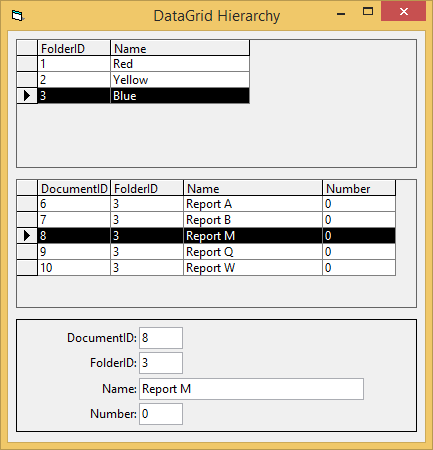
The parent command is named gridFolders and the child command is named gridDocuments, the relation definition field is FolderID. And I display the data from them in two datagrids placed in different tabs of SSTab control, so when you click on a data row from gridFolders it shows the second tab and respectively the second data grid which shows the documents that the selected parent folder contains, so far, so good.
My problem is that I want to make so that when a user double clicks on a record from gridDocuments a third tab is being showed and in it there are text boxes to edit the particular record. I bind the text boxes to DataSource, DataMember and DataField to gridDocuments, but they always display the first document (data row from gridDocuments command) contained into a folder.
How can I save the last selected data row from my child recordset and display the information of it into text boxes in order to allow user to edit the information?
Thank you in advance!
Regards,
Plamen
Last edited by ptrifonov; Sep 7th, 2017 at 08:43 AM.
Re: Process data from bookmarked row of datagrid to text box
for more response, try posting a sample of you project and database
i do my best to test code works before i post it, but sometimes am unable to do so for some reason, and usually say so if this is the case. Note code snippets posted are just that and do not include error handling that is required in real world applications, but avoid On Error Resume Next
dim all variables as required as often i have done so elsewhere in my code but only posted the relevant part
come back and mark your original post as resolved if your problem is fixed
pete
Re: Process data from bookmarked row of datagrid to text box
Also 98% of pro's don't use the Data Environment.
Rob
PS It is very brave of me to mention that, as one member who loves them, gave me a negative rating for saying something similar once. (Hope he feels very guilty)
Re: Process data from bookmarked row of datagrid to text box
Originally Posted by Bobbles
98% of pro's don't use the Data Environment.
Hi Bobbles. I'll agree with you. Early on, I explored the Data Environment, but I haven't even messed with it in many years. Now, it's just an irritant to me because you have to install the DAO350 (which isn't even the latest version of the DAO) to get the VB6 IDE installed on a computer. It's about the only part of the IDE that I never use, other than most of the canned Add-Ins, and the canned module templates. And those "canned" pieces can be easily deleted with no harm done.
Best Regards,
Elroy
Any software I post in these forums written by me is provided "AS IS" without warranty of any kind, expressed or implied, and permission is hereby granted, free of charge and without restriction, to any person obtaining a copy. To all, peace and happiness.
The parent command is named gridFolders and the child command is named gridDocuments, the relation definition field is FolderID. And I display the data from them in two datagrids placed in different tabs of SSTab control, so when you click on a data row from gridFolders it shows the second tab and respectively the second data grid which shows the documents that the selected parent folder contains, so far, so good.
My problem is that I want to make so that when a user double clicks on a record from gridDocuments a third tab is being showed and in it there are text boxes to edit the particular record. I bind the text boxes to DataSource, DataMember and DataField to gridDocuments, but they always display the first document (data row from gridDocuments command) contained into a folder.
How can I save the last selected data row from my child recordset and display the information of it into text boxes in order to allow user to edit the information?
Thank you in advance!
Regards,
Plamen
well I will join the other's as I don't use the DataE.
just reading you project I would say you should use the
Treeview-Listview and Textboxes.
to hunt a species to extinction is not logical !
since 2010 the number of Tigers are rising again in 2016 - 3900 were counted. with Baby Callas it's 3901, my wife and I had 2-3 months the privilege of raising a Baby Tiger.
Re: Process data from bookmarked row of datagrid to text box
Thank you all for your effort.
As an attachment you can find my project and because I use an MS SQL Server database I've Exported the DB schema to an .sql file.
I don't know how to display parent and child records in two DataGrid controls.
@Chris I appreciate your solution, but in my particular case treeview is not applicable, but I will examine how did you manage to bookmark records from the recordset.
Re: Process data from bookmarked row of datagrid to text box
Originally Posted by Bob_too
Plamen, I think you're looking for a bookmark for the selected row in your child grid:
dbgrid.bookmark
Pass the BM to the data control on your edit form. That should get you the correct record in the bound controls.
I'll be home later and I'll have a closer look.
Yes exactly, but I am not using a data control and I can't figure out do I have to pass the bookmark of the datagrid or the bookrmark of the child recordset to the textboxes and how exactly to do it when using ADO. Thank you in advance.
Code:
'Resize
    Dim anchor As New CAnchor

'DB Connection
    Dim rsFolders As Recordset 'dbo.A_Folders
    Dim adoBookmark As Variant


Private Sub Form_Load()

  Me.MousePointer = vbHourglass  'turn MousePointer to HourGlass to show that we are busy processing

  'DB Connect
  Dim db As Connection
  Set db = New Connection
  db.CursorLocation = adUseClient
  db.Open "PROVIDER=MSDataShape;Data PROVIDER=MSDASQL;driver={SQL Server};server=BASIC1\SQLEXPRESS;uid=ams_admin;pwd=123123;database=AMS;"

  Set rsFolders = New Recordset
  rsFolders.Open "SHAPE  {SELECT * FROM A_Folders} APPEND ({SELECT FolderID,Type,Name,Description,Number,Pages,DateOrigin,DateArchived,DateLastEdited,AUser,FilePath FROM A_Documents} RELATE FolderID TO FolderID) AS rsDocuments,({SELECT * FROM A_Documents} RELATE FolderID TO FolderID) AS rsDocuments1", db, adOpenStatic, adLockOptimistic

  'Bind the grids the data provider
  Set gridFolders.DataSource = rsFolders
  Set gridDocuments.DataSource = rsFolders("rsDocuments").UnderlyingValue

  'Bind the textboxes to the data provider rsFolders
  Set txtProjectCode.DataSource = rsFolders
  Set txtClientName.DataSource = rsFolders
  Set txtProjectName.DataSource = rsFolders
  Set txtProjectSubtitle.DataSource = rsFolders
  Set txtArchiveID.DataSource = rsFolders

  Set txtDocumentName.DataSource = rsFolders("rsDocuments").UnderlyingValue
  Set txtDocumentDesc.DataSource = rsFolders("rsDocuments").UnderlyingValue

  'Resize
    Set anchor.owner = Me
    anchor.AddItem tabData, True, False, False
    anchor.AddItem gridFolders, True, False, False
    anchor.AddItem gridDocuments, True, False, False
    anchor.AddItem frameSearch, True, True, False

  'DataGrids Visual Properties
    gridFolders.Columns(0).Caption = "Folder ID"
    gridFolders.Columns(0).Width = "700"
    gridFolders.Columns(1).Caption = "Archive ID"
    gridFolders.Columns(1).Width = "800"
    gridFolders.Columns(2).Caption = "Project Code"
    gridFolders.Columns(2).Width = "1000"
    gridFolders.Columns(3).Caption = "Client Name"
    gridFolders.Columns(4).Caption = "Project Name"
    gridFolders.Columns(6).Caption = "Cover Type"
    gridFolders.Columns(8).Visible = False 'Hide Location 2 by default
    gridFolders.Columns(11).Caption = "Date of Origin"
    gridFolders.Columns(12).Caption = "Date Archived"
    gridDocuments.Columns(2).Width = "7000"

  'Main SSTAB Control Visual Properties
    Me.tabData.TabVisible(2) = False 'Hide tab "Edit Documents" if not accessed via gridDocuments


    Me.MousePointer = vbNormal 'sets the mouse pointer to the normal arrow
End Sub

Private Sub gridDocuments_DblClick()
     adoBookmark = rsFolders.Bookmark
     frmMain.Show
     frmMain.tabData.TabVisible(2) = True 'Unhide "Edit Documents" tab
     frmMain.tabData.Tab = 2
     rsFolders.Bookmark = adoBookmark
     txtDocumentName.DataSource = rsFolders.Bookmark


End Sub

Private Sub gridFolders_DblClick()
     frmMain.Show
     frmMain.tabData.Tab = 1

End Sub

Private Sub mnuExitItem_Click()
        End
End Sub

Private Sub txtSearchQuery_Change()


End Sub
Re: Process data from bookmarked row of datagrid to text box
Originally Posted by Bobbles
Also 98% of pro's don't use the Data Environment.
That's crazy talk. If anything you have it backwards! Most of the casual plinkers still here have "learned" VB from copy/pasting creaky old VBScript snippets from ASP scripts. There was no way to pass the MCPD/MCSD exams without understanding how to use the DataEnvironment.
I think the problem with this stems from the way the DataGrid seizes control over its DataSource. When this is an ADO Recordset or a DataMember of a DataEnvironment the AbsolutePosition will always be changed back to 1.
As a result if you try to bind TextBox or other controls to the same source they can never move off the first row.
Bound TextBox controls are "stuck" on the first row
I attached a demo that creates a small Jet MDB on first run.
The only real way around this is to write event handlers for anything that binds new values or changes the row selection of the bottom-level DataGrid in the hierarchy. From there you can try to fish out the ID value for the selected row and use that for another query.
For example you could have a 3rd Command defined to accept this ID as a parameter. You'd have to close the Command's Recordset if open, then re-execute the Command passing this ID. Then you would have to bind each control to that Command's Recordset. Kind of ugly.
Plus you'd have to examine the EditMode value and conditionally call Update as each bound control loses focus. Also the DataGrid "one level up" would not be updated to reflect the change so you have another can of worms to deal with.
No, this just isn't a well conceived idea as far as I can determine. It may be a flaw in the way data binding was changed during the move to ADO, it may be a bug, or it may be intended behavior.
You are probably better off allowing the user to make edits within the DataGrid. Or rip out the DataGrids and replace them with MSHFlexGrids if they are just being used as row selection controls.
If there is a way to make what you ask for work I sure don't remember it. I can't find anything of the sort in the manuals or by trial and error for that matter either.
Don't expect a lot of help here. Most "professionals" have either moved on from VB to .Net or something else by now.
Re: Process data from bookmarked row of datagrid to text box
Originally Posted by ptrifonov
Thank you all for your effort.
As an attachment you can find my project and because I use an MS SQL Server database I've Exported the DB schema to an .sql file. I don't know how to display parent and child records in two DataGrid controls.
@Chris I appreciate your solution, but in my particular case treeview is not applicable, but I will examine how did you manage to bookmark records from the recordset.
here a sample to setup a Master Detail with Classes rather than the DE
I used the Northwind and tried to keep it as simple as possible
you will need 3 Classes and a Form
I added a further Field to the Order Details Table = Auto_ID
that is Autoincrement
Class1
Code:
'Class: clsCustomer
Option Explicit

Private mConn As ADODB.Connection

Private Sub Class_Initialize()
    Set mConn = New ADODB.Connection
    mConn.CursorLocation = adUseClient
    mConn.ConnectionString = "PROVIDER=Microsoft.Jet.OLEDB.4.0;Data Source=" & App.Path & "\Northwind.MDB;"
    mConn.Open
End Sub

Private Sub Class_Terminate()
    mConn.Close
    Set mConn = Nothing
End Sub

Public Function GetCustomers() As ADODB.Recordset
    Dim Rs As ADODB.Recordset
    Set Rs = New ADODB.Recordset
    Rs.ActiveConnection = mConn
    Rs.CursorLocation = adUseClient
    Rs.CursorType = adOpenStatic
    Rs.Open "SELECT CustomerID FROM Customers"
    If Rs.EOF Then
        Set GetCustomers = Nothing
        Exit Function
    Else
        Set GetCustomers = Rs
    End If
End Function
Class2
Code:
'Class: clsOrders
Option Explicit


Private mConn As ADODB.Connection
Private mCustomerID As String

Private Sub Class_Initialize()
    Set mConn = New ADODB.Connection
    mConn.CursorLocation = adUseClient
    mConn.ConnectionString = "PROVIDER=Microsoft.Jet.OLEDB.4.0;Data Source=" & App.Path & "\Northwind.MDB;"
    mConn.Open
End Sub

Private Sub Class_Terminate()
    mConn.Close
    Set mConn = Nothing
End Sub

Public Function GetOrders() As ADODB.Recordset
    Dim Rs As ADODB.Recordset
    Set Rs = New ADODB.Recordset
    Rs.ActiveConnection = mConn
    Rs.CursorLocation = adUseClient
    Rs.CursorType = adOpenStatic
    Rs.Open "SELECT OrderID, OrderDate FROM Orders WHERE CustomerID='" & mCustomerID & "'"
    If Rs.EOF Then
        Set GetOrders = Nothing
    Else
        Set GetOrders = Rs
    End If
End Function

Public Property Let CustomerID(ByVal vNewValue As String)
    mCustomerID = vNewValue
End Property
Class3
Code:
'Class: clsOrderDetails
Option Explicit


Private mConn As ADODB.Connection
Private mOrderID As Long

Private Sub Class_Initialize()
    Set mConn = New ADODB.Connection
    mConn.CursorLocation = adUseClient
    mConn.ConnectionString = "PROVIDER=Microsoft.Jet.OLEDB.4.0;Data Source=" & App.Path & "\Northwind.MDB;"
    mConn.Open
End Sub

Private Sub Class_Terminate()
    mConn.Close
    Set mConn = Nothing
End Sub

Public Function GetOrderDetails() As ADODB.Recordset
    Dim Rs As ADODB.Recordset
    Set Rs = New ADODB.Recordset
    Rs.ActiveConnection = mConn
    Rs.CursorLocation = adUseClient
    Rs.CursorType = adOpenStatic

   Rs.Open "SELECT Auto_ID, Orders.OrderID, Products.ProductName, " & _
   "[Order Details].UnitPrice, [Order Details].Quantity, " & _
   "[Order Details].Discount " & _
   "FROM Products INNER JOIN (Orders INNER JOIN [Order Details] " & _
   "ON Orders.OrderID = [Order Details].OrderID) " & _
   "ON Products.ProductID= [Order Details].ProductID " & _
  " WHERE Orders.OrderID=" & mOrderID

    If Rs.EOF Then
        Set GetOrderDetails = Nothing
    Else
        Set GetOrderDetails = Rs
    End If
End Function

Public Property Let OrderID(ByVal vNewValue As Long)
    mOrderID = vNewValue
End Property
and the Form
Code:
'1 x commandbutton
'2 x Flexgrid


Option Explicit

Dim objCustomer     As clsCustomer
Dim objOrders       As clsOrders
Dim objOrderDetails  As clsOrderDetails
Dim mlngid As Long

Private Sub Form_Load()
'Load your Classes
    Set objCustomer = New clsCustomer
    Set objOrders = New clsOrders
    Set objOrderDetails = New clsOrderDetails

'load the combobox with Customers
    cmdGetCustomers.Value = True
End Sub

Private Sub cmdGetCustomers_Click()
    Dim rsCustomers As New ADODB.Recordset
    Set rsCustomers = objCustomer.GetCustomers
    If Not (rsCustomers) Is Nothing Then
        cboCustomers.Clear
        Do While Not rsCustomers.EOF
            cboCustomers.AddItem rsCustomers("CustomerID")
            rsCustomers.MoveNext
        Loop
        cboCustomers.ListIndex = 0
        Set rsCustomers = Nothing
    End If
End Sub


Private Sub Form_Unload(Cancel As Integer)
 Set objCustomer = Nothing
    Set objOrders = Nothing
    Set objOrderDetails = Nothing
End Sub


Private Sub cboCustomers_Click()
On Error GoTo Fehler
    Dim rsOrders As New ADODB.Recordset
    If cboCustomers.ListIndex >= 0 Then
        objOrders.CustomerID = cboCustomers.List(cboCustomers.ListIndex)
    Else
        Set objOrders = Nothing
        MsgBox "Kunde wählen!", , "Kunde"
    End If

   'the Orders are Loaded to the 1st. Flexgrid
   'on selecting from the combobox Customers
   Set rsOrders = objOrders.GetOrders
   MSFlexGrid1.Clear
   If rsOrders.RecordCount Then
    Call ShowResultGrid(rsOrders)
    End If
    Set rsOrders = Nothing

Fehler:
'there might be no Orders
    If Err.Number = 3704 Then
    MsgBox "no Orders !"
    Err.Clear
    MSFlexGrid1.Clear
    End If
End Sub

'Load the Orders
Private Sub ShowResultGrid(rsOrders As ADODB.Recordset)
Dim intCol As Integer
Dim strItem As String
With MSFlexGrid1
    .ScrollBars = flexScrollBarNone
    .FixedCols = 0
    .FixedRows = 1
    .Rows = 1
    .Row = 0
    For intCol = 0 To .Cols - 1
        .Col = intCol
        .Text = rsOrders.Fields(intCol).Name
    Next intCol
    Do Until rsOrders.EOF
        strItem = ""
            For intCol = 0 To .Cols - 1
                strItem = strItem & rsOrders.Fields(intCol).Value & vbTab
            Next intCol
        .AddItem strItem
        rsOrders.MoveNext
    Loop
    .ScrollBars = flexScrollBarBoth
    End With
End Sub

'Load the OrderDetails when you Click on the MsFlexgrid1
Private Sub MSFlexGrid1_Click()
Dim iselected As Integer
Dim rsOrderDetails As ADODB.Recordset
With MSFlexGrid1
        iselected = .Row
End With
On Error Resume Next
mlngid = iselected
'pass the OrderID from the 1st. Flexgrid
'now Load MsFlexgrid2
  objOrderDetails.OrderID = MSFlexGrid1.TextMatrix(iselected, 0)
  Set rsOrderDetails = objOrderDetails.GetOrderDetails
    MSFlexGrid2.Clear
            If rsOrderDetails.RecordCount Then
        Call ShowResultGridDetails(rsOrderDetails)
    End If
Set rsOrderDetails = Nothing
End Sub

Private Sub ShowResultGridDetails(rsOrdersDetails As ADODB.Recordset)
Dim intCol As Integer
Dim strItem As String
With MSFlexGrid2
    .ScrollBars = flexScrollBarNone
    .FixedCols = 0
    .FixedRows = 1
    .Rows = 1
    .Row = 0
    .Cols = 5
    For intCol = 0 To .Cols - 1
        .Col = intCol
        .Text = rsOrdersDetails.Fields(intCol).Name
    Next intCol
    Do Until rsOrdersDetails.EOF
        strItem = ""
            For intCol = 0 To .Cols - 1
                strItem = strItem & rsOrdersDetails.Fields(intCol).Value & vbTab
            Next intCol
        .AddItem strItem
        rsOrdersDetails.MoveNext
    Loop
    .ScrollBars = flexScrollBarBoth
    End With
End Sub

'pass the Values from Grid2 to Textboxes
Private Sub MSFlexGrid2_Click()
 With MSFlexGrid2
        .Col = 0
            Form1.Text1 = .Text
        .Col = 1
             Form1.Text2 = .Text
        .Col = 2
             Form1.Text3 = .Text
        .Col = 3
             Form1.Text4 = .Text
        .Col = 4
             Form1.Text5 = .Text
    End With
End Sub
regards
Chris
to hunt a species to extinction is not logical !
since 2010 the number of Tigers are rising again in 2016 - 3900 were counted. with Baby Callas it's 3901, my wife and I had 2-3 months the privilege of raising a Baby Tiger.
Re: Process data from bookmarked row of datagrid to text box
Also 98% of pro's don't use the Data Environment.
Originally Posted by dilettante
That's crazy talk...
In my opinion, the statement is fairly accurate.
And as you've just encountered yourself (by not being able to make the TextBox-Bindings work in conjunction with the Docs-DataGrid) -
there's apparently a reason, why real professionals stay away from the DataEnvironment (and the ADODC-Control as well).
Not to be misunderstood, I think ADO- (or any form of) DataBinding is a nice thing, which can significantly
reduce the amount of code in a (DB-)Project, allowing for quite generic, dynamically generated DataEntry-Forms.
With only a few small Helper-Functions (in a *.bas), one can completely avoid the DE or ADODCs,
and still use (ADO-)DataBinding, allowing the Data to remain "outside" (in Recordset- or other non-visual Containers) -
and not copied "By-Value" into visual COMponents or Controls.
Below is your modified example, which works with such a "handmade" Binding-approach
(including Record-Editing over the Text-Fields, and persistence of the made changes back into the DB).
The Form-Code for that is not really large:
Code:
Private RsFolders As Recordset, RsDocs As Recordset

Private Sub Form_Load()
  Set RsFolders = BindDataSourceReadOnlyTo(DGFolders, GetRs("Select * From Folders"))
  DGFolders_RowColChange Empty, 0 'initiate the full-row-selection of the first Folders-record on DGFolders
End Sub

Private Sub DGFolders_RowColChange(LastRow As Variant, ByVal LastCol As Integer)
  EnsureFullRowSelectOn DGFolders 'needed in the RowColChange-Event of any DataGrid which needs a FullRowSelect-Visualizing

  'any record-change in DGFolders needs to cascade down the Hierarchy (so let's select a new RsDocs appropriately)
  CheckForDocChanges 'before switching to new Docs, make sure (potential) former changes are saved
  Set RsDocs = BindDataSourceReadOnlyTo(DGDocs, GetRs("Select * From Documents Where FolderID=?", RsFolders!FolderID))
  Dim i As Long '(re)bind the new RsDocs-DataSource also to the TextFields (which are editable)
  For i = 0 To txtField.UBound: Set txtField(i).DataSource = RsDocs: Next
End Sub

Private Sub DGDocs_RowColChange(LastRow As Variant, ByVal LastCol As Integer)
  EnsureFullRowSelectOn DGDocs 'needed in the RowColChange-Event of any DataGrid which needs a FullRowSelect-Visualizing
End Sub

Private Sub CheckForDocChanges()
  If Not RsContainsChanges(RsDocs) Then Exit Sub
  If MsgBox("Save Changes on current Documents?", vbYesNo) = vbYes Then RsDocs.UpdateBatch
End Sub

Private Sub Form_Unload(Cancel As Integer)
  ValidateControls
  CheckForDocChanges
End Sub
Re: Process data from bookmarked row of datagrid to text box
Originally Posted by Schmidt
In my opinion, the statement is fairly accurate.
And as you've just encountered yourself (by not being able to make the TextBox-Bindings work in conjunction with the Docs-DataGrid) -
there's apparently a reason, why real professionals stay away from the DataEnvironment (and the ADODC-Control as well).
Not to be misunderstood, I think ADO- (or any form of) DataBinding is a nice thing, which can significantly
reduce the amount of code in a (DB-)Project, allowing for quite generic, dynamically generated DataEntry-Forms.
With only a few small Helper-Functions (in a *.bas), one can completely avoid the DE or ADODCs,
and still use (ADO-)DataBinding, allowing the Data to remain "outside" (in Recordset- or other non-visual Containers) -
and not copied "By-Value" into visual COMponents or Controls.
Below is your modified example, which works with such a "handmade" Binding-approach
(including Record-Editing over the Text-Fields, and persistence of the made changes back into the DB).
The Form-Code for that is not really large:
Code:
Private RsFolders As Recordset, RsDocs As Recordset

Private Sub Form_Load()
  Set RsFolders = BindDataSourceReadOnlyTo(DGFolders, GetRs("Select * From Folders"))
  DGFolders_RowColChange Empty, 0 'initiate the full-row-selection of the first Folders-record on DGFolders
End Sub

Private Sub DGFolders_RowColChange(LastRow As Variant, ByVal LastCol As Integer)
  EnsureFullRowSelectOn DGFolders 'needed in the RowColChange-Event of any DataGrid which needs a FullRowSelect-Visualizing

  'any record-change in DGFolders needs to cascade down the Hierarchy (so let's select a new RsDocs appropriately)
  CheckForDocChanges 'before switching to new Docs, make sure (potential) former changes are saved
  Set RsDocs = BindDataSourceReadOnlyTo(DGDocs, GetRs("Select * From Documents Where FolderID=?", RsFolders!FolderID))
  Dim i As Long '(re)bind the new RsDocs-DataSource also to the TextFields (which are editable)
  For i = 0 To txtField.UBound: Set txtField(i).DataSource = RsDocs: Next
End Sub

Private Sub DGDocs_RowColChange(LastRow As Variant, ByVal LastCol As Integer)
  EnsureFullRowSelectOn DGDocs 'needed in the RowColChange-Event of any DataGrid which needs a FullRowSelect-Visualizing
End Sub

Private Sub CheckForDocChanges()
  If Not RsContainsChanges(RsDocs) Then Exit Sub
  If MsgBox("Save Changes on current Documents?", vbYesNo) = vbYes Then RsDocs.UpdateBatch
End Sub

Private Sub Form_Unload(Cancel As Integer)
  ValidateControls
  CheckForDocChanges
End Sub
This piece of code do the job. Thank you Olaf, thank you all for helping me to resolve this.
I've learned a lot and I am very happy that you all shared your advises with me.



 [RESOLVED] Process data from bookmarked row of datagrid to text box

 Reply With Quote


 Originally Posted by Bobbles