|

-
Aug 25th, 2017, 11:15 AM
#1
Thread Starter
New Member

 [RESOLVED] Issue installing VB 6.0 [RESOLVED] Issue installing VB 6.0
Hi,
I'm trying to install VB6.0 on a Virtual Machine. The node's environment is Windows Server 2008 R2 SP1.
When I run Setup.exe as an administrator, a screen appears asking me to Install service pack.
When I click next, I get the following error: "Service pack setup has detected that the version of the system installed is newer than the update you are applying to it".
I've checked everywhere on the node and there doesn't seem to be another version of the system installed!
Any help with this issue is greatly appreciated!
-
Aug 25th, 2017, 11:26 AM
#2
Re: Issue installing VB 6.0
What service pack are you talking about?
-
Aug 25th, 2017, 04:04 PM
#3
Thread Starter
New Member
Re: Issue installing VB 6.0
Unfortunately, it doesn't say. A screen appears with a checkbox saying "install service pack". The screen appears after I enter my name and company name.
-
Aug 25th, 2017, 04:34 PM
#4
Re: Issue installing VB 6.0
The VB install does not prompt for a service pack. There is a message in the VS installer related to the java virtual machine needing to be updated.
Have a look at this thread
http://www.vbforums.com/showthread.p...dows-10-64-bit
-
Aug 25th, 2017, 11:30 PM
#5
Re: Issue installing VB 6.0
I agree this sounds very strange. I don't recall any prompt about a Service Pack but perhaps I just don't remember the exact wording of the MS JVM complaint.
I have always (many, many times) been able to click through the JVM warning dialog and have installation complete successfully. I don't think I ever had to resort to creating an empty dummy JVM file (MSJAVA.DLL), but that should work too. Some say that fails on Win10, so maybe see:
How To Install Visual Basic 6 (VB6) in Windows 10
But I have installed VB6 on Win10 without any gymnastics and just click through the complaining dialog.
Windows Server 2008 R2 is the server build of Win7. I expect things would work the same as on Win7.
-
Aug 28th, 2017, 02:41 AM
#6
Thread Starter
New Member
Re: Issue installing VB 6.0
All,
Thank you for your response.
Unfortunately, I am still getting the same error message.
For reference, this is the service pack screen that appears each time I try to install VB6:

Also, this is the error message I receive when the installation fails:

-
Aug 28th, 2017, 06:42 AM
#7
Re: Issue installing VB 6.0
I assume that you have tried unchecking the box?
-
Aug 28th, 2017, 07:07 AM
#8
Re: Issue installing VB 6.0
Jay
Are you installing VB6 from a CD?
Spoo
-
Aug 28th, 2017, 07:40 AM
#9
Thread Starter
New Member
Re: Issue installing VB 6.0
DataMiser
When I uncheck the box, the "Next" button becomes disabled.
Spooman
I'm not using a CD. The software is being installed from a VB6 folder on our server.
-
Aug 28th, 2017, 07:41 AM
#10
Re: Issue installing VB 6.0
 Originally Posted by DataMiser

I assume that you have tried unchecking the box?
Yes, Jay....I would simply follow the last statement on that pop-up (which I have never seen before---and I have the Professional Version as well (on CDs)).---And over the years, have installed VB6 (Well, entire VS6.0) SEVERAL times. Interesting.
-
Aug 28th, 2017, 07:55 AM
#11
Thread Starter
New Member
Re: Issue installing VB 6.0
SamOscarBrown
Unfortunately, if I uncheck the checkbox then the "Next" button is disabled.
If I exit the installer and click Setup.exe again then the same window appears again, asking me to install service pack.
-
Aug 28th, 2017, 08:04 AM
#12
Re: Issue installing VB 6.0
Originally Posted by Jay21292
Unfortunately, I am still getting the same error message.
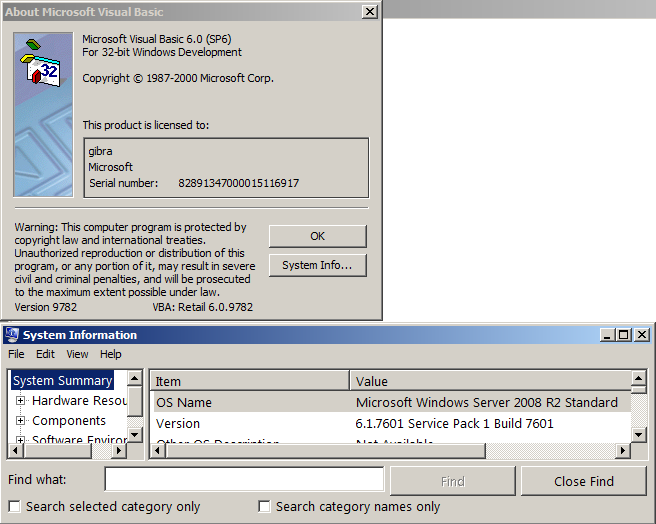
Not for me.
I've use my wizard VS6Installer 4.8 (see my sign)
-
Aug 28th, 2017, 08:15 AM
#13
Thread Starter
New Member
Re: Issue installing VB 6.0
[QUOTE=gibra;5207285]Not for me.
I've use my wizard VS6Installer 4.8 (see my sign)
Your VS6 Installer appears to be blocked on our network.
After checking the anti virus logs and it appears that there were 3 trojans blocked as a result of opening the installer.
Do you know of another workaround for my issue?
-
Aug 28th, 2017, 08:49 AM
#14
Re: Issue installing VB 6.0
There isn't virus in my VS6 Installer!
It's a false positive of your antivirus.
-
Aug 28th, 2017, 08:56 AM
#15
Re: Issue installing VB 6.0
I do not know if I have ever saw that message or not. If so it would have had to have been under windows NT, 98 or 2000. Don't remember seeing it at all. As of Windows 7 ( or was it Vista?) I do remember getting a message about the Java VM when trying to install from my Pro disc. I did not even bother trying to get past it at the time. I downloaded the Enterprise version from MSDN and installed that from the ISO. No Java warning in that one and installed without a hitch so I have used that ISO for all installs since.
-
Aug 28th, 2017, 09:06 AM
#16
Thread Starter
New Member
Re: Issue installing VB 6.0
Gibra
I wasn't saying there's a virus in your installer!
I was just saying that's how it got picked up by our antivirus.
DataMiser
I will try downloading the Enterprise version and see if that works without any hitches.
-
Aug 28th, 2017, 09:38 AM
#17
Re: Issue installing VB 6.0
Yes, I confirm.
The Enteprise Edition doesn't require Java.
-
Aug 28th, 2017, 10:20 AM
#18
Thread Starter
New Member
Re: Issue installing VB 6.0
Thanks guys!
Could someone please point me in the direction of a reliable link to download the Enterprise Edition?
-
Aug 28th, 2017, 10:36 AM
#19
Re: Issue installing VB 6.0
Originally Posted by Jay21292
Thanks guys!
Could someone please point me in the direction of a reliable link to download the Enterprise Edition?
It is on the MSDN developers downloads section. Of course this is only for use by paid MSDN subscribers.
There is no other legit download that I know of.
-
Aug 28th, 2017, 10:41 AM
#20
Re: Issue installing VB 6.0
If you own a MSDN Subscription you can download for free.
https://msdn.microsoft.com
Only EE edition it's available:
Visual Basic 6.0 Enterprise Edition (English), Disc 1
Visual Basic 6.0 Enterprise Edition (English), Disc 2
-
Aug 30th, 2017, 11:05 AM
#21
Re: Issue installing VB 6.0
Originally Posted by gibra
There isn't virus in my VS6 Installer!
It's a false positive of your antivirus.
My company's security software found two items of malware, I didn't see the messages someone else did, that were quarantined. After that it seems to have worked.
Please remember next time...elections matter!
-
Aug 31st, 2017, 11:15 AM
#22
Thread Starter
New Member
Re: Issue installing VB 6.0
All,
See my resolution below as I couldnt get my hands on a copy of the EE edition.
Resolution:
• Open the SETUPWIZ.ini file in the VB6 folder.
• Copy all data from SETUPWIZ.ini into a new textfile, except the following two lines:
NTSP = NTsp3\nt4sp3_i.exe
NTSpMinVer = 3
These lines of code are used to search for the latest service pack on the system and will install Service Pack 3 for the Intel platform, if not present already.
The two lines above are what caused the service pack issue.
• Rename the new textfile SETUPWIZ.ini and add it to the VB6 folder, replacing the old SETUPWIZ.ini file in the process – This step needs to be done as the old ini file is read only and cannot be modified.
• Run the SETUP.exe again and the “Install Service Pack” screen no longer appears.
Thank you for your help!
-
Aug 31st, 2017, 12:08 PM
#23
Re: [RESOLVED] Issue installing VB 6.0
Interesting. I would think this must be unique to Server versions of the OS. Never saw it on a workstation version which is what most people install under.
-
Jun 19th, 2021, 12:35 AM
#24
New Member
Re: Issue installing VB 6.0
Originally Posted by Jay21292
All,
See my resolution below as I couldnt get my hands on a copy of the EE edition.
Resolution:
• Open the SETUPWIZ.ini file in the VB6 folder.
• Copy all data from SETUPWIZ.ini into a new textfile, except the following two lines:
NTSP = NTsp3\nt4sp3_i.exe
NTSpMinVer = 3
These lines of code are used to search for the latest service pack on the system and will install Service Pack 3 for the Intel platform, if not present already.
The two lines above are what caused the service pack issue.
• Rename the new textfile SETUPWIZ.ini and add it to the VB6 folder, replacing the old SETUPWIZ.ini file in the process – This step needs to be done as the old ini file is read only and cannot be modified.
• Run the SETUP.exe again and the “Install Service Pack” screen no longer appears.
Thank you for your help!
Thanks a lot for the Tips. It resolved my issue too. In fact it happened once I re-installed Windows 7 with all Service Packs installed before installing VB6. VS6Installer has failed with same error. the error was really caused by NT4SP3_I.EXE.
 Posting Permissions
- You may not post new threads
- You may not post replies
- You may not post attachments
- You may not edit your posts
-
Forum Rules
|
Click Here to Expand Forum to Full Width
|



 Reply With Quote


