|

-
Aug 21st, 2017, 06:03 PM
#1
-
Aug 26th, 2017, 09:28 AM
#2
Re: How can I change header column backcolor?
Just to clarify ..
How do I get my "grey" header 1 (row) and 1 (col) highlights
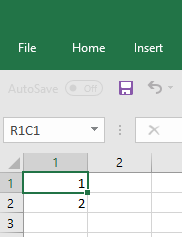
to be "gold" header 1 (row) and A (col) highlights?

with the latter image coming from here
http://www.vbforums.com/showthread.p...eparate-colors
Spoo
-
Aug 26th, 2017, 06:57 PM
#3
Re: How can I change header column backcolor?
i think maybe it is a specific version of excel (possibly 2007), that has the gold
afaik it is not possible to change, there are many work arounds, but none are really satisfactory, maybe you can subclass the excel application window
i do my best to test code works before i post it, but sometimes am unable to do so for some reason, and usually say so if this is the case.
Note code snippets posted are just that and do not include error handling that is required in real world applications, but avoid On Error Resume Next
dim all variables as required as often i have done so elsewhere in my code but only posted the relevant part
come back and mark your original post as resolved if your problem is fixed 
pete
-
Aug 27th, 2017, 04:23 AM
#4
Re: How can I change header column backcolor?
Pete
Thanks. In addition to 2007, there are 2 confirmations for version 2010 in the link in my OP. Not sure what version RobDog had, but given that his post was in 2007, that could be a candidate as well .. 
I was hoping that there might be a Style setting somewhere that enabled one to change the "look and feel".
Subclassing is currently beyond my pay grade .. maybe at a later date.
Any thoughts as to how I could track down some of those workarounds?
Spoo
-
Aug 27th, 2017, 05:18 AM
#5
Re: How can I change header column backcolor?
Any thoughts as to how I could track down some of those workarounds?
just google on it, but most involve changing cell(s) colour in selection change event of the worksheet, nothing to do with what you actually want to achieve
from some other forum, also with no real solution
In 2010 when I select a group of cells the column/row headers are yellow. How can I change this? Yellow is a migrane trigger and I spend hours each day working in Excel. I believe I changed it in 2007 as when I do this same selection in 2007 the headers are orange
i have never used excel 2007 and only rarely 2010
Subclassing is currently beyond my pay grade .. maybe at a later date.
maybe ask in the vb forum if anyone can help to do
i do my best to test code works before i post it, but sometimes am unable to do so for some reason, and usually say so if this is the case.
Note code snippets posted are just that and do not include error handling that is required in real world applications, but avoid On Error Resume Next
dim all variables as required as often i have done so elsewhere in my code but only posted the relevant part
come back and mark your original post as resolved if your problem is fixed
pete
-
Aug 27th, 2017, 09:04 AM
#6
Re: How can I change header column backcolor?
Pete
Thanks for those thoughts.
Spoo
 Posting Permissions
- You may not post new threads
- You may not post replies
- You may not post attachments
- You may not edit your posts
-
Forum Rules
|
Click Here to Expand Forum to Full Width
|



)

 Reply With Quote