|

-
Aug 15th, 2017, 02:21 AM
#1561
Addicted Member

Re: bug with calendar
 Originally Posted by DEXWERX

ah no problem. I think you now know that Krool's controls simply wrap the existing controls found in comctl32.dll.
so we have 4 different controls we can use in VB6.
* comctl32.dll <-- use the API manually
* ComCtrls v5 OCX <-- wraps the controls in comctl32.dll in user controls
* ComCtrls v6 OCX <-- based on the source of comctl32.dll (windows XP version), but is independent.
* Krools Controls <--- wraps the controls in comctl32.dll in user controls
If you want to learn about the Windows Common Controls, MSDN has a huge reference to the APIs.
https://msdn.microsoft.com/en-us/lib...(v=vs.85).aspx
https://msdn.microsoft.com/en-us/lib...(v=vs.85).aspx
Regardless, does the same bug show up in .NET's DTPicker control?
Thanks for the link. I didn't had all theses information... I knew about v5 and v6... v6 (xp) being the fixed version and v5 being the theme able version. and I knew Krool is somewhat similar to v5 but was missing the whole picture 
as for your question, I'm not sure about .net version, not using it but the v6 version is drawed properly.
-
Aug 15th, 2017, 03:41 AM
#1562
Addicted Member
Re: bug with calendar
Originally Posted by LaVolpe
Not sure your statement is correct. If you look at the datepicker.ctl, you will not see anywhere within it where Krool paints/draws the control. At least I didn't see any such statements. Krool creates an instance of the SysDateTimePick32 class (CreateDTPicker() routine) and exposes it via his usercontrol. So, from a cursory look at his code, doesn't look like he's redesigned anything significant, but mostly added support for unicode. However, what you are showing in your screen capture may indicate the font property should be changed (by you & preferably true-type) or some method called (by Krool) that would force the datepicker to adjust size based on font. Just a guess though.
very pertinent comment. 100% agree. as for my font, I used the default Vb6 one, "MS Sans Serif". I tried with the 'new' (.NET) default SegoUI and it work properly
-
Aug 15th, 2017, 04:07 AM
#1563
Hyperactive Member
Re: CommonControls (Replacement of the MS common controls)

I set Location to Canada, Region and Language to French(Canada) but don't get "Aujourd'hui" which is the cause of the problem because it screwed the alignment. To get the 'original' sizing/scaling, perhaps making "Aujourd'hui" back to Today. I know I know Today is not French.
I tried Location as France and Region and Language as French(France), I get the "Aujourd'hui" but is is aligned properly.
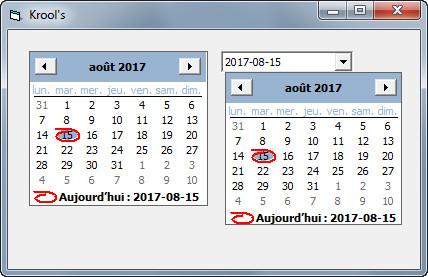
Last edited by chosk; Aug 15th, 2017 at 04:26 AM.
-
Aug 15th, 2017, 04:24 AM
#1564
Hyperactive Member
Re: CommonControls (Replacement of the MS common controls)
MS San Serif different font size. Trying to help but cannot replicate.

-
Aug 15th, 2017, 06:46 AM
#1565
Re: CommonControls (Replacement of the MS common controls)
Originally Posted by VbNetMatrix
very pertinent comment. 100% agree. as for my font, I used the default Vb6 one, "MS Sans Serif". I tried with the 'new' (.NET) default SegoUI and it work properly
I don't know if DPI was in play or not. If it was, say screen at 120-150% DPI, non-truetype fonts don't scale as well and the poor results would not be unexpected.
-
Aug 15th, 2017, 07:41 AM
#1566
Re: CommonControls (Replacement of the MS common controls)
@VbNetMatrix: what version of Windows are you on? Maybe this is a longshot, but the DateTimePicker got a large overhaul between XP and Vista (and minor updates since), and maybe a precise Windows version is required to reproduce your bug. I have seen weird spacing issues before, but I thought these were mostly rectified as of Windows 8...
-
Aug 15th, 2017, 01:13 PM
#1567
Re: bug with calendar
Originally Posted by VbNetMatrix
found a visual bug with calendar, and dropdown calendar (DTPicker1)
on a french computer (Canada French) the word Today is "Aujourd'hui" wich is large. The date at end is truncated, check the number 13 in the picture.
Attachment 150611
also, DTPicker1 doesn't have a min size and can be resized in a way where it's not possible to select it anymore in IDE with the mouse
For me it looks like you have a manifest to v6 of comctl32.dll but you use classic style windows theme? Can you confirm?
If yes, then I have no influence about the size of the drop-down calendar. If it would be v5.8x we could have tweaked it. So this could be really an MS bug.
-
Aug 15th, 2017, 03:21 PM
#1568
Re: CommonControls (Replacement of the MS common controls)
Update released. Quite important internal improvements on some controls.
Some controls adjust their size according to some settings and windows preferences, e.g. the MonthView control.
Therefore after creating the API control it is necessary to resize the UserControl boundaries to fit in.
The dimensions (Width, Height) of an control are saved trough the UserControl.Extender object into the property bag.
Problem is that these dimensions will be applied to the UserControl after UserControl_ReadProperties is finished.
So any attempt to resize a control at ReadProperties will be overwritten afterwards...
UserControl_InitProperties is not affected since there are no saved dimensions yet in the property bag.
Solution was resolved by just applying the dimensions within UserControl_Resize to the Extender object, even if DPICorrectionFactor() equals 1.
There was also some bugfixing done, e.g. ComboBoxW. If applicable, only the Extender.Height is applied and not the Width also via Extender.Move. This allows preservation of previous Width setting stored in the property bag. That change is crucial when migration for instance from ComboBox to this ComboBoxW.
Last edited by Krool; Aug 15th, 2017 at 05:22 PM.
-
Aug 15th, 2017, 04:07 PM
#1569
Hyperactive Member
Re: CommonControls (Replacement of the MS common controls)
Krool, the updated files did not get attached to post #1...
-
Aug 15th, 2017, 08:21 PM
#1570
Addicted Member
Re: CommonControls (Replacement of the MS common controls)
Originally Posted by chosk
MS San Serif different font size. Trying to help but cannot replicate.
Hi,
one thing different I noticed, in your example, the today's date is in a circle while mine is in a rectangle.
This seem to be causing the difference in alignment. What cause my side to have the rectangle instead of the circle ?
-
Aug 15th, 2017, 08:23 PM
#1571
Addicted Member
Re: CommonControls (Replacement of the MS common controls)
Originally Posted by LaVolpe
I don't know if DPI was in play or not. If it was, say screen at 120-150% DPI, non-truetype fonts don't scale as well and the poor results would not be unexpected.
very good comment, somethime we miss this simple solution... not in my case though, I hate DPI change in Windows, about 4 program out of 5 doesn't run well with DPI change.
Mine is set at normal 100% (running Win7 PRO x64)
(btw, I believe MS Sans Serif is a TTF isn't ?)
-
Aug 15th, 2017, 08:29 PM
#1572
Addicted Member
Re: bug with calendar
Originally Posted by Krool
For me it looks like you have a manifest to v6 of comctl32.dll but you use classic style windows theme? Can you confirm?
If yes, then I have no influence about the size of the drop-down calendar. If it would be v5.8x we could have tweaked it. So this could be really an MS bug.
damn... you pin it... my IDE doesn't use manifest. I compiled and got a different result. compiled I got the circle instead of rectangle for "today"
I still got a problem though, the circle is lilttle bit too low and got cut.
can u give me a link where I can get the manifest for vb6.exe ?
or link where you explain how to "completely" use and install your component ? maybe I missed a few step...
I installed OLEGuids.tlb, but didn'T find information about installing a manifest.
-
Aug 15th, 2017, 10:28 PM
#1573
-
Aug 16th, 2017, 08:42 AM
#1574
Re: CommonControls (Replacement of the MS common controls)
Originally Posted by VbNetMatrix
Mine is set at normal 100% (running Win7 PRO x64)
(btw, I believe MS Sans Serif is a TTF isn't ?)
'MS Sans Serif' is NOT a TrueType font.
A similar named font 'Microsoft Sans Serif' is TrueType.
'Segoe UI' is probably a better (TrueType) font to use nowadays.
-
Aug 16th, 2017, 03:13 PM
#1575
Re: ImageList: New bug found
Again small update related to yesterday bugfix, especially on the ComboBoxW control.
For instance on ComboBoxW control the height could be screwed up when the hidden VBControlExtender properties _ExtentX/_ExtentY were 0 or not set.
Typical scenario is on migration from VB.Combo to ComboBoxW that _ExtentX/_ExtentY are not set.
But I carefully tested now again every component and I hope all different scenarios are now resolved.
Originally Posted by Mith
i can reproduce the run-time error message 50003 using windows 8.1 and OCX v1.4.37:

the vb-project contains only the imagelist control with 2 icons and no source code is used.
Sample project: error50003.zip
I can run that sample project without any error...
-
Aug 17th, 2017, 04:47 AM
#1576
Addicted Member
Re: CommonControls (Replacement of the MS common controls)
hi krool ,
I have 2 issues here with listview
1 - when setting the property "usecolumnchevron" to true and autosizing the last column to header , these bugs occur
a - the header caption disappears
b - the width of the column gets too wide and the arrows "chevron" appear
while resetting the property "usecolumnchevron" to false , fixes the problem . this happens only in the last column when use chevron is true
2- autosizing a column to the header caption works fine if the column caption is wider than the items , but if the items text is wider than the column header caption , autosizing for the header is still related to the items text which is wider than the caption although autosizing is set to the header not the items . this happens for any column with chevron is true or false
this is my code . try different captions in various widthes greater or less than items widthes . also comment and uncomment the chevron line to check for the first issue but with the last column . column 3
Code:
Dim i As Long
lvmain.View = lvwReport
lvmain.ListItems.clear


'lvmain.UseColumnChevron = True


lvmain.ColumnHeaders.Add , , "column_a"
lvmain.ColumnHeaders.Add , , "column_b"
lvmain.ColumnHeaders.Add , , "column_c"

For i = 1 To 6
lvmain.ListItems.Add , , "row_a"
lvmain.ListItems(i).ListSubItems.Add , , "row_bbbbbbbbbbbbbbbbbbb"
lvmain.ListItems(i).ListSubItems.Add , , "row_c"
Next i

lvmain.ColumnHeaders(2).AutoSize LvwColumnHeaderAutoSizeToHeader

lvmain.Refresh
lvmain.Redraw = True
Last edited by Hosam AL Dein; Aug 17th, 2017 at 04:52 AM.
-
Aug 17th, 2017, 04:55 PM
#1577
Addicted Member
Re: CommonControls (Replacement of the MS common controls)
Originally Posted by VB6 Programming
'MS Sans Serif' is NOT a TrueType font.
A similar named font 'Microsoft Sans Serif' is TrueType.
'Segoe UI' is probably a better (TrueType) font to use nowadays.
thanks for the information... I never realized there were a "MS" Sans Serif and a "Microsoft" Sans Serif. I thought they were the same and I knew the microsoft one was TTF.
I just changed my "default" Font in Vb6.exe to SegoUI (yup, I had to hack the .exe)
-
Aug 18th, 2017, 12:17 AM
#1578
Re: CommonControls (Replacement of the MS common controls)
Originally Posted by VbNetMatrix
thanks for the information... I never realized there were a "MS" Sans Serif and a "Microsoft" Sans Serif. I thought they were the same and I knew the microsoft one was TTF.
I just changed my "default" Font in Vb6.exe to SegoUI (yup, I had to hack the .exe)
Maybe you can create a tutorial thread of how to achieve this? It could be a common demand to change the default font in the IDE to a truetype font.
-
Aug 18th, 2017, 01:03 AM
#1579
Addicted Member
Re: CommonControls (Replacement of the MS common controls)
Originally Posted by Krool
Originally Posted by VbNetMatrix
thanks for the information... I never realized there were a "MS" Sans Serif and a "Microsoft" Sans Serif. I thought they were the same and I knew the microsoft one was TTF.
I just changed my "default" Font in Vb6.exe to SegoUI (yup, I had to hack the .exe)
Maybe you can create a tutorial thread of how to achieve this? It could be a common demand to change the default font in the IDE to a truetype font.
Yes, it would be very handy, since MS Sans Serif is outdated...
-
Aug 18th, 2017, 07:27 AM
#1580
Re: CommonControls (Replacement of the MS common controls)
Originally Posted by Cube8
Yes, it would be very handy, since MS Sans Serif is outdated...
some binary IDE hacks would be nice, things like changing the code editing colors, and default fonts. great ideas.
-
Aug 18th, 2017, 08:03 AM
#1581
Re: CommonControls (Replacement of the MS common controls)
Originally Posted by VbNetMatrix
thanks for the information... I never realized there were a "MS" Sans Serif and a "Microsoft" Sans Serif. I thought they were the same and I knew the microsoft one was TTF.
I just changed my "default" Font in Vb6.exe to SegoUI (yup, I had to hack the .exe)
Also consider the font size
MS Sans Serif 8 point was the default for older Windows and for VB6.
In newer Windows Segoe UI 9 point is normal.
When updating VB6 apps from MS Sans Serif (and you should do this to support DPI-aware controls) you need to choose a TrueType or OpenType font.
Segoe UI is an obvious one (because it is used by Windows), but it can appear smaller than MS Sans Serif - if you only change the fontname, and not the fontsize - so it may look better to increase the font size too (from e.g. 8pt to 9pt).
Another alternative is to use Microsoft Sans Serif. This is the TrueType/OpenType version of MS Sans Serif and is very similar in size. This means you don't need to change the fontsize.
If you are updating an existing app, using Microsoft Sans Serif is a little easier, but (imo) Segoe UI looks better.
Remember, changing the font on an existing application may give problems if it doesn't quite fit. For example a button may be only just wide-enough to fit the caption (text) using the existing font, changing the font may no longer fit.
-
Aug 18th, 2017, 12:06 PM
#1582
Addicted Member
Re: CommonControls (Replacement of the MS common controls)
Originally Posted by Krool
Maybe you can create a tutorial thread of how to achieve this? It could be a common demand to change the default font in the IDE to a truetype font.
a tutorial on how to "hack" the Vb6.exe ? I think I'll get flamed by the Forum Administator.
not sure it will be accepted ... but maybe as a "Learning Technique" ? a "how to"
I could provide source code of how to make the vb6 "Patcher" we'll see if it is accepted 
I'll get right on it. Thanks for the suggestion.
-
Aug 18th, 2017, 12:09 PM
#1583
Addicted Member
-
Aug 18th, 2017, 12:15 PM
#1584
Addicted Member
Re: CommonControls (Replacement of the MS common controls)
Originally Posted by VB6 Programming
Also consider the font size
MS Sans Serif 8 point was the default for older Windows and for VB6.
In newer Windows Segoe UI 9 point is normal.
When updating VB6 apps from MS Sans Serif (and you should do this to support DPI-aware controls) you need to choose a TrueType or OpenType font.
Segoe UI is an obvious one (because it is used by Windows), but it can appear smaller than MS Sans Serif - if you only change the fontname, and not the fontsize - so it may look better to increase the font size too (from e.g. 8pt to 9pt).
Another alternative is to use Microsoft Sans Serif. This is the TrueType/OpenType version of MS Sans Serif and is very similar in size. This means you don't need to change the fontsize.
If you are updating an existing app, using Microsoft Sans Serif is a little easier, but (imo) Segoe UI looks better.
Remember, changing the font on an existing application may give problems if it doesn't quite fit. For example a button may be only just wide-enough to fit the caption (text) using the existing font, changing the font may no longer fit.
2 things...
1. unfortunately, Vb6.exe (for some reason) doesn't seem to include "fontSize" for the "default" font object (at least I didn't find it in the binary).
You can only change the "default" Font
2. Changing the "default" font only affect "new" object you drop on a form. it will not mess with your existing project.
but you're right, "Microsoft Sans Serif" might be a better alternative for the size reason...
I didn't know this thing would attract so many attention... glad to hear some people still love Vb6 so I'll go work right on it, I should finish the patcher code in an hour, I'll post it in a thread and let you know
-
Aug 19th, 2017, 02:40 AM
#1585
Addicted Member
Re: CommonControls (Replacement of the MS common controls)
hi krool ,
I have 2 issues here with listview
1 - when setting the property "usecolumnchevron" to true and autosizing the last column to header , these bugs occur
a - the header caption disappears
b - the width of the column gets too wide and the arrows "chevron" appear
while resetting the property "usecolumnchevron" to false , fixes the problem . this happens only in the last column when use chevron is true
2- autosizing a column to the header caption works fine if the column caption is wider than the items , but if the items text is wider than the column header caption , autosizing for the header is still related to the items text which is wider than the caption although autosizing is set to the header not the items . this happens for any column with chevron is true or false
this is my code . try different captions in various widthes greater or less than items widthes . also comment and uncomment the chevron line to check for the first issue but with the last column . column 3
Code:
Dim i As Long
lvmain.View = lvwReport
lvmain.ListItems.clear


'lvmain.UseColumnChevron = True


lvmain.ColumnHeaders.Add , , "column_a"
lvmain.ColumnHeaders.Add , , "column_b"
lvmain.ColumnHeaders.Add , , "column_c"

For i = 1 To 6
lvmain.ListItems.Add , , "row_a"
lvmain.ListItems(i).ListSubItems.Add , , "row_bbbbbbbbbbbbbbbbbbb"
lvmain.ListItems(i).ListSubItems.Add , , "row_c"
Next i

lvmain.ColumnHeaders(2).AutoSize LvwColumnHeaderAutoSizeToHeader

lvmain.Refresh
lvmain.Redraw = True
-
Aug 19th, 2017, 04:48 PM
#1586
Addicted Member
Re: CommonControls (Replacement of the MS common controls)
-
Aug 19th, 2017, 06:34 PM
#1587
Addicted Member
Re: CommonControls (Replacement of the MS common controls)
hey all , I posted a question here twice and seemed to be ignored . is there something wrong ? are they visible mainly ?
-
Aug 19th, 2017, 07:04 PM
#1588
Addicted Member
Re: CommonControls (Replacement of the MS common controls)
Originally Posted by Hosam AL Dein
hey all , I posted a question here twice and seemed to be ignored . is there something wrong ? are they visible mainly ?
No question have been ignored to my knowledge, can you give us the Post # so we can validate ?
-
Aug 19th, 2017, 07:08 PM
#1589
Addicted Member
Re: CommonControls (Replacement of the MS common controls)
-
Aug 19th, 2017, 10:00 PM
#1590
Fanatic Member

 Re: ImageList: New bug found Re: ImageList: New bug found
Originally Posted by Krool
I can run that sample project without any error...
Did you run the compiled exe or the project via the IDE?
What windows version did you use for your test?
-
Aug 19th, 2017, 11:32 PM
#1591
Addicted Member
Re: CommonControls (Replacement of the MS common controls)
Originally Posted by Hosam AL Dein
1585 and 1576
can you give us a snapshot picture of what you mean ?
-
Aug 20th, 2017, 12:58 AM
#1592
Addicted Member
Re: CommonControls (Replacement of the MS common controls)
video demonstration for what I mean for both 2 issues
https://www.youtube.com/watch?v=R9ocSUOAxOM
-
Aug 20th, 2017, 01:10 AM
#1593
Addicted Member
Re: CommonControls (Replacement of the MS common controls)
another bug in listview not related to the previous issues
when you set a splitbutton to a column and you manually re-position it , it loses the property and it is set to the other column which replaces it
and here is a video demonstration
https://www.youtube.com/watch?v=l-lo...ature=youtu.be
-
Aug 20th, 2017, 01:27 AM
#1594
Addicted Member
Re: CommonControls (Replacement of the MS common controls)
check this one too
it is in linklabel , when set to transparent this bug happens
https://www.youtube.com/watch?v=HtVQ...ature=youtu.be
-
Aug 20th, 2017, 01:36 AM
#1595
Addicted Member
Re: CommonControls (Replacement of the MS common controls)
the previous bug does not happen if it is placed on a user control as the net video shows
https://www.youtube.com/watch?v=cRkM...ature=youtu.be
-
Aug 20th, 2017, 01:45 AM
#1596
Addicted Member
Re: CommonControls (Replacement of the MS common controls)
also in linklabel , the font is not affected in design time . run the project once , now it will be drawn in both run time and design time
https://www.youtube.com/watch?v=6vX7...ature=youtu.be
-
Aug 20th, 2017, 01:56 AM
#1597
Addicted Member
Re: CommonControls (Replacement of the MS common controls)
still in linklabel , as said above , the transparency works fine only in usercontrols. but , it is not real transparency to my knowledge . It gets its backcolor from its parent as you will see in the next video when we put a label behind it . Is this intended to be like this or it is a bug ?
https://www.youtube.com/watch?v=_sLK...ature=youtu.be
and how to change the forecolor because it has never changed with any trial to change other properties might be preventing it to be changed .
-
Aug 20th, 2017, 03:30 AM
#1598
Re: CommonControls (Replacement of the MS common controls)
Hosam AL Dein, you don't have any patience?
I do not forget your issues.. there will be noted.
Sometimes I posted an update for an issue raised 1 month before or so..
-
Aug 20th, 2017, 03:58 AM
#1599
Addicted Member
Re: CommonControls (Replacement of the MS common controls)
sorry krool , I am new to any forum and I doubted that my posts were not properly published because I used to see the message that tells the post will be published after admin revision and I no longer see it so I thought there was something wrong .
and about the posts I publish in a sequence , I always find it hard to make my point clear due to my " bad english " so I assign a time to record them in a video and publish them all in one time .
I really appreciate what you are doing and keep it up . sorry again
-
Aug 20th, 2017, 08:29 AM
#1600
Re: CommonControls (Replacement of the MS common controls)
Originally Posted by VbNetMatrix
2 things...
1. unfortunately, Vb6.exe (for some reason) doesn't seem to include "fontSize" for the "default" font object (at least I didn't find it in the binary).
You can only change the "default" Font
2. Changing the "default" font only affect "new" object you drop on a form. it will not mess with your existing project.
but you're right, "Microsoft Sans Serif" might be a better alternative for the size reason...
Due to the fact that the default FaceName in vb6.exe is limited to 13 chars there seems to be no way to define "Microsoft Sans Serif", right?
So we could define "Segoi UI" but would need to life with FontSize of 8 instead of 9?
Originally Posted by Mith
Did you run the compiled exe or the project via the IDE?
What windows version did you use for your test?
Win XP SP3 (VM) and Win 7 SP1. (both 32bit)
Last edited by Krool; Aug 20th, 2017 at 08:32 AM.
 Posting Permissions
- You may not post new threads
- You may not post replies
- You may not post attachments
- You may not edit your posts
-
Forum Rules
|
Click Here to Expand Forum to Full Width
|



 Reply With Quote

 ImageList: New bug found
