|

-
Aug 5th, 2017, 03:45 PM
#1
Thread Starter
Junior Member

 Candle Stick Chart in VB Candle Stick Chart in VB
I have a candle stick chart, name is CANDLE
and datagridview for data, name is HesapsonDataGridView
series of chart; open, high, low, close
I arrange everything in chart properties like collection.
That is the code:
Me.CANDLE.Series("open").Points.AddXY("CANDLE", HesapsonDataGridView.Rows(60).Cells(1).Value)
Me.CANDLE.Series("high").Points.AddXY("CANDLE", HesapsonDataGridView.Rows(60).Cells(2).Value)
Me.CANDLE.Series("low").Points.AddXY("CANDLE", HesapsonDataGridView.Rows(60).Cells(3).Value)
Me.CANDLE.Series("close").Points.AddXY("CANDLE", HesapsonDataGridView.Rows(60).Cells(4).Value)
But I can't draw the candle stick, need help. Thanks a lot.
-
Aug 5th, 2017, 09:58 PM
#2
Re: Candle Stick Chart in VB
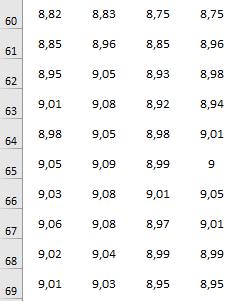
What exactly are the values of those grid cells?
-
Aug 6th, 2017, 04:53 AM
#3
Thread Starter
Junior Member
Re: Candle Stick Chart in VB
Here is the exact values of the grids. Friend, I have 120 rows like those. In my code I wrote only one. At the picture, I have send ten of 120. Thanks a lot for your interest.
-
Aug 6th, 2017, 05:17 AM
#4
Re: Candle Stick Chart in VB
According to the documentation here, each data point in the series has 4 Y values in the order "high, low, open and close, respectively". So your code should look more like:
Code:
Dim someXvalue As Integer = 60 ' for example

Dim open As Double = CDbl(HesapsonDataGridView.Rows(60).Cells(1).Value)
Dim high As Double = CDbl(HesapsonDataGridView.Rows(60).Cells(2).Value)
Dim low As Double = CDbl(HesapsonDataGridView.Rows(60).Cells(3).Value)
Dim close As Double = CDbl(HesapsonDataGridView.Rows(60).Cells(4).Value)

CANDLE.Series(0).Points.AddXY(someXvalue, high, low, open, close)
Tags for this Thread
 Posting Permissions
- You may not post new threads
- You may not post replies
- You may not post attachments
- You may not edit your posts
-
Forum Rules
|
Click Here to Expand Forum to Full Width
|



 Reply With Quote

