|

-
Jul 18th, 2017, 05:29 PM
#1
Thread Starter
New Member

VBA Syntax in VB application Throwing error
I have a old VB 6.0 application written by someone else. When I compile the application, it throws error on every line of code where VBA reference is required so for e.g. it throws an error in the following lines:
Code:
Left$, Chr, Trim$, format
As soon as I prefix it with VBA.Left$, the error goes away. There are tons of keyword through out the application and I don't want to prefix all of them with VBA. Am I missing any reference? If so, then what is the name of the that reference. I was looking at the list of project References and saw only two missing references called "Microsoft DTS run time 1.0" and Microsoft CDO for NTS 1.2 Library. Where can I get this reference from and how can I add this in VB application. Also, is there any way, I can add VBA reference to VB application. I am running this VB application on XP machine. Below is the image of the list of references in my project:
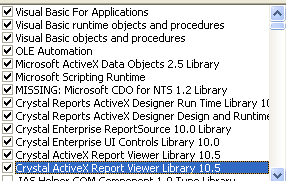
any help will be greatly appreciated. I am using windows XP Virtual machine
Last edited by Anjali66; Jul 18th, 2017 at 08:54 PM.
-
Jul 18th, 2017, 05:33 PM
#2
Fanatic Member
Re: VBA Syntax in VB application Throwing error
what about the "MISSING: .... which is listed"?, that means in your PC that library is not present, maybe removing that will fix everything.
But, breaking all the references to that library.
-
Jul 18th, 2017, 05:52 PM
#3
Re: VBA Syntax in VB application Throwing error
Double check every control and every form for the word VBA. I've seen something like this before and believe it was the word ME that caused problems. The problem was that someone named a form: Me. This could be similar situation. You may have better luck searching your source files: frm, bas, cls, etc instead of a visual search of the control/form names
-
Jul 18th, 2017, 05:58 PM
#4
Fanatic Member
Re: VBA Syntax in VB application Throwing error
My experience is that when there is missing something, it does that kind of hazle, it stops recognizing everything.
-
Jul 18th, 2017, 06:07 PM
#5
Re: VBA Syntax in VB application Throwing error
Hmmm, not sure why you don't have the ADO 2.5 library installed. Maybe try selecting next higher library available to you? Regarding the CDO reference, you may need to reinstall it if it doesn't exist. On my pc, I don't have that library but do have the CDO for Windows2000 Library.
In all cases when you are trying to fix something potentially major, play with a copy of your project -- don't make mattes worse.
Wonder if this is a registry virtualization issue. Are you running VB elevated? What O/S are you using?
-
Jul 18th, 2017, 06:08 PM
#6
Re: VBA Syntax in VB application Throwing error
Anjali66,
First, welcome to the forums.
Next, if you start a new VB6 project (in the IDE development environment), and then put something as simple as the following in the default Form1's code....
Code:
Option Explicit

Private Sub Form_Load()
    Dim s As String
    s = Left$("asdf", 2)
End Sub
....does that work?
If not, there's something wrong with your installation of the VB6 IDE. Do you have the Service Pack 6 (SP6) installed? If not, that's a great place to start.
If my above suggestion does work, then it is something specific about that project. From the little you've told us, it does look like you've got enough reference to get things going. That "Missing" reference may indeed cause you some problems, but it'd be strange if it caused this problem.
Also, you can write your own version of intrinsic VB6 functions that replace the intrinsic functions. However, I tried to do this with the Left (and Left$) function, and couldn't reproduce your exact symptoms, so I'm not thinking that's the problem.
Good Luck,
Elroy
Any software I post in these forums written by me is provided "AS IS" without warranty of any kind, expressed or implied, and permission is hereby granted, free of charge and without restriction, to any person obtaining a copy. To all, peace and happiness.
-
Jul 19th, 2017, 04:35 PM
#7
Re: VBA Syntax in VB application Throwing error
this is normal procedure with missing references
uncheck the missing references, then find them again
i do my best to test code works before i post it, but sometimes am unable to do so for some reason, and usually say so if this is the case.
Note code snippets posted are just that and do not include error handling that is required in real world applications, but avoid On Error Resume Next
dim all variables as required as often i have done so elsewhere in my code but only posted the relevant part
come back and mark your original post as resolved if your problem is fixed 
pete
-
Jul 19th, 2017, 04:49 PM
#8
Thread Starter
New Member
Re: VBA Syntax in VB application Throwing error
Strange, I created a new application and put the above code that you provided me and there was no error. I am not sure what is wrong with that old application.
-
Jul 19th, 2017, 05:10 PM
#9
Re: VBA Syntax in VB application Throwing error
Anjali66,
That's good information though. Now you know it's not your installation of the VB6 IDE, and that it's something to do with that project.
If it were me, I'd do as suggested above, resolve the "missing" references, doing whatever it takes to resolve that.
The next step I'd take is to start another new project, and then, one-by-one, add those references to this new project, and see if you can "break" it. If you successfully break it, then you know which reference is causing the problem. You may have a different version of some DLL than was used for the initial development of the project. But at least you'll know where to focus to get it resolved.
Good Luck,
Elroy
Any software I post in these forums written by me is provided "AS IS" without warranty of any kind, expressed or implied, and permission is hereby granted, free of charge and without restriction, to any person obtaining a copy. To all, peace and happiness.
Tags for this Thread
 Posting Permissions
- You may not post new threads
- You may not post replies
- You may not post attachments
- You may not edit your posts
-
Forum Rules
|
Click Here to Expand Forum to Full Width
|



 Reply With Quote


