|

-
Jul 5th, 2017, 12:08 AM
#1481
Hyperactive Member

Re: CommonControls (Replacement of the MS common controls)
xxDoc123,
I don't understand your comment
may be fixed
With Main.Range("VBP_Path")
I have an updated version of the Excel one with the current package but the old one from post #1463 works just fine. Did you encounter an error using the older Excel version?
-
Jul 5th, 2017, 12:49 AM
#1482
Hyperactive Member
Re: CommonControls (Replacement of the MS common controls)
In one program I have the only part of Krools pack that is used is the Common Dialogue Control - this tells me that there are no controls in use (which is kind of true as nothing is on any forms) so does not insert any code. Is this intentional or can it be added?
See post #1477 for an updated version of this program which addresses your issue. Let me know if it works for you.
-
Jul 7th, 2017, 06:01 PM
#1483
New Member
Re: CommonControls (Replacement of the MS common controls)
 Originally Posted by MountainMan

See post #1477 for an updated version of this program which addresses your issue. Let me know if it works for you.
Not working for me with the code inside a form, does work when the code is in a module - also subscript out of range error with tiny (really tiny) programs, tried to make a test case with just the CDC for a form and in a module. One more thing to maybe add could be a check for the OLE Guid reference, as the code will run without it (will not compile), and if you were to use this utility for compilation then it could be missed (rare I know).
-
Jul 7th, 2017, 06:40 PM
#1484
Hyperactive Member
Re: CommonControls (Replacement of the MS common controls)
Originally Posted by Sam_
Not working for me with the code inside a form, does work when the code is in a module - also subscript out of range error with tiny (really tiny) programs, tried to make a test case with just the CDC for a form and in a module. One more thing to maybe add could be a check for the OLE Guid reference, as the code will run without it (will not compile), and if you were to use this utility for compilation then it could be missed (rare I know).
I do look inside the form (the .frm file) for references to Krool's OCX file and then I remove those references because they aren't needed when you use the individual controls (all of the files making up each controls are referenced in the .vbp project file). Could you send me a copy of the program that wouldn't work and I'll find out why. (My email address is at the end of the .doc file.)
Also, could you send me a copy of the tiny program that gave you the subscript out of range error? Thanks.
I am not sure I understand your last point. Are you concerned that someone would try to use my code on a project that had no reference to the OCX file (i.e., it didn't have the GUID at all)? I do look in the .vbp file for a line containing "vbccr14.ocx" and since I didn't think you could have comments in a .vbp file I thought that if I found the reference to the OCX file that in fact the project used it.
-
Jul 9th, 2017, 02:56 AM
#1485
Hyperactive Member
Re: CommonControls (Replacement of the MS common controls)
Krool,
I have a question for you regarding the use of the OCX version compared to the STD-EXE version.
In your ComCtlsDemo project, in the Load sub of the form Main, there is the following code:
Code:
If ComCtlsSupportLevel() = 0 Then
    ListView1.ColumnHeaders(1).Icon = 1
    Dim EnumColumn As LvwColumnHeader
    For Each EnumColumn In ListView1.ColumnHeaders
        EnumColumn.IconOnRight = True
    Next EnumColumn
Else
    ListView1.SelectedColumn = ListView1.ColumnHeaders(1)
    ListView1.ColumnHeaders(1).SortArrow = LvwColumnHeaderSortArrowDown
End If
and I found the function ComCtlsSupportLevel in ComCtlsBase, a normal module. This function is not available in the OCX version and I looked through all of the normal and hidden classes and variables in ComCtlsDemo and it's not there and there isn't any equivalent. I am guessing that since it is in a .bas file and not in a control or a class module that even though it is a public procedure it won't be visible in the OCX.
So the first question is how do we do the equivalent of your code above when we are using the OCX version of the controls? I suppose we could include the API declaration and the ComCtlsSupprotLevel function in our code but since you are already making the call, it would seem to be easier to just make the result of that call available to users of the OCX as a property or variable.
Also, the function is called many times throughout your code. Since it is just checking the version number of the ComCtl32.dll file, wouldn't it be better to just call it once int he initialization code and then keep the results of that one call in a global variable?
-
Jul 9th, 2017, 05:57 AM
#1486
Hyperactive Member
Re: CommonControls (Replacement of the MS common controls)
In post #1483 Sam_ said he had a problem using my utility in situations where there none of Krool's controls were used but his CommonDialog function was used. I had checked for it in class and standard modules but not inside of forms. This is now fixed and Sam_'s code compiles properly with the OCX reference removed but the references to a handful of Krool's modules required to support that function call included.
I have now posted the update in post #1477 as version 0.9.2.
-
Jul 9th, 2017, 07:16 AM
#1487
Re: CommonControls (Replacement of the MS common controls)
Originally Posted by MountainMan
I found the function ComCtlsSupportLevel in ComCtlsBase, a normal module. This function is not available in the OCX version and I looked through all of the normal and hidden classes and variables in ComCtlsDemo and it's not there and there isn't any equivalent. I am guessing that since it is in a .bas file and not in a control or a class module that even though it is a public procedure it won't be visible in the OCX.
So the first question is how do we do the equivalent of your code above when we are using the OCX version of the controls? I suppose we could include the API declaration and the ComCtlsSupprotLevel function in our code but since you are already making the call, it would seem to be easier to just make the result of that call available to users of the OCX as a property or variable.
Also, the function is called many times throughout your code. Since it is just checking the version number of the ComCtl32.dll file, wouldn't it be better to just call it once int he initialization code and then keep the results of that one call in a global variable?
If you look in the function ComCtlsSupprotLevel the API is already only called once and the result is stored in a Static variable.
For OCX. Yes it could be added in a global class module.
-
Jul 9th, 2017, 10:01 AM
#1488
Fanatic Member
-
Jul 9th, 2017, 10:59 AM
#1489
Re: CommonControls (Replacement of the MS common controls)
Originally Posted by Tech99
ListBoxW vs. VB Intrinsic Listbox Selected property and visibility - problem
Any idea why selected property and selection visibility, does not work via code, as in intrinsic VB Listbox?
Test project attached...
In ListBoxW use the .ItemChecked property instead. I know that this is a little break for migration but then the .Selected property remains free for its actual selection state.
-
Jul 9th, 2017, 01:03 PM
#1490
Fanatic Member
Re: CommonControls (Replacement of the MS common controls)
Ok, big thanks, for fast response.
So it means, that SendMessage LB_ADDSTRING works as usual
'lstFolderList.AddItem CStr(Columns(1)) '
SendMessage lstFolderList.hWnd, LB_ADDSTRING, ByVal 0&, ByVal (CStr(Columns(1))) 'Add item to listbox
but, selection do not.
'SendMessage lstFolderList.hWnd, LB_SETSEL, ByVal CLng(Columns(0)), ByVal CLng(i) 'Selected/not selected via API.
-
Jul 9th, 2017, 01:17 PM
#1491
Fanatic Member
Re: CommonControls (Replacement of the MS common controls)
and this does not work either.
Code:
Private Sub lstFolderList_Click()
If lstFolderList.ListIndex > -1 Then
    If lstFolderList.ItemChecked(lstFolderList.ListIndex) Then 'Clicked item is not selected, before Click event fires -> Does not work
    'If lstFolderList.Selected(lstFolderList.ListIndex) Then 'Clicked item selected, before Click event fires -> Wworks
                'Do something
    Else 'not selected
    End If
End Sub
Code:
For i = 0 To UBound(Rows) - 1
    Columns = Split(Rows(i), "*")
    SendMessage lstFolderList.hWnd, LB_ADDSTRING, ByVal 0&, ByVal (CStr(Columns(1))) 'Can't use this method
     'lstFolderList.AddItem CStr(Columns(1)) '
     'lstFolderList.ItemChecked(i) = CBool(Columns(0)) 'as this does not work
     lstFolderList.ItemChecked(lstFolderList.NewIndex) = CBool(Columns(0)) 'for some reason neither do newindex method.
Next i
Newindex method works only with AddItem method, not with SendMessage API LB_ADDSTRING.
Code:
lstFolderList.AddItem CStr(Columns(1))
lstFolderList.ItemChecked(lstFolderList.NewIndex) = CBool(Columns(0))
Last edited by Tech99; Jul 9th, 2017 at 02:05 PM.
-
Jul 9th, 2017, 02:24 PM
#1492
Re: CommonControls (Replacement of the MS common controls)
Originally Posted by Tech99
and this does not work either.
Code:
Private Sub lstFolderList_Click()
If lstFolderList.ListIndex > -1 Then
    If lstFolderList.ItemChecked(lstFolderList.ListIndex) Then 'Clicked item is not selected, before Click event fires -> Does not work
    'If lstFolderList.Selected(lstFolderList.ListIndex) Then 'Clicked item selected, before Click event fires -> Wworks
                'Do something
    Else 'not selected
    End If
End Sub
Code:
For i = 0 To UBound(Rows) - 1
    Columns = Split(Rows(i), "*")
    SendMessage lstFolderList.hWnd, LB_ADDSTRING, ByVal 0&, ByVal (CStr(Columns(1))) 'Can't use this method
     'lstFolderList.AddItem CStr(Columns(1)) '
     'lstFolderList.ItemChecked(i) = CBool(Columns(0)) 'as this does not work
     lstFolderList.ItemChecked(lstFolderList.NewIndex) = CBool(Columns(0)) 'for some reason neither do newindex method.
Next i
Newindex method works only with AddItem method, not with SendMessage API LB_ADDSTRING.
Code:
lstFolderList.AddItem CStr(Columns(1))
lstFolderList.ItemChecked(lstFolderList.NewIndex) = CBool(Columns(0))
Yes, don't use API to add items.
At least not when using Style other than Normal or using .NewIndex.
-
Jul 9th, 2017, 03:29 PM
#1493
Fanatic Member
Re: CommonControls (Replacement of the MS common controls)
Ok, must use AddItem and NewIndex methods then.
Last edited by Tech99; Jul 9th, 2017 at 03:44 PM.
-
Jul 9th, 2017, 10:26 PM
#1494
Lively Member
Re: CommonControls (Replacement of the MS common controls)
Hi Krool!
Is it possible to do scroll-control based on the framew-control?
Ie also a container, but with the appearance of scrolbars when the elements are out of the container.
-
Jul 10th, 2017, 06:48 AM
#1495
Re: CommonControls (Replacement of the MS common controls)
In TextBoxW there's still two Problems, which prevent us from rolling out our
"Unicode-awareness-updates" in a large old VB6-Project.
Problem 1: DataChanged-Property
One can fix that easily (making it behaving identically to the intrinsic VB.TextBox),
by setting a Boolean m_DataChanged to True, in a Code-line before the Changed-Event is raised.
This Property (in the original VB.TextBox) can be reset at any time per: TextBox.DataChanged = False
Problem 2: Cursor-Movement per Arrow-Keys
The ScreenShot-LabelTexts below explain the Problem.
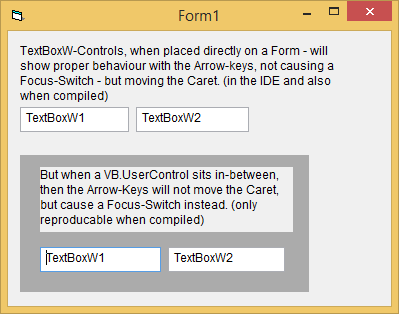
Here's a Download-Link for a small Project which demonstrates the Problem
(the Problem shows itself only in the Executable, not in the IDE):
http://vbRichClient.com/Downloads/CC...ve_Problem.zip
Olaf
-
Jul 10th, 2017, 10:23 AM
#1496
Re: CommonControls (Replacement of the MS common controls)
Originally Posted by Schmidt
Problem 1: DataChanged-Property
One can fix that easily (making it behaving identically to the intrinsic VB.TextBox),
by setting a Boolean m_DataChanged to True, in a Code-line before the Changed-Event is raised.
This Property (in the original VB.TextBox) can be reset at any time per: TextBox.DataChanged = False
Will follow soon.
Originally Posted by Schmidt
Problem 2: Cursor-Movement per Arrow-Keys
The ScreenShot-LabelTexts below explain the Problem.

Here's a Download-Link for a small Project which demonstrates the Problem
(the Problem shows itself only in the Executable, not in the IDE):
http://vbRichClient.com/Downloads/CC...ve_Problem.zip
In IDE you are using the .OCX version which has no problem with embedding into another UserControl.
However at run-time you are switching to the Std-EXE version and for this to properly work embedded into another UserControl there needs to be some code added.
The details are described at Post #597.
-
Jul 10th, 2017, 10:37 AM
#1497
Re: CommonControls (Replacement of the MS common controls)
DataChanged-Property...
Originally Posted by Krool
Will follow soon.
Great. 
Originally Posted by Krool
In IDE you are using the .OCX version which has no problem with embedding into another UserControl.
However at run-time you are switching to the Std-EXE version ...
No, no no...
If there's a professionally maintained binary available (even coming with a nice manifest for regfree-deployment, as in your case) -
then I'd never embed any larger source-codes into the production-code of my own Std-exe projects.
The Zipped-StdExe-Project I've posted above does make use (references) the OCX-version of your Controls (the latest one).
And this Project only needs to be run compiled (then still internally using your external OCX-binary), for the problem to occur.
Olaf
-
Jul 10th, 2017, 12:41 PM
#1498
Re: CommonControls (Replacement of the MS common controls)
Originally Posted by Schmidt
No, no no...
If there's a professionally maintained binary available (even coming with a nice manifest for regfree-deployment, as in your case) -
then I'd never embed any larger source-codes into the production-code of my own Std-exe projects.
The Zipped-StdExe-Project I've posted above does make use (references) the OCX-version of your Controls (the latest one).
And this Project only needs to be run compiled (then still internally using your external OCX-binary), for the problem to occur.
Oops. Then I must had only tested this with the OCX at design-time only. Because as you encountered this is only when run compiled...
Then the OCX has the same issue as the Std-EXE version at run-time.
However, the solution as like in the Std-EXE version does also work with the OCX. I know that this is not nice but I do not find a way as this seems to be a VB behavior (bug?) as the VB.Form does correctly dispatch IOleInPlaceActiveObjectVB to the ActiveControl but the VB.UserControl not. That's why this must be done "manually" as described in the code at Post #597.
If somebody finds a way to solve I am happy to hear, otherwise it needs to stay like this.
-
Jul 10th, 2017, 11:20 PM
#1499
Re: CommonControls (Replacement of the MS common controls)
Edit: I have an idea to maybe fix the whole VB.UserControl embedding issue without adding some extra code to the host UserControl. Will check this out soon.
-
Jul 11th, 2017, 08:22 AM
#1500
Hyperactive Member
Re: CommonControls (Replacement of the MS common controls)
Hi Krool,
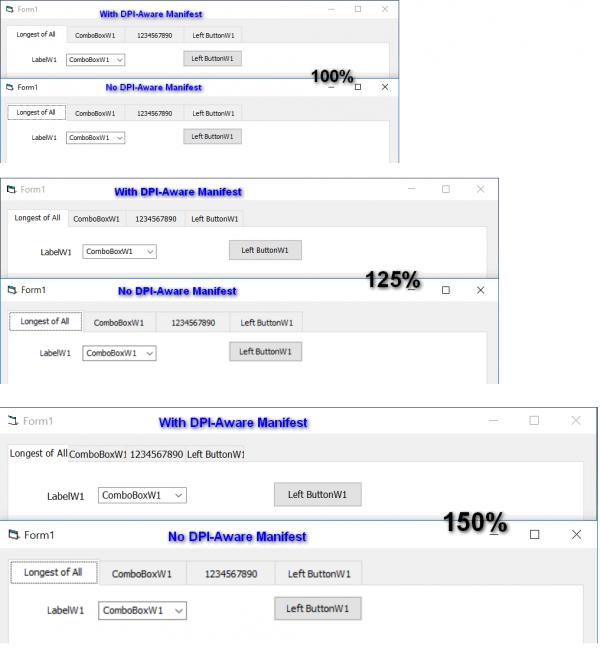
I think something might not right with DPI-Aware in the TabStrip - it is not scaling with the other controls.
In this example, I place the ComboBoxW and the CommandButton in line directly below the 2nd and 4th tabs respectively. I am using "2 - Fixed" for the TabWidthStyle, because I prefer the tabs to be taller. The "0 - Justified" has shorter Tab height by default.
Screen shots taken after I logged out and then back in for the change to take effect.
Last edited by chosk; Jul 11th, 2017 at 08:25 AM.
-
Jul 11th, 2017, 02:57 PM
#1501
Re: CommonControls (Replacement of the MS common controls)
Originally Posted by chosk
I think something might not right with DPI-Aware in the TabStrip - it is not scaling with the other controls.
In this example, I place the ComboBoxW and the CommandButton in line directly below the 2nd and 4th tabs respectively. I am using "2 - Fixed" for the TabWidthStyle, because I prefer the tabs to be taller. The "0 - Justified" has shorter Tab height by default.
I have figured out the problem here. Thanks for reporting.
Problem is that the TabFixedWidth/TabFixedHeight/TabMinWidth are stored as pixels in the property bag.
I think a solution could be to convert always from vbContainerSize to vbTwips instead of vbPixels for writing the properties.
But if I change this it would completly break the property bag compatibility. Everybody would need to re-define the properties...
There could be the same problem for other controls, e.g. ToolBar and the ButtonWidth/ButtonHeight/MinButtonWidth/MaxButtonWidth properties.
Originally Posted by Krool
Edit: I have an idea to maybe fix the whole VB.UserControl embedding issue without adding some extra code to the host UserControl. Will check this out soon.
I have found an solution(!). But it requires an internal change on each control. So it will take a while until update will be released.
Last edited by Krool; Jul 11th, 2017 at 03:24 PM.
-
Jul 11th, 2017, 03:24 PM
#1502
Re: CommonControls (Replacement of the MS common controls)
Originally Posted by Krool
I have figured out the problem here. Thanks for reporting.
Problem is that the TabFixedWidth/TabFixedHeight/TabMinWidth are stored as pixels in the property bag.
I think a solution could be to convert always from vbContainerSize to vbTwips instead of vbPixels for writing the properties.
But if I change this it would completly break the property bag compatibility. Everybody would need to re-define the properties...
There could be the same problem for other controls, e.g. ToolBar and the ButtonWidth/ButtonHeight/MinButtonWidth/MaxButtonWidth properties.
would it be possible to store a "design mode dpi" property (default 96), to translate the stored pixels when loading/saving the properties?
It's a kludgy idea for a workaround.
-
Jul 11th, 2017, 10:24 PM
#1503
Hyperactive Member
Re: CommonControls (Replacement of the MS common controls)
Originally Posted by Krool
I have figured out the problem here. Thanks for reporting.
Problem is that the TabFixedWidth/TabFixedHeight/TabMinWidth are stored as pixels in the property bag.
I think a solution could be to convert always from vbContainerSize to vbTwips instead of vbPixels for writing the properties.
But if I change this it would completly break the property bag compatibility. Everybody would need to re-define the properties...
There could be the same problem for other controls, e.g. ToolBar and the ButtonWidth/ButtonHeight/MinButtonWidth/MaxButtonWidth properties.
I just tested with "0 - Justified" and with DPI Manifest there is also the same issue. TabFixedWidth/TabFixedHeight/TabMinWidth are all 0.
I also just tested the MS TabStrip and it scale nicely with DPI Manifest applied.
Unless there is a work around, otherwise the UI with the TabStrip will not look right. I think this may need to be addressed even with completely breaking the property bag compatibility.
Last edited by chosk; Jul 11th, 2017 at 10:28 PM.
-
Jul 12th, 2017, 02:51 PM
#1504
Re: CommonControls (Replacement of the MS common controls)
Update released. (Major; it is necessary to replace all components and controls)
This update will fix reliably the issue that a kludgy workaround was necessary in order to get the controls properly work when there are embedded into another UserControl.
Now it doesn't matter where the control is sited on, no workaround necessary anymore.
So you can just put the Std-EXE or OCX control into another UserControl and it will just work.
The issue as described by Olaf below will not occur anymore.
The OCX version and the VBFlexGrid control got also updated.
Originally Posted by Schmidt
Problem 2: Cursor-Movement per Arrow-Keys
The ScreenShot-LabelTexts below explain the Problem.
Here's a Download-Link for a small Project which demonstrates the Problem
(the Problem shows itself only in the Executable, not in the IDE):
http://vbRichClient.com/Downloads/CC...ve_Problem.zip
-
Jul 13th, 2017, 01:02 AM
#1505
Hyperactive Member
Re: CommonControls (Replacement of the MS common controls)
Hi Krool,
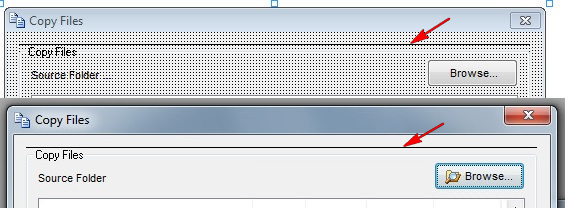
From the 3-Jul update and the one yesterday, I have this issue with most of the existing FrameW that was created from earlier versions. A black horizontal line appear on top of the FrameW. This happen to most of the FrameW that are pre-existing (about 90% or more though I did not actually count). If I replace the FrameW.ctl file back to the earlier version and re-load the project the black line will not appear.
A new FrameW created on the form with the "new" version will not have the black line.
The problem is that I have 20 or more FrameW and there are controls within them. If I were to re-create all the FrameW, I will mess up all the tabstop order in all the forms and have to re-do.
Is it possible to find out what may be causing this?
-
Jul 13th, 2017, 01:21 AM
#1506
Re: CommonControls (Replacement of the MS common controls)
There is a "huge" Problem with yesterdays update.
All controls that have child controls, such as IPAddress control etc. will not work properly with the arrow keys.
Thus there is a Little bit rework to be done.......
-
Jul 13th, 2017, 04:01 PM
#1507
Re: CommonControls (Replacement of the MS common controls)
Critical fix for yesterday's update..
Please again replace everything. Sorry for the inconvenience caused.
The fault was that the *new* method must be "handled" for all window controls. In yesterday update I did this only for the main window control, if the main window control does have any child control the whole thing was broken.
Now in today fix I also "handled" the known child window controls for all main window controls.
Example: IPAddress window has 4 edit child window controls or ListView has a label edit or filter edit child window control etc..
In addition the *new* method is now "double secured". If there would be any child window control forgotten to be handled it will be rescued by the *old* method.
Of course if there would be such case this "rescue" would only help when the control is not embedded into another UserControl.
Conclusion:
For normal use now very reliable. As combination of new and old method.
For embedding in another UserControl certainly reliable. Only in theory if there would be some new unknown child control which is not handled yet it would not work at that point.
@ Chosk,
I cannot reproduce your issue. I used the old FrameW and saved into property bag. Then just replaced and there was no issue..
Can you make a demo? It should show up when you make all the settings you used with the old FrameW and then replace.
Last edited by Krool; Jul 13th, 2017 at 04:13 PM.
-
Jul 13th, 2017, 09:39 PM
#1508
Lively Member
Re: CommonControls (Replacement of the MS common controls)
Originally Posted by chosk
Hi Krool,
From the 3-Jul update and the one yesterday, I have this issue with most of the existing FrameW that was created from earlier versions. A black horizontal line appear on top of the FrameW. This happen to most of the FrameW that are pre-existing (about 90% or more though I did not actually count). If I replace the FrameW.ctl file back to the earlier version and re-load the project the black line will not appear.
A new FrameW created on the form with the "new" version will not have the black line.
The problem is that I have 20 or more FrameW and there are controls within them. If I were to re-create all the FrameW, I will mess up all the tabstop order in all the forms and have to re-do.
Is it possible to find out what may be causing this?
I have the same problem. I solved it by changing the borderstyle parameter
-
Jul 13th, 2017, 10:22 PM
#1509
Re: CommonControls (Replacement of the MS common controls)
A black horizontal line appear on top of the FrameW.
Pretty sure this Black Line appears when you place a Windowless control on the Frame.
That explains why you don't see it when you just place an empty FrameW on the form or by using only non-Windowless controls.
The solution is adding "UserControl.Picture = UserControl.Image" at the end of Sub DrawFrame.
Thanks to LaVolpe for solution at:
http://www.vbforums.com/showthread.p...=1#post3913211
-
Jul 13th, 2017, 11:19 PM
#1510
Hyperactive Member
Re: CommonControls (Replacement of the MS common controls)
Originally Posted by DrUnicode
Pretty sure this Black Line appears when you place a Windowless control on the Frame.
That explains why you don't see it when you just place an empty FrameW on the form or by using only non-Windowless controls.
The solution is adding "UserControl.Picture = UserControl.Image" at the end of Sub DrawFrame.
Thanks to LaVolpe for solution at:
http://www.vbforums.com/showthread.p...=1#post3913211
Hi DrUnicode,
Yes! That solved the black line problem.
I put "UserControl.Picture = UserControl.Image" after End With and before End Sub. Hope this is the right place.
Thanks.
-
Jul 14th, 2017, 02:07 PM
#1511
Re: CommonControls (Replacement of the MS common controls)
Update released.
Originally Posted by chosk
Yes! That solved the black line problem.
I put "UserControl.Picture = UserControl.Image" after End With and before End Sub. Hope this is the right place.
That kinda solved it. However, there was still an issue when resizing the FrameW control.
I solved that by doing an "UserControl.Picture = Nothing" before the drawing.
Code:
Private Sub DrawFrame()
With UserControl
.Cls
Set .Picture = Nothing
[...drawing routine...]
Set .Picture = .Image
End With
End Sub
-
Jul 17th, 2017, 02:05 AM
#1512
Frenzied Member
Re: CommonControls (Replacement of the MS common controls)
it is frustrated that the increment can't be single or double for VB6 UpDown control. Can it be modified?
-
Jul 17th, 2017, 09:17 AM
#1513
Re: CommonControls (Replacement of the MS common controls)
Originally Posted by Jonney
it is frustrated that the increment can't be single or double for VB6 UpDown control. Can it be modified?
You might have to make a custom up-down control, the windows up down control typically uses a 16 bit integer, although it can be extended to a 32bits.
https://msdn.microsoft.com/en-us/lib...(v=vs.85).aspx
-
Jul 17th, 2017, 10:11 AM
#1514
Re: CommonControls (Replacement of the MS common controls)
Yes the UpDown control is limited to 32bit Long Integer.
However, to some degree, you can scale an Double to a Long. For example a Double 0,0000 to 1,0000 can be represented by 0 to 10000. Or do you mean something other?
-
Jul 17th, 2017, 02:51 PM
#1515
Frenzied Member
Re: CommonControls (Replacement of the MS common controls)
Originally Posted by Krool
Yes the UpDown control is limited to 32bit Long Integer.
However, to some degree, you can scale an Double to a Long. For example a Double 0,0000 to 1,0000 can be represented by 0 to 10000. Or do you mean something other?
what I expects the UpDown control as .NET's numericUpDown, which can set decimal place and the increment can be single such as 0.25.
-
Jul 18th, 2017, 03:59 PM
#1516
Re: CommonControls (Replacement of the MS common controls)
Update released.
The DataChanged property works now like in the original MS controls.
Means it's .DataChanged return value is meaningful even when the control is not data-binded.
Also it can be reset anytime with .DataChanged = False.
Originally Posted by Schmidt
Problem 1: DataChanged-Property
One can fix that easily (making it behaving identically to the intrinsic VB.TextBox),
by setting a Boolean m_DataChanged to True, in a Code-line before the Changed-Event is raised.
This Property (in the original VB.TextBox) can be reset at any time per: TextBox.DataChanged = False
-
Jul 19th, 2017, 10:19 AM
#1517
Hyperactive Member
Re: CommonControls (Replacement of the MS common controls)
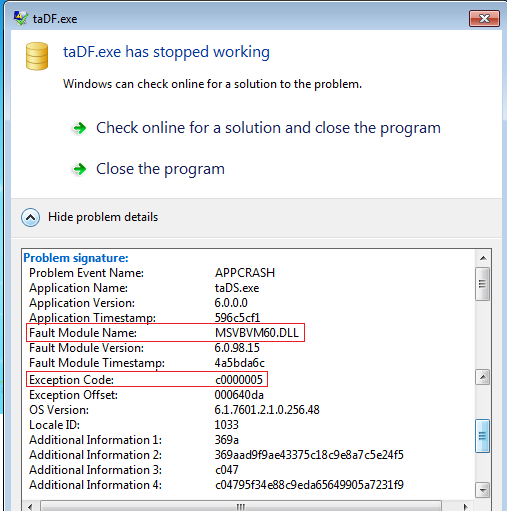
I have been trying to figure out this problem after I released an update to my app a few days ago. I am not sure whether this is related to the Std-EXE controls but because the error is caused by MSVBVM60.DLL on quite a few Win7 computers, I thought maybe I try to ask.
Before this, my previous release was Jan 2016 and I was using the then version of the controls. This is the only difference in components between then and now with some rework/update of of my own program codes. Is there anything in the controls that may sparodically caused MSVBVM60.DLL to trigger an Exception c0000005 which is a memory exception, probably DEP related.
I am just trying to isolate out and if my question is rude and irrelevant, pls excuse and pardon me.
Thanks for any input.
Last edited by chosk; Jul 19th, 2017 at 10:27 AM.
-
Jul 19th, 2017, 10:40 AM
#1518
Re: CommonControls (Replacement of the MS common controls)
Chosk, I can't help you without any additional background info. And as you say, you are not able to isolate the reason..
But such error is unknown to me in relation to my controls.
You need to provide more info when this happens.
-
Jul 19th, 2017, 10:46 AM
#1519
Junior Member
Re: CommonControls (Replacement of the MS common controls)
Originally Posted by chosk
I have been trying to figure out this problem after I released an update to my app a few days ago. I am not sure whether this is related to the Std-EXE controls ...
chosk, if you can reliably reproduce the problem on some PC, then I would try to substitute in the older version of VBCCR which you used and see if the problem is then resolved. (Ideally without changing anything else). That may rule VBCCR in or out as the cause..?
-
Jul 19th, 2017, 10:55 AM
#1520
Hyperactive Member
Re: CommonControls (Replacement of the MS common controls)
Thanks Krool and DaveInCaz.
I did not have the problem on my Win7 which I use to develop with the Jun 2017 controls. I tested the setup.exe and after that running the app on 2 other Win10 before release and also no problem. So I cannot even produce the problem on my computers.
There are quite a few who came back with this same problem so I narrow down to perhaps DEP related. My exe is 4196KB so is not big. I will dig more and see what I can get.
Thanks for the help.
 Posting Permissions
- You may not post new threads
- You may not post replies
- You may not post attachments
- You may not edit your posts
-
Forum Rules
|
Click Here to Expand Forum to Full Width
|



 Reply With Quote
