|

-
May 18th, 2017, 06:01 AM
#1
Thread Starter
New Member

Add-ins don't work (Excel)
Hello.
I got a problem with two add-ins on Microsoft Excel 2013 (32 bits).
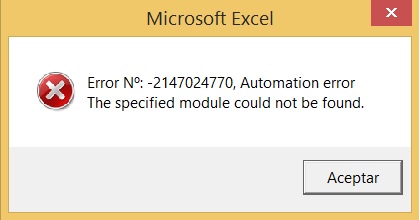
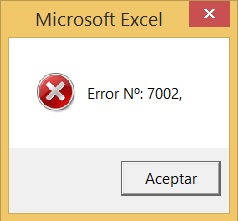
I receive the next messages when i try use them:
Add-in 1:
Add-in 2:
I know how to discover the add-in code (Visual Basic: Alt+11), but i'm not the programmer , so i can't understand the lines.
Can someone help me with this issue? I have no idea. Apparentely, the add-ins are in the right path.
-
May 18th, 2017, 06:48 AM
#2
Re: Add-ins don't work (Excel)
I know how to discover the add-in code (Visual Basic: Alt+11)
so if you posted the code here someone may be able to help
were these addins working previously? is what changed?
are they compiled or workbook addins?
i do my best to test code works before i post it, but sometimes am unable to do so for some reason, and usually say so if this is the case.
Note code snippets posted are just that and do not include error handling that is required in real world applications, but avoid On Error Resume Next
dim all variables as required as often i have done so elsewhere in my code but only posted the relevant part
come back and mark your original post as resolved if your problem is fixed 
pete
-
May 18th, 2017, 06:58 AM
#3
Thread Starter
New Member
Re: Add-ins don't work (Excel)
A days ago, add-ins worked, i dont know if some Office Update caused something.
Visual Basic show this structure (Add-in 1)
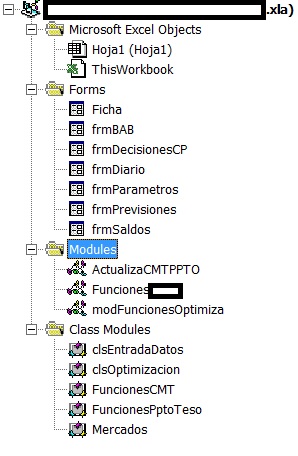
I don't know what part can be interesting to study the problem. I'm in a company, so i censored some name.
Thanks for the reply.
-
May 18th, 2017, 04:11 PM
#4
Re: Add-ins don't work (Excel)
I don't know what part can be interesting to study the problem.
the code where the error occurs might be more interesting
i do my best to test code works before i post it, but sometimes am unable to do so for some reason, and usually say so if this is the case.
Note code snippets posted are just that and do not include error handling that is required in real world applications, but avoid On Error Resume Next
dim all variables as required as often i have done so elsewhere in my code but only posted the relevant part
come back and mark your original post as resolved if your problem is fixed
pete
-
May 19th, 2017, 03:45 AM
#5
Thread Starter
New Member
Re: Add-ins don't work (Excel)
This is the code which load add -in 1:
Public Sub VentanaInicio()
Dim i As Long
Dim RutaIni As String
Dim UtilesComunes As ****UtilidadesComunes.Utilidades
Dim ObjUtiles As Object
On Local Error GoTo ControlError
Set UtilesComunes = New ****UtilidadesComunes.Utilidades
Set ObjUtiles = CreateObject("****_Util.utiles")
RutaIni = ObjUtiles.GetReg("HKEY_LOCAL_MACHINE\SOFTWARE\****\****_Tesoreria", "RutaAplicacion")
RutaBD = UtilesComunes.GetProfile(RutaIni & "\cmt.ini", "BaseDa******vidor", "RutaBDServer", "")
RutaBDTT = UtilesComunes.GetProfile(RutaIni & "\cmt.ini", "BDTAyATesoreria", "RutaBDTT", "")
InformeProceso = UtilesComunes.GetProfile(RutaIni & "\cmt.ini", "BaseDa******vidor", "InformeProceso", "")
Set ObjUtiles = Nothing
Load Ficha
Ficha.Show
Set UtilesComunes = Nothing
Exit Sub
ControlError:
MsgBox "Error Nº: " & Err.Number & ", " & Err.Description, vbCritical
End Sub
HKEY_LOCAL_MACHINE\SOFTWARE\****\****_Tesoreria doesn't exist.
MsgBox "Error Nº: " & Err.Number & ", " & Err.Description, vbCritical is the dialog which appears on the screen.
**** is a word which i prefer don't show on forums.
Last edited by colinz; May 19th, 2017 at 03:51 AM.
Tags for this Thread
 Posting Permissions
- You may not post new threads
- You may not post replies
- You may not post attachments
- You may not edit your posts
-
Forum Rules
|
Click Here to Expand Forum to Full Width
|



 Reply With Quote
