This is some older code of mine that I've just updated to work with vbRichClient5 and to support Serialization/Deserialization. It may even have some bug fixes over the last publicly available version since I think it was updated a bit over the years.
So I thought I would post it here for posterity: JPBDbFactory.zip
UPDATE February 20, 2017
Added JSON Serialization and Deserialization. This is a first pass, and I already think I will probably refactor bits, but it appears to be working as is. As usual, let me know if you run into any problems!
UPDATE February 6, 2017
Added preliminary support for Foreign Keys. Let me know if I've missed any use cases with my object model.
Currently you can add foreign keys to any table (including Deferrable FKs with optional ON DELETE and ON UPDATE declarations).
What Is This?
It is a collection of helper classes that let you easily define Tables, Fields, Indexes, and Foreign Keys in code, then create SQLite databases and connection objects in memory or on disk. For example:
Code:
   Dim lo_Db As JPBDbFactory.CDbFactory
   Dim lo_Table As JPBDbFactory.CDbTableDef
   Dim la_DbSerial() As Byte

   ' Create the main DB definition helper class
   Set lo_Db = New JPBDbFactory.CDbFactory

   ' Add a table
   Set lo_Table = lo_Db.TableDefinitions.Add("my_table")

   With lo_Table
      ' Add fields to the table
      .Fields.Add "field_1", vbInteger, True  ' Create a primary field
      .Fields.Add "field_2", vbString, , , fielddefault_CurrentDateAndTime   ' Add a field that defaults to the current date and time (UTC ISO 8601)
      .Fields.Add "field_3", vbString, , False, fielddefault_Literal, "NEW ITEM"   ' Add a field that defaults to the text "NEW ITEM" and does notdoes not allow NULL values

      ' Index a field on the table
      With .Indexes.Add("idx_my_table_field3")
         .Add lo_Table.Fields.Item("field_3"), fieldsortorder_Ascending
      End With
   End With

   ' Build the schema and save the DB to disk (overwriting any existing file)
   lo_Db.CreateFileDatabase App.Path & "\test.sqlite", , True
I've also included 3 optional "useful" fields with associated TRIGGERs that you can activate with Boolean properties - AutoRowGuid (this will generate a GUID for every newly created row), AutoCreatedDate (this will be set to the current UTC date and time in ISO8601 format on record INSERT), and AutoModifiedDate (this will be set to the current UTC data and time in ISO8601 format on INSERT and UPDATE). The field names for the above "auto" fields are jpbdbf_rowguid, jpbdbf_created, and jpbdbf_lastmodified repspectively (for use with your SELECT statements).
As per CarlosRocha's requirements in the thread linked above, the classes as now fully serializable/deserializable. Just call the Serialize method on the CDbFactory class to get a byte array for storing state, and call Deserialize on a new copy of the CDbFactory class passing the results of a previous Serialize call to restore the state.
The code should be fairly self-explanatory, but I'm happy to answer any questions about it here.
Last edited by jpbro; Feb 20th, 2017 at 12:03 PM.
Reason: Added JSON Serialization and Deserialization. Added FOREIGN KEY support
Hierarchy-Tree in a single table per self-referencing-FK-Fields in an adjacency-lists approach (in post #4)
The same Page (in post #13) contains another example with a variation of the above http://www.vbforums.com/showthread.p...=1#post4832843
Sure, but I create and use in some case temporary Access DB in the Temp Folder that I delete right after.
It is not a big Issue. But if speed on in memory SQLLite is faster, why not.
I will test when I'll have time
1.: 1 x DELETE FROM Tabelle1 (Closing connections):
- SQL Express local : 00:00:00.1723705
- SQL Express remote: 00:00:00.2093229
- SQL CE : 00:00:00.3141897
- MS Access : 00:00:00.3854029
- SQLite : 00:00:00.4639365
- VistaDB : 00:00:00.9699047
2.: 1 x INSERT INTO Tabelle1 (Name1, Wert1) VALUES ({LOOPCTR}, '{LOOPCTR}') (Closing connections):
- SQL Express local : 00:00:00.0039836
- SQL Express remote: 00:00:00.0062002
- SQL CE : 00:00:00.0432679
- MS Access : 00:00:00.0817834
- SQLite : 00:00:00.0933030
- VistaDB : 00:00:00.1200426
3.: 10 x INSERT INTO Tabelle1 (Name1, Wert1) VALUES ({LOOPCTR}, '{LOOPCTR}') (Closing connections):
- SQL Express local : 00:00:00.0031593
- SQL Express remote: 00:00:00.0142514
- SQL CE : 00:00:00.3724224
- MS Access : 00:00:00.7474003
- SQLite : 00:00:00.8818905
- VistaDB : 00:00:00.9342783
4.: 100 x INSERT INTO Tabelle1 (Name1, Wert1) VALUES ({LOOPCTR}, '{LOOPCTR}') (Closing connections):
- SQL Express local : 00:00:00.0242817
- SQL Express remote: 00:00:00.1124771
- SQL CE : 00:00:03.6239390
- MS Access : 00:00:07.3752378
- SQLite : 00:00:08.6489843
- VistaDB : 00:00:09.0933903
5.: 1000 x INSERT INTO Tabelle1 (Name1, Wert1) VALUES ({LOOPCTR}, '{LOOPCTR}') (Closing connections):
- SQL Express local : 00:00:00.2735537
- SQL Express remote: 00:00:01.2657006
- SQL CE : 00:00:36.2335727
- MS Access : 00:01:13.8782439
- SQLite : 00:01:27.1783328
- VistaDB : 00:01:32.0760340
6.: 1 x SELECT * FROM Tabelle1 (Closing connections):
- SQL Express local : 00:00:00.0520670
- SQL Express remote: 00:00:00.0570562
- SQL CE : 00:00:00.1026963
- MS Access : 00:00:00.1646635
- SQLite : 00:00:00.1785981
- VistaDB : 00:00:00.2311263
7.: 10 x SELECT * FROM Tabelle1 (Closing connections):
- SQL Express local : 00:00:00.0183055
- SQL Express remote: 00:00:00.0501115
- SQL CE : 00:00:00.3235680
- MS Access : 00:00:00.7119203
- SQLite : 00:00:00.7533361
- VistaDB : 00:00:00.9804508
8.: 100 x SELECT * FROM Tabelle1 (Closing connections):
- SQL Express local : 00:00:00.1787837
- SQL Express remote: 00:00:00.4321814
- SQL CE : 00:00:03.0401779
- MS Access : 00:00:06.8338598
- SQLite : 00:00:07.2000139
- VistaDB : 00:00:09.1889217
9.: 1000 x SELECT * FROM Tabelle1 (Closing connections):
- SQL Express local : 00:00:01.6112566
- SQL Express remote: 00:00:03.9542611
- SQL CE : 00:00:29.1209991
- MS Access : 00:01:07.2309769
- SQLite : 00:01:10.3167922
- VistaDB : 00:01:31.4312770
10.: 1 x SELECT a.* FROM Tabelle1 a LEFT JOIN Tabelle1 b ON a.ID=b.ID ORDER BY a.ID (Closing connections):
- SQL Express local : 00:00:00.0029406
- SQL Express remote: 00:00:00.0088138
- SQL CE : 00:00:00.0498847
- MS Access : 00:00:00.0893892
- SQLite : 00:00:00.0929506
- VistaDB : 00:00:00.2575795
11.: 10 x SELECT a.* FROM Tabelle1 a LEFT JOIN Tabelle1 b ON a.ID=b.ID ORDER BY a.ID (Closing connections):
- SQL Express local : 00:00:00.0174026
- SQL Express remote: 00:00:00.0400797
- SQL CE : 00:00:00.3408818
- MS Access : 00:00:00.7314978
- SQLite : 00:00:00.7653330
- VistaDB : 00:00:01.9565675
12.: 100 x SELECT a.* FROM Tabelle1 a LEFT JOIN Tabelle1 b ON a.ID=b.ID ORDER BY a.ID (Closing connections):
- SQL Express local : 00:00:00.1565402
- SQL Express remote: 00:00:00.3787208
- SQL CE : 00:00:03.3516629
- MS Access : 00:00:07.2521126
- SQLite : 00:00:07.5618047
- VistaDB : 00:00:19.5181391
13.: 1000 x SELECT a.* FROM Tabelle1 a LEFT JOIN Tabelle1 b ON a.ID=b.ID ORDER BY a.ID (Closing connections):
- SQL Express local : 00:00:01.5686470
- SQL Express remote: 00:00:03.7414669
- SQL CE : 00:00:35.3944204
- MS Access : 00:01:14.6872377
- SQLite : 00:01:17.9964955
- VistaDB : 00:03:18.1902279
14.: 1 x SELECT a.* FROM Tabelle1 a LEFT JOIN Tabelle1 b ON a.ID=b.ID WHERE a.ID < 100 OR a.ID > 300 ORDER BY a.ID (Closing connections):
- SQL Express local : 00:00:00.0053295
- SQL Express remote: 00:00:00.0089722
- SQL CE : 00:00:00.0395485
- MS Access : 00:00:00.0797776
- SQLite : 00:00:00.0833477
- VistaDB : 00:00:00.2554930
15.: 10 x SELECT a.* FROM Tabelle1 a LEFT JOIN Tabelle1 b ON a.ID=b.ID WHERE a.ID < 100 OR a.ID > 300 ORDER BY a.ID (Closing connections):
- SQL Express local : 00:00:00.0168467
- SQL Express remote: 00:00:00.0552233
- SQL CE : 00:00:00.3929877
- MS Access : 00:00:00.7886399
- SQLite : 00:00:00.8209904
- VistaDB : 00:00:02.1248734
16.: 100 x SELECT a.* FROM Tabelle1 a LEFT JOIN Tabelle1 b ON a.ID=b.ID WHERE a.ID < 100 OR a.ID > 300 ORDER BY a.ID (Closing connections):
- SQL Express local : 00:00:00.1705345
- SQL Express remote: 00:00:00.3969228
- SQL CE : 00:00:03.4886826
- MS Access : 00:00:07.4564258
- SQLite : 00:00:07.7828646
- VistaDB : 00:00:20.4092926
17.: 1000 x SELECT a.* FROM Tabelle1 a LEFT JOIN Tabelle1 b ON a.ID=b.ID WHERE a.ID < 100 OR a.ID > 300 ORDER BY a.ID (Closing connections):
- SQL Express local : 00:00:01.6237424
- SQL Express remote: 00:00:03.9816212
- SQL CE : 00:00:35.1441759
- MS Access : 00:01:14.7739758
- SQLite : 00:01:17.9477049
- VistaDB : 00:03:24.0049633
Then I'll use the occasion, and vote +1 for the introduction of ForeignKey-support...
I'll get right on it! Thanks for the useful links. I've read the SQLite documentation a few times now, and I think I have a good picture of what needs to be done, though I suspect in my first pass there will be some conditions I mess up. Fingers crossed
Just added foreign key support and updated the download link in the first post.
This is just a first pass at it, so I've probably missed something (or introduced bugs), so let me know if I've missed any use-cases with my model/approach.
Sadly, I had to break binary compatibility for the DLL if you've already built it
The serialization code is a bit ugly since it was possible that upon deserialization a foreign key table wouldn't have been deserialized yet, so I stored table and field names for serialization purposes, then call a friend function to convert those to objects after all deserialization is complete. Maybe there's a better way?
Very good material, thank you jpbro, thank you Olaf.
I would like to ask several questions:
(1) Json can instead of PropertyBag to implement VB6 object serialization?
(2) If so, is Json serialization smaller and faster than PropertyBag ?
(3) vbRichClient also provides serialization, can we use vbRichClient's serialization instead of VB6 PropertyBag to serialize vb6 object (class) , including ADO RecordSet ?
Last edited by dreammanor; Feb 7th, 2017 at 06:32 AM.
Very good material, thank you jpbro, thank you Olaf.
You are very welcome
Originally Posted by dreammanor
(1) Json can instead of PropertyBag to implement VB6 object serialization?
I don't see why we couldn't - I don't mind doing this if there's a need, though I'm not sure there is. Perhaps you could explain why you'd prefer JSON to the binary PB format?
Originally Posted by dreammanor
(2) If so, is Json serialization smaller and faster than PropertyBag
I'm not sure, I would have to profile them side-by-side. Since Json works with strings, I would *expect* it to be a bit larger and slower, but I'm not sure. I don't have a lot of experience with Json serialization, though I see that vbRichClient5 has some Json support, so it might be worth doing just to get familiar with those classes.
Originally Posted by dreammanor
(3) vbRichClient also provides serialization, can we use vbRichClient's serialization instead of VB6 PropertyBag to serialize vb6 object (class)...
Since the classes are all persistable, you should be able to ship the CDbFactory object over vbRichClient5 RPC channels and it will handle the serialization/deserialization. I'll try to put together a small demo for this.
Originally Posted by dreammanor
...including ADO RecordSet?
This project doesn't deal with recordsets in any way - the goal of the project is to make it possible to define SQLite database schemas using VB6 code as opposed to SQL. But you can ship vbRC5 CRecordset classes back and forth across RC5 RPC channels already.
Sure, but I create and use in some case temporary Access DB in the Temp Folder that I delete right after.
It is not a big Issue. But if speed on in memory SQLLite is faster, why not.
I will test when I'll have time
I did a quick test of 100000 INSERTS against an RC5 Sqlite in-memory DB vs. an ADO connected MDB on disk and got dramatically better results from RC5/SQLite. About 1 second for RC5/SQLite and 28 seconds for ADO/MDB using this code:
Code:
Sub Test()
   Dim lo_CnnAdo As ADODB.Connection   ' ADO/MDB Connection
   Dim lo_Cnn5 As vbRichClient5.cConnection  ' RC5/SQLite Connection

   Dim tt As Double
   Dim ii As Long

   ' Create RC5/SQLite in-memory DB
   Set lo_Cnn5 = New_c.Connection(":memory:", DBCreateInMemory)
   ' Create a test table
   lo_Cnn5.Execute "CREATE TABLE test (name1 INTEGER, name2 TEXT)"

   ' Test 100000 INSERTS
   tt = New_c.HPTimer

   For ii = 1 To 100000
      lo_Cnn5.Execute "INSERT INTO test (name1, name2) VALUES (" & ii & ", '" & ii & "')"
   Next ii

   MsgBox New_c.HPTimer - tt

   ' Use on-disk ADO MDB connection
   Set lo_CnnAdo = New ADODB.Connection
   ' Make a copy of a blank DB
   If New_c.FSO.FileExists("C:\db2.mdb") Then New_c.FSO.DeleteFile "C:\db2.mdb"
   FileCopy "C:\db1.mdb", "c:\db2.mdb"
   ' Connect and create a test table
   lo_CnnAdo.Open "Provider=Microsoft.Jet.OLEDB.4.0;Data Source=C:\db2.mdb;Persist Security Info=False;"
   lo_CnnAdo.Execute "CREATE TABLE test (name1 INTEGER, name2 TEXT)"

   ' Test 100000 INSERTS
   tt = New_c.HPTimer

   For ii = 1 To 100000
      lo_CnnAdo.Execute "INSERT INTO test (name1, name2) VALUES (" & ii & ", '" & ii & "')"
   Next ii

   MsgBox New_c.HPTimer - tt
End Sub
Why did you quote only the figures from the totally bogus test cases posted there? It is insane to re-open and close the database for every operation your program performs on it.
The reasonable test cases tell a very different story.
You either don't understand or you are trying to hoodwink people. Which is it?
1.: 1 x DELETE FROM Tabelle1 (keeping connection open):
- SQL Express local : 00:00:00.0426930
- SQL Express remote: 00:00:00.0546357
- SQL CE : 00:00:00.0786765
- MS Access : 00:00:00.0909099
- SQLite : 00:00:00.1101572
- VistaDB : 00:00:00.4637726
2.: 1 x INSERT INTO Tabelle1 (Name1, Wert1) VALUES ({LOOPCTR}, '{LOOPCTR}') (keeping connection open):
- SQL Express local : 00:00:00.0030936
- SQL Express remote: 00:00:00.0051136
- SQL CE : 00:00:00.0054226
- MS Access : 00:00:00.0074847
- SQLite : 00:00:00.0154474
- VistaDB : 00:00:00.0373701
3.: 10 x INSERT INTO Tabelle1 (Name1, Wert1) VALUES ({LOOPCTR}, '{LOOPCTR}') (keeping connection open):
- SQL Express local : 00:00:00.0023271
- SQL Express remote: 00:00:00.0109913
- SQL CE : 00:00:00.0119872
- MS Access : 00:00:00.0152531
- SQLite : 00:00:00.1131698
- VistaDB : 00:00:00.1261859
4.: 100 x INSERT INTO Tabelle1 (Name1, Wert1) VALUES ({LOOPCTR}, '{LOOPCTR}') (keeping connection open):
- SQL Express local : 00:00:00.0201695
- SQL Express remote: 00:00:00.0888872
- SQL CE : 00:00:00.0966017
- MS Access : 00:00:00.1256167
- SQLite : 00:00:01.3632978
- VistaDB : 00:00:01.9422151
5.: 1000 x INSERT INTO Tabelle1 (Name1, Wert1) VALUES ({LOOPCTR}, '{LOOPCTR}') (keeping connection open):
- SQL Express local : 00:00:00.1693362
- SQL Express remote: 00:00:00.9181297
- SQL CE : 00:00:01.0366334
- MS Access : 00:00:01.2794199
- SQLite : 00:00:13.9398816
- VistaDB : 00:00:19.8319476
6.: 1 x SELECT * FROM Tabelle1 (keeping connection open):
- SQL Express local : 00:00:00.0481500
- SQL Express remote: 00:00:00.0507066
- SQL CE : 00:00:00.0738698
- MS Access : 00:00:00.0911707
- SQLite : 00:00:00.1012425
- VistaDB : 00:00:00.1515495
7.: 10 x SELECT * FROM Tabelle1 (keeping connection open):
- SQL Express local : 00:00:00.0157947
- SQL Express remote: 00:00:00.0692206
- SQL CE : 00:00:00.0898558
- MS Access : 00:00:00.1196514
- SQLite : 00:00:00.1400944
- VistaDB : 00:00:00.3227485
8.: 100 x SELECT * FROM Tabelle1 (keeping connection open):
- SQL Express local : 00:00:00.1517498
- SQL Express remote: 00:00:00.3399897
- SQL CE : 00:00:00.5497382
- MS Access : 00:00:00.8619646
- SQLite : 00:00:01.0463369
- VistaDB : 00:00:02.8607334
9.: 1000 x SELECT * FROM Tabelle1 (keeping connection open):
- SQL Express local : 00:00:01.5042900
- SQL Express remote: 00:00:03.8431985
- SQL CE : 00:00:05.9075477
- MS Access : 00:00:09.2642402
- SQLite : 00:00:11.4427914
- VistaDB : 00:00:30.8470936
10.: 1 x SELECT a.* FROM Tabelle1 a LEFT JOIN Tabelle1 b ON a.ID=b.ID ORDER BY a.ID (keeping connection open):
- SQL Express local : 00:00:00.0033803
- SQL Express remote: 00:00:00.0062499
- SQL CE : 00:00:00.0141105
- MS Access : 00:00:00.0188573
- SQLite : 00:00:00.0208236
- VistaDB : 00:00:00.1796513
11.: 10 x SELECT a.* FROM Tabelle1 a LEFT JOIN Tabelle1 b ON a.ID=b.ID ORDER BY a.ID (keeping connection open):
- SQL Express local : 00:00:00.0168644
- SQL Express remote: 00:00:00.0377185
- SQL CE : 00:00:00.1121558
- MS Access : 00:00:00.1599104
- SQLite : 00:00:00.1799435
- VistaDB : 00:00:01.4042534
12.: 100 x SELECT a.* FROM Tabelle1 a LEFT JOIN Tabelle1 b ON a.ID=b.ID ORDER BY a.ID (keeping connection open):
- SQL Express local : 00:00:00.1547275
- SQL Express remote: 00:00:00.3692526
- SQL CE : 00:00:01.1215470
- MS Access : 00:00:01.5577172
- SQLite : 00:00:01.7519790
- VistaDB : 00:00:14.5687575
13.: 1000 x SELECT a.* FROM Tabelle1 a LEFT JOIN Tabelle1 b ON a.ID=b.ID ORDER BY a.ID (keeping connection open):
- SQL Express local : 00:00:01.4992800
- SQL Express remote: 00:00:03.7601806
- SQL CE : 00:00:11.1738426
- MS Access : 00:00:15.8112902
- SQLite : 00:00:17.8045042
- VistaDB : 00:02:21.4492368
14.: 1 x SELECT a.* FROM Tabelle1 a LEFT JOIN Tabelle1 b ON a.ID=b.ID WHERE a.ID < 100 OR a.ID > 300 ORDER BY a.ID (keeping connection open):
- SQL Express local : 00:00:00.0048145
- SQL Express remote: 00:00:00.0076790
- SQL CE : 00:00:00.0152074
- MS Access : 00:00:00.0204568
- SQLite : 00:00:00.0229056
- VistaDB : 00:00:00.2091614
15.: 10 x SELECT a.* FROM Tabelle1 a LEFT JOIN Tabelle1 b ON a.ID=b.ID WHERE a.ID < 100 OR a.ID > 300 ORDER BY a.ID (keeping connection open):
- SQL Express local : 00:00:00.0156564
- SQL Express remote: 00:00:00.0377571
- SQL CE : 00:00:00.1138433
- MS Access : 00:00:00.1598932
- SQLite : 00:00:00.1793267
- VistaDB : 00:00:01.4667061
16.: 100 x SELECT a.* FROM Tabelle1 a LEFT JOIN Tabelle1 b ON a.ID=b.ID WHERE a.ID < 100 OR a.ID > 300 ORDER BY a.ID (keeping connection open):
- SQL Express local : 00:00:00.1512625
- SQL Express remote: 00:00:00.4658652
- SQL CE : 00:00:01.2441809
- MS Access : 00:00:01.7224126
- SQLite : 00:00:01.9297231
- VistaDB : 00:00:14.9351318
17.: 1000 x SELECT a.* FROM Tabelle1 a LEFT JOIN Tabelle1 b ON a.ID=b.ID WHERE a.ID < 100 OR a.ID > 300 ORDER BY a.ID (keeping connection open):
- SQL Express local : 00:00:01.5223833
- SQL Express remote: 00:00:03.9885174
- SQL CE : 00:00:11.8356048
- MS Access : 00:00:16.5977939
- SQLite : 00:00:18.6504260
- VistaDB : 00:02:26.0513056
dilettante, it is not my test, but just a result of a research on the net.
And as I am looking to upgrade the Access DB to another one, I do some search.
But not so easy as maintenance/upgrade schema on an Access is easier than in other databases (for multiple clients sites)
dilettante, it is not my test, but just a result of a research on the net.
And as I am looking to upgrade the Access DB to another one, I do some search.
SQLite is an ideal replacement for ADO/JET - because it's still a "Single-File-DesktopDB-Engine"
(easy to deploy - or copy from one place to another) - though with much better performance -
and a lot more useful features.
But not so easy as maintenance/upgrade schema on an Access is easier than in other databases (for multiple clients sites)
There 's a larger list of good "SQLite-Manager"-Tools out there, which allow you to
define your SQLite-Schemas quite comfortably - just google for it - maybe Carlos or jpbro
can give recommendations on what they use in this regard...
As for performance, the tests you linked to aren't really good examples -
why not check-out *concrete* VB6-based ones, like the one for
"bulk-inserts per Command-Objects" I've prepared here: SQLitePerfComp.zip
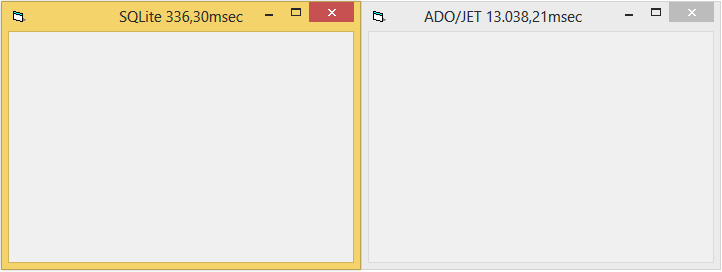
The result is this one (for 100000 Inserts into a real FileDB, on a "6-Columns-mixed-Types"-Table):
So with Bulk-Inserts (using proper Command-Objects instead of "Insert-String-Concats"),
SQLite achieves 300000 Inserts per second - whereas ADO/JET achieves only 7700/sec
(a performance difference of about factor 40).
There 's a larger list of good "SQLite-Manager"-Tools out there, which allow you to
define your SQLite-Schemas quite comfortably - just google for it - maybe Carlos or jpbro
can give recommendations on what they use in this regard...
I can't post links, but a simple google "sqlite tool" will give lots of options. The one I use is Sqlite Expert
There 's a larger list of good "SQLite-Manager"-Tools out there, which allow you to
define your SQLite-Schemas quite comfortably - just google for it - maybe Carlos or jpbro
can give recommendations on what they use in this regard...
Olaf
I use SQLiteStudio which is free. Can't say whether it's the "best-in-class" but it does all I need it to do and, like I say, it's free...
If you don't know where you're going, any road will take you there...
My schemas are pretty simple, but I actually use the code presented in the first post of this thread for creating them (actually an older version of the code above).
For spelunking tables and recordsets, I actually use the SQLite Manager addon for Firefox...it isn't great, but it is within a few keystrokes of the browser I spend much of time using
I don't see why we couldn't - I don't mind doing this if there's a need, though I'm not sure there is. Perhaps you could explain why you'd prefer JSON to the binary PB format?
Sorry for the late reply. Today, most software is universal software, which includes both PC-Desktop, Web and Mobile-client. These three different software generally use XML and JSON to pass the data to each other. Compared to the bloat of XML, I prefer Json. So I am concerned about Json and serialization.
Last edited by dreammanor; Feb 13th, 2017 at 07:46 PM.
I don't mind adding JSON serialization, but I'm not sure how useful it will be re: universal software, as there is nothing universal about the purpose of my code - it is just a way to define schemas and generate empty SQLite databases using VB6 with the vbRichClient5 library. I don't think there is any other software out there that would consume the JSON output by my program and know what to do with it (though I guess you could write your own programs on other platforms to consume and process the JSON and generate SQLite databases - is this what you are after?).
I have been working on local database application development for many years, but I have no experience on Web development.
Three months later, I will develop a simple Web application - Cloud User Management(User Management System based on the cloud database). Server side: cloud database (SQLServer or MySQL), Client side: PC desktop, Web App and Mobile App. So
Someone suggested I use C# + WebAPI + Json architecture, but I want to use VB6 to develop most of this application (server side, PC desktop and web part). Using VB6 to develop Web applications is a huge challenge for me.
This greatly enhanced my confidence, and I think VB6 + vbRichClient + Json should be a good solution. I hope my VB6 programs can exchange data with Mobile-App and Web-App (WebServer) using Json as a common data format.
I will compare these two solutions carefully(compare C # + WebAPI + Json with VB6 + vbRichClient + Json). So I've been searching the information related to the WebAPI, vbRichClient, and Json for several months.
I will send a new thread to discuss these solutions, hope to get you more help in the new thread, thanks very much.
Hi @dreammanor - I've added JSON serialization and deserialization via the SerializeJson and DeserializeJson methods. I've updated the attachment in the first post with the new code. Let me know if you find any bugs.
Unfortunately binary compatibility was broken again
Thank you very much, Jpbro. I've downloaded the JPBDbFactory. I need to take some time to learn it, and then I will write a test program and report the results to you.



 Reply With Quote
 Originally Posted by jpbro