|

-
Aug 3rd, 2008, 08:53 AM
#1
Thread Starter
Addicted Member

Clipboard Extender
Please find attached a complete working Clipboard Extender Application in 100% pure VB.
Please refer to the Manual for more details.
Last edited by Shaggy Hiker; Mar 28th, 2017 at 04:12 PM.
Reason: Removed attachment.
-
Feb 4th, 2017, 11:21 PM
#2
Re: Clipboard Extender
Probably many of you are not checking this out, since you cannot get enough info about the program to see if it interests you ?
If no one objects, I will paste the overview/details from the manual (which is in the download) -
Y-Clips
Windows Clipboard Extender
Overview
By default Windows Clipboard will store only one single item. If you want Windows Clipboard to store multiple items, capture a series of items or save items for later use then you need
Y-Clips.
Y-Clips enhances the native clipboard functionality by remembering all items (both text and graphic) that are copied to the clipboard and storing them in a collection for later pasting... even after you shut off your computer. With Y-Clips custom load and save option you have an unlimited amount of clips available to you with just a couple mouse clicks. With Y-Clips as a Windows companion, you'll never accidentally lose a piece of clipboard data again.
Features
Auto Pasting
With Y-Clips you can work in virtually any Windows program while Y-Clips sits in your windows system tray... capturing all data that is copied to the Windows Clipboard.
When you need to access those clips a simple press of a HotKey and a click on the desired clip will automatically paste your selected clips directly into that program. No more copying to the clipboard and then switching back to your program window and then paste. This feature works with most any Windows program that uses text and graphics.
Screen Captures
Y-Clips comes with a Screen Capture tool. Press the Capture Hot Key or the Screen Capture button and you will be able to capture any part of screen and the result will be saved as a clips. The Screen Capture utility also features a magnified window for precision screen captures.
Viewing and Editing Clips
You can immediately view and edit all text clips captured by Y-Clips just by left clicking the thumbnail clip or right clicking on the list item and choose Open from the pop-up menu.
Capture Color Code
Y-Clips also includes a color code (number) (RGB, long and hex) capturing tool. Press the Color Hot Key or Color Pick button and choose any color on your screen with an eyedropper and the color number will be saved as a clip.
Software Requirement
This program requires Windows NT, 2000, XP or Vista (not tested as on date as I don't have one) operating systems.
Y-Clip will store all Clipboard captures into the same folder where it is installed so please install it in such a folder which does not have any restrictions.
Quick Start
When you start Y-Clips for the first time the main window, similar to that pictured below, will appear on your screen. The first time means that you have no clips in your collection so the list and thumbnail areas will be empty. As you start to copy data the clips will appear in the Y-Clip List and in the Thumbnail Window.
View Panel Toggle
Extra Features
Options
Clip List
Clip Content View
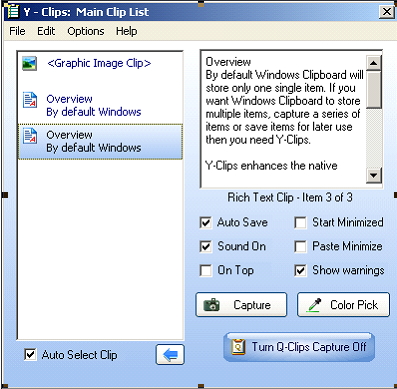
Auto Select/Hover Option
Almost everything is self explanatory. Yet let me try and explain two of the most important options briefly.
View Panel Toggle : Will show or hide Clip View Panel.
Auto Select/Hover Option : When checked will automatically select the Clip on which Mouse hovers. When this check box is checked Left Mouse click on any Clip will copy it to the Windows Clipboard. If Y-Clips is called by shortcut key (which is Ctrl+Win+Y by default) Left Mouse Click will copy the content to Windows Clipboard and also paste in active Application.

You can save and load a collection of clips to files if required by using Open Custom Clip List and Save Custom Clip List As menu commands.
Y-Clips HotKey
The Y-Clip HotKey is a Windows system wide hotkey. That means you can press the HotKey while working in virtually any Windows program and Y-Clips will open, ready to paste any desired clip. The HotKey serves two purposes.
1) It will restore and show the Y-Clips Window from the system tray or bring it to the foreground if it's already displayed in the background.
2) If you are working in any Windows program when you press the HotKey it tells Y-Clips what program you are in and can quickly paste any desired clip directly into that program with a single mouse left-click.
Setting the HotKey
The default HotKey for Y-Clips has been preset as Ctrl+Win+Y keys. For the Screen Capture the HotKey is the Win+F11 function key and for Color Capture the HotKey is the F12 function key. You can change the HotKey's any time from Options Menu. The HotKey dialogbox is self explanatory.
Rob
PS To hide the Form, just single left click the SysTray (Notification Area) icon.
Do the same to show the Form
Last edited by Bobbles; Feb 4th, 2017 at 11:31 PM.
Reason: Additional tidbit of info
-
Feb 5th, 2017, 02:19 AM
#3
Re: Clipboard Extender
Hi Bobbles,
I must confess that I haven't looked at this program. However, there's always one question I have when I see these:
The built-in clipboard has the ability to store information in many different formats. For instance, anytime we do Ctrl-C from something like Word, we're possibly creating an ANSI version, an RTF version, an XML version, and possibly others, all simultaneously in the clipboard. That's partly why you see the "Paste Special" option in many programs, so you can select which format to paste.
The same ideas hold for many other things, such as images, or matrices (think Excel or SPSS or flexgrid), or nested objects (such as what might be copied from a PowerPoint slide).
In addition, some programs create their own clipboard formats which only work for copy-pasting around in different areas of that program.
Okay, back to this program. If it just hangs onto text and images, it's not going to be much use to me. However, if it somehow makes binary copies of all the different formats for a single entry, and then possibly puts them back into the clipboard, then that's pretty cool. However, I've never seen anyone truly do that in a universal way.
Please let me know what you think.
Regards,
Elroy
EDIT1: As a simple test, possibly select a few controls on a form in the VB6 IDE, copy them, and then save them with this program. And then see if it can later retrieve those controls for pasting after the clipboard has been used for other purposes.
Last edited by Elroy; Feb 5th, 2017 at 02:23 AM.
Any software I post in these forums written by me is provided "AS IS" without warranty of any kind, expressed or implied, and permission is hereby granted, free of charge and without restriction, to any person obtaining a copy. To all, peace and happiness.
-
Feb 5th, 2017, 06:57 PM
#4
Re: Clipboard Extender
 Originally Posted by Elroy

Hi Bobbles,
EDIT1: As a simple test, possibly select a few controls on a form in the VB6 IDE, copy them, and then save them with this program. And then see if it can later retrieve those controls for pasting after the clipboard has been used for other purposes.
You're right it is not that sophisticated.
I will persevere with it for a while, to see what it can do for me.
If PicPick did not exist (or was not free), I would be finding uses for it's ability to grab/store image regions (and you can choose BMP or JPG)
Regards,
Rob
-
Feb 5th, 2017, 07:57 PM
#5
Re: Clipboard Extender
Yeah, many think that the clipboard is a fairly simple thing, but that's actually very far from the truth. When you start thinking about it, it's actually rather amazing that it does some of the things it does.
One thing that's pretty cool is that it works hard to find a common format when copying-pasting between two entirely different programs. And just to be able to handle all the different formats, and to also have them nested to any level you like, is rather amazing. Just think; you can take a VB6 form maybe with frames and pictureboxes on it that also have controls (nested to any level you want), and then draw a carat-box around them to select them, and then Ctrl-C, and voila, they're all in the clipboard, all organized just as they should be.
Also, certainly copies to the clipboard can be quite memory intensive.
I've messed around a bit with clipboard-stack type programs in the past, but always given up when I realized how difficult it would be to make a truly universal clipboard-stack program. Also, it'd almost certainly require some kind of disk-cache so that it didn't overflow memory. Ideally, you could set limits as to how much it'd store in memory versus flush it to disk-cache. It all just winds up being a monumental undertaking.
Also, just as an FYI, VB6's access/use of the clipboard (via its clipboard object) is fairly primitive considering all that the clipboard actually does.
Best Regards,
Elroy
Any software I post in these forums written by me is provided "AS IS" without warranty of any kind, expressed or implied, and permission is hereby granted, free of charge and without restriction, to any person obtaining a copy. To all, peace and happiness.
-
Feb 6th, 2017, 12:20 AM
#6
Thread Starter
Addicted Member
Re: Clipboard Extender
Originally Posted by Elroy
Okay, back to this program. If it just hangs onto text and images, it's not going to be much use to me. However, if it somehow makes binary copies of all the different formats for a single entry, and then possibly puts them back into the clipboard, then that's pretty cool. However, I've never seen anyone truly do that in a universal way.
As the source is provided why not add missing features to it as per your expertise and requirements/demand and let the community benefit from it...!!!
Regards,
Yogi Yang
-
Feb 6th, 2017, 12:49 PM
#7
Re: Clipboard Extender
Hi Yogi Yang. 
Please don't think that I was disparaging your work. That was not my intent at all. Seeing your post, I was motivated to download your post and take a look at it. It's clear that you've put a great deal of effort into it.
I'm simply pointing out that these clipboard projects are often a much bigger deal than many give them credit for.
Who knows, maybe someday I will revisit this area of VB6 programming.
You Take Care,
Elroy
Any software I post in these forums written by me is provided "AS IS" without warranty of any kind, expressed or implied, and permission is hereby granted, free of charge and without restriction, to any person obtaining a copy. To all, peace and happiness.
-
Mar 23rd, 2017, 09:42 PM
#8
Re: Clipboard Extender
Originally Posted by Elroy
Yeah, many think that the clipboard is a fairly simple thing, but that's actually very far from the truth. When you start thinking about it, it's actually rather amazing that it does some of the things it does.
One thing that's pretty cool is that it works hard to find a common format when copying-pasting between two entirely different programs. And just to be able to handle all the different formats, and to also have them nested to any level you like, is rather amazing. Just think; you can take a VB6 form maybe with frames and pictureboxes on it that also have controls (nested to any level you want), and then draw a carat-box around them to select them, and then Ctrl-C, and voila, they're all in the clipboard, all organized just as they should be.
Also, certainly copies to the clipboard can be quite memory intensive.
I've messed around a bit with clipboard-stack type programs in the past, but always given up when I realized how difficult it would be to make a truly universal clipboard-stack program. Also, it'd almost certainly require some kind of disk-cache so that it didn't overflow memory. Ideally, you could set limits as to how much it'd store in memory versus flush it to disk-cache. It all just winds up being a monumental undertaking.
Also, just as an FYI, VB6's access/use of the clipboard (via its clipboard object) is fairly primitive considering all that the clipboard actually does.
Best Regards,
Elroy
I totally agree with you. It will take a lot of time to fully understand the Windows clipboard.
-
Mar 28th, 2017, 03:56 PM
#9
Re: Clipboard Extender
This code appears to be a blatant copy of the project "Q-Clips" from planet-source-code:
http://planet-source-code.com/vb/scr...69399&lngWId=1
The PSC project includes copyright information that has been suspiciously scrubbed from this version, and it also includes a PDF manual (with additional copyright data) that has also been removed from this version.
Note that the copyright on the original PSC version is "Copyright 2006-2007 Tom Moran", which predates this forum post by at least a year.
Please let me know if I've missed something...?
-
Mar 28th, 2017, 04:14 PM
#10
Re: Clipboard Extender
The code is clearly copied and the original was clearly copyrighted. The only changes appeared to be those necessary to cover the theft of the code. If you want to see it, the link is in the post by Tanner_H, where you will get the code plus the change notes that were deleted from the copy.
My usual boring signature: Nothing
 
 Posting Permissions
- You may not post new threads
- You may not post replies
- You may not post attachments
- You may not edit your posts
-
Forum Rules
|
Click Here to Expand Forum to Full Width
|



