|

-
Jan 23rd, 2017, 08:50 AM
#1
 [RESOLVED] [NOT - RESOLVED] View images in the debugger [RESOLVED] [NOT - RESOLVED] View images in the debugger
Hey all,
Does anyone know if there is a way to view images directly from the debugger in VS2013 while stopped at a break point? I am looking for something that would be analogous to the DataSet Visualizer for viewing a data table except for an image. If not could this be created as an add on?
Thanks kevin
Last edited by kebo; Oct 2nd, 2017 at 09:56 AM.
Process control doesn't give you good quality, it gives you consistent quality.
Good quality comes from consistently doing the right things.
Vague general questions have vague general answers. A $100 donation is required for me to help you if you PM me asking for help. Instructions for donating to one of our local charities will be provided.
______________________________ Last edited by kebo : Now. Reason: superfluous typo's
-
Jan 23rd, 2017, 01:05 PM
#2
Re: View images in the debugger
-
Jan 23rd, 2017, 07:00 PM
#3
Re: View images in the debugger
Besides topshot's recommendations, it's not hard to code your own DebuggerVisualizer for images. This has the advantage that you can customize it however you like. Here's a VB.Net version based on the CodeProject article by Tomer Noy. It dates from VS2005 but it works fine in VS2013 and I'm sure it still will in VS2015/7.
To make and install it:
1. Start a ClassLibary project.
2. Add the following project references:
Code:
Microsoft.VisualStudio.DebuggerVisualizers
System.Drawing
System.Windows.Forms
3. Code a Class as follows:
vb.net Code:
Imports Microsoft.VisualStudio.DebuggerVisualizers Imports System.Windows.Forms Imports System.Drawing <Assembly: System.Diagnostics.DebuggerVisualizer(GetType(ImageVisualizer.DebuggerSide), GetType(VisualizerObjectSource), Target:=GetType(System.Drawing.Image), Description:="Image Visualizer")> Namespace ImageVisualizer Public Class DebuggerSide Inherits DialogDebuggerVisualizer Protected Overrides Sub Show(windowService As IDialogVisualizerService, objectProvider As IVisualizerObjectProvider) Dim image As Image = DirectCast(objectProvider.GetObject(), Image) Dim form As New Form With {.Text = image.Size.ToString, .AutoSize = True, .FormBorderStyle = FormBorderStyle.FixedToolWindow} Dim pictureBox As New PictureBox With {.Image = image, .Parent = form, .Dock = DockStyle.Fill} windowService.ShowDialog(form) End Sub End Class End Namespace
4. Build the solution.
5. In File Explorer, find the compiled ImageVisualizer.dll in the project's bin\Debug folder and copy it into the installed Visual Studio Common7/Packages/Debugger/Visualizers folder.
Restart Visual Studio and, hey presto, you have a debugger visualizer for images!
BB
-
Jan 23rd, 2017, 08:11 PM
#4
Re: View images in the debugger
hey presto, you have a debugger visualizer for images!
Now that what I'm talking about. I should have made this post years ago. Thanks a ton BB.
BTW, the dll can also be put in the My Documents\ VisualStudioVersion \Visualizers folder as well.
Process control doesn't give you good quality, it gives you consistent quality.
Good quality comes from consistently doing the right things.
Vague general questions have vague general answers. A $100 donation is required for me to help you if you PM me asking for help. Instructions for donating to one of our local charities will be provided.
______________________________ Last edited by kebo : Now. Reason: superfluous typo's
-
Oct 2nd, 2017, 09:32 AM
#5
Re: [RESOLVED] View images in the debugger
I've rolled up to VS2017, and my visualizer broke with the following message,
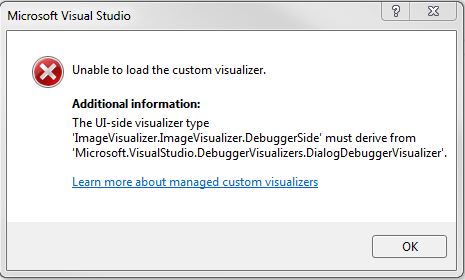 . .
It was working, and still does work in VS2013.
I've tried rebuilding the visualizer in VS2017, but to no avail. This is the code, which as you can see inherits from DialogDebuggerVisualizer.
vb.net Code:
Imports Microsoft.VisualStudio.DebuggerVisualizers ' < -- import the namespace
Imports System.Windows.Forms
Imports System.Drawing
 <Assembly: System.Diagnostics.DebuggerVisualizer(GetType(ImageVisualizer.DebuggerSide), GetType(VisualizerObjectSource), Target:=GetType(System.Drawing.Image), Description:="Image Visualizer")>
Namespace ImageVisualizer
    Public Class DebuggerSide
        Inherits DialogDebuggerVisualizer ' < - inherit the Visualizer
        Protected Overrides Sub Show(windowService As IDialogVisualizerService, objectProvider As IVisualizerObjectProvider)
            Dim image As Image = DirectCast(objectProvider.GetObject(), Image)
            Dim form As New Form With {.Text = image.Size.ToString, .AutoSize = True}
            Dim pictureBox As New PictureBox With {.BackgroundImage = image, .Parent = form, .BackgroundImageLayout = ImageLayout.Zoom, .Dock = DockStyle.Fill}
             Try
                windowService.ShowDialog(form)
            Catch ex As Exception
                MessageBox.Show(String.Format("{0}{1}{1}{2}", ex.Message, Environment.NewLine, ex.ToString))
            End Try
         End Sub
    End Class
End Namespace
Not sure whats going on here.Has anyone seen this with their visualizers, or is there something special I need to do for VS2017
Process control doesn't give you good quality, it gives you consistent quality.
Good quality comes from consistently doing the right things.
Vague general questions have vague general answers. A $100 donation is required for me to help you if you PM me asking for help. Instructions for donating to one of our local charities will be provided.
______________________________ Last edited by kebo : Now. Reason: superfluous typo's
-
Oct 2nd, 2017, 01:04 PM
#6
Re: [RESOLVED] View images in the debugger
That's strange because the class clearly does inherit from the correctly named class. I don't have VS2017 installed to try it out, but I wonder if you are referencing an outdated version of Microsoft.VisualStudio.DebuggerVisualizer? I notice that there's a version 12 as well as a version 10.
BB
-
Oct 2nd, 2017, 02:01 PM
#7
Re: [NOT - RESOLVED] View images in the debugger
Well you were certainly on the right track. To get it to work in VS2017, I had to build the visualizer in VS2017 with DebuggerVisualizer version 15.
Thanks for the input. My world is right once again.
Process control doesn't give you good quality, it gives you consistent quality.
Good quality comes from consistently doing the right things.
Vague general questions have vague general answers. A $100 donation is required for me to help you if you PM me asking for help. Instructions for donating to one of our local charities will be provided.
______________________________ Last edited by kebo : Now. Reason: superfluous typo's
 Posting Permissions
- You may not post new threads
- You may not post replies
- You may not post attachments
- You may not edit your posts
-
Forum Rules
|
Click Here to Expand Forum to Full Width
|



 Reply With Quote