|

-
Jan 18th, 2017, 11:48 AM
#1
 [RESOLVED] Can't post a link [RESOLVED] Can't post a link
Every time I try to post a link in a thread (either as a new thread or a reply) I get the following message....
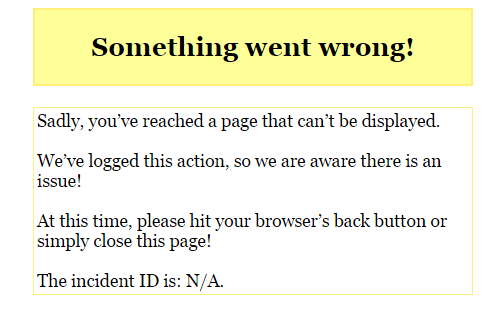
After that I lose all of my thread reply.
Any idea why, or how to fix it?
thanks
kevin
Process control doesn't give you good quality, it gives you consistent quality.
Good quality comes from consistently doing the right things.
Vague general questions have vague general answers. A $100 donation is required for me to help you if you PM me asking for help. Instructions for donating to one of our local charities will be provided.
______________________________ Last edited by kebo : Now. Reason: superfluous typo's
-
Jan 18th, 2017, 11:57 AM
#2
Re: Can't post a link
We'd need to see what you are posting..... Try to post it here. Something in the thread is tripping the server filters. Is there a code listing in the text? Try posting without the link. That will tell you if it is the link or the rest of the post tripping the issue.
If none of that works, then email the text you are trying to post to submit@codeguru and say it is from VBForums and tripping the SWW issue.
Brad!
-
Jan 18th, 2017, 12:04 PM
#3
Re: Can't post a link
http://www.vbforums.com/showthread.p...49#post5129949
That is the address of this page. Without adding the hyperlink I can post just fine. If I add the hyperlink, I get the message. Even if I remove everything from the post except the hyperlink, I get the message
Process control doesn't give you good quality, it gives you consistent quality.
Good quality comes from consistently doing the right things.
Vague general questions have vague general answers. A $100 donation is required for me to help you if you PM me asking for help. Instructions for donating to one of our local charities will be provided.
______________________________ Last edited by kebo : Now. Reason: superfluous typo's
-
Jan 18th, 2017, 12:06 PM
#4
Re: Can't post a link
ok wait... that created a link without using the link button. I guess the message only appears when I try to add a link using the button in the toolbar.
Process control doesn't give you good quality, it gives you consistent quality.
Good quality comes from consistently doing the right things.
Vague general questions have vague general answers. A $100 donation is required for me to help you if you PM me asking for help. Instructions for donating to one of our local charities will be provided.
______________________________ Last edited by kebo : Now. Reason: superfluous typo's
-
Jan 18th, 2017, 12:06 PM
#5
Re: Can't post a link
email me the hyperlink please.
Thanks!
-
Jan 18th, 2017, 03:13 PM
#6
Re: Can't post a link
so it sounds like you have it working.... It sounds like the key is to imply include the link text (which gets converted), but not use the hyperlink button or markup.
My guess is that if you try to edit the post with the link, you'll get the error since the hyperlink markup will be part of the post again....
-
Jan 18th, 2017, 03:24 PM
#7
Re: Can't post a link
Yea... Every time I use the link button, my post gets trashed. It's an easy fix to simple paste the link text and be done.
thanks
kevin
Process control doesn't give you good quality, it gives you consistent quality.
Good quality comes from consistently doing the right things.
Vague general questions have vague general answers. A $100 donation is required for me to help you if you PM me asking for help. Instructions for donating to one of our local charities will be provided.
______________________________ Last edited by kebo : Now. Reason: superfluous typo's
-
Jan 26th, 2017, 01:46 PM
#8
Re: [RESOLVED] Can't post a link
Although I've marked this as resolved, there is still a problem. If I were to edit post #3 of this thread (or any other post which contains an embedded link), then click the "Go Advanced" button, the error will pop up. The obvious work around is to not have an embedded link, but I just wanted to bring this to your attention.
kevin
Process control doesn't give you good quality, it gives you consistent quality.
Good quality comes from consistently doing the right things.
Vague general questions have vague general answers. A $100 donation is required for me to help you if you PM me asking for help. Instructions for donating to one of our local charities will be provided.
______________________________ Last edited by kebo : Now. Reason: superfluous typo's
-
Jan 26th, 2017, 02:24 PM
#9
Re: [RESOLVED] Can't post a link
I can edit->go advanced and all is well.. It could be my elevated privileges??
Wi-fi went down for five minutes, so I had to talk to my family....They seem like nice people.
-
Jan 26th, 2017, 03:35 PM
#10
Re: [RESOLVED] Can't post a link
If I'm the only one reporting this, I would have to assume it's something in my profile. Based on how prevalent it is for me, I would think others would have brought it up as well.
Process control doesn't give you good quality, it gives you consistent quality.
Good quality comes from consistently doing the right things.
Vague general questions have vague general answers. A $100 donation is required for me to help you if you PM me asking for help. Instructions for donating to one of our local charities will be provided.
______________________________ Last edited by kebo : Now. Reason: superfluous typo's
 Posting Permissions
- You may not post new threads
- You may not post replies
- You may not post attachments
- You may not edit your posts
-
Forum Rules
|
Click Here to Expand Forum to Full Width
|



 Reply With Quote
